
🌍 Sustainable Spending Dashboard
About
AI Agents to support sustainable spending on Bunq using MCP servers
Details
- Author
- Rohit8y
- Downloads
- 248
- Categories
- Other
Jump to
- Classify spending into intuitive categories.
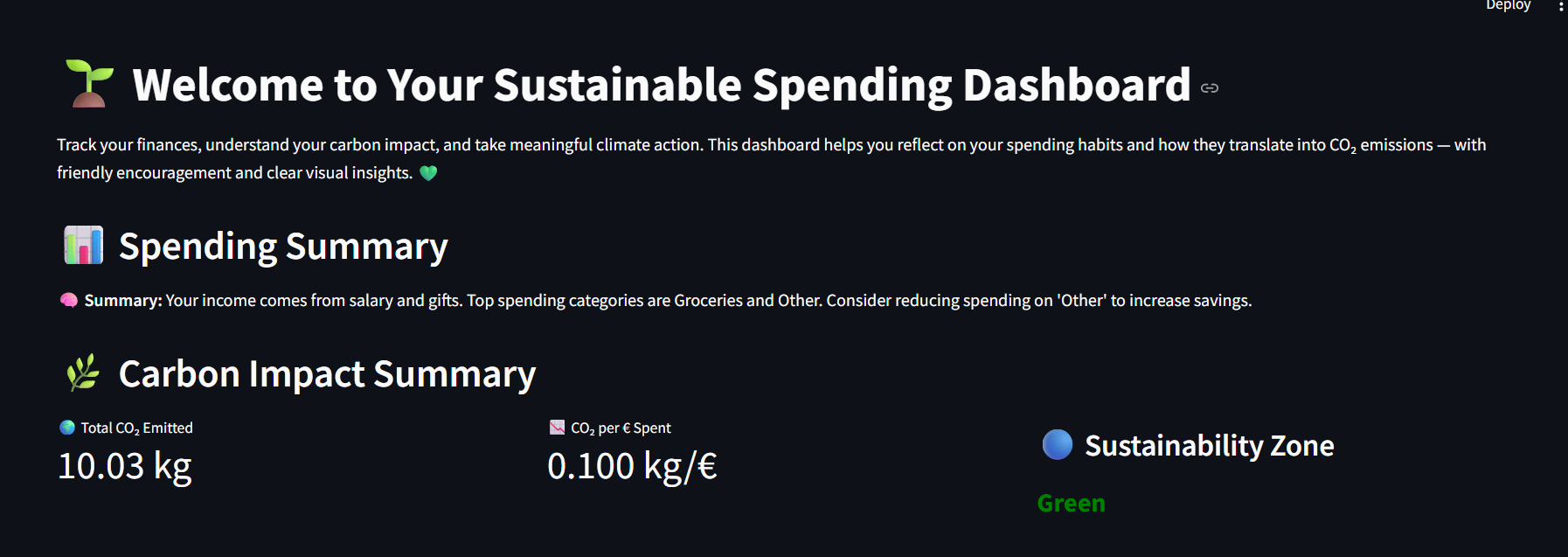
- Calculate total CO₂ emissions and CO₂ per € spent.
- Assign a sustainability zone (Green / Yellow / Red).
- Visualize insights in a modern dashboard.
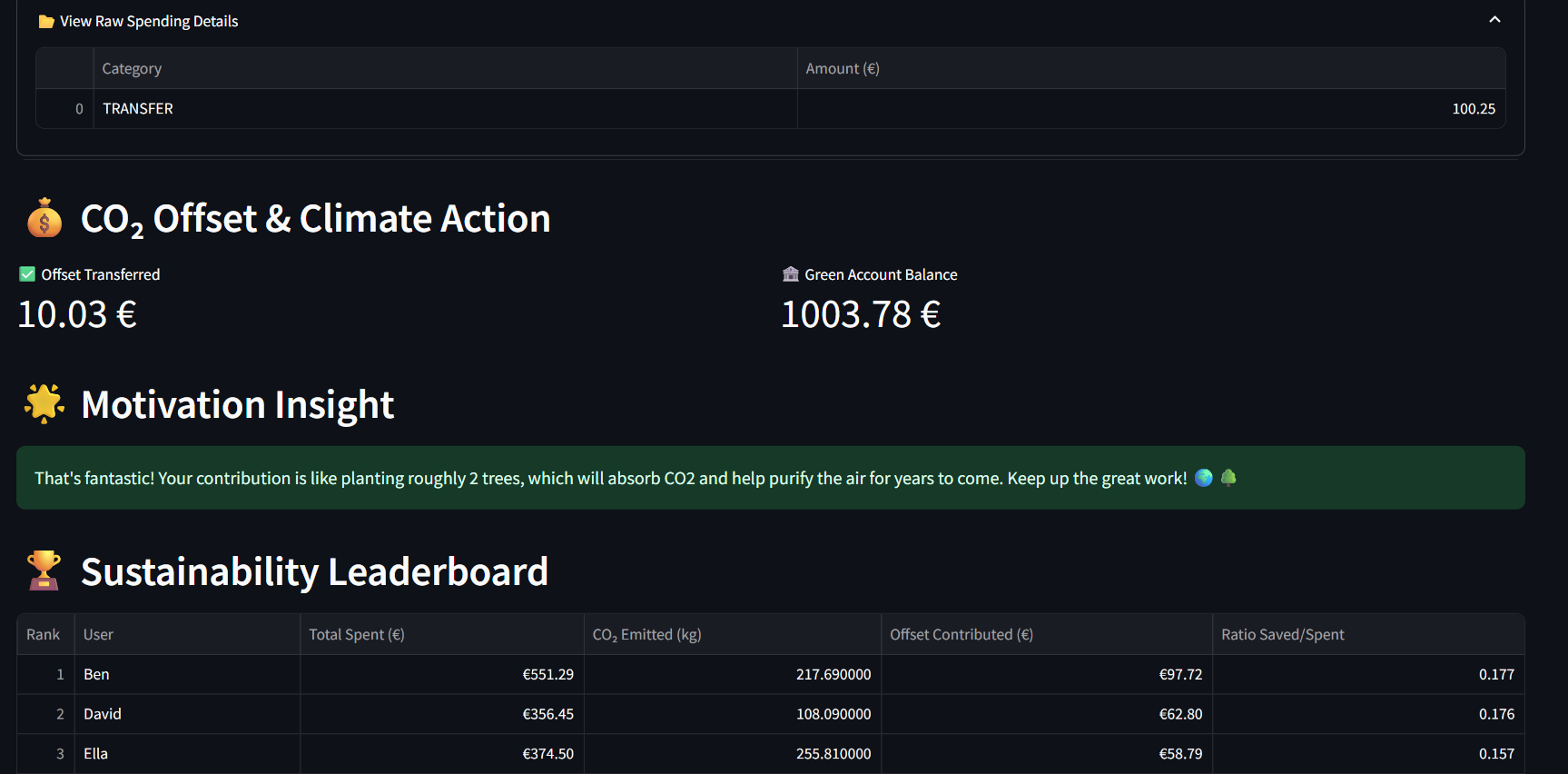
- Transfer offset amounts to a Bunq green account.
- Display motivational messages like “you planted 3 trees!”
- Show a gamified leaderboard comparing offset-to-spend ratios.

Setting up with Highlight
This MCP is not yet compatible with Highlight’s one-click setup. However, you can still use it with Highlight by following these steps:
- Download and install Highlight from highlightai.com/download
- Navigate to the plugins tab and select "Add Custom Plugin"
-
Configure the plugin with the settings below
Plugin Name
🌍 Sustainable Spending DashboardCommand (node, npx, python, etc.)Please refer to the README for specific instructions on how to obtain API keys or other required environment variables.
- Enable "Start Automatically" if you want the plugin to start when Highlight launches





From the repository
Clone the repository, create a Python virtual environment, install dependencies from requirements.txt, and add a Bunq API key to a .env file. Then run streamlit run dashboard.py to launch the interactive dashboard.
Claude Desktop / Cursor
Paste into your MCP client config file to install this server.
{
    "mcpServers": {
        "\ud83c\udf0d sustainable spending dashboard": {
            "bunq-hackathon-agents-6.0": {
                "command": "python",
                "args": [
                    "-m",
                    "venv",
                    "venv"
                ]
            }
        }
    }
}McpServers
{
    "bunq-hackathon-agents-6.0": {
        "command": "python",
        "args": [
            "-m",
            "venv",
            "venv"
        ]
    }
}
🌍 Sustainable Spending Dashboard
An AI-powered dashboard that analyzes your spending habits, estimates your carbon footprint, and encourages climate-friendly financial decisions — built with Streamlit, LLMs, and Bunq.
The Dashboard looks like this(cool right!)
---
💡 What It Does
This dashboard connects financial data with climate awareness using the power of LLMs. It helps you:
- Understand where your money goes 💸
- See how your spending impacts the planet 🌱
- Take climate action via automated CO₂ offset transfers ♻️
- Compete (gently!) with others in a sustainability leaderboard 🏆
---
🧠 Powered By
| Technology | Role |
|--------------------|--------------------------------|
| Streamlit | Dashboard UI & interactivity |
| pydantic_ai | Agent orchestration + LLM I/O |
| Gemini / OpenAI| Spending & CO₂ reasoning |
| Bunq SDK | Carbon offset transfers |
| Pandas, Matplotlib | Data processing & charts |
---
📂 Project Structure
.
├── src/
|   |- dashboard.py # Streamlit dashboard
|   |- bunq_agents.py # Pydantic agents & logic
|   |- mcp_ # MCP servers
|   |- utils/wrapper.py  Bunq integration wrapper
├── data/
│ └── transactions.csv # Sample transactions
├── requirements.txt
└── README.md
✨ Features
✅ Classify spending into intuitive categories
✅ Calculate total CO₂ emissions and CO₂ per € spent
✅ Assign a sustainability zone (Green / Yellow / Red)
✅ Visualize insights in a modern, intuitive dashboard
✅ Transfer offset amounts to a Bunq green account 💚
✅ Display motivational messages like “you planted 3 trees!” 🌳
✅ See how you compare on a gamified leaderboard 🏆
---
🛠 Setup Instructions
1. Clone the Repo
git clone https://github.com/your-username/bunq-hackathon-agents-6.0.git
cd bunq-hackathon-agents-6.0
python -m venv venv
source venv/bin/activate  # On Windows: venv\Scripts\activate
pip install -r requirements.txt
BUNQ_API_KEY=your_bunq_api_key_here
5. 🚀 Run the App
`` bash``
streamlit run dashboard.py
---
🌟 Example Insights
🌿 You just offset 25 kg of CO₂ — that’s like planting 1.2 trees!
💬 Most of your spending goes to groceries and travel. Try biking more often to reduce your footprint.
🏦 You transferred €40 to your green account. Nice work!
---
🏆 Leaderboard Logic
Users are ranked by their Offset Amount / Spend Ratio.
The current user is highlighted in light orange for visibility:
The higher the ratio, the better you're doing for the planet 🌎
---
✅ Sustainability Zone Logic
🟢 Green: CO₂ per € < 0.4 → Excellent!
🟠 Yellow: 0.4 ≤ CO₂ per € ≤ 0.6 → Room to improve
🔴 Red: CO₂ per € > 0.6 → Consider more eco-friendly habits
Your zone is displayed as a dynamic badge in the app.
---
Created with 💚 during the Bunq Hackathon.
---
Sign in to leave a review
Use Google, GitHub, or an email account so ratings stay tied to real people.
No reviews posted yet.





