Saiki
A customizable, general purpose AI Agent that supports MCP. Talk to Saiki in natural language to control computers, applications and more!
- agent-framework
About
What is Saiki?
Saiki is an open, modular, and extensible AI agent that lets you control tools, apps, and services using natural language. It runs locally via CLI, web UI, server, Discord bot, or Telegram bot, and is designed for developers automating workflows and building AI agents.
How to use Saiki?
Install globally with npm install -g @truffle-ai/saiki, then run saiki for interactive CLI, saiki --mode web for the web UI, or saiki --mode server for REST APIs and WebSockets. You can also run Saiki as a Discord or Telegram bot by setting the appropriate environment variables. Agents are configured using a YAML file (default configuration/saiki.yml) where you define MCP servers and LLM providers.
Key features of Saiki
- Open and extensible via Model Context Protocol (MCP)
- Config-driven agents defined in YAML
- Multi-interface: CLI, web UI, server, Discord, Telegram
- Local-first runtime with logging, retries, and retry logic
- Supports multiple LLM providers (OpenAI, Anthropic, Google, Groq)
- Can be used programmatically as a TypeScript library
Use cases of Saiki
- Automate e-commerce tasks like adding items to a shopping cart
- Summarize emails and send highlights to Slack
- Integrate with Notion as a second brain for knowledge management
- Build custom AI agents for backend integrations or microservices
- Prototype and experiment with multi-agent systems
FAQ from Saiki
What is Saiki and how does it work?
Saiki is an AI agent that takes natural-language commands and automatically orchestrates the right tools and services to complete tasks. It connects to any service via MCP and can run in multiple modes (CLI, web, server, bots).
What LLM providers are supported?
Saiki supports OpenAI, Anthropic, Google, and Groq out of the box, as well as any OpenAI SDK‑compatible provider. You switch models using the -m flag or in the config file.
Can I run Saiki as a bot or server?
Yes. Use --mode discord or --mode telegram to run as a bot, or --mode server to expose REST APIs and WebSockets for custom integrations. Saiki can also act as an MCP server itself.
How do I configure Saiki agents?
Configuration is done via a YAML file where you define MCP servers (tools) and LLM providers. Example configs are included for filesystem, Puppeteer, email, Slack, and Notion integrations.
Is Saiki open source?
Saiki is available under the Elastic License 2.0. The source code is public and the project is actively developed, with community contributions welcomed via GitHub and Discord.
Details
- Author
- truffle-ai
- GitHub stars
- 146
- Category
- agent-framework
- Website
- img.shields.io/badge/Status-Beta-yellow
- Docs
- Official docs
- Repository
- truffle-ai/saiki
<p align="center">

<a href="https://discord.gg/GFzWFAAZcm">
<a href="https://deepwiki.com/truffle-ai/saiki"> </a>
</a>
</p>

Use natural language to control your tools, apps, and services — connect once, command everything.
<div align="center">
</div>
Installation
Global (npm)
npm install -g @truffle-ai/saiki
<details><summary><strong>Build & Link from source</strong></summary>
git clone https://github.com/truffle-ai/saiki.git
cd saiki
npm install
npm run build
npm link
After linking, the saiki command becomes available globally.
</details>
Quick Start
CLI Mode
Invoke the interactive CLI:
saiki
<details><summary><strong>Alternative: without global install</strong></summary>
You can also run directly via npm:
npm start
</details>
Web UI Mode
Serve the experimental web interface:
saiki --mode web
<details><summary><strong>Alternative: without global install</strong></summary>
npm start -- --mode web
</details>
Open http://localhost:3000 in your browser.
Server Mode
Run Saiki as a server with just REST APIs and WebSockets:
saiki --mode server
This mode is perfect for:
- Backend integrations
- Microservice architectures
- Custom frontend development
- API-only deployments
The server exposes REST endpoints for messaging, MCP server management, and WebSocket support for real-time communication.
Bot Modes
Run Saiki as a Discord or Telegram bot.
Discord Bot:
saiki --mode discord
Make sure you have
DISCORD_BOT_TOKEN set in your environment. See here for more details.
Telegram Bot:
saiki --mode telegram
Make sure you have
TELEGRAM_BOT_TOKEN set in your environment. See here for more details.
MCP Server Mode
Spin up an agent that acts as an MCP server
saiki --mode mcp
Overview
Saiki is an open, modular and extensible AI agent that lets you perform tasks across your tools, apps, and services using natural language. You describe what you want to do — Saiki figures out which tools to invoke and orchestrates them seamlessly, whether that means running a shell command, summarizing a webpage, or calling an API.
Why developers choose Saiki:
1. Open & Extensible: Connect to any service via the Model Context Protocol (MCP).
2. Config-Driven Agents: Define & save your agent prompts, tools (via MCP), and model in YAML.
3. Multi-Interface Support: Use via CLI, wrap it in a web UI, or integrate into other systems.
4. Runs Anywhere: Local-first runtime with logging, retries, and support for any LLM provider.
5. Interoperable: Expose as an API or connect to other agents via MCP/A2A(soon).
Saiki is the missing natural language layer across your stack. Whether you're automating workflows, building agents, or prototyping new ideas, Saiki gives you the tools to move fast — and bend it to your needs. Interact with Saiki via the command line or the new experimental web UI.
Ready to jump in? Follow the Installation guide or explore demos below.
Examples & Demos
🛒 Amazon Shopping Assistant
Task:Can you go to amazon and add some snacks to my cart? I like trail mix, cheetos and maybe surprise me with something else?
# Use default config which supports puppeteer for navigating the browser
saiki
📧 Send Email Summaries to Slack
Task:Summarize emails and send highlights to Slack
saiki --config-file ./configuration/examples/email_slack.yml

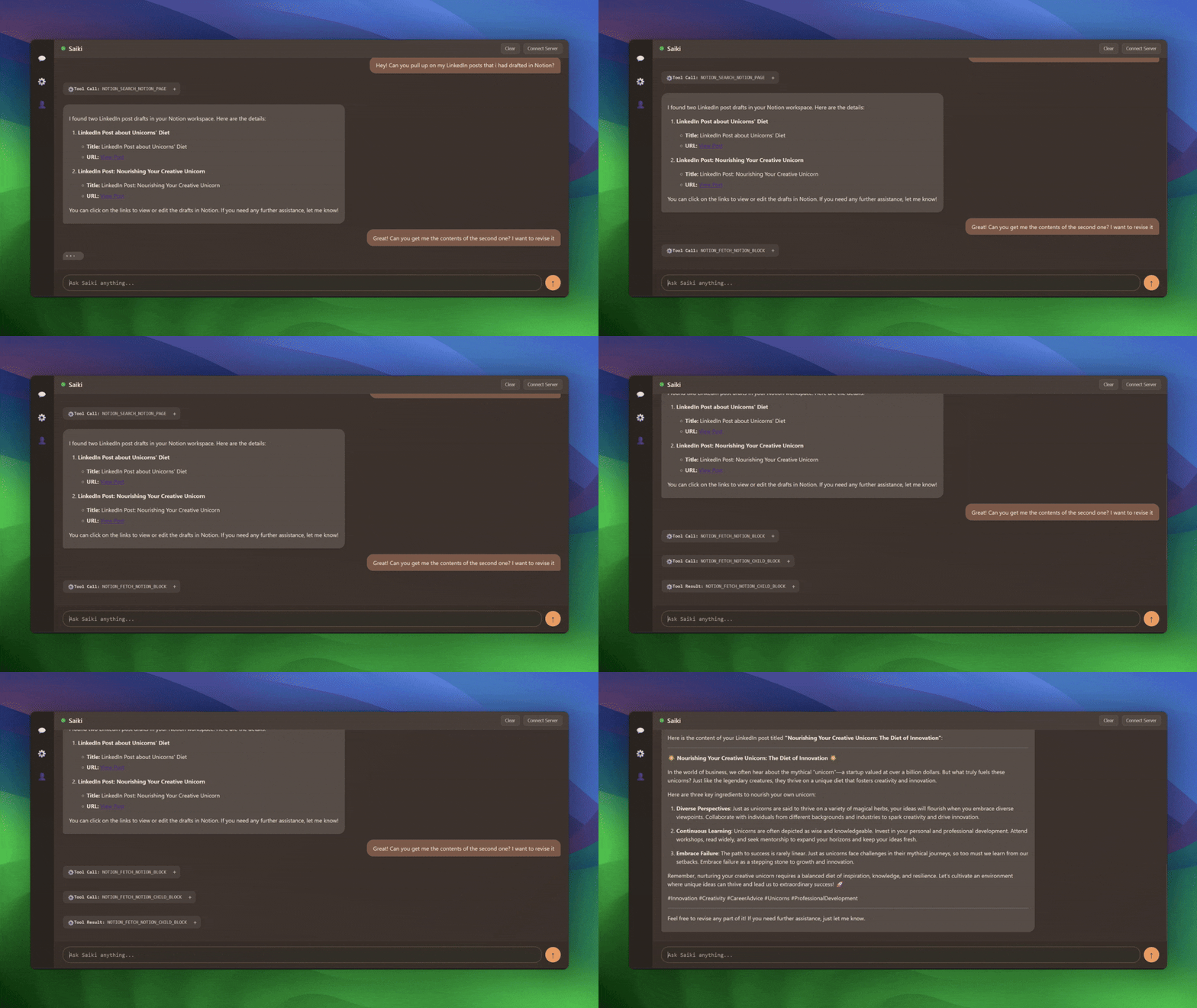
📝 Use Notion As A Second Brain
saiki --config-file ./configuration/examples/notion.yml #Requires setup
CLI Reference
The saiki command supports several options to customize its behavior. Run saiki --help for the full list.
> saiki -h
Usage: saiki [options] [command] [prompt...]
Saiki CLI allows you to talk to Saiki, build custom AI Agents, build complex AI applications like Cursor, and more.
Run saiki interactive CLI with saiki or run a one-shot prompt with saiki <prompt>

Run saiki web UI with saiki --mode web

Run saiki as a server (REST APIs + WebSockets) with saiki --mode server

Run saiki as a discord bot with saiki --mode discord

Run saiki as a telegram bot with saiki --mode telegram

Run saiki as an MCP server with saiki --mode mcp
Check subcommands for more features. Check https://github.com/truffle-ai/saiki for documentation on how to customize saiki and other examples
Arguments:

  prompt                    Natural-language prompt to run once. If not passed, saiki will start as an interactive CLI
Options:

  -v, --version             output the current version

  -c, --config-file <path>  Path to config file (default: "configuration/saiki.yml")

  -s, --strict              Require all server connections to succeed

  --no-verbose              Disable verbose output

  -m, --model <model>       Specify the LLM model to use.

  -r, --router <router>     Specify the LLM router to use (vercel or in-built)

  --mode <mode>             The application in which saiki should talk to you - cli | web | server | discord | telegram | mcp (default: "cli")

  --web-port <port>         optional port for the web UI (default: "3000")

  -h, --help                display help for command
Commands:

  create-app                Scaffold a new Saiki Typescript app

  init-app                  Initialize an existing Typescript app with Saiki
Common Examples:
Specify a custom configuration file:
    cp configuration/saiki.yml configuration/custom_config.yml

    saiki --config-file configuration/custom_config.yml
Use a specific AI model (if configured):
saiki -m gemini-2.5-pro-exp-03-25
Configuration
Saiki defines agents using a YAML config file (configuration/saiki.yml by default). To configure an agent, use tool servers (MCP servers) and LLM providers.
mcpServers:
  filesystem:
    type: stdio
    command: npx
    args:
      - -y
      - "@modelcontextprotocol/server-filesystem"
      - .
  puppeteer:
    type: stdio
    command: npx
    args:
      - -y
      - "@truffle-ai/puppeteer-server"
llm:

  provider: openai

  model: gpt-4.1-mini

  apiKey: $OPENAI_API_KEY
LLM Providers & Setup
Saiki supports multiple LLM providers out of the box, plus any OpenAI SDK-compatible provider.
Built-in Providers
- OpenAI: gpt-4.1-mini, gpt-4o, o3, o1 and more
- Anthropic: claude-3-7-sonnet-20250219, claude-3-5-sonnet-20240620 and more
- Google: gemini-2.5-pro-exp-03-25, gemini-2.0-flash and more
- Groq: llama-3.3-70b-versatile, gemma-2-9b-it
You will need to set your provider specific API keys accordingly.
Quick Setup
Set your API key and run:
# OpenAI (default)

export OPENAI_API_KEY=your_key

saiki
Switch providers via CLI
saiki -m claude-3-5-sonnet-20240620
saiki -m gemini-2.0-flash
For comprehensive setup instructions, all supported models, advanced configuration, and troubleshooting, see our LLM Providers Guide.
Building with Saiki
Saiki can be easily integrated into your applications as a powerful AI agent library. Here's a simple example to get you started:
Quick Start: Programmatic Usage
import 'dotenv/config';
import { loadConfigFile, createSaikiAgent } from '@truffle-ai/saiki';
// Load your agent configuration

const config = await loadConfigFile('./saiki.yml');

const agent = await createSaikiAgent(config);
// Use the agent for single tasks

const result = await agent.run("Analyze the files in this directory and create a summary");

console.log(result);
// Or have conversations

const response1 = await agent.run("What files are in the current directory?");

const response2 = await agent.run("Create a README for the main.py file");
// Reset conversation when needed

agent.resetConversation();
For detailed information on the available API endpoints and WebSocket communication protocol, please see the Saiki API and WebSocket Interface documentation.
Learn More
For comprehensive guides on building different types of applications with Saiki, including:
- Web backends and APIs
- Discord/Telegram bots
- Advanced patterns and best practices
- Multi-agent systems
See our Building with Saiki Developer Guide.
MCP Server Management
Saiki includes a powerful MCPClientManager that can be used as a standalone utility for managing MCP servers in your own applications. This is perfect for developers who need MCP server management without the full Saiki agent framework.
Quick Start: MCP Manager
import { MCPClientManager } from '@truffle-ai/saiki';
// Create manager instance

const manager = new MCPClientManager();
// Connect to MCP servers

await manager.connectServer('filesystem', {

  type: 'stdio',

  command: 'npx',

  args: ['-y', '@modelcontextprotocol/server-filesystem', '.']

});
await manager.connectServer('web-search', {

  type: 'stdio',

  command: 'npx',

  args: ['-y', '[email protected]'],

  env: { TAVILY_API_KEY: process.env.TAVILY_API_KEY }

});
// Get all available tools across servers

const tools = await manager.getAllTools();

console.log('Available tools:', Object.keys(tools));
// Execute a tool

const result = await manager.executeTool('readFile', { path: './README.md' });

console.log('File contents:', result);
// List connected servers

const clients = manager.getClients();

console.log('Connected servers:', Array.from(clients.keys()));
// Disconnect when done

await manager.disconnectAll();
The MCPClientManager provides a simple, unified interface for connecting to and managing multiple MCP servers simultaneously. See our MCP Manager Documentation for complete API reference and advanced usage patterns.
Documentation & Learning Resources
Find detailed guides, architecture, and API reference in our comprehensive documentation:
- Quick Start - Get up and running in minutes
- Configuration Guide - Configure agents, LLMs, and tools
- Building with Saiki - Developer guide with examples and patterns
- Multi-Agent Systems - Agent collaboration patterns
- API Reference - REST APIs, WebSocket, and SDKs
- MCP Manager - Standalone MCP server management
- Architecture - System design and concepts
Learning Resources
- What is an AI Agent? - Understanding AI agents
- Model Context Protocol - Learn about MCP
- Examples & Demos - See Saiki in action
Contributing
We welcome contributions! Refer to our Contributing Guide for more details.Community & Support
Saiki was built by the team at Truffle AI.
Saiki is better with you! Join our Discord whether you want to say hello, share your projects, ask questions, or get help setting things up:
If you're enjoying Saiki, please give us a ⭐ on GitHub!
License
Elastic License 2.0. See LICENSE for details.
Contributors
Thanks to all these amazing people for contributing to Saiki! (full list):