
SeekChat
✨ A Sleek and Powerful AI Desktop Assistant that supports MCP integration✨
- desktop-chat
About
What is SeekChat?
SeekChat is a sleek and powerful AI desktop assistant that supports MCP (Model Context Protocol) tool execution. It runs on desktop platforms (Windows, macOS, Linux) and is designed for users who want a local AI assistant capable of directly controlling their computer.
How to use SeekChat?
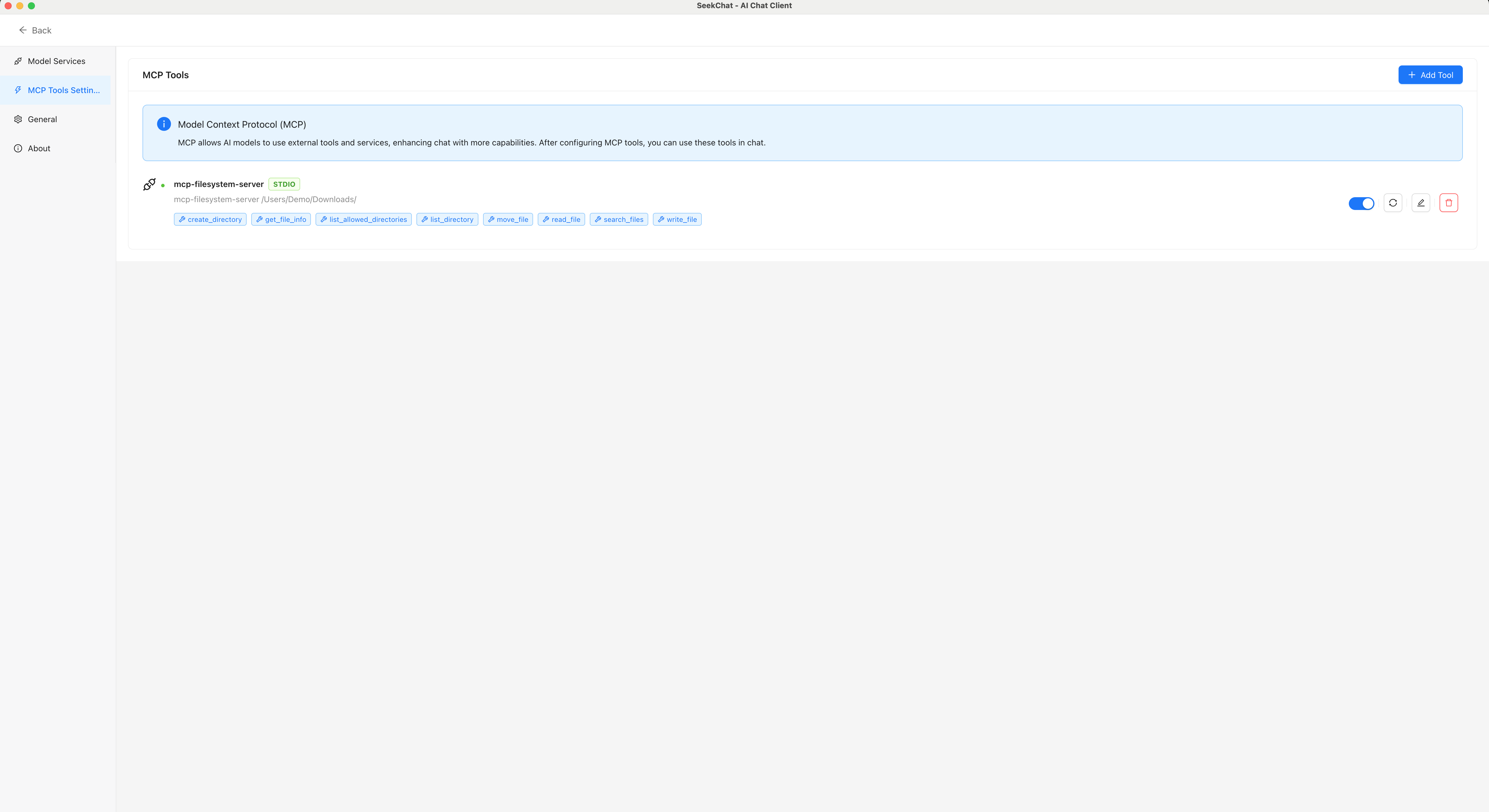
Download the pre-compiled version from the Releases page or build from source using npm. After installation, connect MCP servers through the MCP Tool Settings interface to enable AI to perform tasks like file management, data analysis, and code development.
Key features of SeekChat
- Multiple AI provider support
- MCP tool integration for enhanced AI capabilities
- Local storage of chat history for privacy
- Multi-language support (English and Chinese)
- Modern, intuitive user interface
Use cases of SeekChat
- Automate file management tasks
- Perform data analysis with AI assistance
- Streamline code development workflows
- Control computer actions via MCP tools
FAQ from SeekChat
What is SeekChat and how is it different from other AI assistants?
SeekChat is a desktop AI assistant that supports MCP tool execution, allowing AI to directly control your computer. It stores chat history locally for privacy and supports multiple AI providers.
Which platforms and AI models does SeekChat support?
SeekChat runs on Windows, macOS, and Linux. It supports various AI service providers (not specified in the README). MCP tools can be connected to enhance AI capabilities.
Does SeekChat support MCP servers?
Yes, SeekChat fully supports the Model Context Protocol (MCP) for integrating tools that enhance AI capabilities, as shown in its MCP Tool Settings interface.
What is the pricing/licensing of SeekChat?
— (No pricing or licensing information is provided in the README.)
What are the known limits of SeekChat?
— (No known limits are documented in the README.)
Details
- Author
- seekrays
- GitHub stars
- 31
- Category
- desktop-chat
- Website
- www.seekrays.com/chat
- Docs
- Official docs
- Repository
- seekrays/seekchat
<div align="center">

<h3>✨ A Sleek and Powerful AI Desktop Assistant ✨</h3>
<p>
<a href="https://www.seekrays.com/chat" target="_blank">Official Website</a> |
<a href="README_zh-cn.md">中文文档</a>
</p>
</div>


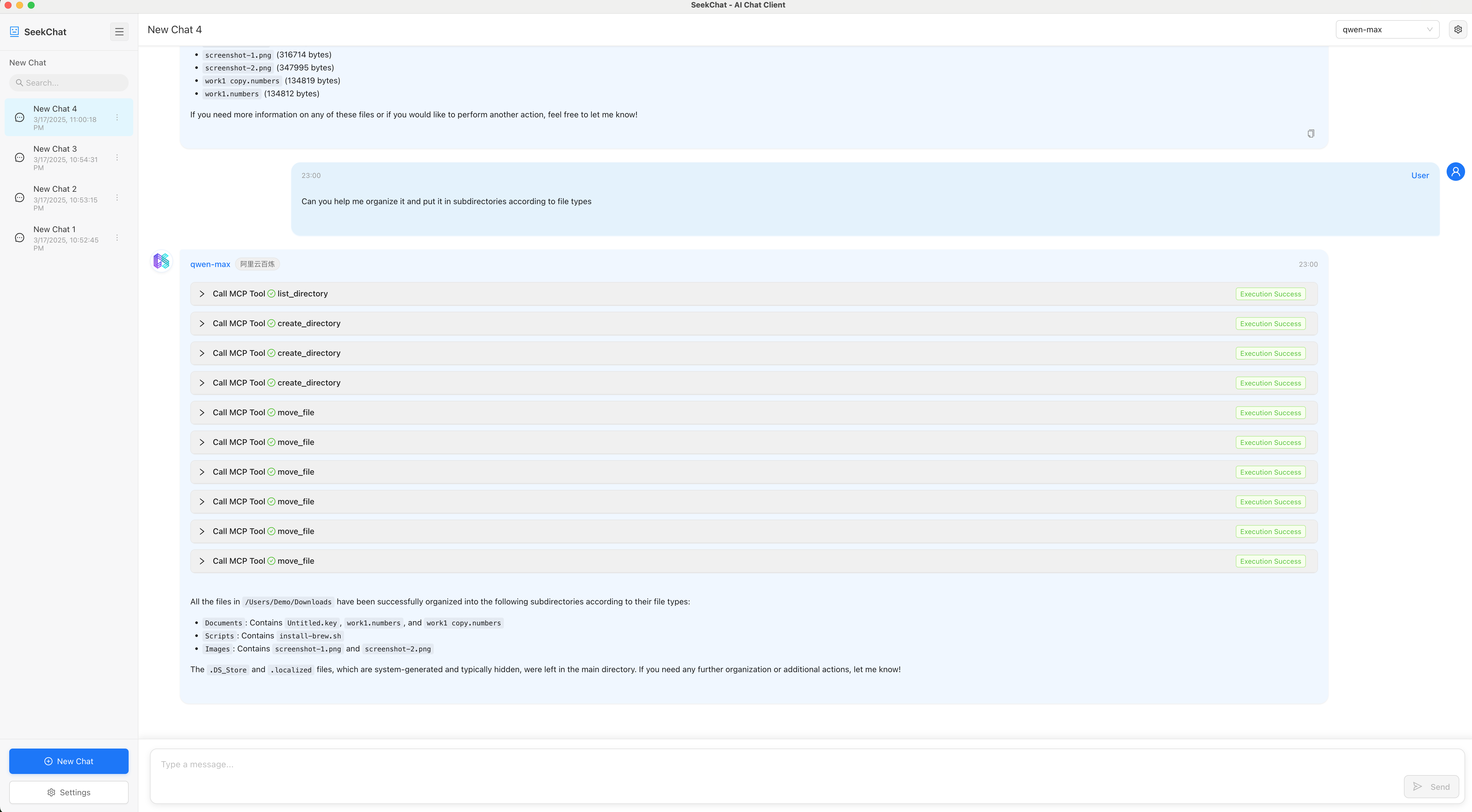
SeekChat supports MCP tool execution, enabling AI to directly control your computer and perform various tasks. Easily automate file management, data analysis, code development, and more, turning AI into a truly intelligent assistant.
✨ Key Features
- Multiple AI Providers: Support for various AI service providers
- MCP Tool Integration: Support for Model Context Protocol tools that enhance AI capabilities
- Local Storage: Chat history is stored locally to protect your privacy
- Multi-language Support: Available in English and Chinese
- Modern UI: Simple and intuitive user interface
🌠 Screenshots
Chat Interface
MCP Tool Settings
📦 Installation
Download Pre-compiled Version
Visit the Releases page to download the latest pre-compiled version.
Build from Source
# Clone the repository
git clone https://github.com/seekrays/seekchat.git
cd seekchat
Install dependencies
npm install
Run in development mode
npm run dev
Build for production
For macOS
npm run electron:build:mac
For Windows
npm run electron:build:win
For Linux
npm run electron:build:linux
Community
Discord Community
Join our Discord community to get the latest updates and participate in product discussions.WeChat Community

After following our WeChat Official Account, send the message "加群" to join our WeChat community group and discuss with other users.
🤝 Contributing
Pull Requests and Issues are welcome! If you have any suggestions or find a bug, please let us know.
🙏 Acknowledgements
- Thanks to all open-source project contributors
- Thanks to the Electron and React communities
- Special thanks to all users for their support and feedback











