
World ID and MiniApps Documentation
About
Provides AI access to World ID and MiniApps documentation through vector search capabilities, enabling developers to retrieve relevant technical information directly within their coding environment.
Details
- Repository
- Livus-AI/WorldMiniApp_MCP
Explore

Setting up with Highlight
This MCP is not yet compatible with Highlight’s one-click setup. However, you can still use it with Highlight by following these steps:
- Download and install Highlight from highlightai.com/download
- Navigate to the plugins tab and select "Add Custom Plugin"
-
Configure the plugin with the settings below
Plugin Name
World ID and MiniApps DocumentationCommand (node, npx, python, etc.)your-absolute-path-to-repo-folder/WorldMCP/.venv/bin/pythonArguments-
Argument 1
your-absolute-path-to-repo-folder/WorldMCP/worldMiniApp-MCP/miniApp_mcp.py
Environment-
OPENAI_API_KEY
sk-xxxxxxxxxxxxxxxxxxxx
Please refer to the README for specific instructions on how to obtain API keys or other required environment variables.
-
Argument 1
- Enable "Start Automatically" if you want the plugin to start when Highlight launches





From the repository
- Python 3: Download from python.org or install via Homebrew:
brew install python
- Cursor: Installed on your system.
Open your terminal and run these commands:
python3 -m venv .venv
source .venv/bin/activate
With your virtual environment activated, install the required packages:
pip install langchain_community langchain-openai langchain-anthropic scikit-learn bs4 pandas pyarrow matplotlib lxml langgraph "mcp[cli]" tiktoken
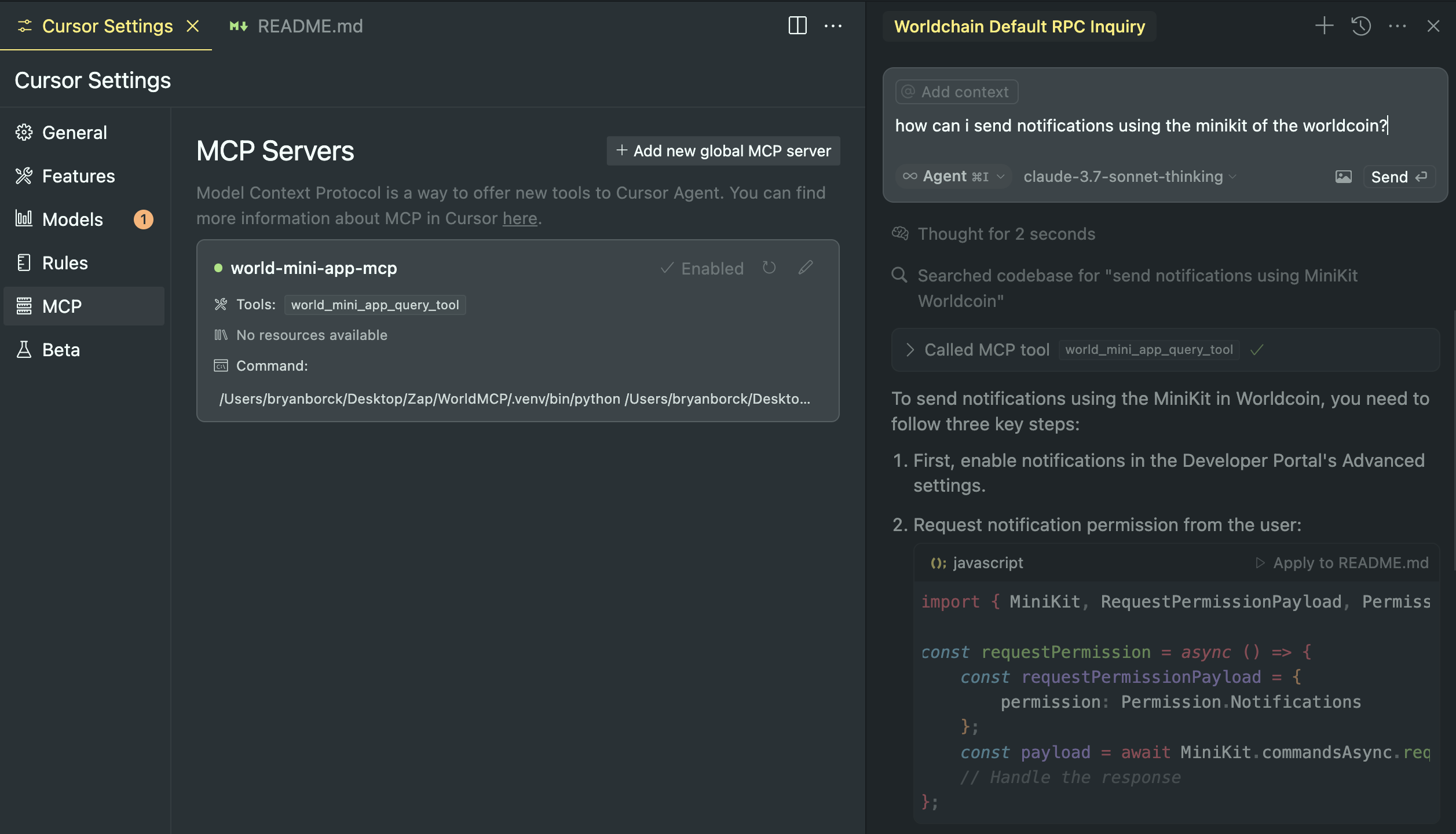
1. Open Cursor Settings:
- In Cursor, go to Settings and click the MCP tab.
2. Activate MCP and Add Configuration:
- Copy and paste the JSON below into the MCP configuration area:
{
"mcpServers": {
"world-mini-app-mcp": {
"command": "your-absolute-path-to-repo-folder/WorldMCP/.venv/bin/python",
"args": [
"your-absolute-path-to-repo-folder/WorldMCP/worldMiniApp-MCP/miniApp_mcp.py"
],
"env": {
"OPENAI_API_KEY": "sk-xxxxxxxxxxxxxxxxxxxx"
}
}
}
}
- Replace "your-openai-api-key" with your actual API key.
3. Save the Configuration:
- Cursor will now detect your MCP server.
Image support for the 3 steps:
Claude Desktop / Cursor
Paste into your MCP client config file to install this server.
{
    "mcpServers": {
        "world id and miniapps documentation": {
            "env": {
                "OPENAI_API_KEY": "sk-xxxxxxxxxxxxxxxxxxxx"
            },
            "args": [
                "your-absolute-path-to-repo-folder/WorldMCP/worldMiniApp-MCP/miniApp_mcp.py"
            ],
            "command": "your-absolute-path-to-repo-folder/WorldMCP/.venv/bin/python"
        }
    }
}Linux
{
"env": {
"OPENAI_API_KEY": "sk-xxxxxxxxxxxxxxxxxxxx"
},
"args": [
"your-absolute-path-to-repo-folder/WorldMCP/worldMiniApp-MCP/miniApp_mcp.py"
],
"command": "your-absolute-path-to-repo-folder/WorldMCP/.venv/bin/python"
}Macos
{
"env": {
"OPENAI_API_KEY": "sk-xxxxxxxxxxxxxxxxxxxx"
},
"args": [
"your-absolute-path-to-repo-folder/WorldMCP/worldMiniApp-MCP/miniApp_mcp.py"
],
"command": "your-absolute-path-to-repo-folder/WorldMCP/.venv/bin/python"
}Windows
{
"env": {
"OPENAI_API_KEY": "sk-xxxxxxxxxxxxxxxxxxxx"
},
"args": [
"your-absolute-path-to-repo-folder/WorldMCP/worldMiniApp-MCP/miniApp_mcp.py"
],
"command": "your-absolute-path-to-repo-folder/WorldMCP/.venv/bin/python"
}World MiniApps MCP Server with Cursor
This project sets up an MCP server to query World Mini Apps docs and integrates it with Cursor.
Idea
The idea is to have an agent capable to read the MiniApps Documentation, and thenn help you code your world MiniApp with Cursor.
Prerequisites
- Python 3: Download from python.org or install via Homebrew:
brew install python
- Cursor: Installed on your system.
Setup Instructions
1. Setup Your Python Environment
Open your terminal and run these commands:
# Create a virtual environment
python3 -m venv .venv
Activate the virtual environment
source .venv/bin/activate
2. Install Dependencies
With your virtual environment activated, install the required packages:
pip install langchain_community langchain-openai langchain-anthropic scikit-learn bs4 pandas pyarrow matplotlib lxml langgraph "mcp[cli]" tiktoken
3. Build the Documentation Vector Store
Before running the build script, export your OpenAI API key in the terminal:
export OPENAI_API_KEY="your-openai-api-key"
Then, run:
python3 worldMiniApp-MCP/miniApp_build_docs.py
Obs.: Mateo (World Team) said that you can use https://docs.world.org/llms-full.txt for all World Docs support.
This script will create llms_full.txt and sklearn_vectorstore.parquet.
4. Run the MCP Server
Start your MCP server by running:
python3 worldMiniApp-MCP/miniApp_mcp.py
The server runs over stdio and waits for MCP requests.
5. Configure Cursor to Use Your MCP Server
1. Open Cursor Settings:
- In Cursor, go to Settings and click the MCP tab.
2. Activate MCP and Add Configuration:
- Copy and paste the JSON below into the MCP configuration area:
{
  "mcpServers": {
    "world-mini-app-mcp": {
      "command": "your-absolute-path-to-repo-folder/WorldMCP/.venv/bin/python",
      "args": [
        "your-absolute-path-to-repo-folder/WorldMCP/worldMiniApp-MCP/miniApp_mcp.py"
      ],
      "env": {
        "OPENAI_API_KEY": "sk-xxxxxxxxxxxxxxxxxxxx"
      }
    }
  }
}
- Replace "your-openai-api-key" with your actual API key.
3. Save the Configuration:
- Cursor will now detect your MCP server.
Image support for the 3 steps:
6. Chat with the MCP Agent in Cursor
- Switch to Agent Mode:
- Instead of standard chat, activate Agent mode in Cursor.
- When you chat, Cursor will use your MCP tool (world_mini_app_query_tool) to fetch World MiniApp documentation as needed.
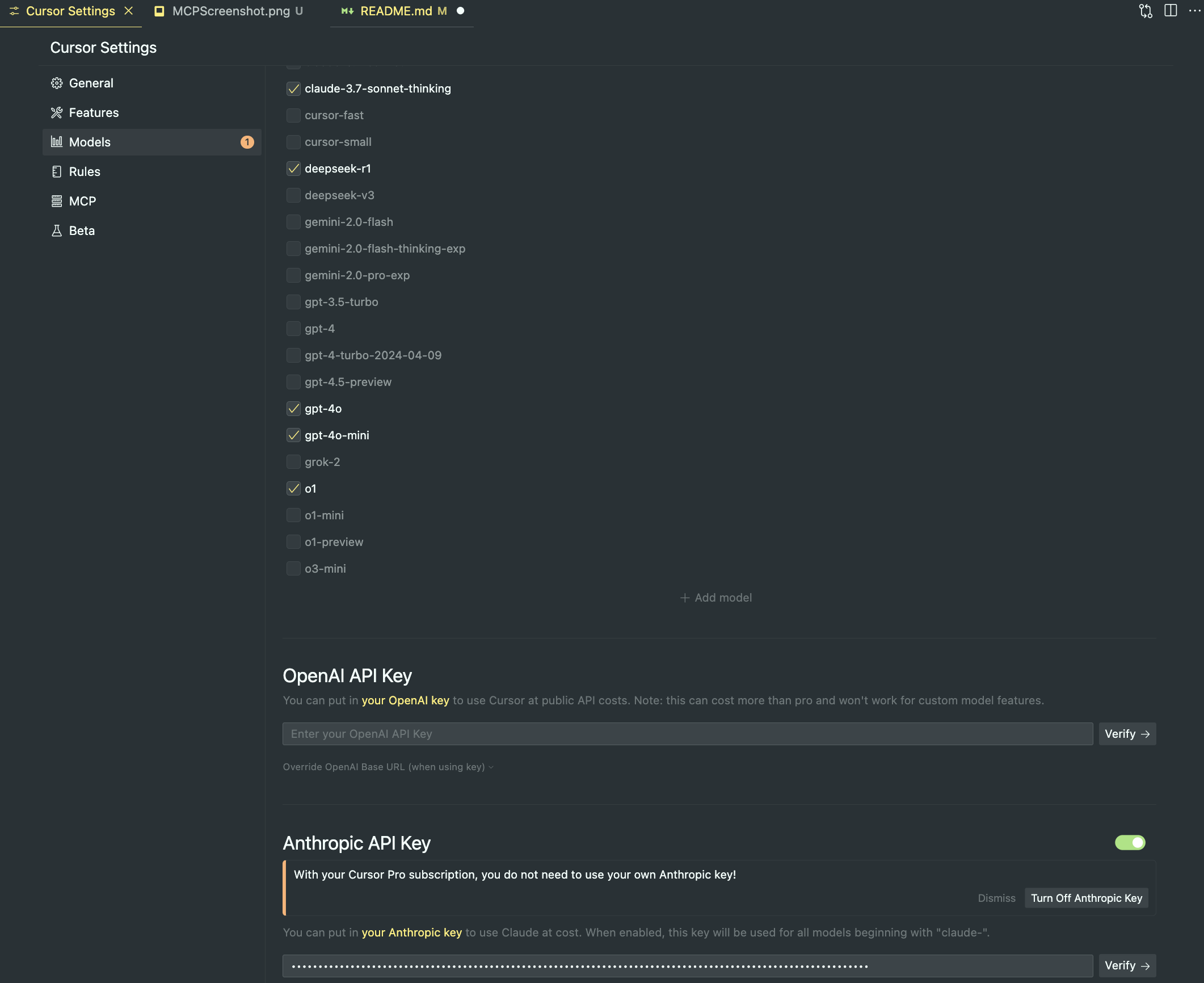
1. Remember to use Claude Sonnet
- specially the model "claude-3.7-sonnet-thinking"
2. Get API Key from Anthropic:
- Go to https://console.anthropic.com/
- Create a Profile
- Get an API Key putting credit, 10 USD is a good amount to test and use for build your miniApp (remembers Claude 3.7 has more token usege)
3. Open Cursor Settings:
- In Cursor, go to Settings and click the Models tab.
- Select the Claude model
- Put your Anthtopic API Key
Image support for the 3 steps:
(Optional) Test with MCP Inspector
To manually inspect your MCP server, install and run MCP Inspector:
npm install -g @modelcontextprotocol/inspector
mcp-inspector
Sign in to leave a review
Use Google, GitHub, or an email account so ratings stay tied to real people.
No reviews posted yet.



