
12306 Mcp
About
This is a 12306 ticket search server based on the Model Context Protocol (MCP).
Details
- License
- MIT
Explore
<div align="center">
| 功能描述 | 状态 |
|------------------------------|--------|
| 查询12306购票信息 | ✅ 已完成 |
| 过滤列车信息 | ✅ 已完成 |
| 过站查询 | ✅ 已完成 |
| 中转查询 | ✅ 已完成 |
| 其余接口,欢迎提feature | 🚧 计划内 |
</div>
<div align="center">
</div>
<div align="center">
</div>

Setting up with Highlight
This MCP is not yet compatible with Highlight’s one-click setup. However, you can still use it with Highlight by following these steps:
- Download and install Highlight from highlightai.com/download
- Navigate to the plugins tab and select "Add Custom Plugin"
-
Configure the plugin with the settings below
Plugin Name
12306 McpCommand (node, npx, python, etc.)Please refer to the README for specific instructions on how to obtain API keys or other required environment variables.
- Enable "Start Automatically" if you want the plugin to start when Highlight launches





From the repository
~~~bash
git clone https://github.com/Joooook/12306-mcp.git
npm i
~~~
~~~json
{
"mcpServers": {
"12306-mcp": {
"command": "npx",
"args": [
"-y",
"12306-mcp"
]
}
}
}
~~~
get-current-date
获取当前日期,以上海时区(Asia/Shanghai, UTC+8)为准,返回格式为 "yyyy-MM-dd"。主要用于解析用户提到的相对日期(如“明天”、“下周三”),提供准确的日期输入。
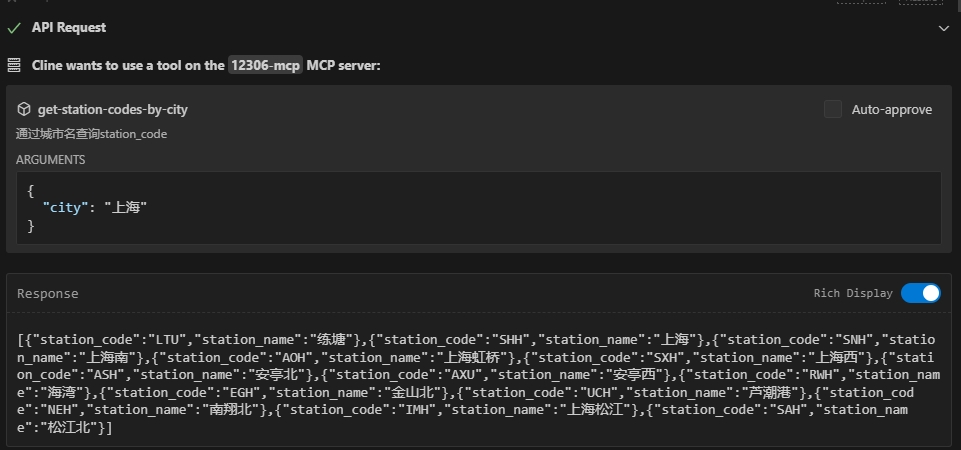
get-stations-code-in-city
通过中文城市名查询该城市 **所有** 火车站的名称及其对应的 `station_code`,结果是一个包含多个车站信息的列表。
get-station-code-of-citys
通过中文城市名查询代表该城市的 `station_code`。
get-station-code-by-names
通过具体的中文车站名查询其 `station_code` 和车站名。
get-station-by-telecode
通过车站的 `station_telecode` 查询车站的详细信息,包括名称、拼音、所属城市等。此接口主要用于在已知 `telecode` 的情况下获取更完整的车站数据,或用于特殊查询及调试目的。一般用户对话流程中较少直接触发。
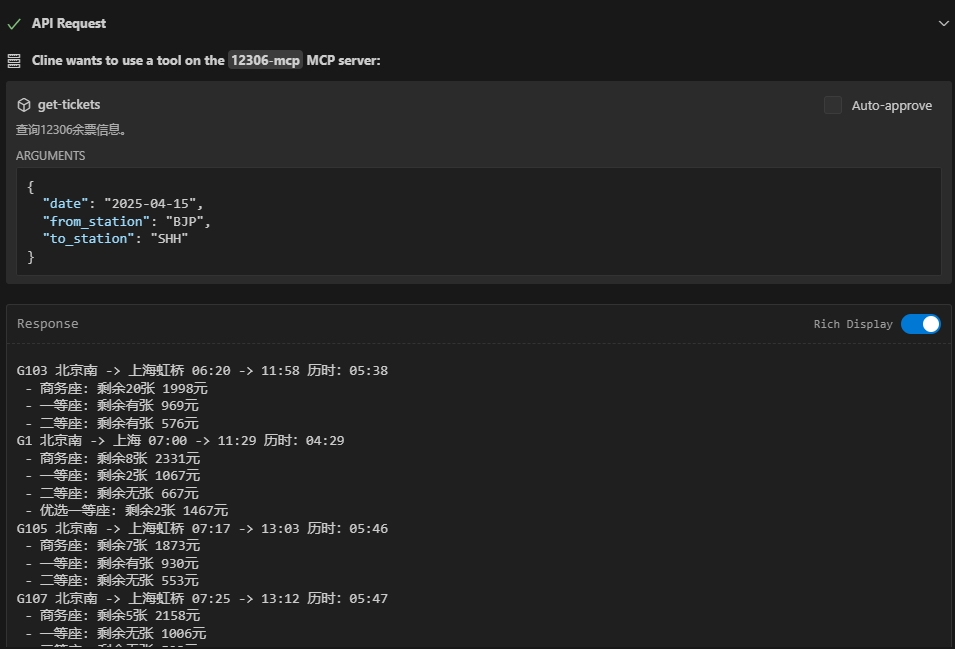
get-tickets
查询12306余票信息。
get-interline-tickets
查询12306中转余票信息。尚且只支持查询前十条。
get-train-route-stations
查询特定列车车次在指定区间内的途径车站、到站时间、出发时间及停留时间等详细经停信息。当用户询问某趟具体列车的经停站时使用此接口。
Claude Desktop / Cursor
Paste into your MCP client config file to install this server.
{
    "mcpServers": {
        "12306 mcp": {
            "12306-mcp": {
                "command": "npx",
                "args": [
                    "-y",
                    "12306-mcp"
                ]
            }
        }
    }
}McpServers
{
    "12306-mcp": {
        "command": "npx",
        "args": [
            "-y",
            "12306-mcp"
        ]
    }
}
<div align="center">12306-mcp</div>
<div align="center">




</div>

A 12306 ticket search server based on the Model Context Protocol (MCP). The server provides a simple API interface that allows users to search for 12306 tickets.
基于 Model Context Protocol (MCP) 的12306购票搜索服务器。提供了简单的API接口,允许大模型利用接口搜索12306购票信息。
<div align="center">🚩Features</div>
<div align="center">| 功能描述 | 状态 |
|------------------------------|--------|
| 查询12306购票信息 | ✅ 已完成 |
| 过滤列车信息 | ✅ 已完成 |
| 过站查询 | ✅ 已完成 |
| 中转查询 | ✅ 已完成 |
| 其余接口,欢迎提feature | 🚧 计划内 |
</div>
<div align="center">
</div>
<div align="center">
</div>
<div align="center">⚙️Installation</div>
~~~bash
git clone https://github.com/Joooook/12306-mcp.git
npm i
~~~
<div align="center">▶️Quick Start</div>
CLI-stdio
~~~bash npx -y 12306-mcp ~~~CLI-http
~~~bash npx -y 12306-mcp --port [端口号] ~~~MCP sever configuration
~~~json
{
"mcpServers": {
"12306-mcp": {
"command": "npx",
"args": [
"-y",
"12306-mcp"
]
}
}
}
~~~
Docker-stdio
~~~bash docker build . -t 12306-mcp docker run --rm -it 12306-mcp npx 12306-mcp ~~~Docker-http
~~~bash docker build . -t 12306-mcp docker run -p [your_port]:8080 -d 12306-mcp npx 12306-mcp --port 8080 ~~~<div align="center">📚Documentation</div>
- 服务原理详解 12306-MCP服务的工作原理
- 架构图 12306-MCP服务的架构图
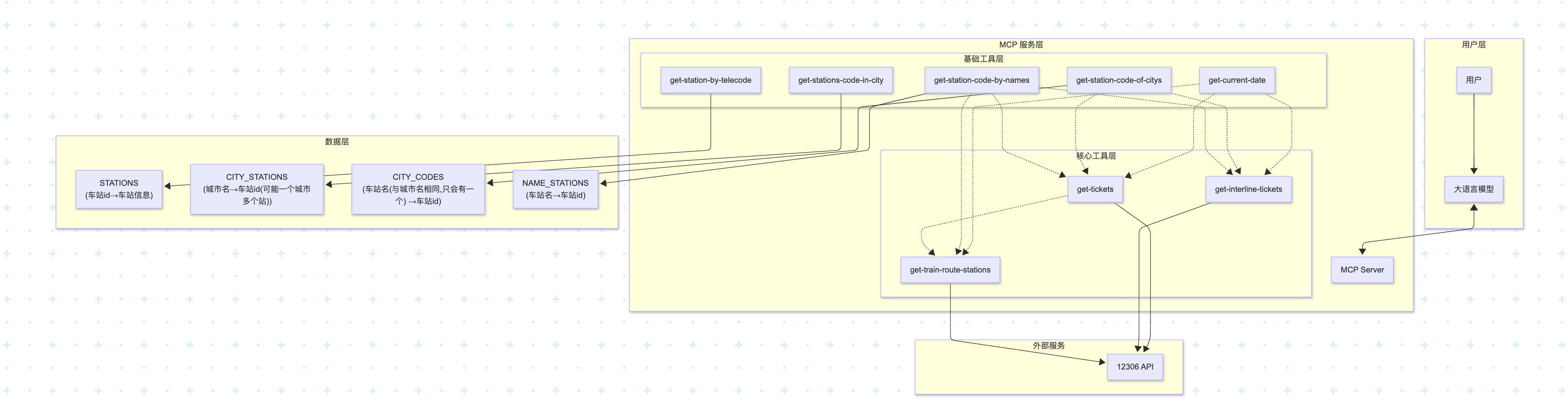
<div align="center">👉️Reference</div>
- modelcontextprotocol/modelcontextprotocol - modelcontextprotocol/typescript-sdk<div align="center">💭Murmurs</div>
本项目仅用于学习,欢迎催更。<div align="center">🎫Badges</div>
<div align="center"> <a href="https://glama.ai/mcp/servers/@Joooook/12306-mcp">
</div>
<div align="center">☕️Donate</div>
请我喝杯奶茶吧。 <div align="center"> <a href="https://afdian.com/item/2a0e0cdcadf911ef9f725254001e7c00"> </a>
</div>
</a>
</div>Sign in to leave a review
Use Google, GitHub, or an email account so ratings stay tied to real people.
No reviews posted yet.