1Panel MCP Server
About
A MCP server for automated website deployment to 1Panel (Experimental)
Details
- License
- MIT
Explore
- Automates website deployment to 1Panel servers
- Creates websites if they don't already exist
- Uploads static website files to 1Panel
- Fully compatible with the MCP standard protocol

Setting up with Highlight
This MCP is not yet compatible with Highlight’s one-click setup. However, you can still use it with Highlight by following these steps:
- Download and install Highlight from highlightai.com/download
- Navigate to the plugins tab and select "Add Custom Plugin"
-
Configure the plugin with the settings below
Plugin Name
1Panel MCP ServerCommand (node, npx, python, etc.)Please refer to the README for specific instructions on how to obtain API keys or other required environment variables.
- Enable "Start Automatically" if you want the plugin to start when Highlight launches





From the repository
To use this server with Cursor IDE, add the following MCP configuration:
1. Open Cursor
2. Create .cursor/mcp.json
{
"mcpServers": {
"1panel-mcp": {
"command": "npx",
"args": [
"-y",
"1panel-mcp"
],
"env": {
"ONEPANEL_BASE_URL": "<your 1Panel base URL>",
"ONEPANEL_API_KEY": "<your 1Panel API key>",
"ONEPANEL_API_VERSION": "v2" // optional, default is v2
}
}
}
}
In Cursor, you can deploy websites using the following command in the AI chat:
Deploy to 1Panel with domain=yourdomain.com
Or you can use the following format:
Deploy website to 1Panel server, domain: yourdomain.com
Deploys a website to 1Panel.
Parameters:
- domain (required): Website domain
- buildDir (optional): Build directory path
Response:
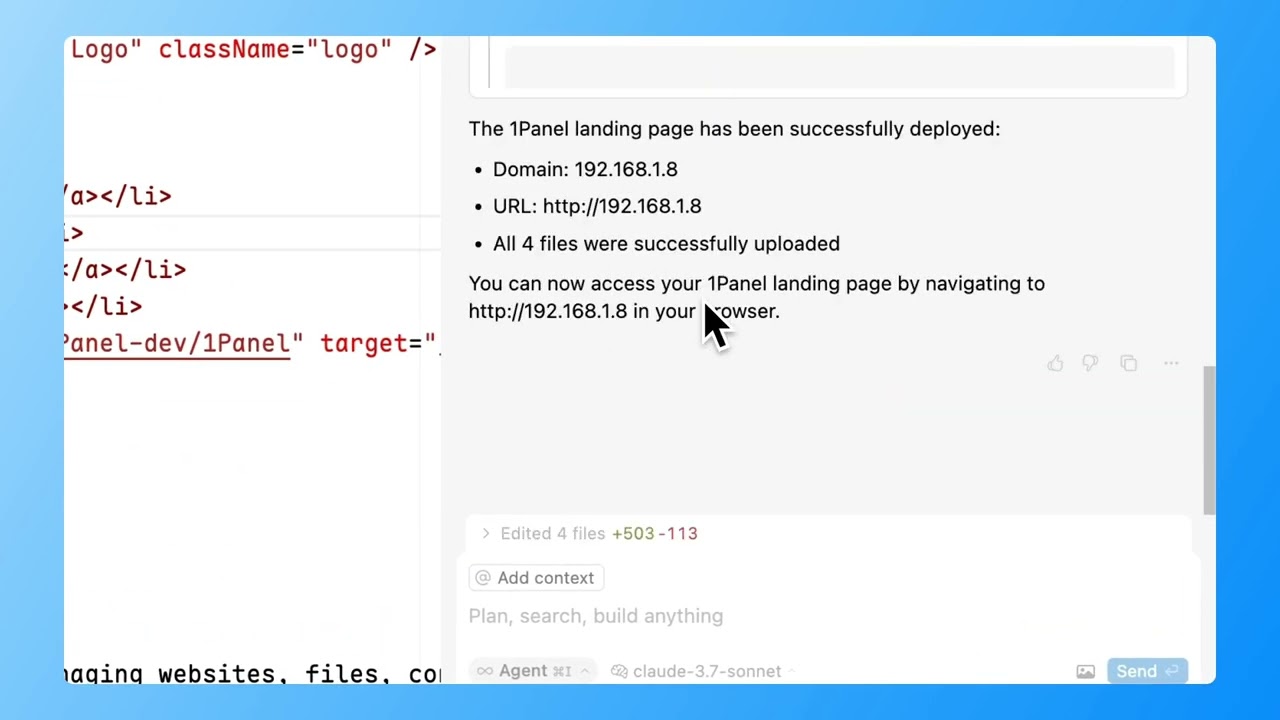
Successfully deployed to 1Panel!
Domain: yourdomain.com
URL: http://yourdomain.com
Upload statistics:
- Total files: 25
- Successfully uploaded: 25
- Failed to upload: 0
1. Check Build Directory: Verifies if the specified build directory exists
2. Website Creation: Creates a new static website through 1Panel API if it doesn't exist
3. File Upload: Uploads all files from the build directory to the website
4. Statistics: Returns detailed statistics about the upload process
deploy_website
Deploy website to 1Panel server
Deploys a website to 1Panel.
Parameters:
- domain (required): Website domain
- buildDir (optional): Build directory path
Response:
Successfully deployed to 1Panel!
Domain: yourdomain.com
URL: http://yourdomain.com
Upload statistics:
- Total files: 25
- Successfully uploaded: 25
- Failed to upload: 0
Claude Desktop / Cursor
Paste into your MCP client config file to install this server.
{
    "mcpServers": {
        "1panel mcp server": {
            "1panel-mcp": {
                "command": "npx",
                "args": [
                    "-y",
                    "1panel-mcp"
                ],
                "env": {
                    "ONEPANEL_BASE_URL": "<your 1Panel base URL>",
                    "ONEPANEL_API_KEY": "<your 1Panel API key>",
                    "ONEPANEL_API_VERSION": "v2"
                }
            }
        }
    }
}McpServers
{
"1panel-mcp": {
"command": "npx",
"args": [
"-y",
"1panel-mcp"
],
"env": {
"ONEPANEL_BASE_URL": "<your 1Panel base URL>",
"ONEPANEL_API_KEY": "<your 1Panel API key>",
"ONEPANEL_API_VERSION": "v2"
}
}
}A Model Context Protocol (MCP) server for automated website deployment to 1Panel.
> [!IMPORTANT]
> Currently, this project is an experimental project and does not mean that it can be used directly.
Video demo
<https://www.bilibili.com/video/BV1SjQRY3EmM/>
Features
- Automates website deployment to 1Panel servers
- Creates websites if they don't already exist
- Uploads static website files to 1Panel
- Fully compatible with the MCP standard protocol
Usage
Configure MCP in Cursor IDE
To use this server with Cursor IDE, add the following MCP configuration:
1. Open Cursor
2. Create .cursor/mcp.json
{
  "mcpServers": {
    "1panel-mcp": {
      "command": "npx",
      "args": [
        "-y",
        "1panel-mcp"
      ],
      "env": {
        "ONEPANEL_BASE_URL": "<your 1Panel base URL>",
        "ONEPANEL_API_KEY": "<your 1Panel API key>",
        "ONEPANEL_API_VERSION": "v2" // optional, default is v2
      }
    }
  }
}
Use MCP to Deploy Websites
In Cursor, you can deploy websites using the following command in the AI chat:
Deploy to 1Panel with domain=yourdomain.com
Or you can use the following format:
Deploy website to 1Panel server, domain: yourdomain.com
API Reference
MCP Tool: deploy_website
Deploys a website to 1Panel.
Parameters:
- domain (required): Website domain
- buildDir (optional): Build directory path
Response:
Successfully deployed to 1Panel!
Domain: yourdomain.com
URL: http://yourdomain.com
Upload statistics:
- Total files: 25
- Successfully uploaded: 25
- Failed to upload: 0
Implementation Details
Deployment Process
1. Check Build Directory: Verifies if the specified build directory exists
2. Website Creation: Creates a new static website through 1Panel API if it doesn't exist
3. File Upload: Uploads all files from the build directory to the website
4. Statistics: Returns detailed statistics about the upload process
Troubleshooting
If you encounter deployment issues, check the following:
1. Ensure your API Key is valid and has sufficient permissions
2. Verify that the website directory exists and has write permissions
3. Check the 1Panel server logs for more detailed error information
4. If file uploads fail, it may be due to file permission or format issues
Sign in to leave a review
Use Google, GitHub, or an email account so ratings stay tied to real people.
No reviews posted yet.