
Bmbrick Photo To Lego Mosaic Skill
About
MCP server that converts local photos into LEGO-style brick mosaic previews. For Claude, Cursor, Windsurf & more.
Explore
- Same Engine as bmbrick.com — canonical color science, quantization, and 3D rendering pipeline
- Local & Private — all processing happens on your machine via Node.js
- Agent-Ready — ships with a SKILL.md for seamless agent workflow integration
- 3D Render Mode — InstancedMesh PBR rendering with realistic brick studs

Setting up with Highlight
This MCP is not yet compatible with Highlight’s one-click setup. However, you can still use it with Highlight by following these steps:
- Download and install Highlight from highlightai.com/download
- Navigate to the plugins tab and select "Add Custom Plugin"
-
Configure the plugin with the settings below
Plugin Name
Bmbrick Photo To Lego Mosaic SkillCommand (node, npx, python, etc.)Please refer to the README for specific instructions on how to obtain API keys or other required environment variables.
- Enable "Start Automatically" if you want the plugin to start when Highlight launches





From the repository
npx -y @bmbrick/photo-to-lego-mosaic-skill
Claude Desktop (claude_desktop_config.json):
{
"mcpServers": {
"lego-mosaic": {
"command": "npx",
"args": ["-y", "@bmbrick/photo-to-lego-mosaic-skill"]
}
}
}
Cursor (.cursor/mcp.json):
{
"mcpServers": {
"lego-mosaic": {
"command": "npx",
"args": ["-y", "@bmbrick/photo-to-lego-mosaic-skill"]
}
}
}
Parameter
Type
imagePath
string
columns
number
rows
number
materialMode
string
renderMode
string
removeBackground
boolean
| Parameter | Type | Required | Default | Description |
|-----------|------|----------|---------|-------------|
| imagePath | string | Yes | — | Absolute path to a local image |
| columns | number | No | 48 | Preview width in studs (max 64) |
| rows | number | No | 48 | Preview height in studs (max 64) |
| materialMode | string | No | square_1x1 | square_1x1 or round_1x1 |
| renderMode | string | No | 3D | Render style |
| removeBackground | boolean | No | false | Clean up white/transparent backgrounds |
Returns: a local watermarked PNG preview + a link to unlock the full project at bmbrick.com.
Claude Desktop / Cursor
Paste into your MCP client config file to install this server.
{
    "mcpServers": {
        "bmbrick photo to lego mosaic skill": {
            "lego-mosaic": {
                "command": "npx",
                "args": [
                    "-y",
                    "@bmbrick/photo-to-lego-mosaic-skill"
                ]
            }
        }
    }
}McpServers
{
"lego-mosaic": {
"command": "npx",
"args": [
"-y",
"@bmbrick/photo-to-lego-mosaic-skill"
]
}
}


Convert any local photo into a LEGO-style brick mosaic preview — directly from your AI agent.
@bmbrick/photo-to-lego-mosaic-skill is an MCP server that lets Claude, Cursor, Windsurf, and other AI agents transform local images into high-fidelity 3D brick mosaics using the same canonical engine as bmbrick.com.
> Renamed from @bmbrick/agent-mosaic-skill (the old name still works but is deprecated — please migrate to the new name for future updates).
Visual Previews
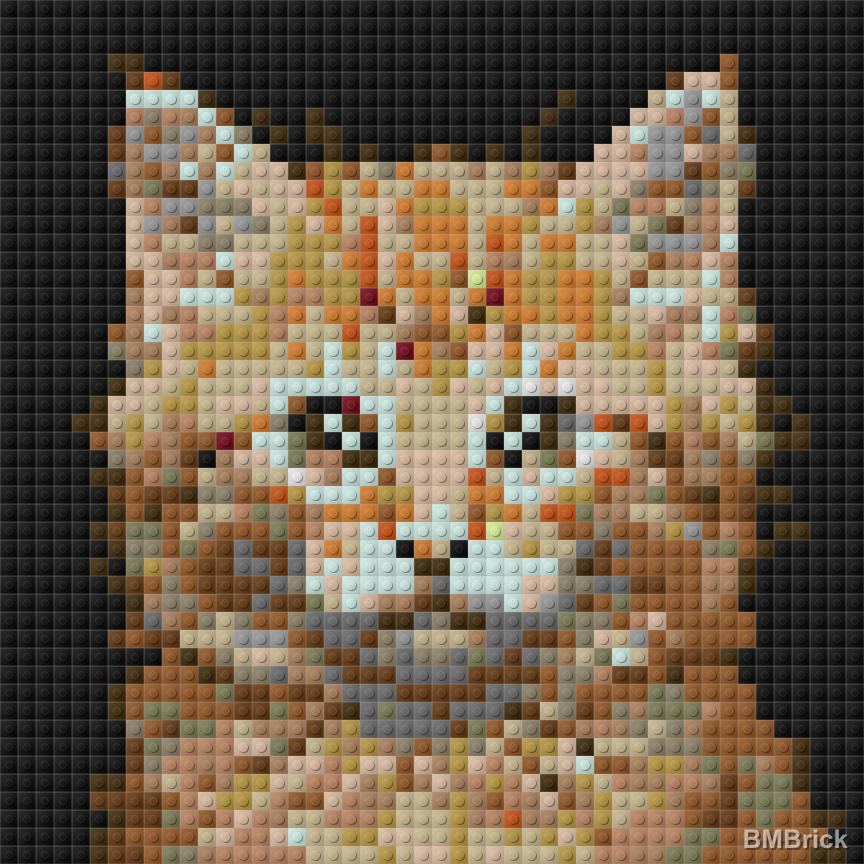
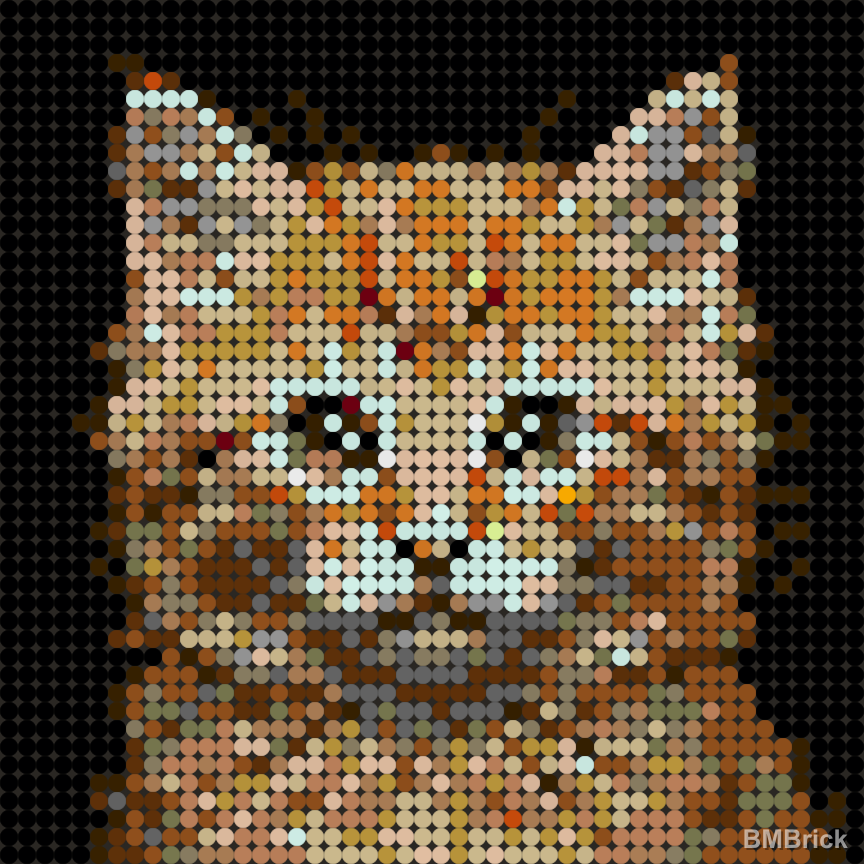
Generated with the generate_lego_mosaic tool (3D render mode):
Square Tiles (square_1x1)
| Original Photo | 48x48 Preview | 64x64 Preview |
| :--- | :--- | :--- |
|  |
|  |
|  |
|
Round Tiles (round_1x1)
| Original Photo | 48x48 Preview | 64x64 Preview |
| :--- | :--- | :--- |
| |  |
|  |
|
For more case studies and mosaic examples, check out our Pinterest Showcase.
Quick Start
npx -y @bmbrick/photo-to-lego-mosaic-skill
MCP Client Configuration
Claude Desktop (claude_desktop_config.json):
{
  "mcpServers": {
    "lego-mosaic": {
      "command": "npx",
      "args": ["-y", "@bmbrick/photo-to-lego-mosaic-skill"]
    }
  }
}
Cursor (.cursor/mcp.json):
{
  "mcpServers": {
    "lego-mosaic": {
      "command": "npx",
      "args": ["-y", "@bmbrick/photo-to-lego-mosaic-skill"]
    }
  }
}
Tool: generate_lego_mosaic
| Parameter | Type | Required | Default | Description |
|-----------|------|----------|---------|-------------|
| imagePath | string | Yes | — | Absolute path to a local image |
| columns | number | No | 48 | Preview width in studs (max 64) |
| rows | number | No | 48 | Preview height in studs (max 64) |
| materialMode | string | No | square_1x1 | square_1x1 or round_1x1 |
| renderMode | string | No | 3D | Render style |
| removeBackground | boolean | No | false | Clean up white/transparent backgrounds |
Returns: a local watermarked PNG preview + a link to unlock the full project at bmbrick.com.
Unlock Full Project
The preview is watermarked and intended for creative exploration. To get the complete deliverables — HD unwatermarked mosaic, brick-by-brick PDF instructions, parts list with ordering links, and CSV/XML placement matrices — visit bmbrick.com.
Features
- Same Engine as bmbrick.com — canonical color science, quantization, and 3D rendering pipeline
- Local & Private — all processing happens on your machine via Node.js
- Agent-Ready — ships with a SKILL.md for seamless agent workflow integration
- 3D Render Mode — InstancedMesh PBR rendering with realistic brick studs
Engineering Docs
Deep technical reference for the color quantization pipeline that powers this skill and bmbrick.com:
- Color quantization pipeline: principles, history, and lessons — current architecture, architectural decisions, verified principles, failed experiments from 25+ versions of iteration, and parameter sensitivity reference.
- 🇬🇧 English
- 🇨🇳 中文
Migrating from @bmbrick/agent-mosaic-skill
If you were using the old name, the migration is one search/replace:
1. Package name: @bmbrick/agent-mosaic-skill → @bmbrick/photo-to-lego-mosaic-skill
2. MCP tool name (in your agent's tool list): generate_bmbrick_mosaic → generate_lego_mosaic
3. Binary name (rare): agent-mosaic-skill → photo-to-lego-mosaic-skill
The tool parameters (imagePath, columns, rows, etc.) and return shape are unchanged.
Development
License
Dual-licensed:
- MIT — MCP wrapper, skill/ directory, agent integration surface
- Restricted — dist/ engine files: free to use and distribute as-is, but no de-obfuscation, reverse engineering, or redistribution of modified versions
See LICENSE for full terms.
Sign in to leave a review
Use Google, GitHub, or an email account so ratings stay tied to real people.
No reviews posted yet.



