
🦊 MCPBench: A Benchmark for Evaluating MCP Servers
About
MCPBench is an evaluation framework for MCP servers. It supports evaluating three types of servers (Web Search, Database Query, and GAIA) and is compatible with both local and remote MCP servers. The framework measures task completion accuracy, latency, and token consumption…
Details
- License
- Apache-2.0
Explore
- Evaluates Web Search, Database Query, and GAIA server types.
- Works with both remote (SSE) and local (STDIO) MCP servers.
- Measures accuracy, latency, and token consumption.
- Provides built-in datasets for WebSearch and Database Query.
- Automatically detects server tools and parameters.
- Compatible with multiple MCP servers (e.g., Brave Search, DuckDuckGo).
The framework requires Python version >= 3.11, nodejs and jq.
conda create -n mcpbench python=3.11 -y
conda activate mcpbench
pip install -r requirements.txt
Please first determine the type of MCP server you want to use:
- If it is a remote host (accessed via SSE, such as ModelScope, Smithery, or localhost), you can directly conduct the evaluation.
- If it is started locally (accessed via npx using STDIO), you need to launch it.
<h1 align="center">
🦊 MCPBench: A Benchmark for Evaluating MCP Servers
</h1>
<div align="center">
[![Documentation][docs-image]][docs-url]
[![Package License][package-license-image]][package-license-url]
</div>
<div align="center">
<h4 align="center">
</h4>
</div>
MCPBench is an evaluation framework for MCP Servers. It supports the evaluation of three types of servers: Web Search, Database Query and GAIA, and is compatible with both local and remote MCP Servers. The framework primarily evaluates different MCP Servers (such as Brave Search, DuckDuckGo, etc.) in terms of task completion accuracy, latency, and token consumption under the same LLM and Agent configurations. Here is the evaluation report.
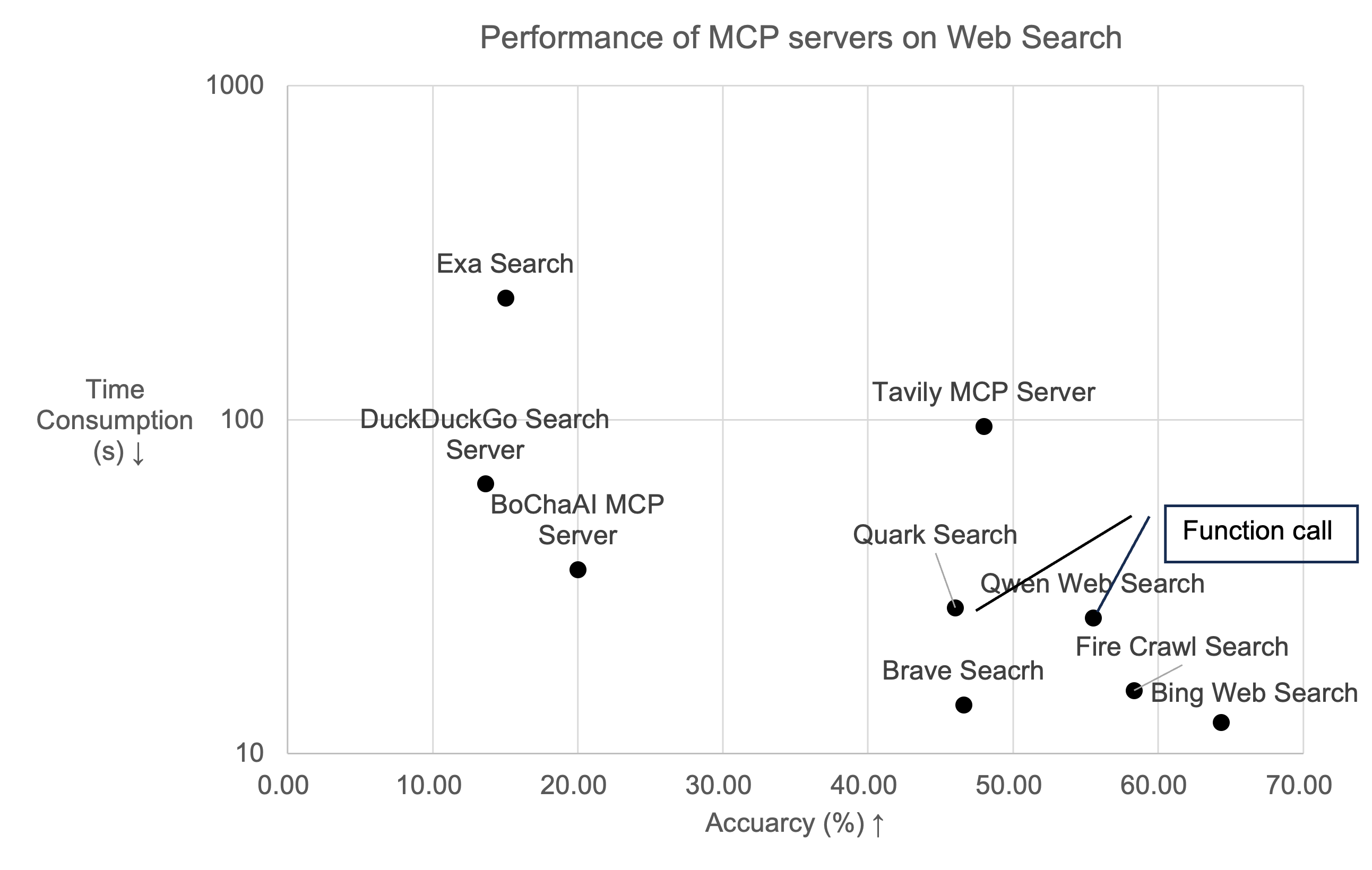
> The implementation refers to LangProBe: a Language Programs Benchmark.\
> Big thanks to Qingxu Fu for the initial implementation!
<hr>
📋 Table of Contents
- 🔥 News
- 🛠️ Installation
- 🚀 Quick Start
- Launch MCP Server
- Launch Evaluation
- 🧂 Datasets and Experiments
- 🚰 Cite
🔥 News
+Sep. 1, 2025 🌟 Modelscope AI hackathon will be hold on Sep. 23rd, ref: https://modelscope.cn/active/aihackathon-mcp-agent
+ Apr. 29, 2025 🌟 Update the code for evaluating the MCP Server Package within GAIA.
+ Apr. 14, 2025 🌟 We are proud to announce that MCPBench is now open-sourced.
🛠️ Installation
The framework requires Python version >= 3.11, nodejs and jq.conda create -n mcpbench python=3.11 -y
conda activate mcpbench
pip install -r requirements.txt
🚀 Quick Start
Please first determine the type of MCP server you want to use: - If it is a remote host (accessed via SSE, such as ModelScope, Smithery, or localhost), you can directly conduct the evaluation. - If it is started locally (accessed via npx using STDIO), you need to launch it.Launch MCP Server (optional for stdio)
First, you need to write the following configuration:{
"mcp_pool": [
{
"name": "firecrawl",
"run_config": [
{
"command": "npx -y firecrawl-mcp",
"args": "FIRECRAWL_API_KEY=xxx",
"port": 8005
}
]
}
]
}
configs folder and launch it using:
sh launch_mcps_as_sse.sh YOUR_CONFIG_FILE
For example, save the above configuration in the configs/firecrawl.json file and launch it using:
sh launch_mcps_as_sse.sh firecrawl.json
Launch Evaluation
To evaluate the MCP Server's performance, you need to set up the necessary MCP Server information. the code will automatically detect the tools and parameters in the Server, so you don't need to configure them manually, like:{
"mcp_pool": [
{
"name": "Remote MCP example",
"url": "url from https://modelscope.cn/mcp or https://smithery.ai"
},
{
"name": "firecrawl (Local run example)",
"run_config": [
{
"command": "npx -y firecrawl-mcp",
"args": "FIRECRAWL_API_KEY=xxx",
"port": 8005
}
]
}
]
}
To evaluate the MCP Server's performance on WebSearch tasks:
sh evaluation_websearch.sh YOUR_CONFIG_FILE
To evaluate the MCP Server's performance on Database Query tasks:
sh evaluation_db.sh YOUR_CONFIG_FILE
To evaluate the MCP Server's performance on GAIA tasks:
sh evaluation_gaia.sh YOUR_CONFIG_FILE
For example, save the above configuration in the configs/firecrawl.json file and launch it using:
sh evaluation_websearch.sh firecrawl.json
Datasets and Experimental Results
Our framework provides two datasets for evaluation. For the WebSearch task, the dataset is located atMCPBench/langProBe/WebSearch/data/websearch_600.jsonl, containing 200 QA pairs each from Frames, news, and technology domains. Our framework for automatically constructing evaluation datasets will be open-sourced later.
For the Database Query task, the dataset is located at MCPBench/langProBe/DB/data/car_bi.jsonl. You can add your own dataset in the following format:
{
  "unique_id": "",
  "Prompt": "",
  "Answer": ""
}
We have evaluated mainstream MCP Servers on both tasks. For detailed experimental results, please refer to Documentation
🚰 Cite
If you find this work useful, please consider citing our project or giving us a 🌟:@misc{mcpbench,
title={MCPBench: A Benchmark for Evaluating MCP Servers},
author={Zhiling Luo, Xiaorong Shi, Xuanrui Lin, Jinyang Gao},
howpublished = {\url{https://github.com/modelscope/MCPBench}},
year={2025}
}
Alternatively, you may reference our report.
@article{mcpbench_report,

      title={Evaluation Report on MCP Servers},

      author={Zhiling Luo, Xiaorong Shi, Xuanrui Lin, Jinyang Gao},

      year={2025},

      journal={arXiv preprint arXiv:2504.11094},

      url={https://arxiv.org/abs/2504.11094},

      primaryClass={cs.AI}

}
[docs-image]: https://img.shields.io/badge/Documentation-EB3ECC
[docs-url]: https://arxiv.org/abs/2504.11094
[package-license-image]: https://img.shields.io/badge/License-Apache_2.0-blue.svg
[package-license-url]: https://github.com/modelscope/MCPBench/blob/main/LICENSE
Sign in to leave a review
Use Google, GitHub, or an email account so ratings stay tied to real people.
No reviews posted yet.



