
Unstructured API MCP Server for Research Paper Data Processing
About
GitHub repository for Unstructured MCP Hackathon.
Explore
- Connects to Google Drive to fetch research paper PDFs.
- Sends structured data to a MongoDB destination connector.
- Offers 18 tools for source, destination, workflow, and job management.
- Supports auto partitioning, chunking, NER enrichment, and embedding.
- Integrates directly with Claude Desktop via MCP configuration.
Install dependencies:
- uv add "mcp[cli]"
- uv pip install --upgrade unstructured-client python-dotenv
or use uv sync.
The main difference here is it becomes easier to set breakpoints on the server side during development -- the client and server are decoupled.
```
list_sources
Lists available sources from the Unstructured API.
get_source_info
Get detailed information about a specific source connector.
create_gdrive_source
Create a google drive source connector.
delete_gdrive_source
Delete a source connector by source id.
list_destinations
Lists available destinations from the Unstructured API.
get_destination_info
Get detailed info about a specific destination connector. Currently, we have s3/weaviate/astra/neo4j/mongo DB (more to come!)
create_mongodb_destination
Create a mongodb destination connector by params.
update_mongodb_destination
Update an existing mongodb destination connector by destination id.
delete_mongodb_destination
Delete a mongodb destination connector by destination id.
list_workflows
Lists workflows from the Unstructured API.
get_workflow_info
Get detailed information about a specific workflow.
create_workflow
Create a new workflow with source, destination id, etc.
run_workflow
Run a specific workflow with workflow id
update_workflow
Update an existing workflow by params.
delete_workflow
Delete a specific workflow by id.
list_jobs
Lists jobs for a specific workflow from the Unstructured API.
get_job_info
Get detailed information about a specific job by job id.
cancel_job
Delete a specific job by id.
| Tool | Description |
|------|-------------|
| list_sources | Lists available sources from the Unstructured API. |
| get_source_info | Get detailed information about a specific source connector. |
| create_gdrive_source | Create a google drive source connector.
| update_gdrive_source | Update an existing google source connector by params. |
| delete_gdrive_source | Delete a source connector by source id. |
| list_destinations | Lists available destinations from the Unstructured API. |
| get_destination_info | Get detailed info about a specific destination connector. Currently, we have s3/weaviate/astra/neo4j/mongo DB (more to come!) |
| create_mongodb_destination | Create a mongodb destination connector by params. |
| update_mongodb_destination | Update an existing mongodb destination connector by destination id. |
| delete_mongodb_destination | Delete a mongodb destination connector by destination id. |
| list_workflows | Lists workflows from the Unstructured API. |
| get_workflow_info | Get detailed information about a specific workflow. |
| create_workflow | Create a new workflow with source, destination id, etc. |
| run_workflow | Run a specific workflow with workflow id |
| update_workflow | Update an existing workflow by params. |
| delete_workflow | Delete a specific workflow by id. |
| list_jobs | Lists jobs for a specific workflow from the Unstructured API. |
| get_job_info | Get detailed information about a specific job by job id. |
| cancel_job |Delete a specific job by id. |
By leveraging the Unstructured API, this server facilitates easy access to a set of powerful tools that extract meaningful information from research papers, which can then be used for fine-tuning a language model (LLM) to reduce the literature review time for researchers.
Check out the Blog here:
- For a detailed explanation of the hackathon, the project, and to follow along, check out my blog post on Dev.to: Unstructured Model Context Protocol Hackathon.Table of Contents:
1. Setup 2. Requirements 3. Project Flow 4. Available Tools 5. Follow Along 6. Claude Desktop Integration 7. Debugging Tools 8. Running locally minimal client with serverSetup
Install dependencies: -uv add "mcp[cli]"
- uv pip install --upgrade unstructured-client python-dotenv
or use uv sync.
Requirements
Before you can begin working with the UNS_MCP project, make sure you have the following setup:
1. UNSTRUCTURED_API_KEY
- Get your API key from the Unstructured platform to access their API for document processing.
2. GOOGLEDRIVE_SERVICE_ACCOUNT_KEY
- Set up a Google Cloud project and create a service account to enable access to Google Drive for reading PDFs. Check the set up process here.
- Save the JSON credentials for your service account and use it to set up the GOOGLEDRIVE_SERVICE_ACCOUNT_KEY.
3. MONGO_DB_CONNECTION_STRING
- Set up a MongoDB database (cloud) and get the connection string for connecting to the database. Check out set up process here.
4. .env.template
- The .env.template file includes all the required environment variables. Copy this file to .env and set the necessary values for the keys mentioned above.
Example .env file:
UNSTRUCTURED_API_KEY="<key-here>"
MONGO_DB_CONNECTION_STRING="<CONNECTION_STRING>"
GOOGLEDRIVE_SERVICE_ACCOUNT_KEY="<converted string>"
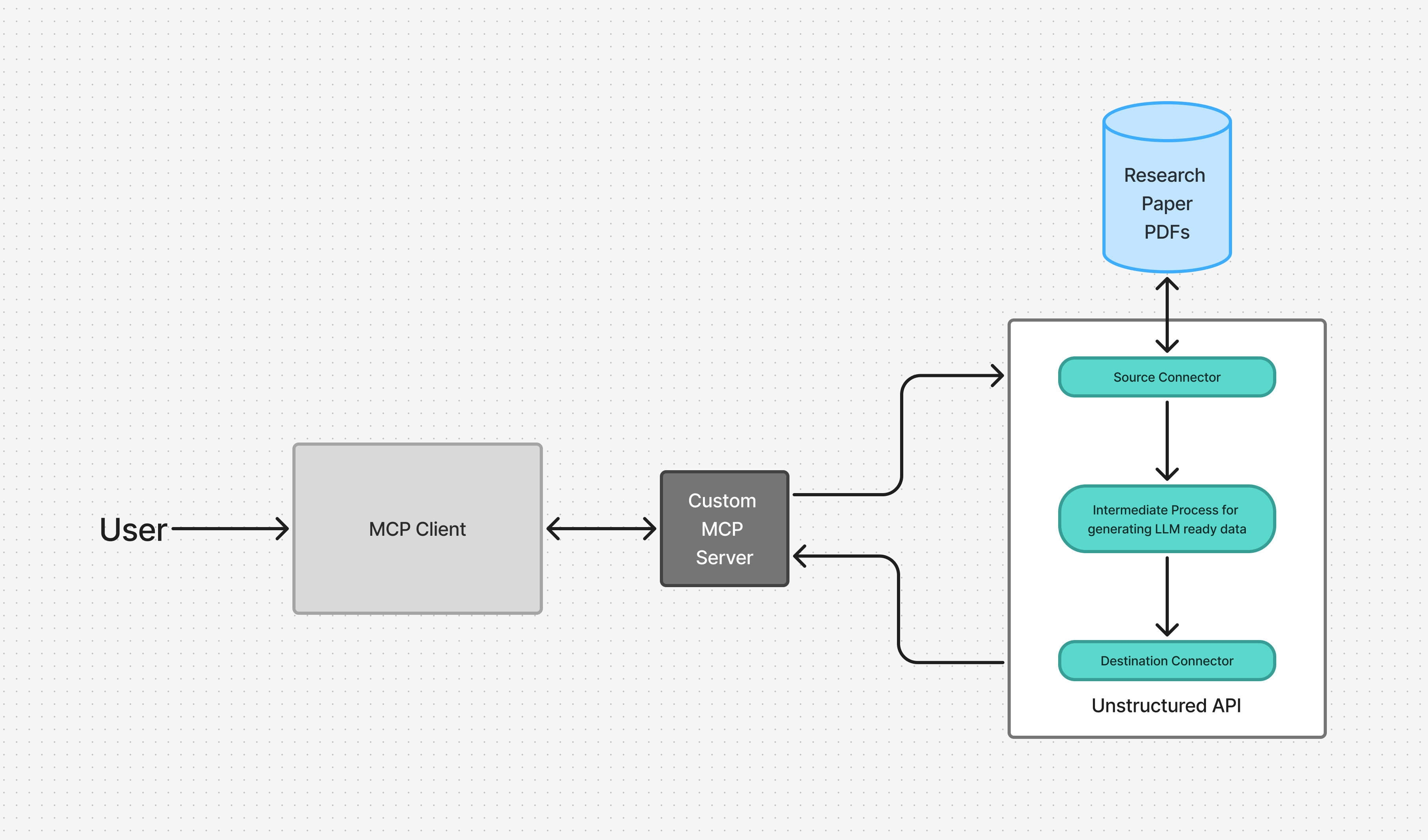
Project Flow
1. User Query to MCP Client
2. Claude Interacts with UNS_MCP Server
- Claude forwards the user's query to the custom MCP server named UNS_MCP.
3. MCP Tool Executes Unstructured API
- UNS_MCP interacts with the Unstructured API to process the research paper PDF, extract relevant information, and convert it into structured JSON data.
4. Structured Data (JSON) Output is stored in the destination source
- The result from the Unstructured API is transformed into JSON format, which can then be further utilized to fine-tune LLMs, helping researchers quickly find the relevant information without manually reading the entire paper.
Available Tools
| Tool | Description |
|------|-------------|
| list_sources | Lists available sources from the Unstructured API. |
| get_source_info | Get detailed information about a specific source connector. |
| create_gdrive_source | Create a google drive source connector.
| update_gdrive_source | Update an existing google source connector by params. |
| delete_gdrive_source | Delete a source connector by source id. |
| list_destinations | Lists available destinations from the Unstructured API. |
| get_destination_info | Get detailed info about a specific destination connector. Currently, we have s3/weaviate/astra/neo4j/mongo DB (more to come!) |
| create_mongodb_destination | Create a mongodb destination connector by params. |
| update_mongodb_destination | Update an existing mongodb destination connector by destination id. |
| delete_mongodb_destination | Delete a mongodb destination connector by destination id. |
| list_workflows | Lists workflows from the Unstructured API. |
| get_workflow_info | Get detailed information about a specific workflow. |
| create_workflow | Create a new workflow with source, destination id, etc. |
| run_workflow | Run a specific workflow with workflow id |
| update_workflow | Update an existing workflow by params. |
| delete_workflow | Delete a specific workflow by id. |
| list_jobs | Lists jobs for a specific workflow from the Unstructured API. |
| get_job_info | Get detailed information about a specific job by job id. |
| cancel_job |Delete a specific job by id. |
Follow Along
1. Set Up Required Connectors
Google Drive Source Connector:
- Create a Google Drive Source Connector to connect your service account with Google Drive and retrieve PDFs.
- Test the connection to ensure accessibility.
MongoDB Destination Connector:
- Set up the MongoDB Destination Connector to store processed data.
- Test the connection to ensure accessibility.
---
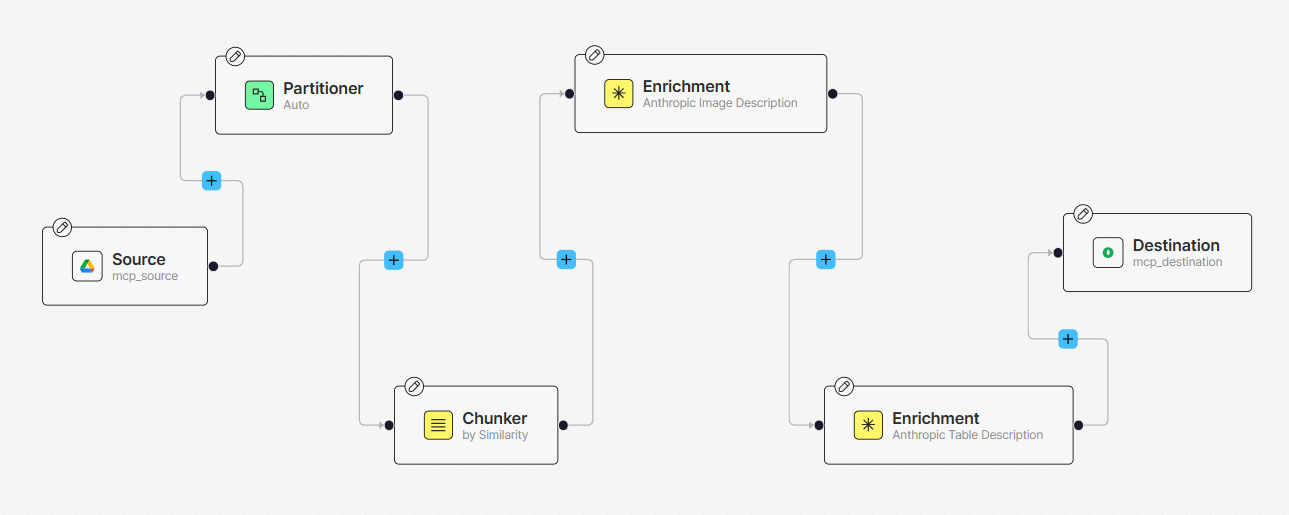
2. Develop the Workflow
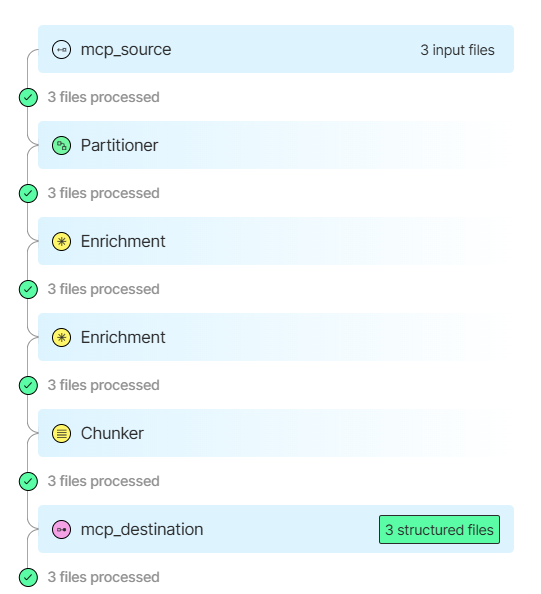
1. Define Connectors: Set up the Google Drive source and MongoDB destination connectors.
2. Partitioning: Use Auto partitioning for optimal document splitting.
3. Chunking: Apply by-page chunking for manageable text segments.
4. Enrichment: Use NER to extract entities and table enrichment for any tables.
5. Embedding: Convert text into embeddings for querying or analysis.
Note: Tweak the Flow: Adjust any step (partitioning, chunking, enrichment, embedding) as needed.
---
3. Set Up Claude Desktop
1. Install Claude Desktop and integrate it with the UNS_MCP server by following steps given below.
2. Restart Claude to link with the MCP server and ensure workflow functionality.
---
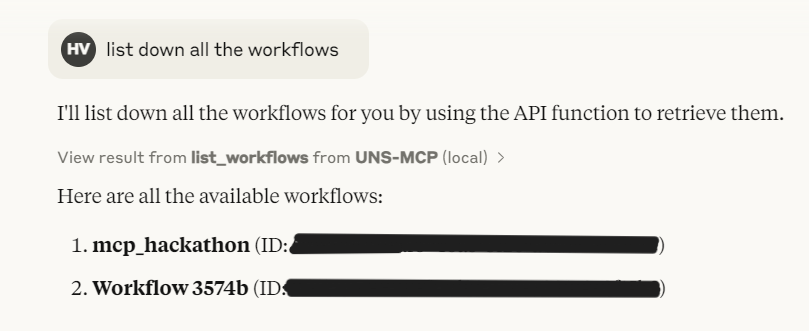
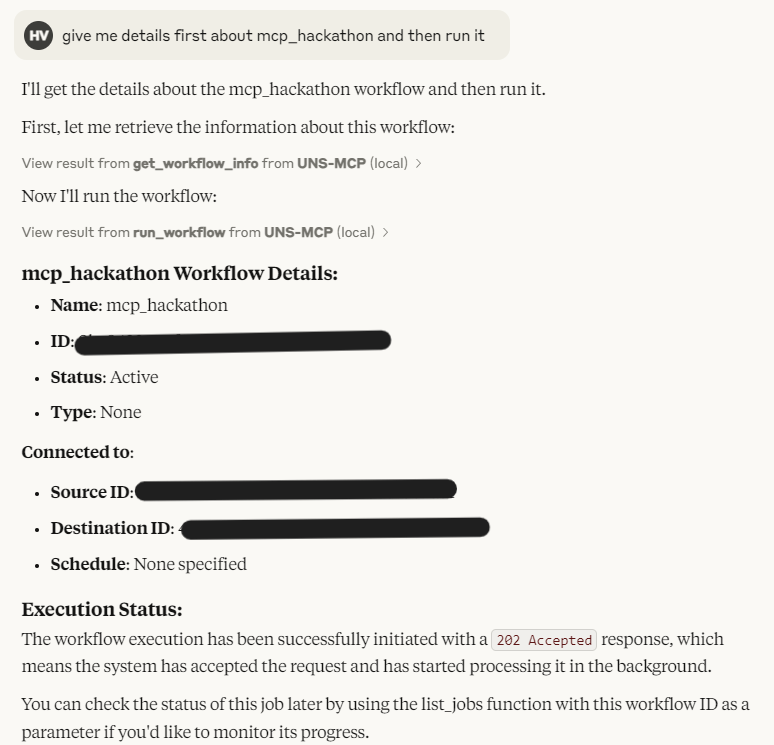
4. Query and Run the Workflow
- Use Claude to interact with the system and execute queries to list, create, edit, delete and run the workflow. You can perform many such tasks, go through Available Tools given above.
5. Results
Claude Desktop Integration
To install in Claude Desktop:
1. Go to claude_desktop_config.json by running the below command.
Sign in to leave a review
Use Google, GitHub, or an email account so ratings stay tied to real people.
No reviews posted yet.



