
McpClientServerExample
About
A simple .NET implementation of an MCP (Model Context Protocol) Client and Server example. This project demonstrates how to create and interact with an MCP server using custom tools, natural language prompts, and standard I/O transport.
Details
- License
- MIT license
Explore
- Client uses ModelContextProtocol.Client to communicate with the server.
- Supports OpenAI GPT models for conversation and tool calling.
- Server uses ModelContextProtocol.Server and communicates via standard input/output.
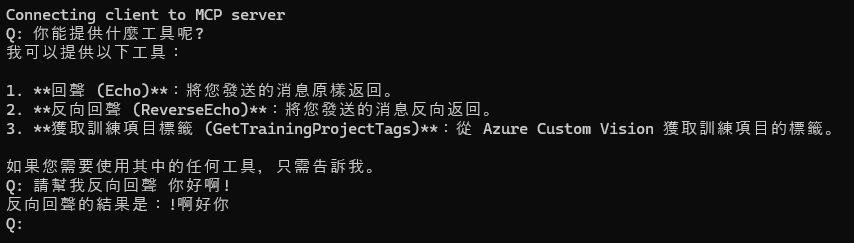
- Provides built-in tools: Echo (returns user input) and ReverseEcho (returns reversed input).
Clone the repository and ensure you have .NET 8.0 SDK and an OpenAI API key (if using GPT models). Set the OPENAI_API_KEY environment variable, then run the client with dotnet run --project client/McpClient.csproj.
McpClientServerExample 是一個基於 Model Context Protocol (MCP) 的範例專案,展示了如何實現客戶端與伺服器之間的通訊。此專案包含兩個主要部分:McpClient 和 McpServer,分別代表客戶端與伺服器。
用自製的Client,以不使用Claude Client App 為範例
功能
客戶端 (McpClient)
- 使用 ModelContextProtocol.Client 與伺服器通訊。
- 支援 OpenAI GPT 模型進行對話。
- 提供工具列表並支援工具函數調用。
伺服器 (McpServer)
- 使用 ModelContextProtocol.Server 提供 MCP 伺服器功能。
- 支援標準輸入/輸出通訊。
- 提供內建工具,例如:
- Echo: 回傳用戶輸入的訊息。
- ReverseEcho: 回傳用戶輸入訊息的反轉版本。
安裝與執行
需求
- .NET 8.0 SDK - OpenAI API 金鑰(若使用 GPT 模型)export OPENAI_API_KEY=your_api_key_here
執行
dotnet run --project client/McpClient.csproj
使用範例
Sign in to leave a review
Use Google, GitHub, or an email account so ratings stay tied to real people.
No reviews posted yet.



