
Liu
About
[**中文主页**](https://github.com/modelscope/Trinity-RFT/blob/main/README_zh.md) | [**Tutorial**](https://modelscope.github.io/Trinity-RFT/) | [**FAQ**](./docs/sphinx_doc/source/tutorial/faq.md) <div align="center"> <img src="https://img.alicdn.com/imgextra/i1/O1CN01lvLpfw25Pl4ohGZnU_!!6000000007519-2-tps-1628-490.png"…
Explore
Unified RFT Core:
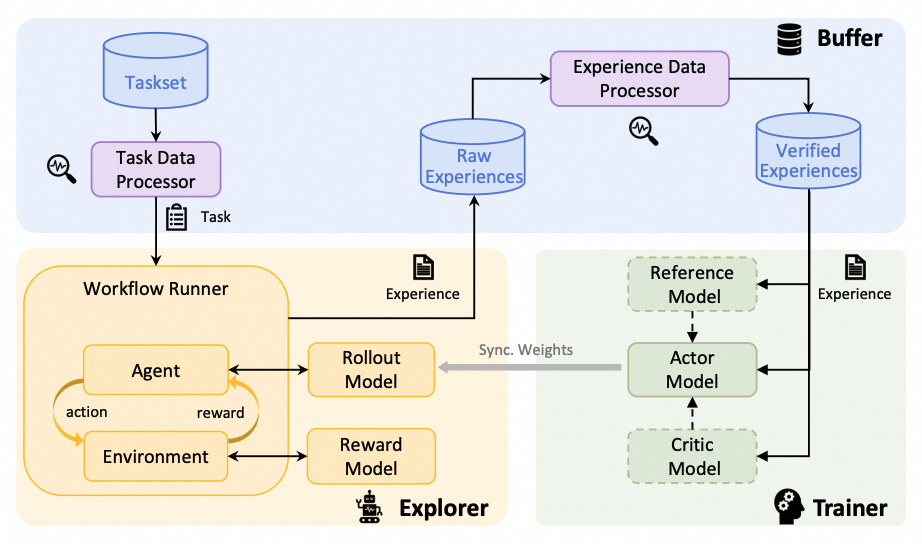
Supports synchronous/asynchronous, on-policy/off-policy, and online/offline training. Rollout and training can run separately and scale independently on different devices.
First-Class Agent-Environment Interaction:
Handles lagged feedback, long-tailed latencies, and agent/env failures gracefully. Supports multi-turn agent-env interaction.
Optimized Data Pipelines:
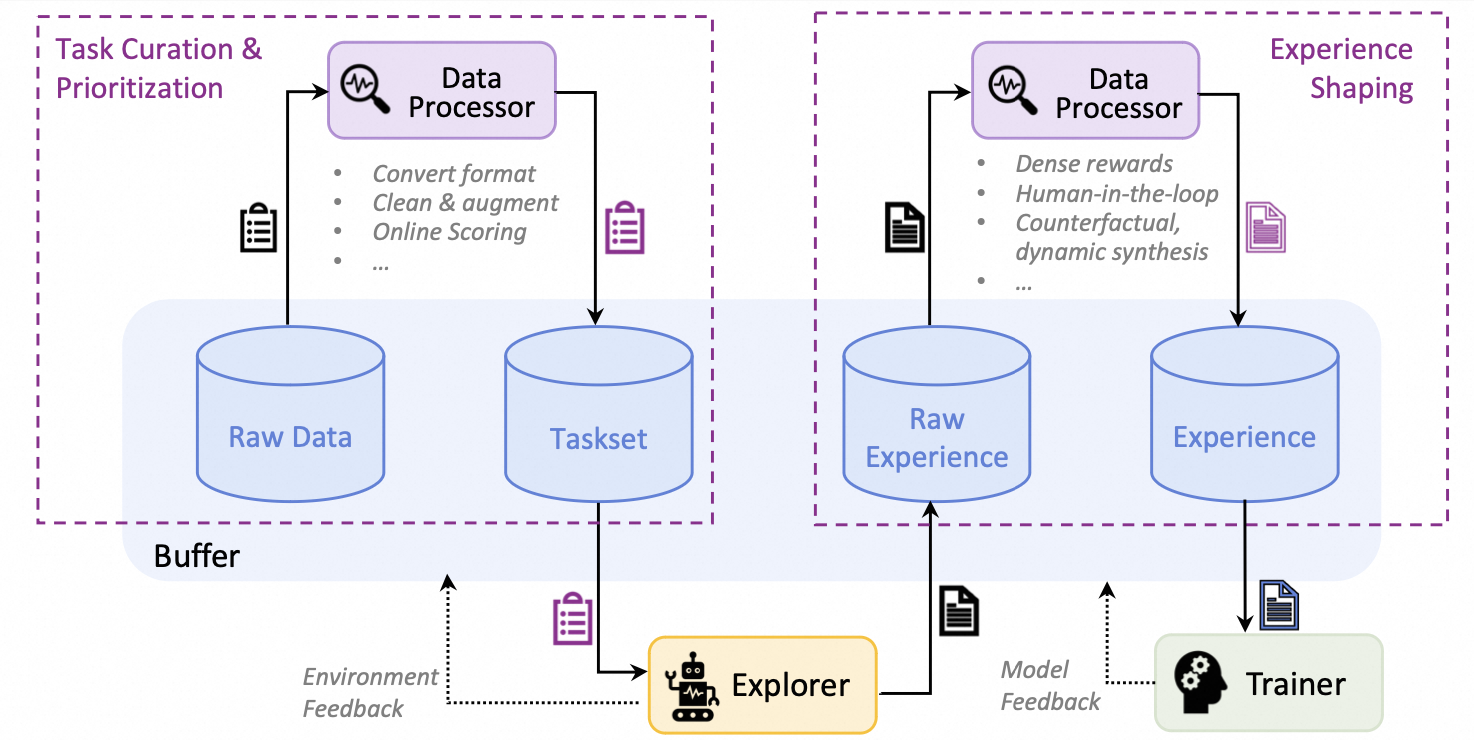
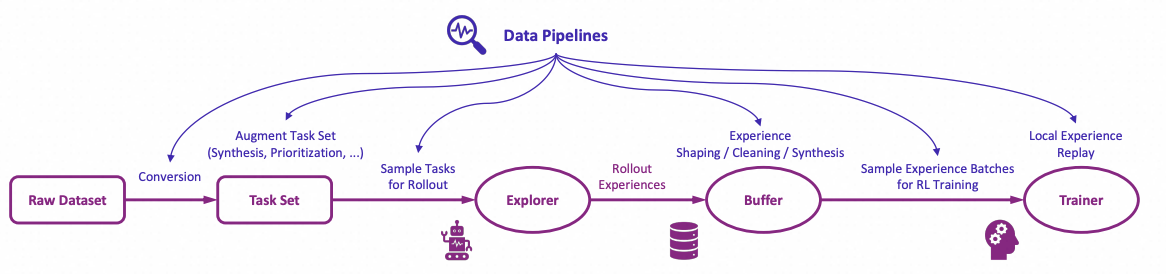
Treats rollout tasks and experiences as dynamic assets, enabling active management (prioritization, cleaning, augmentation) throughout the RFT lifecycle.
User-Friendly Design:
Modular and decoupled architecture for easy adoption and development, plus rich graphical user interfaces for low-code usage.
<p align="center">

<em>Figure: The high-level design of Trinity-RFT</em>
</p>
<details>
<summary>Figure: The architecture of RFT-core</summary>
<p align="center">
</p>
</details>
<details>
<summary>Figure: Some RFT modes supported by Trinity-RFT</summary>
<p align="center">

</p>
</details>
<details>
<summary>Figure: Concatenated and general multi-step workflows</summary>
<p align="center">

</p>
</details>
<details>
<summary>Figure: The architecture of data processors</summary>
<p align="center">
</p>
</details>
<details>
<summary>Figure: The high-level design of data pipelines in Trinity-RFT</summary>
<p align="center">
</p>
</details>
A tentative roadmap: #51

Setting up with Highlight
This MCP is not yet compatible with Highlight’s one-click setup. However, you can still use it with Highlight by following these steps:
- Download and install Highlight from highlightai.com/download
- Navigate to the plugins tab and select "Add Custom Plugin"
-
Configure the plugin with the settings below
Plugin Name
LiuCommand (node, npx, python, etc.)Please refer to the README for specific instructions on how to obtain API keys or other required environment variables.
- Enable "Start Automatically" if you want the plugin to start when Highlight launches





From the repository
> [!NOTE]
> This project is currently under active development. Comments and suggestions are welcome!
Requirements:
- Python version >= 3.10, <= 3.12
- CUDA version >= 12.4, <= 12.8
- At least 2 GPUs
Installation from source (recommended):
Installation using pip:
pip install trinity-rft==0.2.1
pip install flash-attn==2.8.0.post2
Installation from docker:
we have provided a dockerfile for Trinity-RFT (trinity)
git clone https://github.com/modelscope/Trinity-RFT
cd Trinity-RFT
Trinity-RFT provides a web interface for configuring your RFT process.
> [!NOTE]
> This is an experimental feature, and we will continue to improve it.
To launch the web interface for minimal configurations, you can run
trinity studio --port 8080
``
Then you can configure your RFT process in the web page and generate a config file. You can save the config file for later use or run it directly as described in the following section.
Advanced users can also edit the config file directly.
We provide example config files in
examples`.
For complete GUI features, please refer to the monorepo for Trinity-Studio.
<details>
<summary> Example: config manager GUI </summary>

</details>
Claude Desktop / Cursor
Paste into your MCP client config file to install this server.
{
    "mcpServers": {
        "liu": {
            "Trinity-RFT": {
                "command": "docker",
                "args": [
                    "build",
                    "-f",
                    "scripts/docker/Dockerfile",
                    "-t",
                    "trinity-rft:latest",
                    "."
                ]
            }
        }
    }
}McpServers
{
    "Trinity-RFT": {
        "command": "docker",
        "args": [
            "build",
            "-f",
            "scripts/docker/Dockerfile",
            "-t",
            "trinity-rft:latest",
            "."
        ]
    }
}
💡 What is Trinity-RFT?
Trinity-RFT is a general-purpose, flexible and easy-to-use framework for reinforcement fine-tuning (RFT) of large language models (LLM).
It is designed to support diverse application scenarios and serve as a unified platform for exploring advanced RL paradigms in the era of experience.
Sign in to leave a review
Use Google, GitHub, or an email account so ratings stay tied to real people.
No reviews posted yet.



