
WeiWanMcpServer
About
WeiWanMcpServer is a custom MCP server built for the AI Hackathon that integrates with HyperChat (an open-source chat client). It enables web search, note downloading, note management, and note overwriting via chat-based tool calls. Designed for users who want to retrieve and…
Explore
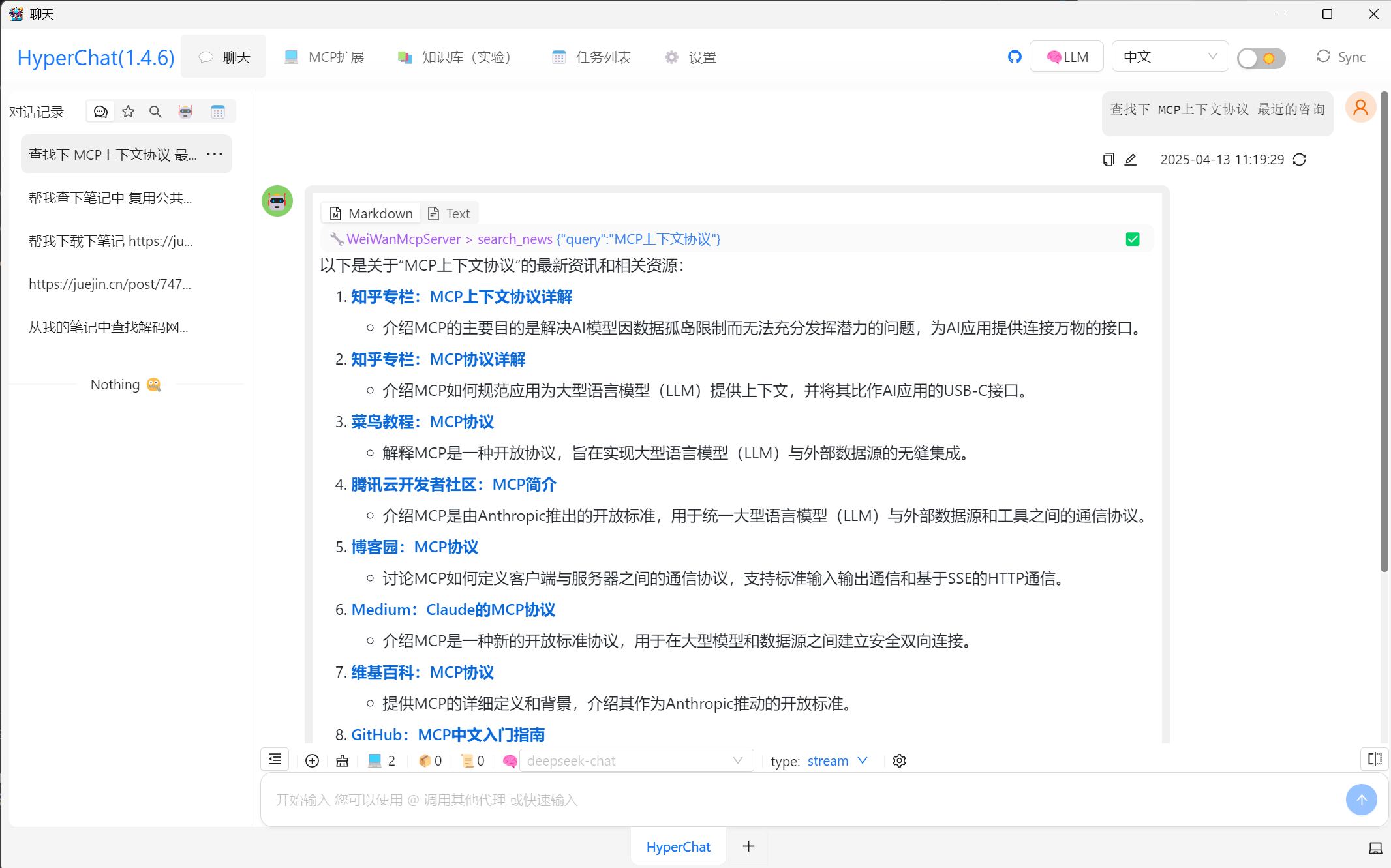
- search_news: retrieve web content from specified sites (e.g., zhihu.com) with link+summary output.
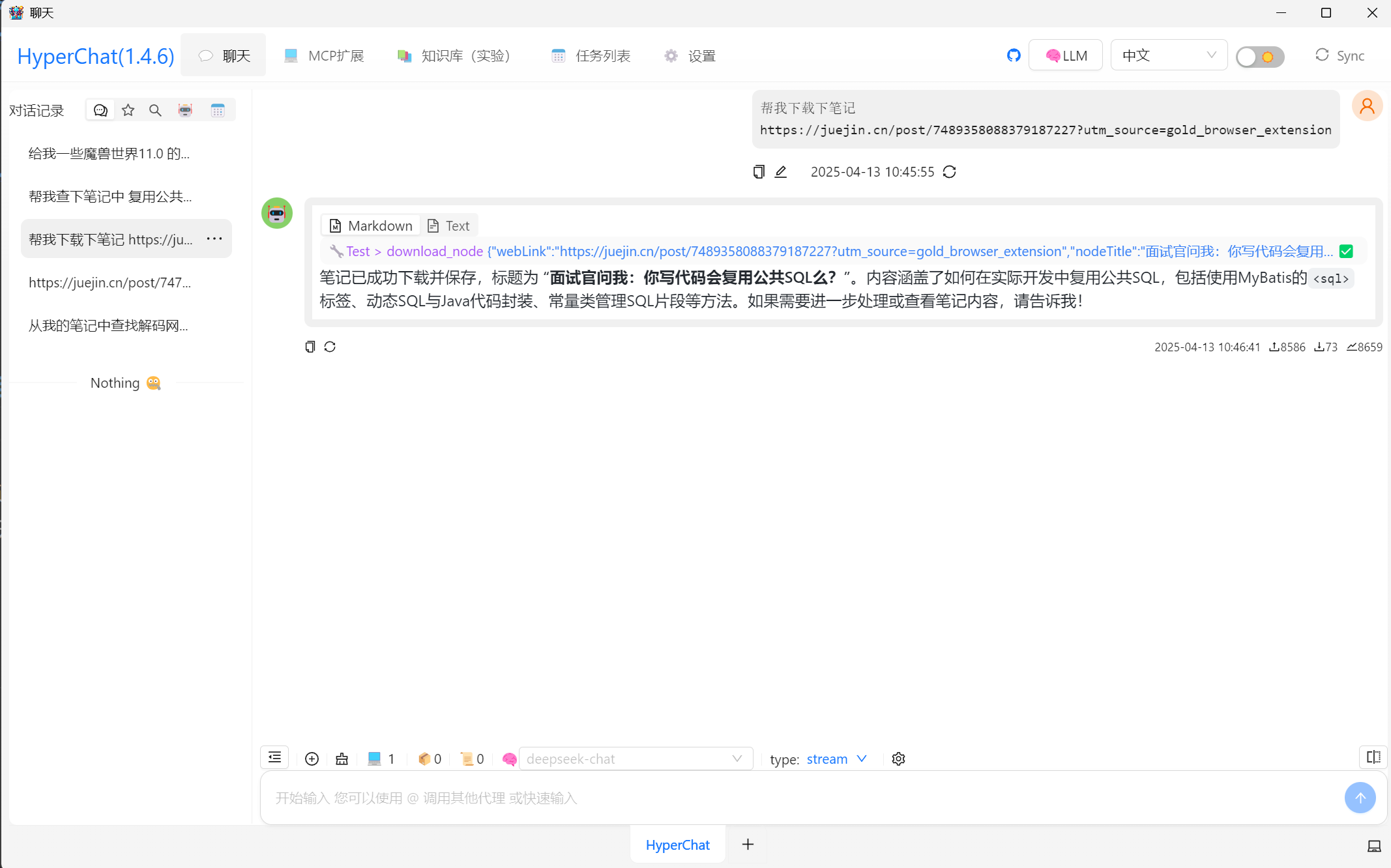
- download_note: download a webpage as a Markdown file to the local note repository.
- overwrite_note: overwrite or reorganize the content of an existing note.
- Auxiliary tools: get current date/time.
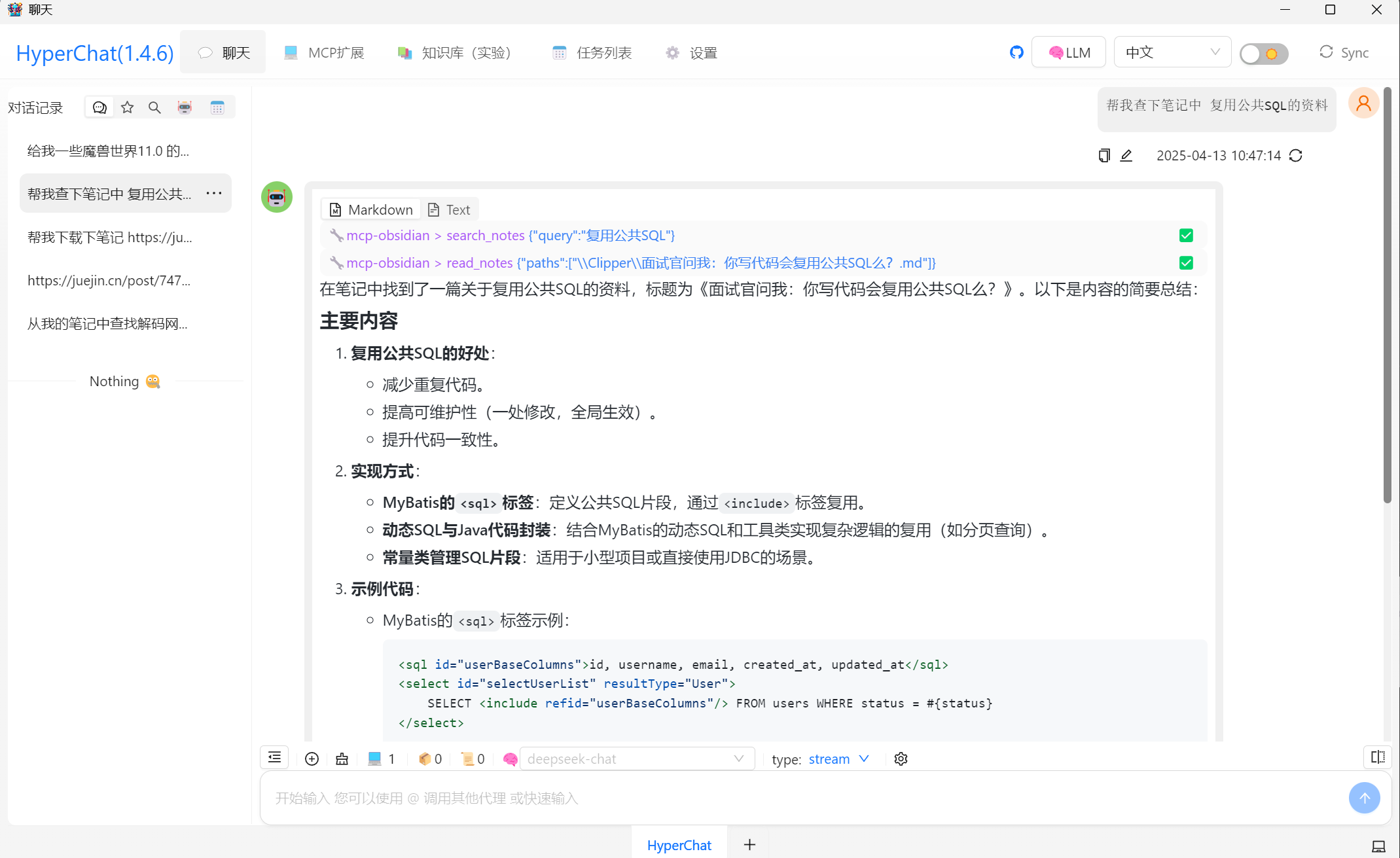
- Obsidian integration: view, delete, rename, and search notes via obsidian_mcp.
Set the environment variable NOTES_PATH to your local note repository path. Use HyperChat as the frontend to invoke MCP tools such as search_news, download_note, and overwrite_note. Provide an API key for Jina.ai services (placeholder YOUR_API_KEY in the code).
Show Time: AI Hackathon Project - HyperChat + Custom MCP Server
项目背景
在本次AI Hackathon竞赛中,我实现了一个基于HyperChat(开源Chat客户端)和自定义MCP服务器的程序。该程序通过聊天交互的方式调用MCP工具,实现以下核心功能: 1. 网络资讯检索:在指定站点(如知乎)检索关键词相关的资料,并以链接+摘要的形式返回。 2. 笔记下载:将检索到的链接内容下载为Markdown笔记,保存到本地笔记仓库。 3. 笔记管理:对笔记进行查看、总结、删除等操作(基于Obsidian的开源实现)。 4. 笔记复写:对下载的笔记进行内容复写或整理。技术实现
1. 核心组件
- HyperChat:作为用户交互的前端,支持聊天式调用MCP工具。 - 自定义MCP服务器:基于Python实现,提供以下工具: -search_news: 检索网络资讯。
- download_note: 下载网页内容为Markdown笔记。
- overwrite_note: 复写或整理笔记内容。
- 其他辅助工具(如获取当前时间、日期等)。
2. 代码亮点
MCP服务器核心代码
``python
from mcp.server.fastmcp import FastMCP
from datetime import datetime
import os
import requests
import re
mcp = FastMCP("WeiWanMcp", instructions="""
限制:
1.调用search_news查询咨询后,不要对内容进行总结,直接进行输出.
""")
nodePath = os.getenv("NOTES_PATH", "E:\MyDocuments\MyNotes\Clipper")
@mcp.tool()
def search_news(query: str, website: str):
"""检索网络资讯"""
url = 'https://s.jina.ai/?q=' + query + '&num=20'
headers = {
'Authorization': 'Bearer YOUR_API_KEY',
'X-Respond-With': 'no-content',
}
if website:
if validate_domain(website):
headers['X-Site'] = website
response = requests.get(url, headers=headers)
return response.text
@mcp.tool()
def download_note(webLink: str, nodeTitle: str):
"""下载网页内容为笔记"""
headers = {"Authorization": "Bearer YOUR_API_KEY"}
response = requests.get("https://r.jina.ai/" + webLink, headers=headers)
with open(nodePath + "\\" + nodeTitle + ".md", "w", encoding='utf-8') as file:
file.write(response.text)
return "笔记已保存至: " + nodePath + "\\" + nodeTitle + ".md"
@mcp.tool()
def overwrite_note(content: str, nodeTitle: str):
"""复写笔记内容"""
with open(nodePath + "\\" + nodeTitle + ".md", "w", encoding='utf-8') as file:
file.write(content)
return "笔记已复写: " + nodePath + "\\" + nodeTitle + ".md"
`
3. 功能演示

场景1:检索资讯

- 用户输入:
在zhihu.com站点帮我检索MCP相关的资料
- MCP响应:
- 调用search_news工具,返回知乎上与“MCP”相关的链接和摘要。
- 示例输出:
`
    1. MCP技术详解 - 摘要内容...
    2. MCP开源项目 - 摘要内容...
`
场景2:下载笔记

- 用户输入:
下载第一个链接的笔记,保存为“MCP技术详解”
- MCP响应:
- 调用download_note工具,将链接内容下载为Markdown文件。
- 输出:笔记已保存至: E:\MyDocuments\MyNotes\Clipper\MCP技术详解.md
场景3:复写笔记

- 用户输入:
复写“MCP技术详解”笔记,内容为整理后的Markdown文本
- MCP响应:
- 调用overwrite_note工具,覆盖原笔记内容。
- 输出:笔记已复写: E:\MyDocuments\MyNotes\Clipper\MCP技术详解.md
4. 与Obsidian集成

- 通过
obsidian_mcp`开源实现,支持对笔记仓库的进一步操作:
- 查看笔记内容。
- 删除或重命名笔记。
- 基于笔记内容进行复杂搜索。
项目亮点
1. 无缝集成:通过HyperChat实现自然语言交互,降低用户学习成本。 2. 高效检索:支持指定站点检索,快速获取目标资讯。 3. 本地化管理:将网络内容保存为Markdown笔记,方便后续整理和复用。 4. 灵活性:支持笔记复写和Obsidian集成,满足个性化需求。未来展望
1. 扩展工具集:增加更多MCP工具(如翻译、摘要生成等)。 2. 多平台支持:适配更多笔记软件(如Notion、Logseq)。 3. 性能优化:提升检索和下载速度。功能截图
 ---
结语
本次项目通过结合HyperChat和自定义MCP服务器,实现了从资讯检索到笔记管理的全流程自动化。未来将进一步优化功能,为用户提供更强大的知识管理工具!
---
结语
本次项目通过结合HyperChat和自定义MCP服务器,实现了从资讯检索到笔记管理的全流程自动化。未来将进一步优化功能,为用户提供更强大的知识管理工具!Sign in to leave a review
Use Google, GitHub, or an email account so ratings stay tied to real people.
No reviews posted yet.



