
MCP servers powered by
About
An MCP server package providing two servers (apps-server and unified-server) for accessing ACI.dev managed functions (tools) via the Model Context Protocol. Designed for developers integrating ACI.dev capabilities into MCP-compatible clients.
Details
- License
- MIT
Explore
- Two servers: apps-specific and unified access
- Apps-server gives direct access to functions from specified apps
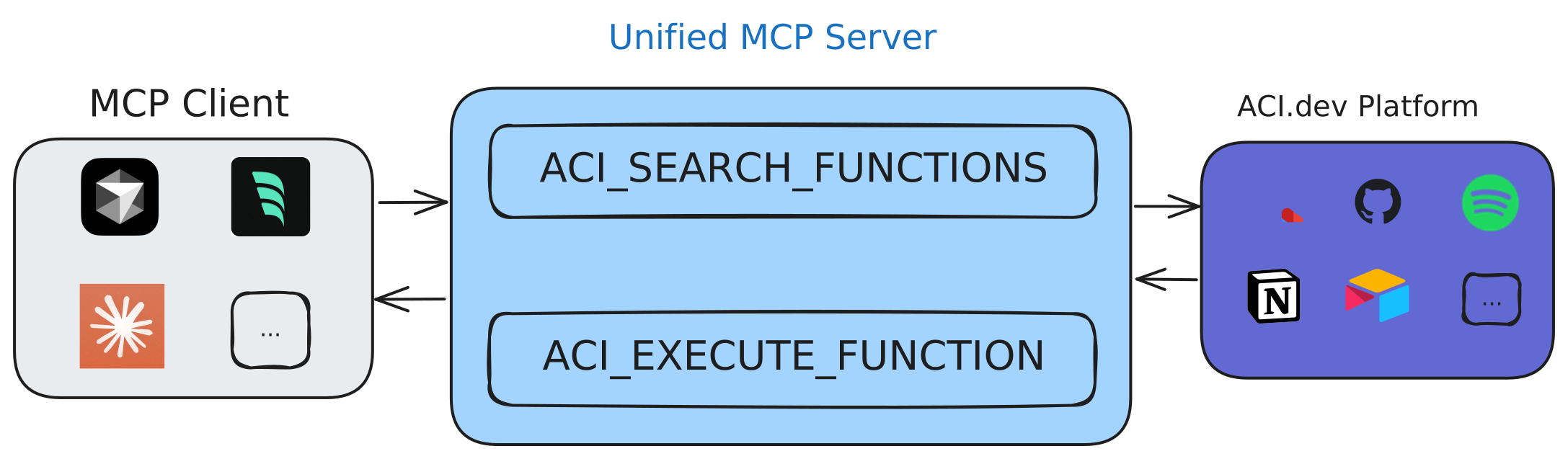
- Unified-server provides meta functions (ACI_SEARCH_FUNCTIONS, ACI_EXECUTE_FUNCTION)
- Available via PyPI, runnable with uvx or Docker
- Debuggable with MCP inspector and log files

Setting up with Highlight
This MCP is not yet compatible with Highlight’s one-click setup. However, you can still use it with Highlight by following these steps:
- Download and install Highlight from highlightai.com/download
- Navigate to the plugins tab and select "Add Custom Plugin"
-
Configure the plugin with the settings below
Plugin Name
MCP servers powered byCommand (node, npx, python, etc.)Please refer to the README for specific instructions on how to obtain API keys or other required environment variables.
- Enable "Start Automatically" if you want the plugin to start when Highlight launches





From the repository
curl -sSf https://install.pypa.io/get-pip.py | python3 -
pip install uv
$ uvx aci-mcp --help
Usage: aci-mcp [OPTIONS] COMMAND [ARGS]...
Main entry point for the package.
Options:
--help Show this message and exit.
Commands:
apps-server Start the apps-specific MCP server to access tools...
unified-server Start the unified MCP server with unlimited tool access.
```
Claude Desktop / Cursor
Paste into your MCP client config file to install this server.
{
    "mcpServers": {
        "mcp servers powered by": {
            "aci-mcp": {
                "command": "uvx",
                "args": [
                    "aci-mcp",
                    "--help"
                ]
            }
        }
    }
}McpServers
{
    "aci-mcp": {
        "command": "uvx",
        "args": [
            "aci-mcp",
            "--help"
        ]
    }
}
> [!IMPORTANT]
> This README only covers basic development guide. For full documentation and tutorials on ACI.dev MCP servers please visit aci.dev docs.
Table of Contents
- MCP servers powered by ACI.dev
- Table of Contents
- Overview
- Run MCP Servers Locally
- Integration with MCP Clients
- Docker
- Debugging
Overview
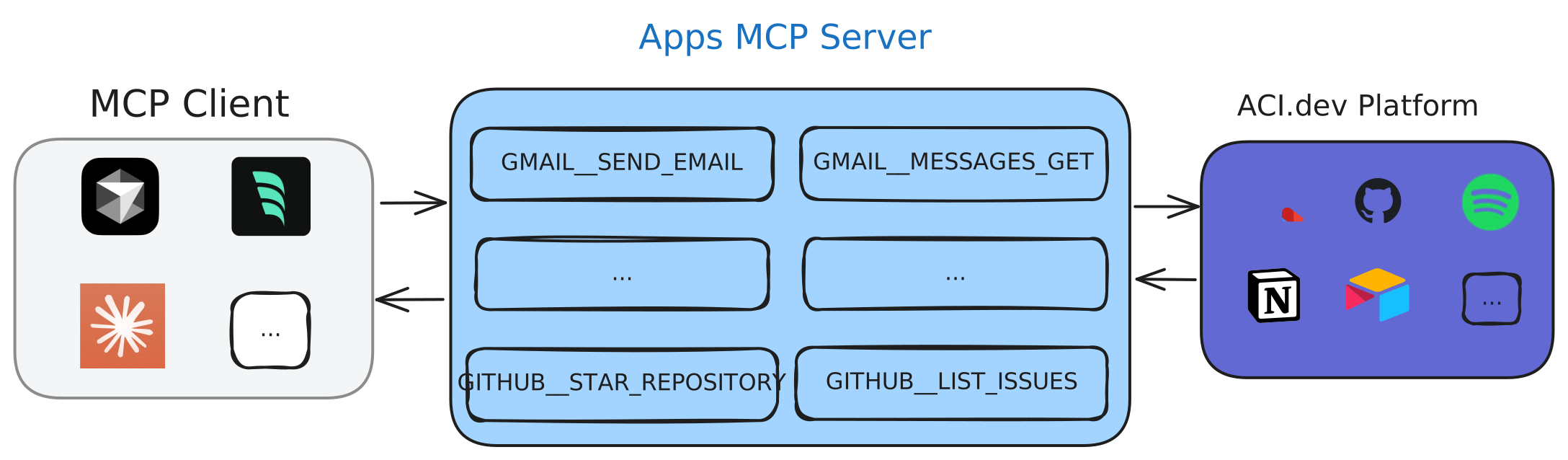
This package provides three Model Context Protocol (MCP) servers for accessing ACI.dev managed functions (tools):
- aci-mcp-apps: An MCP server that provides direct access to functions (tools) from specified apps
- aci-mcp-unified: An MCP server that provides two meta functions (tools) (ACI_SEARCH_FUNCTIONS and ACI_EXECUTE_FUNCTION) to discover and execute ALL functions (tools) available on ACI.dev
> [!IMPORTANT]
> For detailed explanation and tutorials on the MCP servers please visit aci.dev docs.
Run MCP Servers Locally
The package is published to PyPI, so you can run it directly using uvx:
```bash
Sign in to leave a review
Use Google, GitHub, or an email account so ratings stay tied to real people.
No reviews posted yet.