
Mapbox
About
An MCP server for interacting with the Mapbox API, providing access to maps, navigation, and other location-based services.
Details
- Repository
- AidenYangX/mapbox-mcp-server
- License
- MIT
Explore
- Directions between coordinates with multiple travel profiles
- Directions between place names using geocoding
- Travel time and distance matrices between coordinates
- Matrices between places with geocoding
- Geocoding search with filters and language support

Setting up with Highlight
This MCP is not yet compatible with Highlight’s one-click setup. However, you can still use it with Highlight by following these steps:
- Download and install Highlight from highlightai.com/download
- Navigate to the plugins tab and select "Add Custom Plugin"
-
Configure the plugin with the settings below
Plugin Name
MapboxCommand (node, npx, python, etc.)nodeArguments-
Argument 1
/absolute/path/to/mapbox-mcp-server/build/index.js
Environment-
MAPBOX_ACCESS_TOKEN
your-api-key
Please refer to the README for specific instructions on how to obtain API keys or other required environment variables.
-
Argument 1
- Enable "Start Automatically" if you want the plugin to start when Highlight launches





From the repository
- Node.js 16 or higher
- TypeScript 4.5 or higher
- A valid Mapbox API key
mapbox_directions
Get directions between coordinates. Inputs: coordinates ({latitude: number, longitude: number}[]), profile (optional): 'driving-traffic', 'driving', 'walking', 'cycling'. Returns: route details with steps, distance, duration.
mapbox_directions_by_places
Get directions between places using their names. Inputs: places (string[]): Array of place names, profile (optional): 'driving-traffic', 'driving', 'walking', 'cycling', language (optional): Two-letter language code (e.g., 'zh', 'en'). Returns: Geocoding results for each place, route details with steps, distance, duration, and any errors that occurred during processing.
mapbox_matrix
Calculate travel time and distance matrices between coordinates. Inputs: coordinates ({latitude: number, longitude: number}[]), profile (optional): 'driving', 'walking', 'cycling', annotations (optional): 'duration', 'distance', 'duration,distance', sources (optional): Indices of source coordinates, destinations (optional): Indices of destination coordinates. Returns: Matrix of durations and/or distances between points.
mapbox_matrix_by_places
Calculate travel time and distance matrices between places using their names. Inputs: places (string[]): Array of place names (2-25 places), profile (optional): 'driving', 'walking', 'cycling', annotations (optional): 'duration', 'distance', 'duration,distance', language (optional): Two-letter language code, sources (optional): Indices of source places, destinations (optional): Indices of destination places. Returns: Geocoding results for each place, matrix of durations and/or distances, and any errors that occurred during processing.
mapbox_geocoding
Search for places and convert addresses into coordinates. Inputs: searchText (string): The place or address to search for, limit (optional): Maximum number of results (1-10), types (optional): Filter by place types (country, region, place, etc.), language (optional): Two-letter language code, fuzzyMatch (optional): Enable/disable fuzzy matching. Returns: Detailed location information including coordinates and properties.
1. mapbox_directions
- Get directions between coordinates
- Inputs:
- coordinates ({latitude: number, longitude: number}[])
- profile (optional): "driving-traffic", "driving", "walking", "cycling"
- Returns: route details with steps, distance, duration
2. mapbox_directions_by_places
- Get directions between places using their names
- Inputs:
- places (string[]): Array of place names
- profile (optional): "driving-traffic", "driving", "walking", "cycling"
- language (optional): Two-letter language code (e.g., "zh", "en")
- Returns:
- Geocoding results for each place
- Route details with steps, distance, duration
- Any errors that occurred during processing
3. mapbox_matrix
- Calculate travel time and distance matrices between coordinates
- Inputs:
- coordinates ({latitude: number, longitude: number}[])
- profile (optional): "driving", "walking", "cycling"
- annotations (optional): "duration", "distance", "duration,distance"
- sources (optional): Indices of source coordinates
- destinations (optional): Indices of destination coordinates
- Returns: Matrix of durations and/or distances between points
4. mapbox_matrix_by_places
- Calculate travel time and distance matrices between places using their names
- Inputs:
- places (string[]): Array of place names (2-25 places)
- profile (optional): "driving", "walking", "cycling"
- annotations (optional): "duration", "distance", "duration,distance"
- language (optional): Two-letter language code
- sources (optional): Indices of source places
- destinations (optional): Indices of destination places
- Returns:
- Geocoding results for each place
- Matrix of durations and/or distances
- Any errors that occurred during processing
1. mapbox_geocoding
- Search for places and convert addresses into coordinates
- Inputs:
- searchText (string): The place or address to search for
- limit (optional): Maximum number of results (1-10)
- types (optional): Filter by place types (country, region, place, etc.)
- language (optional): Two-letter language code
- fuzzyMatch (optional): Enable/disable fuzzy matching
- Returns: Detailed location information including coordinates and properties
Claude Desktop / Cursor
Paste into your MCP client config file to install this server.
{
    "mcpServers": {
        "mapbox": {
            "env": {
                "MAPBOX_ACCESS_TOKEN": "your-api-key"
            },
            "args": [
                "/absolute/path/to/mapbox-mcp-server/build/index.js"
            ],
            "command": "node"
        }
    }
}Linux
{
    "env": {
        "MAPBOX_ACCESS_TOKEN": "your-api-key"
    },
    "args": [
        "/absolute/path/to/mapbox-mcp-server/build/index.js"
    ],
    "command": "node"
}
Macos
{
    "env": {
        "MAPBOX_ACCESS_TOKEN": "your-api-key"
    },
    "args": [
        "/absolute/path/to/mapbox-mcp-server/build/index.js"
    ],
    "command": "node"
}
Windows
{
    "env": {
        "MAPBOX_ACCESS_TOKEN": "your-api-key"
    },
    "args": [
        "/c",
        "node",
        "/absolute/path/to/mapbox-mcp-server/build/index.js"
    ],
    "command": "cmd"
}
MCP Server for the Mapbox API.
Features
Navigation Tools
1. mapbox_directions
- Get directions between coordinates
- Inputs:
- coordinates ({latitude: number, longitude: number}[])
- profile (optional): "driving-traffic", "driving", "walking", "cycling"
- Returns: route details with steps, distance, duration
2. mapbox_directions_by_places
- Get directions between places using their names
- Inputs:
- places (string[]): Array of place names
- profile (optional): "driving-traffic", "driving", "walking", "cycling"
- language (optional): Two-letter language code (e.g., "zh", "en")
- Returns:
- Geocoding results for each place
- Route details with steps, distance, duration
- Any errors that occurred during processing
3. mapbox_matrix
- Calculate travel time and distance matrices between coordinates
- Inputs:
- coordinates ({latitude: number, longitude: number}[])
- profile (optional): "driving", "walking", "cycling"
- annotations (optional): "duration", "distance", "duration,distance"
- sources (optional): Indices of source coordinates
- destinations (optional): Indices of destination coordinates
- Returns: Matrix of durations and/or distances between points
4. mapbox_matrix_by_places
- Calculate travel time and distance matrices between places using their names
- Inputs:
- places (string[]): Array of place names (2-25 places)
- profile (optional): "driving", "walking", "cycling"
- annotations (optional): "duration", "distance", "duration,distance"
- language (optional): Two-letter language code
- sources (optional): Indices of source places
- destinations (optional): Indices of destination places
- Returns:
- Geocoding results for each place
- Matrix of durations and/or distances
- Any errors that occurred during processing
Search Tools
1. mapbox_geocoding
- Search for places and convert addresses into coordinates
- Inputs:
- searchText (string): The place or address to search for
- limit (optional): Maximum number of results (1-10)
- types (optional): Filter by place types (country, region, place, etc.)
- language (optional): Two-letter language code
- fuzzyMatch (optional): Enable/disable fuzzy matching
- Returns: Detailed location information including coordinates and properties
Claude Desktop Integration
Add this configuration to your Claude Desktop config file (typically located at ~/Library/Application Support/Claude/claude_desktop_config.json):
{
  "mcpServers": {
    "mapbox-mcp-server": {
      "command": "node",
      "args": ["/absolute/path/to/mapbox-mcp-server/build/index.js"],
      "env": {
        "MAPBOX_ACCESS_TOKEN": "your-api-key"
      }
    }
  }
}
Setup
Prerequisites
- Node.js 16 or higher
- TypeScript 4.5 or higher
- A valid Mapbox API key
API Key
Get a Mapbox API key by following the instructions here.
Set your API key as an environment variable:
export MAPBOX_ACCESS_TOKEN=your_api_key_here
Rate Limits
- Directions API: 300 requests per minute
- Matrix API:
- 60 requests per minute for driving/walking/cycling
- 30 requests per minute for driving-traffic
- Geocoding API: 600 requests per minute
Deployment
Structure
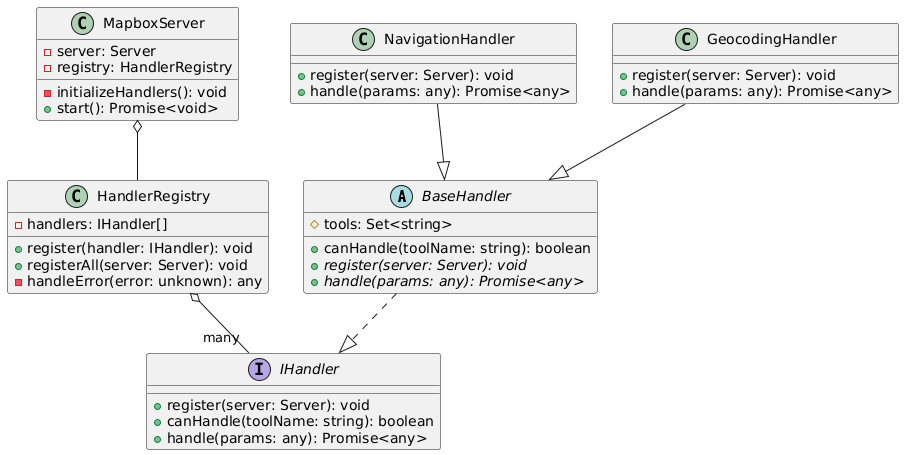
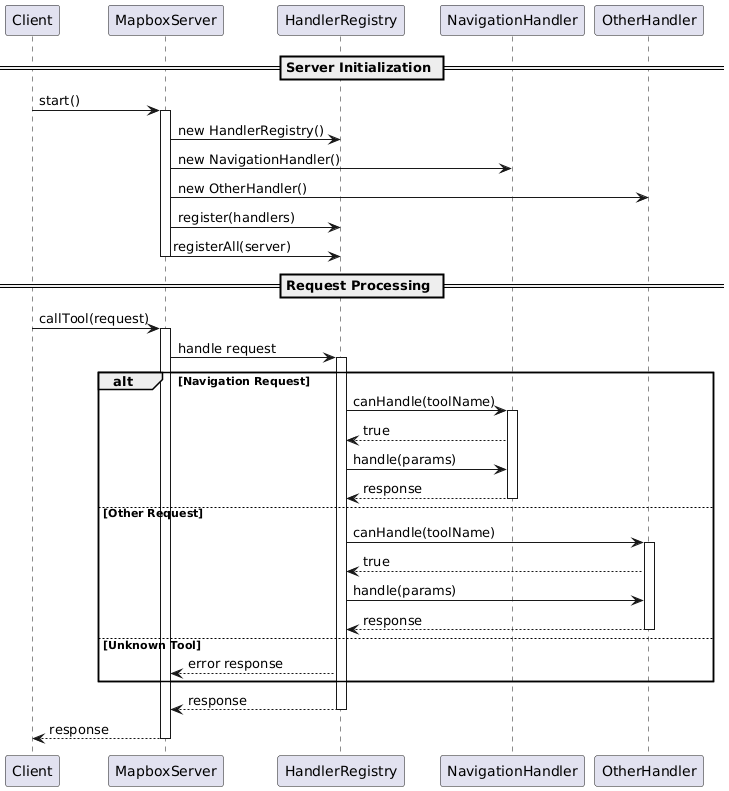
In mapbox-mcp-server, we use the following structure to manage the server's handlers:
- src/server/handlers/base.ts: Base class for all handlers
- src/server/registry.ts: Registry for all handlers
- src/server/main.ts: Main entry point for the server
Each feature module follows this structure:
src/
├── types/          # Type definitions
├── schemas/        # Zod schemas for validation
├── tools/
│   ├── definitions/  # Tool definitions
│   └── handlers/     # Tool implementations
└── server/
    └── handlers/     # Handler classes
---
Class Diagram:
---
Process Diagram:
Error Handling
All tools implement comprehensive error handling:
- Input validation errors
- API request failures
- Rate limit errors
- Service-specific errors (e.g., no routes found, invalid coordinates)
License
This MCP server is licensed under the MIT License. This means you are free to use, modify, and distribute the software, subject to the terms and conditions of the MIT License. For more details, please see the LICENSE file in the project repository.
Sign in to leave a review
Use Google, GitHub, or an email account so ratings stay tied to real people.
No reviews posted yet.



