
Alibaba Cloud ADB MySQL
About
Connects to Alibaba Cloud's Adb MySQL databases for executing SQL queries, analyzing query plans, and retrieving database metadata with minimal configuration requirements
Details
- Repository
- aliyun/alibabacloud-adb-mysql-mcp-server
- License
- Apache-2.0
Explore
- OpenAPI tools for cluster management and diagnostics
- SQL tools for direct query execution and plans
- Resource URIs for database metadata browsing
- Read‑only tools annotated for safe use
- Supports stdio, SSE, and streamable HTTP transports
- Temporary account creation when credentials are absent

Setting up with Highlight
This MCP is not yet compatible with Highlight’s one-click setup. However, you can still use it with Highlight by following these steps:
- Download and install Highlight from highlightai.com/download
- Navigate to the plugins tab and select "Add Custom Plugin"
-
Configure the plugin with the settings below
Plugin Name
Alibaba Cloud ADB MySQLCommand (node, npx, python, etc.)uvArguments-
Argument 1
--directory -
Argument 2
/path/to/alibabacloud-adb-mysql-mcp-server -
Argument 3
run -
Argument 4
adb-mysql-mcp-server
Environment-
MCP_TOOLSETS
sql -
ADB_MYSQL_HOST
your_adb_mysql_host -
ADB_MYSQL_PORT
3306 -
ADB_MYSQL_USER
your_username -
ADB_MYSQL_DATABASE
your_database -
ADB_MYSQL_PASSWORD
your_password
Please refer to the README for specific instructions on how to obtain API keys or other required environment variables.
-
Argument 1
- Enable "Start Automatically" if you want the plugin to start when Highlight launches





From the repository
- Python >= 3.13
- uv (recommended package manager and runner)
- Alibaba Cloud AccessKey (required for OpenAPI tools)
- Optional: ADB MySQL connection credentials (for SQL tools in direct-connection mode)
Choose the tool groups and extra switches for your scenario before copying a client configuration:
| Scenario | Tool groups | Extra switch | Best for |
| --- | --- | --- | --- |
| Read-only SQL queries, EXPLAIN, and metadata browsing | sql | None | Recommended default for querying, troubleshooting, and read-only analysis |
| Full SQL execution through execute_sql | sql | ENABLE_SQL_WRITE_TOOLS=true | INSERT/UPDATE/DELETE/DDL/multi-statement SQL when the MCP client is trusted |
| OpenAPI cluster management tools + SQL read tools | openapi,sql | Alibaba Cloud AK/SK + ADB_MYSQL_ direct connection settings | Cluster, account, whitelist, diagnostics, and monitoring operations while keeping SQL read access |
| OpenAPI + full SQL execution | openapi,sql | Alibaba Cloud AK/SK + ADB_MYSQL_ direct connection settings + ENABLE_SQL_WRITE_TOOLS=true | Administration plus full SQL execution |
> MCP_TOOLSETS=sql only enables the SQL tool group. Full SQL execution is not a separate tool group, and there is no sql_write tool group. It must be enabled separately with ENABLE_SQL_WRITE_TOOLS=true.
Before configuring a client, check:
- Direct database mode: configure ADB_MYSQL_HOST, ADB_MYSQL_PORT, ADB_MYSQL_USER, ADB_MYSQL_PASSWORD, and optionally ADB_MYSQL_DATABASE.
- Temporary account mode: if ADB_MYSQL_USER / ADB_MYSQL_PASSWORD are not configured but AK/SK is available, the server creates a temporary database account through OpenAPI; SQL tool calls must provide region_id and db_cluster_id.
- Remote SSE / Streamable HTTP: when SERVER_HOST is not a loopback address, configure API_KEY on the server and Authorization: Bearer <API_KEY> on the client.
- Full SQL execution: enable it only for trusted users and trusted MCP clients, and use a least-privilege database account.
| Variable | Required | Description |
| --- | --- | --- |
| ALIBABA_CLOUD_ACCESS_KEY_ID | Yes (OpenAPI tools) | Alibaba Cloud AccessKey ID |
| ALIBABA_CLOUD_ACCESS_KEY_SECRET | Yes (OpenAPI tools) | Alibaba Cloud AccessKey Secret |
| ALIBABA_CLOUD_SECURITY_TOKEN | No | STS temporary security token |
| ADB_MYSQL_HOST | No | Database host (direct-connection mode) |
| ADB_MYSQL_PORT | No | Database port, default 3306 (direct-connection mode) |
| ADB_MYSQL_USER | No | Database username (direct-connection mode) |
| ADB_MYSQL_PASSWORD | No | Database password (direct-connection mode) |
| ADB_MYSQL_DATABASE | No | Default database name (direct-connection mode) |
| ADB_MYSQL_CONNECT_TIMEOUT | No | Database connection timeout in seconds, default 2 |
| ADB_MYSQL_MAX_SQL_LENGTH | No | Maximum accepted SQL statement length, default 10000. Must be a positive integer |
| ADB_API_CONNECT_TIMEOUT | No | OpenAPI connection timeout in milliseconds, default 10000 (10s) |
| ADB_API_READ_TIMEOUT | No | OpenAPI read timeout in milliseconds, default 300000 (5min) |
| MCP_TOOLSETS | No | Comma-separated tool groups to enable. Default: sql. Supported groups: sql, openapi; shortcut: all expands to openapi,sql. This variable only controls tool-group exposure and does not control full SQL execution permission |
| SERVER_TRANSPORT | No | Transport protocol: stdio (default), sse, streamable_http |
| SERVER_HOST | No | SSE/HTTP bind host, default 127.0.0.1; non-loopback hosts require API_KEY |
| SERVER_PORT | No | SSE/HTTP server port, default 8000 |
| API_KEY | No | MCP HTTP auth token; clients must send Authorization: Bearer <API_KEY> when configured. Required on non-loopback hosts; use at least 32 characters |
| ENABLE_SQL_WRITE_TOOLS | No | Controls whether execute_sql enters full SQL execution mode. Default: false; it must be explicitly set to true to enter full SQL execution mode. The actual executable scope is still limited by the database account privileges, database driver, and maximum SQL length |
describe_db_clusters
List ADB MySQL clusters in a region.
describe_db_cluster_attribute
Get detailed cluster attributes.
describe_cluster_access_whitelist
Get cluster IP whitelist.
modify_cluster_access_whitelist
Modify cluster IP whitelist.
describe_accounts
List database accounts in a cluster.
describe_cluster_net_info
Get cluster network connection info.
get_current_time
Get current server time.
describe_db_cluster_performance
Query cluster performance metrics (CPU, memory, QPS, etc.).
describe_db_cluster_health_status
Query cluster health status.
describe_diagnosis_records
Query SQL diagnosis summary records.
describe_diagnosis_sql_info
Get SQL execution details (plan, runtime info).
describe_bad_sql_detection
Detect bad SQL impacting cluster stability.
describe_sql_patterns
Query SQL pattern list.
describe_table_statistics
Query table-level statistics.
create_account
Create a database account.
modify_db_cluster_description
Modify cluster description.
describe_db_cluster_space_summary
Get cluster storage space summary.
describe_audit_log_records
Query SQL audit log records.
describe_executor_detection
Compute node diagnostics.
describe_worker_detection
Storage node diagnostics.
describe_controller_detection
Access node diagnostics.
describe_available_advices
Get optimization advices.
kill_process
Kill a running query process.
describe_db_resource_group
Get resource group configuration.
describe_excessive_primary_keys
Detect tables with excessive primary keys.
describe_oversize_non_partition_table_infos
Detect oversized non-partition tables.
describe_table_partition_diagnose
Diagnose table partitioning issues.
describe_inclined_tables
Detect data-skewed tables.
execute_sql
Execute SQL on an ADB MySQL cluster. Read-only SQL is allowed by default; full SQL execution requires `ENABLE_SQL_WRITE_TOOLS=true`.
get_query_plan
Get EXPLAIN execution plan for a single SELECT or read-only WITH CTE statement.
get_execution_plan
Get EXPLAIN ANALYZE actual execution plan for a single SELECT or read-only WITH CTE statement.
adbmysql:///databases
List all databases.
adbmysql:///{database}/tables
List all tables in a database.
adbmysql:///{database}/{table}/ddl
Get table DDL.
adbmysql:///config/{key}/value
Get a config key value.
uv --directory /path/to/alibabacloud-adb-mysql-mcp-server run adb-mysql-mcp-server
{
"mcpServers": {
"adb-mysql-mcp-server": {
"url": "http://localhost:8000/sse"
}
}
}
If the server is bound to a non-loopback host, configure API_KEY on the server side and send it from the client side as an HTTP header. In short: API_KEY is the server-side token, and Authorization: Bearer <API_KEY> is the client-side request header.
uv --directory /path/to/alibabacloud-adb-mysql-mcp-server run adb-mysql-mcp-server
Then configure the Cline remote server:
remote_server = "http://127.0.0.1:8000/sse"
``
By default, only the
sql group is enabled and execute_sql only allows read-only SQL. The openapi group is enabled only when openapi is explicitly included in MCP_TOOLSETS. MCP_TOOLSETS only controls tool-group exposure; full SQL execution through execute_sql must be enabled separately with ENABLE_SQL_WRITE_TOOLS=true.
| Tool | Description |
| --- | --- |
|
execute_sql | Execute SQL on an ADB MySQL cluster. Read-only SQL is allowed by default; full SQL execution requires ENABLE_SQL_WRITE_TOOLS=true |
| get_query_plan | Get EXPLAIN execution plan for a single SELECT or read-only WITH CTE statement |
| get_execution_plan` | Get EXPLAIN ANALYZE actual execution plan for a single SELECT or read-only WITH CTE statement |Claude Desktop / Cursor
Paste into your MCP client config file to install this server.
{
    "mcpServers": {
        "alibaba cloud adb mysql": {
            "env": {
                "MCP_TOOLSETS": "sql",
                "ADB_MYSQL_HOST": "your_adb_mysql_host",
                "ADB_MYSQL_PORT": "3306",
                "ADB_MYSQL_USER": "your_username",
                "ADB_MYSQL_DATABASE": "your_database",
                "ADB_MYSQL_PASSWORD": "your_password"
            },
            "args": [
                "--directory",
                "/path/to/alibabacloud-adb-mysql-mcp-server",
                "run",
                "adb-mysql-mcp-server"
            ],
            "command": "uv"
        }
    }
}Linux
{
    "env": {
        "MCP_TOOLSETS": "sql",
        "ADB_MYSQL_HOST": "your_adb_mysql_host",
        "ADB_MYSQL_PORT": "3306",
        "ADB_MYSQL_USER": "your_username",
        "ADB_MYSQL_DATABASE": "your_database",
        "ADB_MYSQL_PASSWORD": "your_password"
    },
    "args": [
        "--directory",
        "/path/to/alibabacloud-adb-mysql-mcp-server",
        "run",
        "adb-mysql-mcp-server"
    ],
    "command": "uv"
}
Macos
{
    "env": {
        "MCP_TOOLSETS": "sql",
        "ADB_MYSQL_HOST": "your_adb_mysql_host",
        "ADB_MYSQL_PORT": "3306",
        "ADB_MYSQL_USER": "your_username",
        "ADB_MYSQL_DATABASE": "your_database",
        "ADB_MYSQL_PASSWORD": "your_password"
    },
    "args": [
        "--directory",
        "/path/to/alibabacloud-adb-mysql-mcp-server",
        "run",
        "adb-mysql-mcp-server"
    ],
    "command": "uv"
}
Windows
{
    "env": {
        "MCP_TOOLSETS": "sql",
        "ADB_MYSQL_HOST": "your_adb_mysql_host",
        "ADB_MYSQL_PORT": "3306",
        "ADB_MYSQL_USER": "your_username",
        "ADB_MYSQL_DATABASE": "your_database",
        "ADB_MYSQL_PASSWORD": "your_password"
    },
    "args": [
        "--directory",
        "/path/to/alibabacloud-adb-mysql-mcp-server",
        "run",
        "adb-mysql-mcp-server"
    ],
    "command": "uv"
}
AnalyticDB for MySQL MCP Server
English | 中文
AnalyticDB for MySQL MCP Server is a universal interface between AI Agents and AnalyticDB MySQL. It provides two tool groups:
- SQL Tools & Resources (sql group): Connect directly to ADB MySQL clusters to execute SQL, view execution plans, and browse database metadata. The sql group is only a tool-group switch; execute_sql runs in read-only mode by default, and full SQL execution mode requires the additional explicit setting ENABLE_SQL_WRITE_TOOLS=true.
- OpenAPI Tools (openapi group): Manage clusters, whitelists, accounts, networking, monitoring, diagnostics, and audit logs via Alibaba Cloud OpenAPI.
Read-only tools are annotated with ToolAnnotations(readOnlyHint=True) per the MCP protocol, allowing clients to distinguish them from mutating operations.
一、Prerequisites
- Python >= 3.13
- uv (recommended package manager and runner)
- Alibaba Cloud AccessKey (required for OpenAPI tools)
- Optional: ADB MySQL connection credentials (for SQL tools in direct-connection mode)
二、Quick Start
2.0 Choose a Configuration
Choose the tool groups and extra switches for your scenario before copying a client configuration:
| Scenario | Tool groups | Extra switch | Best for |
| --- | --- | --- | --- |
| Read-only SQL queries, EXPLAIN, and metadata browsing | sql | None | Recommended default for querying, troubleshooting, and read-only analysis |
| Full SQL execution through execute_sql | sql | ENABLE_SQL_WRITE_TOOLS=true | INSERT/UPDATE/DELETE/DDL/multi-statement SQL when the MCP client is trusted |
| OpenAPI cluster management tools + SQL read tools | openapi,sql | Alibaba Cloud AK/SK + ADB_MYSQL_ direct connection settings | Cluster, account, whitelist, diagnostics, and monitoring operations while keeping SQL read access |
| OpenAPI + full SQL execution | openapi,sql | Alibaba Cloud AK/SK + ADB_MYSQL_ direct connection settings + ENABLE_SQL_WRITE_TOOLS=true | Administration plus full SQL execution |
> MCP_TOOLSETS=sql only enables the SQL tool group. Full SQL execution is not a separate tool group, and there is no sql_write tool group. It must be enabled separately with ENABLE_SQL_WRITE_TOOLS=true.
Before configuring a client, check:
- Direct database mode: configure ADB_MYSQL_HOST, ADB_MYSQL_PORT, ADB_MYSQL_USER, ADB_MYSQL_PASSWORD, and optionally ADB_MYSQL_DATABASE.
- Temporary account mode: if ADB_MYSQL_USER / ADB_MYSQL_PASSWORD are not configured but AK/SK is available, the server creates a temporary database account through OpenAPI; SQL tool calls must provide region_id and db_cluster_id.
- Remote SSE / Streamable HTTP: when SERVER_HOST is not a loopback address, configure API_KEY on the server and Authorization: Bearer <API_KEY> on the client.
- Full SQL execution: enable it only for trusted users and trusted MCP clients, and use a least-privilege database account.
2.1 Using cherry-studio (Recommended)
1. Download and install cherry-studio
2. Follow the documentation to install uv, which is required for the MCP environment
3. Configure and use ADB MySQL MCP according to the documentation. You can quickly import the configuration using the JSON below.
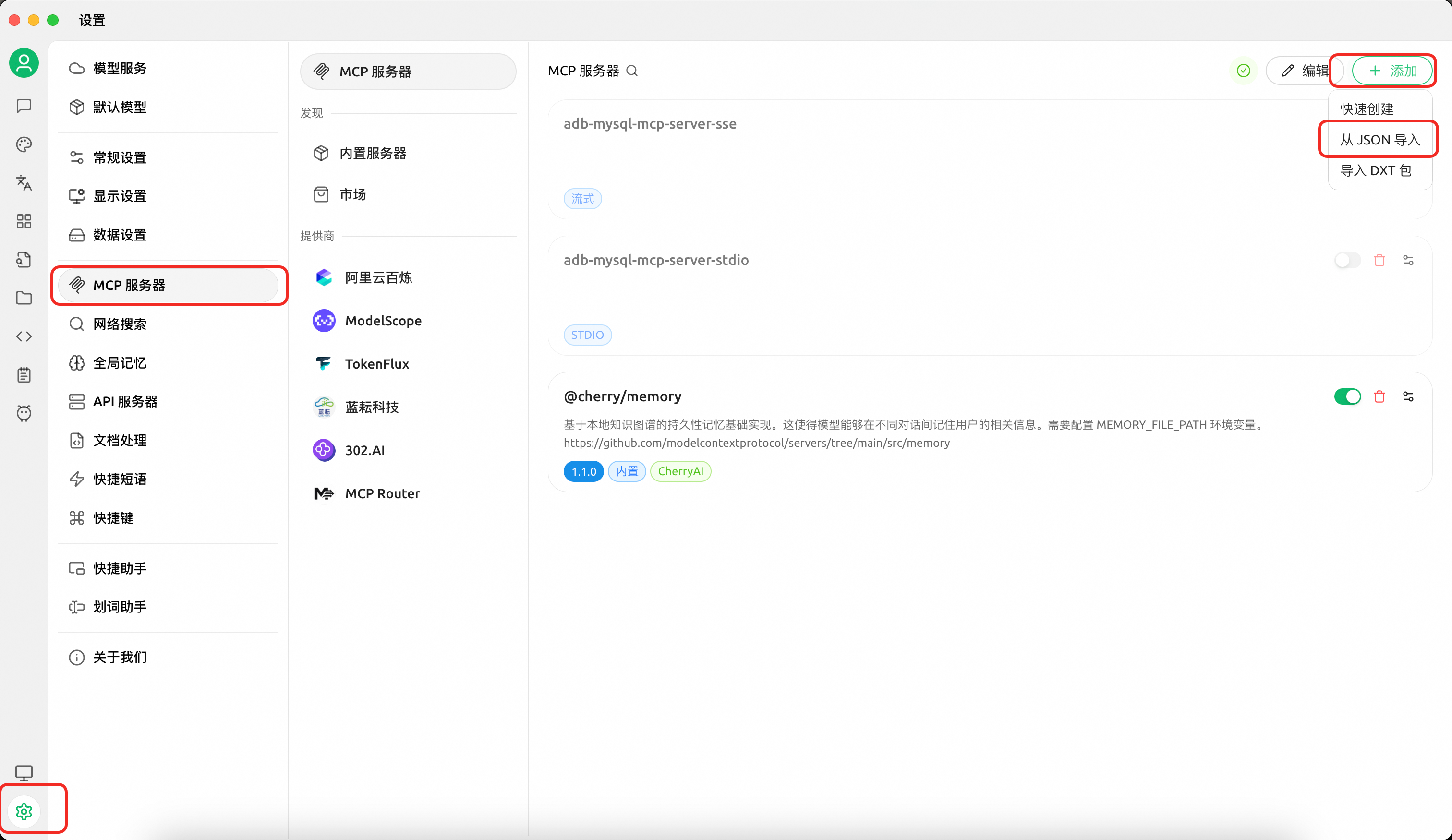
Configuration A — SQL read tools only (execute read-only queries, view plans, browse metadata):
{
  "mcpServers": {
    "adb-mysql-mcp-server": {
      "name": "adb-mysql-mcp-server",
      "type": "stdio",
      "isActive": true,
      "command": "uv",
      "args": [
        "--directory",
        "/path/to/alibabacloud-adb-mysql-mcp-server",
        "run",
        "adb-mysql-mcp-server"
      ],
      "env": {
        "ADB_MYSQL_HOST": "your_adb_mysql_host",
        "ADB_MYSQL_PORT": "3306",
        "ADB_MYSQL_USER": "your_username",
        "ADB_MYSQL_PASSWORD": "your_password",
        "ADB_MYSQL_DATABASE": "your_database",
        "MCP_TOOLSETS": "sql"
      }
    }
  }
}
Configuration B — OpenAPI tools + SQL read tools:
> Note: OpenAPI tools include mutating administration capabilities such as account creation, whitelist modification, and query termination. Enable them only when you intentionally need management operations. The example below also keeps the sql tool group enabled, so it includes direct database connection settings.
{
  "mcpServers": {
    "adb-mysql-mcp-server": {
      "name": "adb-mysql-mcp-server",
      "type": "stdio",
      "isActive": true,
      "command": "uv",
      "args": [
        "--directory",
        "/path/to/alibabacloud-adb-mysql-mcp-server",
        "run",
        "adb-mysql-mcp-server"
      ],
      "env": {
        "ALIBABA_CLOUD_ACCESS_KEY_ID": "your_access_key_id",
        "ALIBABA_CLOUD_ACCESS_KEY_SECRET": "your_access_key_secret",
        "ADB_MYSQL_HOST": "your_adb_mysql_host",
        "ADB_MYSQL_PORT": "3306",
        "ADB_MYSQL_USER": "your_username",
        "ADB_MYSQL_PASSWORD": "your_password",
        "ADB_MYSQL_DATABASE": "your_database",
        "MCP_TOOLSETS": "openapi,sql"
      }
    }
  }
}
If you only want OpenAPI management tools and do not need SQL tools or resources, change MCP_TOOLSETS to openapi and remove the ADB_MYSQL_* direct database settings.
Configuration C — Full SQL execution through execute_sql:
> Warning: With ENABLE_SQL_WRITE_TOOLS=true, execute_sql exposes full SQL execution. The server only performs basic input validation and does not restrict statement type, comments, semicolons, multi-statement SQL, DDL, DML, DCL, or TCL. Enable it only for trusted users and use a least-privilege database account.
{
  "mcpServers": {
    "adb-mysql-mcp-server": {
      "name": "adb-mysql-mcp-server",
      "type": "stdio",
      "isActive": true,
      "command": "uv",
      "args": [
        "--directory",
        "/path/to/alibabacloud-adb-mysql-mcp-server",
        "run",
        "adb-mysql-mcp-server"
      ],
      "env": {
        "ADB_MYSQL_HOST": "your_adb_mysql_host",
        "ADB_MYSQL_PORT": "3306",
        "ADB_MYSQL_USER": "your_username",
        "ADB_MYSQL_PASSWORD": "your_password",
        "ADB_MYSQL_DATABASE": "your_database",
        "MCP_TOOLSETS": "sql",
        "ENABLE_SQL_WRITE_TOOLS": "true"
      }
    }
  }
}
Configuration D — OpenAPI tools + full SQL execution:
> Warning: This configuration enables both OpenAPI management capabilities and full SQL execution through execute_sql. Use it only with trusted clients, trusted users, and a least-privilege database account.
{
  "mcpServers": {
    "adb-mysql-mcp-server": {
      "name": "adb-mysql-mcp-server",
      "type": "stdio",
      "isActive": true,
      "command": "uv",
      "args": [
        "--directory",
        "/path/to/alibabacloud-adb-mysql-mcp-server",
        "run",
        "adb-mysql-mcp-server"
      ],
      "env": {
        "ALIBABA_CLOUD_ACCESS_KEY_ID": "your_access_key_id",
        "ALIBABA_CLOUD_ACCESS_KEY_SECRET": "your_access_key_secret",
        "ADB_MYSQL_HOST": "your_adb_mysql_host",
        "ADB_MYSQL_PORT": "3306",
        "ADB_MYSQL_USER": "your_username",
        "ADB_MYSQL_PASSWORD": "your_password",
        "ADB_MYSQL_DATABASE": "your_database",
        "MCP_TOOLSETS": "openapi,sql",
        "ENABLE_SQL_WRITE_TOOLS": "true"
      }
    }
  }
}
> Without MCP_TOOLSETS, only the sql group is enabled, and execute_sql still runs in read-only mode by default. When AK/SK is not configured, OpenAPI tools are automatically disabled even if requested.
2.2 Using Claude Code
…
Sign in to leave a review
Use Google, GitHub, or an email account so ratings stay tied to real people.
No reviews posted yet.



