
AlibabaCloud DevOps MCP
About
Yunxiao MCP Server provides AI assistants with the ability to interact with the [Yunxiao platform](https://devops.aliyun.com).
Details
- License
- Apache-2.0
Explore
alibabacloud-devops-mcp-server provides the following capabilities for AI assistants:
- organization-management: Organization management tools (organization list, organization details, department information, organizational roles, member information, etc.)
- code-management: Code repository management tools (repository management, branch management, merge request management, file tree, etc.)
- project-management: Project management tools (project management, work item management, work item fields, work item comments, time tracking, etc.)
- pipeline-management: Pipeline management tools (pipeline list, pipeline configuration, resource management, tag management, deployment management, etc.)
- application-delivery: Application delivery tools (deployment order management, application management, application tags, variable group management, etc.)
- packages-management: Artifact repository management tools (artifact repositories, artifact lists, etc.)
- test-management: Test management tools (test case management, test case directories, test plans, test results, etc.)

Setting up with Highlight
This MCP is not yet compatible with Highlight’s one-click setup. However, you can still use it with Highlight by following these steps:
- Download and install Highlight from highlightai.com/download
- Navigate to the plugins tab and select "Add Custom Plugin"
-
Configure the plugin with the settings below
Plugin Name
AlibabaCloud DevOps MCPCommand (node, npx, python, etc.)Please refer to the README for specific instructions on how to obtain API keys or other required environment variables.
- Enable "Start Automatically" if you want the plugin to start when Highlight launches





From the repository
node version >= 18.0.0
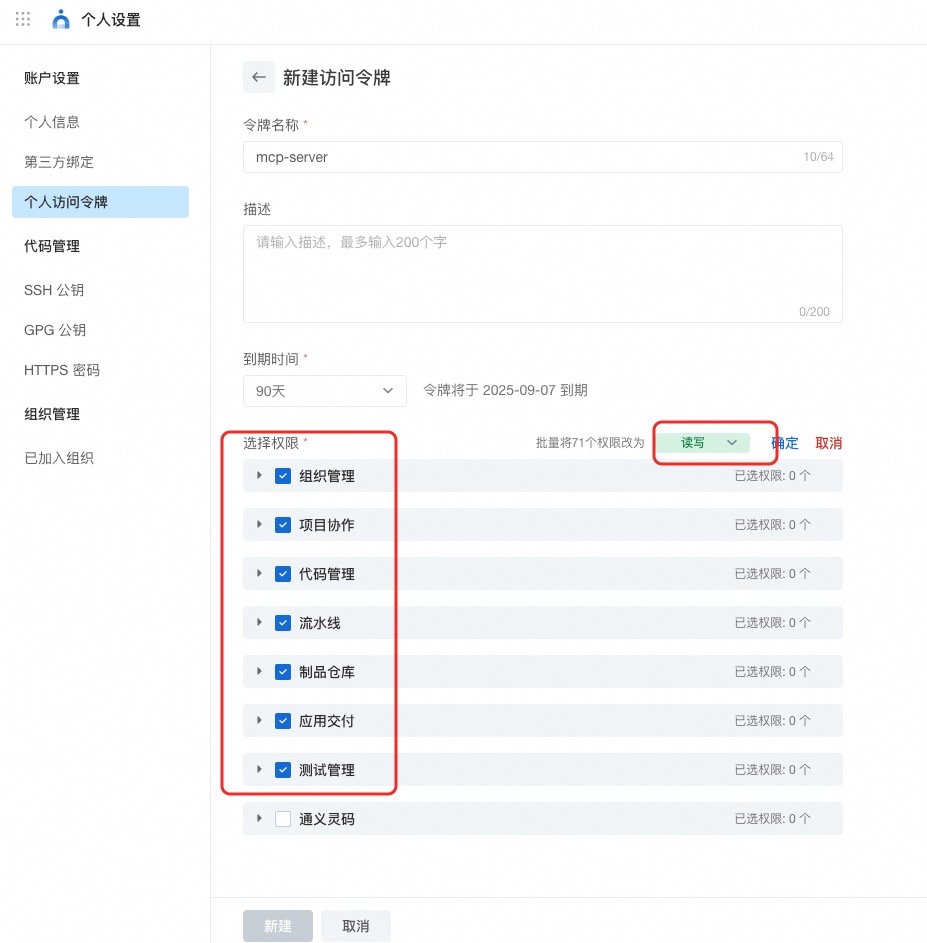
AlibabaCloud Devops Personal Access Token, click here to obtain. Grant read and write permissions to all APIs under organization management, project collaboration, code management, pipeline management, artifact repository management, application delivery and testing management.
When using a Region edition, set the YUNXIAO_API_BASE_URL environment variable:
{
"mcpServers": {
"yunxiao": {
"command": "npx",
"args": ["-y", "alibabacloud-devops-mcp-server"],
"env": {
"YUNXIAO_ACCESS_TOKEN": "<YOUR_TOKEN>",
"YUNXIAO_API_BASE_URL": "https://your-org.devops.aliyuncs.com"
}
}
}
}
Yunxiao provides an officially hosted MCP endpoint — no local install or Docker needed. Just point your client at it and authenticate with your Yunxiao token.
- Endpoint: https://openapi-rdc.aliyuncs.com/ai/mcp
- Transport: Streamable HTTP (stateless)
- Auth: Authorization: Bearer <YOUR_TOKEN> (or header X-Yunxiao-Token: <YOUR_TOKEN>)
Client config (clients with native remote support, e.g. Cursor):
{
"mcpServers": {
"yunxiao": {
"url": "https://openapi-rdc.aliyuncs.com/ai/mcp",
"headers": { "Authorization": "Bearer <YOUR_TOKEN>" }
}
}
}
> Tip: cut context usage by requesting only the toolsets you need — ?toolsets=code-management,project-management or header X-Devops-Toolsets. See the full guide: docs/hosted-mcp-guide.zh-CN.md.
---
Stdio mode is the simplest self-hosting way, suitable for most MCP clients (like Cursor, Claude Desktop, iFlow, etc.). No Docker installation required, just run via npx.
Stdio:
{
"mcpServers": {
"yunxiao": {
"command": "docker",
"args": ["run", "-i", "--rm", "-e", "YUNXIAO_ACCESS_TOKEN", "build-steps-public-registry.cn-beijing.cr.aliyuncs.com/build-steps/alibabacloud-devops-mcp-server:latest"],
"env": { "YUNXIAO_ACCESS_TOKEN": "<YOUR_TOKEN>" }
}
}
}
SSE: http://localhost:3000/sse
Streamable HTTP: http://localhost:3000/mcp
Pass credentials via query parameter or header:
http://localhost:3000/mcp?yunxiao_access_token=YOUR_TOKEN_HERE
Or request header:
x-yunxiao-token: YOUR_TOKEN_HERE
Region / instance OpenAPI base:
http://localhost:3000/mcp?yunxiao_access_token=TOKEN&yunxiao_api_base_url=https%3A%2F%2Fyour-org.devops.aliyuncs.com
Or request header:
x-yunxiao-api-base-url: https://your-org.devops.aliyuncs.comget_current_organization_info
Get information about the current user and organization based on the token. In the absence of an explicitly specified organization ID, this result will take precedence.
get_user_organizations
Get the list of organizations the current user belongs to
get_current_user
Get information about the current user based on the token. In the absence of an explicitly specified user ID, this result will take precedence.
create_branch
[Code Management] Create a new branch in a Codeup repository
get_branch
[Code Management] Get information about a branch in a Codeup repository
delete_branch
[Code Management] Delete a branch from a Codeup repository
list_branches
[Code Management] List branches in a Codeup repository
get_file_blobs
[Code Management] Get file content from a Codeup repository
create_file
[Code Management] Create a new file in a Codeup repository
update_file
[Code Management] Update an existing file in a Codeup repository
delete_file
[Code Management] Delete a file from a Codeup repository
list_files
[Code Management] List file tree from a Codeup repository
compare
[Code Management] Query code to compare content
get_repository
[Code Management] Get information about a Codeup repository
list_repositories
[Code Management] Get the CodeUp Repository List. A Repository serves as a unit for managing source code and is distinct from a Project. Use Case: View my repositories
create_repository
[Code Management] Create a new Codeup repository. Creates an empty code repository that can then be pushed to via git. Use Cases: Create a new repository for a project
get_change_request
[Code Management] Get detailed information about a specific change request (merge request) by its local ID.
list_change_requests
[Code Management] List change requests with multi-condition filtering, pagination and sorting. Supports filtering by repository, author, reviewer, state (opened/merged/closed), search keywords, and creation time range.
create_change_request
[Code Management] Create a new change request (merge request). Supports specifying source/target branches, reviewers, associated work items, and optional AI review trigger.
review_change_request
[Code Management] Review a change request (merge request): submit a PASS / NOT_PASS opinion, optionally with a comment, and optionally submit pending draft comments at the same time.
merge_change_request
[Code Management] Merge a change request (merge request) using a specific merge type (ff-only / no-fast-forward / squash / rebase), with an optional merge message and optional source-branch deletion. This rewrites the target branch and is not reversible.
create_change_request_comment
[Code Management] Create a comment on a change request. Supports two types: GLOBAL_COMMENT (global comment on the entire merge request) and INLINE_COMMENT (inline comment on specific code lines). For INLINE_COMMENT, you must provide file_path, line_number, from_patchset_biz_id, and to_patchset_biz_id parameters.
list_change_request_comments
[Code Management] List comments on a change request. Supports filtering by comment type (GLOBAL_COMMENT or INLINE_COMMENT), state (OPENED or DRAFT), resolved status, and file path (for inline comments).
update_change_request_comment
[Code Management] Update a comment on a change request. Can update the comment content and/or resolved status.
list_change_request_patch_sets
[Code Management] List patch sets (versions) for a change request. Patch sets represent different versions of the merge request as it evolves.
list_commits
[Code Management] List commits in a Codeup repository
get_commit
[Code Management] Get information about a commit
create_commit_comment
[Code Management] Create a comment on a commit
list_organization_departments
Get the list of departments in an organization
get_organization_department_info
Get information about a department in an organization
get_organization_department_ancestors
Get the ancestors of a department in an organization
list_organization_members
list user members in an organization
get_organization_member_info
Get information about a member in an organization
get_organization_member_info_by_user_id
Get information about a member in an organization by user ID
search_organization_members
[Organization Management] Search for organization members
list_organization_roles
[Organization Management] List organization roles
get_organization_role
[Organization Management] Get information about an organization role
get_project
[Project Management] Get information about a Yunxiao project
search_projects
[Project Management] Search for Yunxiao Project List. A Project is a project management unit that includes work items and sprints, and it is different from a code repository (Repository). Use Cases: Query projects I am involved in Query projects I have created
search_programs
[Project Management] Search for Yunxiao Program (Project Set) List. A Program is a collection of multiple related projects, used for unified management and coordination of large projects. Use Cases: Query programs by name Query programs by status Query programs by creator
list_program_versions
[Project Management] List versions for a Yunxiao Program (Project Set). Versions are used to manage release plans and track delivery progress. Use Cases: List all versions in a program Filter versions by status (TODO, DOING, ARCHIVED) Search versions by name
list_versions
[Project Management] List versions for a Yunxiao Project or Program. Versions are used to manage release plans and track delivery progress. Use Cases: List all versions in a project Filter versions by status (TODO, DOING, ARCHIVED) Search versions by name
create_version
[Project Management] Create a new version in a Yunxiao Project. Versions are used to manage release plans and track delivery progress. Use Cases: Create a new release version Plan project milestones Set version owners and dates
update_version
[Project Management] Update an existing version in a Yunxiao Project. Can update version name, owners, start date, and publish date. Use Cases: Update version name Change version owners Modify version dates
delete_version
[Project Management] Delete a version from a Yunxiao Project. Use Cases: Remove obsolete versions Clean up project versions
get_sprint
[Project Management] Get information about a sprint
list_sprints
[Project Management] List sprints in a project
create_sprint
[Project Management] Create a new sprint
update_sprint
[Project Management] Update an existing sprint
get_work_item
[Project Management] Get information about a work item
create_work_item
[Project Management] Create a work item. 描述字段使用提示: - description 支持 Markdown / 富文本,需配合 formatType("MARKDOWN" 或 "RICHTEXT")。 - 描述中插入图片三步法:① 先建工作项(本工具, description 可先为空或占位);② 调 create_workitem_attachment 上传图片拿到返回值中的 embedMarkdown 或 embedHtml;③ 调 update_work_item 把拼好的 description 写回。✅ 报错点:不要使用 create_workitem_attachment 返回的 url 字段,那是 30 秒过期的 OSS 临时签名。 - 实际工时(fieldId 101587)与预计工时(fieldId 101586)为云效受控系统字段,不能通过本工具的 customFieldValues 修改;请改用 `create_effort_record` / `create_estimated_effort` 。
search_workitems
[Project Management] Search work items with various filter conditions. Paging is capped: page * perPage must not exceed 10000, otherwise the API returns 400 — narrow the filters to reach more results
get_work_item_types
[Project Management] Get the list of work item types for a project
delete_work_item
[Project Management] Delete a work item. This operation is irreversible.
update_work_item
[Project Management] Update a work item. 调用参数结构:除 organizationId / workItemId 外,所有要更新的字段必须放在 updateWorkItemFields 对象中(包括 subject / description / formatType / status / assignedTo / priority / labels / sprint / trackers / verifier / participants / versions / customFieldValues)。 描述中插入图片:先调 create_workitem_attachment 拿到返回值的 embedMarkdown(formatType="MARKDOWN")或 embedHtml(formatType="RICHTEXT"),拼进 updateWorkItemFields.description,同时 updateWorkItemFields.formatType 设为对应值。⚠️ 不要把 create_workitem_attachment 返回的 url 嵌入 description,那是 30 秒过期的 OSS 临时签名。 受控字段提醒:实际工时(fieldId 101587)与预计工时(fieldId 101586)为云效受控系统字段,不能通过 updateWorkItemFields.customFieldValues 修改;请改用 `create_effort_record`/`update_effort_record` 与 `create_estimated_effort`/`update_estimated_effort`。
list_all_work_item_types
[Project Management] List all work item types in an organization
list_work_item_types
[Project Management] List work item types in a project space
get_work_item_type
[Project Management] Get details of a specific work item type
list_work_item_relation_work_item_types
[Project Management] List work item types that can be related to a specific work item
get_work_item_type_field_config
[Project Management] Get field configuration for a specific work item type
get_work_item_workflow
[Project Management] Get workflow information for a specific work item type
list_work_item_comments
[Project Management] List comments for a specific work item
create_work_item_comment
[Project Management] Create a comment for a specific work item
list_workitem_testcase_relations
[Project Management] List test cases related to a work item. Returns relation records including relationRecordId (used for deletion), testcaseId, subject and owner.
create_workitem_testcase_relation
[Project Management] Relate a test case to a work item. Returns the created relation record id.
delete_workitem_testcase_relation
[Project Management] Remove a test case relation from a work item by relationRecordId (obtained from list_workitem_testcase_relations).
list_workitem_attachments
[Project Management] List attachments for a specific work item. Returns attachment information including file name, size, suffix, download URL, and creator/modifier details.
get_workitem_file
[Project Management] Get file information for a specific work item. Supports both file IDs (long hex for description-embedded images) and attachment IDs (numeric like 62487031). Returns file details including name, size, suffix, and a temporary download URL.
create_workitem_attachment
[Project Management] Upload a file as an attachment to a work item via multipart/form-data. Supports any file type (单文件 ≤ 10MB,云效不支持 svg/tiff)。 文件来源二选一: - 远程(streamable HTTP)部署:传 fileContent(文件内容的 base64 编码)+ fileName(含扩展名)。此时 server 与调用方通常不同机,server 读不到调用方本地文件,必须走 base64 内联。 - 同机 / stdio 本地运行:传 filePath(绝对路径),server 直接读该文件;fileName 可省略(默认取路径 basename)。⚠️ 远程部署下 filePath 已被禁用(指向服务器文件系统,存在任意文件读取风险),只能用 fileContent。 返回 WorkitemFile 含以下关键字段: - `id`/`name`/`size`/`suffix`:文件基础信息 - `url`:OSS 临时下载地址,约 30 秒过期。⚠️ 仅用于下载,不要嵌入工作项描述/评论 - `embedUrl`:永久代理 URL,适用于在工作项描述/评论中嵌入图片 - `embedMarkdown`:预拼好的 Markdown 图片标签,formatType=MARKDOWN 时拼接进 description 即可 - `embedHtml`:预拼好的 HTML <img> 标签,formatType=RICHTEXT 时拼接进 description 即可 在工作项描述中插入图片的标准三步法:① 创建工作项(如已有则跳过);② 调本工具上传图片、读出 embedMarkdown / embedHtml;③ 调 update_work_item,在 updateWorkItemFields.description 中拼入该 embed* 字段,同时设置 updateWorkItemFields.formatType 为 "MARKDOWN" 或 "RICHTEXT"。 应用 token 场景必传 operatorId,个人 token 必传可省略。
list_workitem_activities
[Project Management] List activity history for a specific work item. Returns changes including field updates, status transitions, association changes, and attachment changes, with operator and timestamp details.
list_current_user_effort_records
[Project Management] 获取用户的实际工时明细,结束时间和开始时间的间隔不能大于6个月
list_effort_records
[Project Management] 获取实际工时明细
create_effort_record
[Project Management] 登记实际工时。云效中实际工时(fieldId 101587)为受控字段,不能通过 update_work_item 的 customFieldValues 修改,必须调用本工具。
list_estimated_efforts
[Project Management] 获取预计工时明细
create_estimated_effort
[Project Management] 登记预计工时。云效中预计工时(fieldId 101586)为受控字段,不能通过 update_work_item 的 customFieldValues 修改,必须调用本工具。
update_effort_record
[Project Management] 更新已登记的实际工时(云效实际工时受控字段,不能走 update_work_item.customFieldValues)。
update_estimated_effort
[Project Management] 更新已登记的预计工时(云效预计工时受控字段,不能走 update_work_item.customFieldValues)。
get_pipeline
[Pipeline Management] Get details of a specific pipeline in an organization
list_pipelines
[Pipeline Management] Get a list of pipelines in an organization with filtering options
generate_pipeline_yaml
[Pipeline Management] Generate the pipeline YAML without creating the pipeline — a dry run of create_pipeline_from_description, for previewing the config or debugging a generation problem. Takes the same parameters and follows the same guidelines.
create_pipeline_from_description
[Pipeline Management] Create a pipeline from structured parameters. Workflow: take the parameters the user stated explicitly, fill the rest by inspecting the local project (each parameter's description says which file or git command to read), then call this tool. Guidelines: - Prefer local detection over API calls. Do NOT call list_repositories / list_service_connections first; only do so when the user explicitly wants to pick from the available options. - Omit serviceConnectionId to have the default resolved internally. serviceName is derived from repoUrl (git@host:org/repo.git → repo) when omitted.
smart_list_pipelines
[Pipeline Management] Intelligently search pipelines with natural language time references (e.g., 'today', 'this week')
create_pipeline_run
[Pipeline Management] Run a pipeline. Use the simplified parameters (branch, tag, branches, repositories, environmentVariables). Do NOT hand-craft the 'params' JSON — it is only for a raw JSON string the user supplies verbatim, and it overrides everything else. Behavior: passing branch or tag alone resolves the repository URLs from the pipeline config automatically; passing branches enables branch mode.
get_latest_pipeline_run
[Pipeline Management] Get information about the latest pipeline run
get_pipeline_run
[Pipeline Management] Get details of a specific pipeline run instance
list_pipeline_runs
[Pipeline Management] Get a list of pipeline run instances with filtering options
list_pipeline_jobs_by_category
[Pipeline Management] Get pipeline execution tasks by category. Currently only supports DEPLOY category.
list_pipeline_job_historys
[Pipeline Management] Get the execution history of a pipeline task. Retrieve all execution records for a specific task in a pipeline.
execute_pipeline_job_run
[Pipeline Management] Manually run a pipeline task. Start a specific job in a pipeline run instance.
get_pipeline_job_run_log
[Pipeline Management] Get the execution logs of a pipeline job. Retrieve the log content for a specific job in a pipeline run.
stop_pipeline_job_run
[Pipeline Management] Stop/terminate a running pipeline job.
retry_pipeline_job_run
[Pipeline Management] Retry a failed pipeline job run.
rerun_pipeline_job_run
[Pipeline Management] Rerun a pipeline job. Only deploy-type jobs are supported. You can set a job as deploy type in its configuration.
skip_pipeline_job_run
[Pipeline Management] Skip a pipeline job run.
pass_pipeline_validate
[Pipeline Management] Approve/pass a manual checkpoint (human validation gate) in a pipeline run.
refuse_pipeline_validate
[Pipeline Management] Refuse/reject a manual checkpoint (human validation gate) in a pipeline run.
execute_pipeline_job_action
[Pipeline Management] Execute a subsequent action of a pipeline job.
get_pipeline_job_steps
[Pipeline Management] Get the list of steps for a pipeline job. Returns step details including stepIndex and buildId needed for log retrieval.
get_pipeline_job_step_log
[Pipeline Management] Get the log content for a specific step of a pipeline job. Use GetPipelineJobSteps first to get stepIndex and buildId.
get_pipeline_job_step_log_url
[Pipeline Management] Get the download URL for a pipeline job step log. Use GetPipelineJobSteps first to get stepIndex and buildId.
update_pipeline
[Pipeline Management] Update an existing pipeline in Yunxiao by pipelineId. Use this to update pipeline YAML, stages, jobs, etc.
list_service_connections
[Service Connection Management] List service connections in an organization with filtering options
delete_resource_member
[Resource Member Management] Delete a resource member
list_resource_members
[Resource Member Management] Get a list of resource members
update_resource_member
[Resource Member Management] Update a resource member
create_resource_member
[Resource Member Management] Create a resource member
update_resource_owner
[Resource Member Management] Transfer resource owner
stop_vm_deploy_order
[VM Deploy Order Management] Stop VM deploy order
skip_vm_deploy_machine
[VM Deploy Order Management] Skip VM deploy machine
retry_vm_deploy_machine
[VM Deploy Order Management] Retry VM deploy machine
resume_vm_deploy_order
[VM Deploy Order Management] Resume VM deploy order
get_vm_deploy_order
[VM Deploy Order Management] Get VM deploy order details
get_vm_deploy_machine_log
[VM Deploy Order Management] Get VM deploy machine log
create_flow_variable_group
[Pipeline Management] Create an organization-level variable group for Flow (pipeline).
list_flow_variable_groups
[Pipeline Management] List organization-level Flow (pipeline) variable groups with pagination.
get_flow_variable_group
[Pipeline Management] Get a Flow (pipeline) variable group by numeric id.
update_flow_variable_group
[Pipeline Management] Update a Flow (pipeline) variable group by numeric id.
delete_flow_variable_group
[Pipeline Management] Delete a Flow (pipeline) variable group by numeric id.
list_package_repositories
[Packages Management] List package repositories in an organization with filtering options
list_artifacts
[Packages Management] List artifacts in a package repository with filtering options
get_artifact
[Packages Management] Get information about a single artifact in a package repository
list_applications
[application delivery] List applications in an organization with pagination
get_application
[application delivery] Get application details by name
create_application
[application delivery] Create a new application
update_application
[application delivery] Update an existing application
list_application_sources
[application delivery] List application sources with pagination
create_app_tag
[application delivery] Create an application tag
update_app_tag
[application delivery] Update an application tag
search_app_tags
[application delivery] Search application tags
update_app_tag_bind
[application delivery] Update application tag bindings
search_app_templates
[application delivery] Search application templates
create_global_var
[application delivery] Create a global variable group
get_global_var
[application delivery] Get a global variable group
update_global_var
[application delivery] Update a global variable group
list_global_vars
[application delivery] List global variable groups
get_env_variable_groups
[application delivery] Get variable groups for an environment
create_variable_group
[application delivery] Create a variable group
delete_variable_group
[application delivery] Delete a variable group
get_variable_group
[application delivery] Get a variable group
update_variable_group
[application delivery] Update a variable group
get_app_variable_groups
[application delivery] Get variable groups for an application
get_app_variable_groups_revision
[application delivery] Get the revision of variable groups for an application
get_latest_orchestration
[application delivery] Get the latest orchestration for an environment
list_app_orchestration
[application delivery] List application orchestrations
create_app_orchestration
[application delivery] Create an application orchestration
delete_app_orchestration
[application delivery] Delete an application orchestration
get_app_orchestration
[application delivery] Get an application orchestration
update_app_orchestration
[application delivery] Update an application orchestration. This is a full replacement — include all existing spec fields (componentList, labels, placeholderList, groupNameMap) to avoid data loss. Call get_app_orchestration first to retrieve the current state.
create_appstack_change_request
[application delivery] Create a change request
get_appstack_change_request_audit_items
[application delivery] Get audit items for a change request
list_appstack_change_request_executions
[application delivery] List change request executions
list_appstack_change_request_work_items
[application delivery] List work items for a change request
cancel_appstack_change_request
[application delivery] Cancel a change request
close_appstack_change_request
[application delivery] Close a change request
list_appstack_change_requests
[application delivery] Search change requests in an application with pagination and filtering
list_attached_change_requests
[application delivery] List change requests attached to a release
get_machine_deploy_log
[application delivery] Get machine deployment log
add_host_list_to_host_group
[application delivery] Add host list to host group
add_host_list_to_deploy_group
[application delivery] Add host list to deploy group
create_change_order
[application delivery] 创建部署单
list_change_order_versions
[application delivery] 查看部署单版本列表
get_change_order
[application delivery] 读取部署单使用的物料和工单状态
list_change_order_job_logs
[application delivery] 查询环境部署单日志
find_task_operation_log
[application delivery] 查询部署任务执行日志,其中通常包含下游部署引擎的调度细节信息
execute_job_action
[application delivery] 操作环境部署单
list_change_orders_by_origin
[application delivery] 根据创建来源查询部署单
list_app_release_workflows
[application delivery] 查询应用下所有发布流程
list_app_release_workflow_briefs
[application delivery] 查询应用下所有发布流程摘要
get_app_release_workflow_stage
[application delivery] 获取发布流程阶段详情
list_app_release_stage_briefs
[application delivery] 查询发布流程阶段摘要列表
update_app_release_stage
[application delivery] 更新应用发布流程阶段
list_app_release_stage_runs
[application delivery] 查询发布流程阶段执行记录列表
execute_app_release_stage
[application delivery] 执行变更请求的发布流程阶段
cancel_app_release_stage_execution
[application delivery] 取消发布流程阶段执行
retry_app_release_stage_pipeline
[application delivery] 重试变更请求的发布流程阶段流水线
skip_app_release_stage_pipeline
[application delivery] 跳过变更请求的发布流程阶段流水线
list_app_release_stage_metadata
[application delivery] 查询研发阶段执行记录集成变更信息
get_app_release_stage_pipeline_run
[application delivery] 获取研发阶段流水线运行实例
pass_app_release_stage_validate
[application delivery] 通过发布流程阶段验证
get_app_release_stage_job_log
[application delivery] 查询研发阶段流水线任务运行日志
refuse_app_release_stage_validate
[application delivery] 拒绝发布流程阶段验证
list_testcase_directories
[test management] 获取测试用例目录列表
create_testcase_directory
[test management] 创建测试用例目录
get_testcase_field_config
[test management] 获取测试用例字段配置
create_testcase
[test management] 创建测试用例
search_testcases
[test management] 搜索测试用例。分页有上限:page * perPage 不能超过 10000,超出会返回 400,需要更多结果时用 directoryId 或 conditions 缩小范围
get_testcase
[test management] 获取测试用例信息
delete_testcase
[test management] 删除测试用例
list_test_plans
[test management] 获取测试计划列表
get_test_result_list
[test management] 获取测试计划中测试用例列表
update_test_result
[test management] 更新测试结果
get_test_plan_progress
[test management] 获取测试计划用例执行进度统计(通过/失败/延后/待执行)
list_test_plan_result_directories
[test management] 获取测试计划结果目录列表,按用例库分组返回目录树及每个目录下的用例数量
list_test_repo_tags
[test management] 获取测试用例库标签列表,支持分页与按名称关键词过滤
list_test_repos
[test management] 获取用例库列表,支持分页与按名称模糊筛选
list_testcase_comments
[test management] 获取测试用例评论列表
create_testcase_comment
[test management] 创建测试用例评论,支持回复(通过parentId)
list_test_plan_testcase_comments
[test management] 获取测试计划中测试用例的评论列表(与用例库中的用例评论不同,这里是测试计划上下文)
create_test_plan_testcase_comment
[test management] 创建测试计划中测试用例的评论,支持回复(通过parentId)。与用例库中的用例评论不同,这里是测试计划上下文
alibabacloud-devops-mcp-server integrates various tools, including:
Claude Desktop / Cursor
Paste into your MCP client config file to install this server.
{
    "mcpServers": {
        "alibabacloud devops mcp": {
            "yunxiao": {
                "command": "npx",
                "args": [
                    "-y",
                    "alibabacloud-devops-mcp-server"
                ],
                "env": {
                    "YUNXIAO_ACCESS_TOKEN": "<YOUR_TOKEN>"
                }
            }
        }
    }
}McpServers
{
"yunxiao": {
"command": "npx",
"args": [
"-y",
"alibabacloud-devops-mcp-server"
],
"env": {
"YUNXIAO_ACCESS_TOKEN": "<YOUR_TOKEN>"
}
}
}AlibabaCloud Devops MCP Server provides AI assistants with the ability to interact with the Yunxiao platform, enabling them to read work item contents in projects, automatically write code after understanding requirements, and submit code merge requests. Enterprise development teams can use it to assist with code reviews, optimize task management, reduce repetitive operations, and thus focus on more important innovation and product delivery.
Features
alibabacloud-devops-mcp-server provides the following capabilities for AI assistants:
- organization-management: Organization management tools (organization list, organization details, department information, organizational roles, member information, etc.)
- code-management: Code repository management tools (repository management, branch management, merge request management, file tree, etc.)
- project-management: Project management tools (project management, work item management, work item fields, work item comments, time tracking, etc.)
- pipeline-management: Pipeline management tools (pipeline list, pipeline configuration, resource management, tag management, deployment management, etc.)
- application-delivery: Application delivery tools (deployment order management, application management, application tags, variable group management, etc.)
- packages-management: Artifact repository management tools (artifact repositories, artifact lists, etc.)
- test-management: Test management tools (test case management, test case directories, test plans, test results, etc.)
Usage
Region Edition Support
This tool supports both Yunxiao central station and Region edition deployment modes:
- Central Station: Uses https://openapi-rdc.aliyuncs.com as the API domain
- Region Edition: Uses organization-specific domains, such as https://your-org.devops.aliyuncs.com
Automatic Mode Detection
The tool automatically determines the deployment mode based on the configured API base URL:
- If the URL contains openapi-rdc.aliyuncs.com, it operates in central station mode
- Otherwise, it operates in region edition mode
Configuring Region Edition
When using a Region edition, set the YUNXIAO_API_BASE_URL environment variable:
{
  "mcpServers": {
    "yunxiao": {
      "command": "npx",
      "args": ["-y", "alibabacloud-devops-mcp-server"],
      "env": {
        "YUNXIAO_ACCESS_TOKEN": "<YOUR_TOKEN>",
        "YUNXIAO_API_BASE_URL": "https://your-org.devops.aliyuncs.com"
      }
    }
  }
}
Prerequisites
node version >= 18.0.0 AlibabaCloud Devops Personal Access Token, click here to obtain. Grant read and write permissions to all APIs under organization management, project collaboration, code management, pipeline management, artifact repository management, application delivery and testing management.
Official Hosted MCP Service (No Install)
Yunxiao provides an officially hosted MCP endpoint — no local install or Docker needed. Just point your client at it and authenticate with your Yunxiao token.
- Endpoint: https://openapi-rdc.aliyuncs.com/ai/mcp
- Transport: Streamable HTTP (stateless)
- Auth: Authorization: Bearer <YOUR_TOKEN> (or header X-Yunxiao-Token: <YOUR_TOKEN>)
Client config (clients with native remote support, e.g. Cursor):
{
  "mcpServers": {
    "yunxiao": {
      "url": "https://openapi-rdc.aliyuncs.com/ai/mcp",
      "headers": { "Authorization": "Bearer <YOUR_TOKEN>" }
    }
  }
}
> Tip: cut context usage by requesting only the toolsets you need — ?toolsets=code-management,project-management or header X-Devops-Toolsets. See the full guide: docs/hosted-mcp-guide.zh-CN.md.
---
Quick Start (Self-host, Using Stdio Mode)
Stdio mode is the simplest self-hosting way, suitable for most MCP clients (like Cursor, Claude Desktop, iFlow, etc.). No Docker installation required, just run via npx.
Option 1: Direct Use via NPX (Simplest)
Add the following configuration to your MCP client configuration file:
{
"mcpServers": {
"yunxiao": {
"command": "npx",
"args": [
"-y",
"alibabacloud-devops-mcp-server"
],
"env": {
"YUNXIAO_ACCESS_TOKEN": "<YOUR_TOKEN>"
}
}
}
}
> Note:
> - Replace <YOUR_TOKEN> with your Yunxiao access token
> - The -y flag automatically confirms installation without manual confirmation
> - By default the tool calls the Yunxiao Central Station OpenAPI (https://openapi-rdc.aliyuncs.com); no extra configuration is required
> - If you are on a Region edition (organization-specific domain), set an additional environment variable YUNXIAO_API_BASE_URL to your Yunxiao instance URL, e.g. https://your-org.devops.aliyuncs.com. See the Configuring Region Edition section above for details
> - This method uses stdio mode, communicating with the MCP client via standard input/output
---
Using Docker (Optional)
Transport Modes
| Mode | CLI Flag | Env Variable | Endpoints |
|------|----------|-------------|----------|
| Stdio | (default) | — | stdin/stdout |
| SSE | --sse | MCP_TRANSPORT=sse | /sse + /messages |
| Streamable HTTP | --streamable-http | MCP_TRANSPORT=streamable-http | /mcp |
| Both | --sse --streamable-http | MCP_TRANSPORT=both | /sse + /mcp |
> Streamable HTTP is the MCP specification's recommended remote transport. SSE is legacy; use both during migration.
1. Pull Image
docker pull build-steps-public-registry.cn-beijing.cr.aliyuncs.com/build-steps/alibabacloud-devops-mcp-server:latest
> Self-built: docker build -t alibabacloud/alibabacloud-devops-mcp-server .
2. Start Server
Stdio:
docker run -i --rm -e YUNXIAO_ACCESS_TOKEN \
build-steps-public-registry.cn-beijing.cr.aliyuncs.com/build-steps/alibabacloud-devops-mcp-server:latest
SSE / Streamable HTTP / Both — set MCP_TRANSPORT and expose PORT:
docker run -d --name yunxiao-mcp -p 3000:3000 \
-e YUNXIAO_ACCESS_TOKEN="your_token" -e PORT=3000 \
-e MCP_TRANSPORT=streamable-http \ # sse | streamable-http | both
build-steps-public-registry.cn-beijing.cr.aliyuncs.com/build-steps/alibabacloud-devops-mcp-server:latest
Optional Streamable HTTP env vars:
- MCP_STREAMABLE_PATH: MCP endpoint path (default /mcp)
- MCP_HTTP_HOST: Bind host (default 0.0.0.0)
- MCP_ALLOWED_HOSTS: Allowed Host header values (comma-separated)
3. Configure MCP Client
Stdio:
{

  "mcpServers": {

    "yunxiao": {

      "command": "docker",

      "args": ["run", "-i", "--rm", "-e", "YUNXIAO_ACCESS_TOKEN", "build-steps-public-registry.cn-beijing.cr.aliyuncs.com/build-steps/alibabacloud-devops-mcp-server:latest"],

      "env": { "YUNXIAO_ACCESS_TOKEN": "<YOUR_TOKEN>" }

    }

  }

}
SSE: http://localhost:3000/sse
Streamable HTTP: http://localhost:3000/mcp
Pass credentials via query parameter or header:
http://localhost:3000/mcp?yunxiao_access_token=YOUR_TOKEN_HERE
Or request header:
x-yunxiao-token: YOUR_TOKEN_HERE
Region / instance OpenAPI base:
http://localhost:3000/mcp?yunxiao_access_token=TOKEN&yunxiao_api_base_url=https%3A%2F%2Fyour-org.devops.aliyuncs.com
Or request header:
x-yunxiao-api-base-url: https://your-org.devops.aliyuncs.com
Docker Compose
cp .env.example .env   # set YUNXIAO_ACCESS_TOKEN
docker compose up -d
Client URL: http://localhost:3000/sse (SSE) or http://localhost:3000/mcp (Streamable HTTP)
Toolsets
The server now supports toolsets, allowing you to enable only the tools you need. This can reduce the number of tools presented to the AI assistant and improve performance.Available toolsets:
- organization-management: Organization management tools (organization list, organization details, department information, organizational roles, member information, etc.)
- code-management: Code repository management tools (repository management, branch management, merge request management, file tree, etc.)
- project-management: Project management tools (project management, work item management, work item fields, work item comments, time tracking, etc.)
- pipeline-management: Pipeline management tools (pipeline list, pipeline configuration, resource management, tag management, deployment management, etc.)
- packages-management: Artifact repository management tools (artifact repositories, artifact lists, etc.)
- application-delivery: Application delivery tools (deployment order management, application management, application tags, variable group management, etc.)
- test-management: Test management tools (test case management, test case directories, test plans, test results, etc.)
To use toolsets, you can specify them via command line arguments or environment variables:
1. Via command line argument:
npx -y alibabacloud-devops-mcp-server --toolsets=code-management,project-management
2. Via environment variable:
DEVOPS_TOOLSETS=code-management,project-management npx -y alibabacloud-devops-mcp-server
If no toolsets are specified, all tools will be enabled by default.
Tools
alibabacloud-devops-mcp-server integrates various tools, including:
Organization Management
- get_current_organization_Info: Get current user's organization information
- get_user_organizations: Get the list of organizations the current user has joined
- get_organization_role: Get information about an organization role
- get_organization_departments: Get the list of departments in an organization
- get_organization_department_info: Get information about a department in an organization
- get_organization_department_ancestors: Get the ancestors of a department in an organization
- get_organization_members: Get the list of members in an organization
- get_organization_member_info: Get information about a member in an organization
- get_organization_member_info_by_user_id: Get information about a member in an organization by user ID
- search_organization_members: Search for organization members
- list_organization_roles: List organization roles
- get_organization_role: Get information about an organization role
Code Management Tools
- create_branch: Create a branch
- delete_branch: Delete a branch
- get_branch: Get branch information
- list_branches: Get branch list
- create_file: Create a file
- delete_file: Delete a file
- get_file_blobs: Get file content
- list_files: Query file tree
- update_file: Update file content
- create_change_request: Create a merge request
- create_change_request_comment: Create a comment on a merge request
- get_change_request: Query merge request
- list_change_request_patch_sets: Query merge request version list
- list_change_request: Query merge request list
- list_change_request_comments: Query merge request comment list
- get_compare: Compare code
- get_repository: Get repository details
- list_repositories: Get repository list
- list_commits: [Code Management] List commits in a repository
- get_commit: [Code Management] Get commit details
- create_commit_comment: [Code Management] Create a comment on a commit
Project Management Tools
- get_project: Get project details
- search_projects: Search projects
- get_sprint: Get sprint details
- list_sprints: List sprints in a project
- create_sprint: [Project Management] Create a sprint
- update_sprint: [Project Management] Update a sprint
- search_programs: [Project Management] Search for programs
- list_program_versions: [Project Management] List program versions
- list_versions: [Project Management] List project versions
- create_version: [Project Management] Create a version
- update_version: [Project Management] Update a version
- delete_version: [Project Management] Delete a version
- get_work_item: Get work item details
- update_work_item: [Project Management] Update a work item
- search_workitems: Search work items
- get_work_item_types: get work item types
- create_work_item: create work item
- list_all_work_item_types: List all work item types in an organization
- list_work_item_types: List work item types in a project space
- get_work_item_type: Get details of a specific work item type
- list_work_item_relation_work_item_types: List work item types that can be related to a specific work item
- get_work_item_type_field_config: Get field configuration for a specific work item type
- get_work_item_workflow: Get workflow information for a specific work item type
- list_work_item_comments: List comments for a specific work item
- create_work_item_comment: Create a comment for a specific work item
- list_workitem_attachments: List attachments for a specific work item
- get_workitem_file: Get file information for a specific work item attachment
- create_workitem_attachment: Upload a local file as an attachment to a work item
- list_workitem_activities: List activity history for a work item (field changes, status transitions, association changes)
- list_current_user_effort_records: [Project Management] 获取用户的实际工时明细,结束时间和开始时间的间隔不能大于6个月
- list_effort_records: [Project Management] 获取实际工时明细
- create_effort_record: [Project Management] 登记实际工时
- list_estimated_efforts: [Project Management] 获取预计工时明细
- create_estimated_effort: [Project Management] 登记预计工时
- update_effort_record: [Project Management] 更新登记实际工时
- update_estimated_effort: [Project Management] 更新登记预计工时
Pipeline Management Tools
- get_pipeline: Get pipeline details
- list_pipelines: Get pipeline list
- smart_list_pipelines: Smart pipeline search with natural language time references
- generate_pipeline_yaml: [Pipeline Management] Generate pipeline YAML configuration
- create_pipeline_from_description: Create a pipeline from natural language description
- update_pipeline: [Pipeline Management] Update pipeline YAML content
- create_pipeline_run: Create a pipeline run instance
- get_latest_pipeline_run: Get the latest pipeline run instance
- get_pipeline_run: Get pipeline run details
- list_pipeline_runs: Get pipeline run list
- list_pipeline_jobs_by_category: Get pipeline execution tasks by category
- list_pipeline_job_historys: Get the execution history of a pipeline task
- execute_pipeline_job_run: Manually run a pipeline task
- get_pipeline_job_run_log: Get the execution logs of a pipeline job
- list_service_connections: List service connections in organization
- create_pipeline_from_description: Automatically generates YAML configuration and creates pipeline
- update_pipeline: Update an existing pipeline in Yunxiao by pipelineId. Use this to update pipeline YAML, stages, jobs, etc.
- create_resource_member: Create a resource member
- delete_resource_member: Delete a resource member
- list_resource_members: Get a list of resource members
- update_resource_member: Update a resource member
- update_resource_owner: Transfer resource owner
- create_tag: Create a tag
- create_tag_group: Create a tag group
- list_tag_groups: Get a list of tag groups
- delete_tag_group: Delete a tag group
- update_tag_group: Update a tag group
- get_tag_group: Get a tag group
- delete_tag: Delete a tag
- update_tag: Update a tag
- stop_vm_deploy_order: Stop VM deploy order
- skip_vm_deploy_machine: Skip VM deploy machine
- retry_vm_deploy_machine: Retry VM deploy machine
- resume_vm_deploy_order: Resume VM deploy order
- get_vm_deploy_order: Get VM deploy order details
- get_vm_deploy_machine_log: Get VM deploy machine log
Application Delivery Tools
- create_change_order: [application delivery] 创建部署单
- list_change_order_versions: [application delivery] 查看部署单版本列表
- get_change_order: [application delivery] 读取部署单使用的物料和工单状态
- list_change_order_job_logs: [application delivery] 查询环境部署单日志
- find_task_operation_log: [application delivery] 查询部署任务执行日志,其中通常包含下游部署引擎的调度细节信息
- execute_job_action: [application delivery] 操作环境部署单
- list_change_orders_by_origin: [application delivery] 根据创建来源查询部署单
- create_appstack_change_request: [application delivery] 创建变更请求
- get_appstack_change_request_audit_items: [application delivery] 获取变更请求的审批项
- list_appstack_change_request_executions: [application delivery] 列出变更请求的执行记录
- list_appstack_change_request_work_items: [application delivery] 列出变更请求的工作项
- cancel_appstack_change_request: [application delivery] 取消变更请求
- close_appstack_change_request: [application delivery] 关闭变更请求
- list_applications: [application delivery] List applications in an organization with pagination
- get_application: [application delivery] Get application details by name
- create_application: [application delivery] Create a new application
- update_application: [application delivery] Update an existing application
- get_latest_orchestration: [application delivery] Get the latest orchestration for an environment
- list_app_orchestration: [application delivery] List application orchestrations
- create_app_orchestration: [application delivery] Create an application orchestration
- delete_app_orchestration: [application delivery] Delete an application orchestration
- get_app_orchestration: [application delivery] Get an application orchestration
- update_app_orchestration: [application delivery] Update an application orchestration
- get_env_variable_groups: [application delivery] Get variable groups for an environment
- create_variable_group: [application delivery] Create a variable group
- delete_variable_group: [application delivery] Delete a variable group
- get_variable_group: [application delivery] Get a variable group
- update_variable_group: [application delivery] Update a variable group
- get_app_variable_groups: [application delivery] Get variable groups for an application
- get_app_variable_groups_revision: [application delivery] Get the revision of variable groups for an application
- search_app_templates: [application delivery] Search application templates
- create_app_tag: [application delivery] Create an application tag
- update_app_tag: [application delivery] Update an application tag
- search_app_tags: [application delivery] Search application tags
- update_app_tag_bind: [application delivery] Update application tag bindings
- create_global_var: [application delivery] Create a global variable group
- get_global_var: [application delivery] Get a global variable group
- update_global_var: [application delivery] Update a global variable group
- list_global_vars: [application delivery] List global variable groups
- get_machine_deploy_log: [application delivery] Get machine deployment log
- add_host_list_to_host_group: [application delivery] Add host list to host group
- add_host_list_to_deploy_group: [application delivery] Add host list to deploy group
- list_app_release_workflows: [application delivery] List all release workflows for an application
- list_app_release_workflow_briefs: [application delivery] List release workflow briefs for an application
- list_system_release_workflows: [application delivery] List all system release workflows
- create_system_release_workflow: [application delivery] Create a system release workflow
- update_system_release_stage: [application delivery] Update system release workflow stage
- execute_system_release_stage: [application delivery] Execute system release workflow stage
- get_app_release_workflow_stage: [application delivery] Get release workflow stage details
- list_app_release_stage_briefs: [application delivery] List release stage briefs
- update_app_release_stage: [application delivery] Update application release workflow stage
- list_app_release_stage_runs: [application delivery] List release stage execution records
- execute_app_release_stage: [application delivery] Execute release workflow stage for a change request
- cancel_app_release_stage_execution: [application delivery] Cancel release workflow stage execution
- retry_app_release_stage_pipeline: [application delivery] Retry release workflow stage pipeline
- skip_app_release_stage_pipeline: [application delivery] Skip release workflow stage pipeline
- list_app_release_stage_metadata: [application delivery] List integrated metadata for stage execution
- get_app_release_stage_pipeline_run: [application delivery] Get release stage pipeline run instance
- pass_app_release_stage_validate: [application delivery] Pass release workflow stage validation
- get_app_release_stage_job_log: [application delivery] Get pipeline job execution log
- refuse_app_release_stage_validate: [application delivery] Refuse release workflow stage validation
Packages Management Tools
- list_package_repositories: Get package repositories details list
- list_artifacts: Get artifacts details list
- get_artifact: Get single artifact details
Test Management Tools
- list_testcase_directories: [test management] Get test case directory list
- create_testcase_directory: [test management] Create a test case directory
- get_testcase_field_config: [test management] Get test case field configuration
- create_testcase: [test management] Create a test case
- search_testcases: [test management] Search test cases
- get_testcase: [test management] Get test case information
- delete_testcase: [test management] Delete a test case
- list_test_plans: [test management] Get test plan list
- get_test_result_list: [test management] Get test case list in a test plan
- update_test_result: [test management] Update test result
Contact Us
If you have any questions, please join the Alibaba Cloud Devops discussion group (134400004101) for discussion.
Related Links
- AlibabaCloud DevOps - MCP market - Example Use Cases - 使用云效进行项目管理 - 使用云效进行代码管理Sign in to leave a review
Use Google, GitHub, or an email account so ratings stay tied to real people.
No reviews posted yet.