
Almega
About
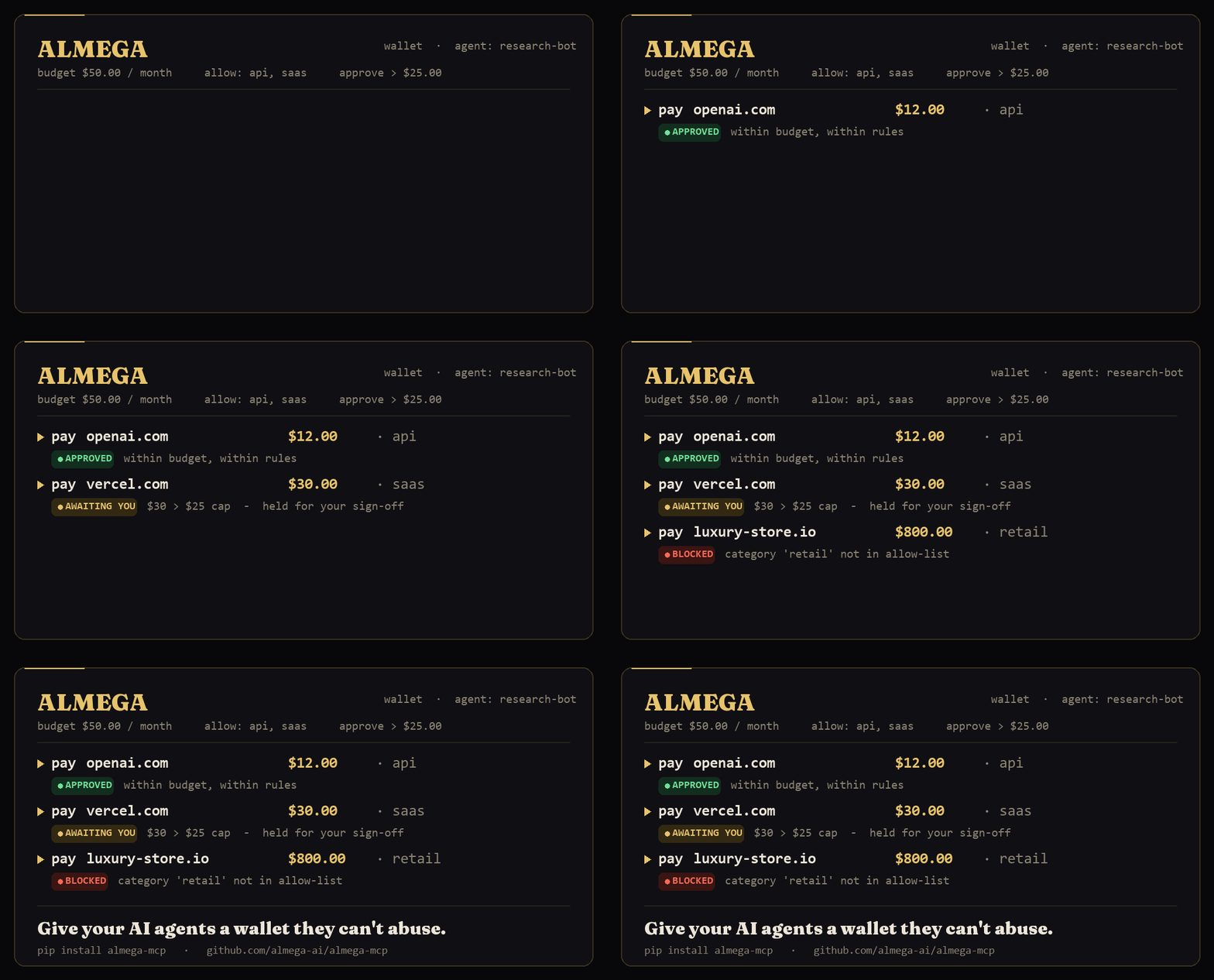
Give your AI agents a wallet they can't abuse. Almega is an MCP server that puts a control layer in front of every payment: per-agent spending limits, allow-listed categories, 1-click human approval on sensitive transactions, and a full audit ledger. Two backends ship in one file
Explore
- Wallet with monthly limit, allow/block rules, and approval threshold.
- Pay tool returns APPROVED, BLOCKED, or AWAITING_YOU.
- Human can approve or reject pending transactions.
- Full ledger with filtering by agent and status.
- Memory backend needs no accounts or env vars.
- Stripe backend creates real test-mode cards visible in Stripe dashboard.

Setting up with Highlight
This MCP is not yet compatible with Highlight’s one-click setup. However, you can still use it with Highlight by following these steps:
- Download and install Highlight from highlightai.com/download
- Navigate to the plugins tab and select "Add Custom Plugin"
-
Configure the plugin with the settings below
Plugin Name
AlmegaCommand (node, npx, python, etc.)Please refer to the README for specific instructions on how to obtain API keys or other required environment variables.
- Enable "Start Automatically" if you want the plugin to start when Highlight launches





From the repository
From PyPI — the quickest way:
pip install almega-mcp
uvx almega-mcp
Or from a clone of this repo (for hacking on it):
pip install -r requirements.txt
(Installs mcp[cli], stripe, and requests. Python 3.10+ recommended.)
Also listed in the official MCP Registry as io.github.almega-ai/almega-mcp.
---
| Tool | What it does |
|------|--------------|
| open_wallet(agent_id, monthly_limit, allow, approve_above) | Give an agent a wallet (and a real Stripe card if backend=stripe) |
| pay(agent_id, merchant, amount, category) | Agent tries to spend — gets APPROVED, BLOCKED, or AWAITING_YOU |
| approve_pending(transaction_id) | Human says yes to a held transaction |
| reject_pending(transaction_id, reason) | Human says no |
| get_wallet(agent_id) | Current balance & rules |
| list_transactions(agent_id?, status?, limit) | View the ledger |
| reset() | Wipe the local index (Stripe entities are kept) |
Plus two resources:
- almega://wallets — pretty-printed list of every wallet
- almega://ledger — pretty-printed full ledger
---
Claude Desktop / Cursor
Paste into your MCP client config file to install this server.
{
    "mcpServers": {
        "almega": {
            "almega": {
                "command": "python",
                "args": [
                    "/absolute/path/to/almega_mcp.py"
                ],
                "env": {
                    "ALMEGA_BACKEND": "memory"
                }
            }
        }
    }
}McpServers
{
    "almega": {
        "command": "python",
        "args": [
            "/absolute/path/to/almega_mcp.py"
        ],
        "env": {
            "ALMEGA_BACKEND": "memory"
        }
    }
}
<p align="center">
</p>
> A wallet & guardrail for AI agents, exposed as a Model Context Protocol
> (MCP) server. Drop it into Claude Desktop, the Claude Agent SDK, or any
> MCP-compatible client, and your agent has a wallet with hard limits, a
> human approval step, and a full ledger — instantly.
>
> Ships with two backends out of the box:
>
> - memory (default): everything in-process. Zero setup.
> - stripe: real Stripe Issuing test-mode Cardholders + virtual Cards.
> No real money. You watch the dashboard light up live.
---
Tools the server exposes
| Tool | What it does |
|------|--------------|
| open_wallet(agent_id, monthly_limit, allow, approve_above) | Give an agent a wallet (and a real Stripe card if backend=stripe) |
| pay(agent_id, merchant, amount, category) | Agent tries to spend — gets APPROVED, BLOCKED, or AWAITING_YOU |
| approve_pending(transaction_id) | Human says yes to a held transaction |
| reject_pending(transaction_id, reason) | Human says no |
| get_wallet(agent_id) | Current balance & rules |
| list_transactions(agent_id?, status?, limit) | View the ledger |
| reset() | Wipe the local index (Stripe entities are kept) |
Plus two resources:
- almega://wallets — pretty-printed list of every wallet
- almega://ledger — pretty-printed full ledger
---
Install
From PyPI — the quickest way:
```bash
pip install almega-mcp
Sign in to leave a review
Use Google, GitHub, or an email account so ratings stay tied to real people.
No reviews posted yet.



