中国城市天气查询 MCP 服务
About
基于高德地图 API 的中国城市天气查询 Model Context Protocol (MCP) 服务,允许用户通过简单的 MCP 请求获取中国各城市的实时天气状况和未来几天的天气预报。该服务面向需要在 AI 应用中集成中国天气查询功能的开发者和用户。
Explore
- 使用高德地图天气 API 获取精确的中国城市天气数据
- 支持查询实时天气状况和未来 3-4 天天气预报
- 智能城市名称识别,支持城市和区县级查询
- 提供城市名称搜索功能
- 标准 MCP 服务,易于集成到 AI 应用中

Setting up with Highlight
This MCP is not yet compatible with Highlight’s one-click setup. However, you can still use it with Highlight by following these steps:
- Download and install Highlight from highlightai.com/download
- Navigate to the plugins tab and select "Add Custom Plugin"
-
Configure the plugin with the settings below
Plugin Name
中国城市天气查询 MCP 服务Command (node, npx, python, etc.)Please refer to the README for specific instructions on how to obtain API keys or other required environment variables.
- Enable "Start Automatically" if you want the plugin to start when Highlight launches





From the repository
需要先获取高德地图 API 密钥,并通过环境变量 AMAP_API_KEY 配置。使用 uv 安装依赖后,运行 weather.py 启动服务。在 MCP 客户端中可以调用三个工具函数:get_current_weather、get_weather_forecast 和 search_city。也可以在 Claude Desktop 或 Cherry Studio 等应用中配置使用。
Claude Desktop / Cursor
Paste into your MCP client config file to install this server.
{
    "mcpServers": {
        "\u4e2d\u56fd\u57ce\u5e02\u5929\u6c14\u67e5\u8be2 mcp \u670d\u52a1": {
            "amap-weather-mcp-server": {
                "command": "uv",
                "args": [
                    "venv"
                ]
            }
        }
    }
}McpServers
{
    "amap-weather-mcp-server": {
        "command": "uv",
        "args": [
            "venv"
        ]
    }
}
基于高德地图 API 的中国城市天气查询 Model Context Protocol (MCP) 服务。该服务允许用户通过简单的请求获取中国各城市的实时天气状况和未来几天的天气预报。
功能特点
- 使用高德地图天气 API 获取精确的中国城市天气数据
- 支持查询实时天气状况
- 支持查询未来 3-4 天的天气预报
- 支持智能城市名称识别,包括城市、区县级别的查询
- 支持城市名称搜索功能
- 实现为标准 MCP 服务,易于集成到 AI 应用中
安装说明
前提条件
- 高德地图开发者 API 密钥(需通过环境变量配置)
安装步骤
1. 克隆或下载本仓库
2. 进入项目目录
3. 使用 uv 安装依赖:
uv venv
source .venv/bin/activate
uv add "mcp[cli]" httpx
使用方法
启动 MCP 服务
如果你需要自行创建客户端测试该 MCP 服务,请手动启动。
在终端中执行以下命令启动 MCP 服务:
uv run weather.py
使用集成的 MCP 服务
在 Claude Desktop 中使用
如果想在 Claude Desktop 中使用,请添加服务器配置:
请在文本编辑器中打开 Claude for Desktop App 配置,路径参考如下 ~/Library/Application Support/Claude/claude_desktop_config.json
如果文件不存在,请确保创建该文件。
{
    "mcpServers": {
        "amap-weather-mcp-server": {
            "command": "uv",
            "args": [
                "--directory",
                "/ABSOLUTE/PATH/TO/PARENT/FOLDER/weather",
                "run",
                "weather.py"
            ],
            "env": {
                "AMAP_API_KEY": "YOUR_API_KEY_HERE"
            }
        }
    }
}
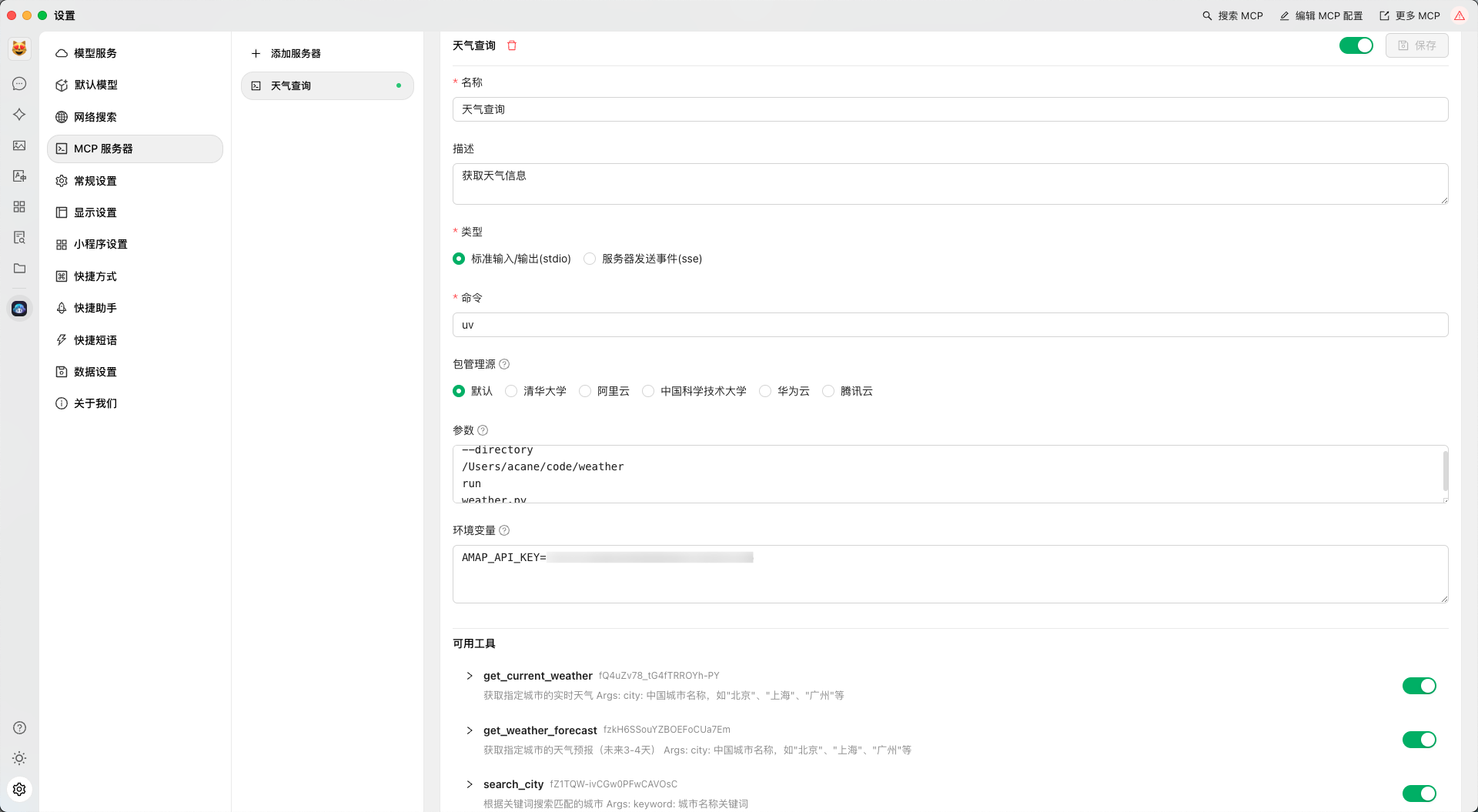
在 Cherry Studio 中使用
如下图所示配置即可:
调用服务
MCP 服务提供了三个主要工具函数用于天气查询:
1. get_current_weather: 获取城市当前天气状况
2. get_weather_forecast: 获取未来几天的天气预报
3. search_city: 搜索城市名称
使用 MCP 客户端调用示例:
```python
from mcp.client import Client
Sign in to leave a review
Use Google, GitHub, or an email account so ratings stay tied to real people.
No reviews posted yet.