
amazon-ads-mcp-server
About
The amazon-ads-mcp-server connects your MCP client (e.g., Claude Desktop) to Amazon Advertising data through MarketplaceAdPros. It provides access to Sponsored Products, Sponsored Brands, and Sponsored Display resources like campaigns, ad groups, keywords, product ads, and…
Details
- License
- MIT
Explore
- Access Amazon Advertising campaigns, ad groups, and keywords.
- Manage Sponsored Products, Brands, and Display ads.
- Query advertising reports with natural language.
- Receive recommendations and experiments (with subscription).
- Support stdio (npx) and Streamable HTTP transports.

Setting up with Highlight
This MCP is not yet compatible with Highlight’s one-click setup. However, you can still use it with Highlight by following these steps:
- Download and install Highlight from highlightai.com/download
- Navigate to the plugins tab and select "Add Custom Plugin"
-
Configure the plugin with the settings below
Plugin Name
amazon-ads-mcp-serverCommand (node, npx, python, etc.)Please refer to the README for specific instructions on how to obtain API keys or other required environment variables.
- Enable "Start Automatically" if you want the plugin to start when Highlight launches





From the repository
To add the amazon-ads-mcp-server to your MCP client of choice, add the following to the server config:
On MacOS: ~/Library/Application Support/Claude/claude_desktop_config.json
On Windows: %APPDATA%/Claude/claude_desktop_config.json
Claude Desktop / Cursor
Paste into your MCP client config file to install this server.
{
    "mcpServers": {
        "amazon-ads-mcp-server": {
            "marketplaceadpros": {
                "command": "npx",
                "args": [
                    "@marketplaceadpros/amazon-ads-mcp-server"
                ],
                "env": {
                    "BEARER_TOKEN": "abcdefghijklmnop"
                }
            }
        }
    }
}McpServers
{
    "marketplaceadpros": {
        "command": "npx",
        "args": [
            "@marketplaceadpros/amazon-ads-mcp-server"
        ],
        "env": {
            "BEARER_TOKEN": "abcdefghijklmnop"
        }
    }
}
Connect to your Amazon Advertising Data by integrating your account with MarketplaceAdPros.
Provides access to:
- Advertising Resources in Sponsored Products, Sponsored Brands and Sponsored Display, like Campaigns, Ad Groups, Keywords, Product Ads, Targeting
- Reports and ability to query them with plain english.
- Marketplace Ad Pros Recommendations, Experiments and more with purchased subscription plan
Also available as a Streamable HTTP MCP Server by connecting to https://app.marketplaceadpros.com/mcp
Installation
To add the amazon-ads-mcp-server to your MCP client of choice, add the following to the server config:
On MacOS: ~/Library/Application Support/Claude/claude_desktop_config.json
On Windows: %APPDATA%/Claude/claude_desktop_config.json
Env Vars
- BEARER_TOKEN: The Bearer token you got from MarketplaceAdPros.com
Configuration
You can use it via npx in your Claude Desktop configuration like this:
{
  "mcpServers": {
    "marketplaceadpros": {
      "command": "npx",
      "args": [
        "@marketplaceadpros/amazon-ads-mcp-server"
      ],
      "env": {
        "BEARER_TOKEN": "abcdefghijklmnop"
      }
    }
  }
}
Or, if you clone the repo, you can build and use in your Claude Desktop configuration like this:
{
  "mcpServers": {
    "marketplaceadpros": {
      "command": "node",
      "args": [
        "/path/to/amazon-ads-mcp-server/build/index.js"
      ],
      "env": {
        "BEARER_TOKEN": "abcdefghijklmnop"
      }
    }
  }
}
Or, if your client supports the Streamable HTTP MCP Servers, you can just point to the MCP endpoint at https://app.marketplaceadpros.com/mcp.
{
  "mcpServers": {
    "marketplaceadpros": {
      "type": "streamable-http",
      "url": "https://app.marketplaceadpros.com/mcp"
    }
  }
}
Or, configure in LibreChat like:
  MAP:

    type: streamable-http

    url: https://app.marketplaceadpros.com/mcp

    headers:

      Authorization: "Bearer abcdefghijklmnop"
Development
Install dependencies:
npm install
Build the server:
npm run build
For development with auto-rebuild:
npm run watch
Debugging
Since MCP servers communicate over stdio, debugging can be challenging. We recommend using the MCP Inspector, which is available as a package script:
npm run inspector
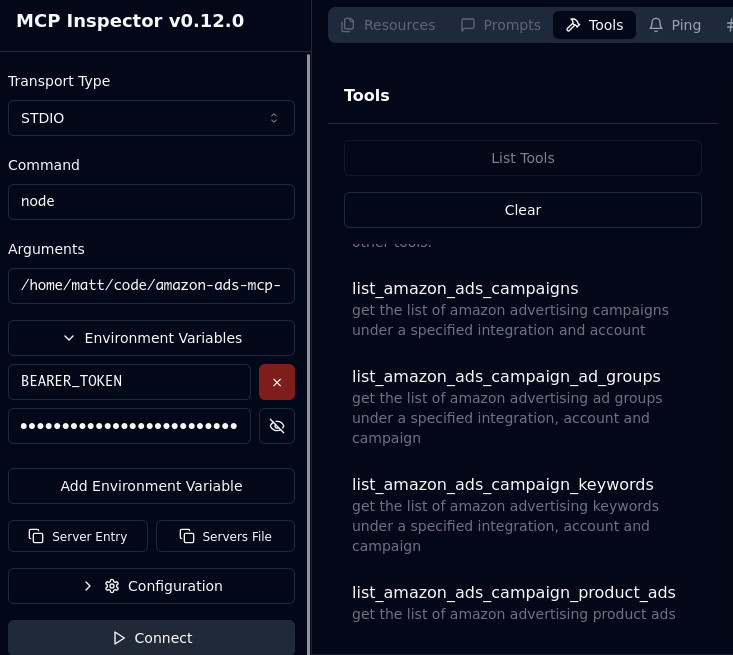
The Inspector will provide a URL to access debugging tools in your browser.
Acknowledgements
- Obviously the modelcontextprotocol and Anthropic teams for the MCP Specification. https://modelcontextprotocol.io/introduction
- MarketplaceAdPros for enabling and sponsoring this project.
Sign in to leave a review
Use Google, GitHub, or an email account so ratings stay tied to real people.
No reviews posted yet.





