
Aqara Mcp Server
About
Aqara MCP Server is a remote MCP service provided by Aqara Agent that allows MCP-enabled AI applications to securely connect to Aqara smart home capabilities, enabling query and control of homes, devices, scenes, automations, energy consumption, lighting effects, and firmware.
Details
- License
- MIT
Explore
- 🔍 Flexible device queries: Query device basics, real-time status, and control logs by home/space, device type, or device ID.
- ✨ Comprehensive device control: Control power, brightness, color temperature, temperature, fan speed, mode, curtain percentage, and more on Aqara devices.
- 🎬 Smart scene management: Query and run scenes, and review scene execution history.
- ⏰ Automation queries: Query automation rules and their execution history.
- 📈 Energy statistics: Query electricity usage and cost by room/space or device, with aggregated and detailed views.
- 💡 Lighting effect management: Query lighting scenarios/effects, apply specified effects, and query effect configuration parameters.
- 🔄 Firmware management: Query current and available firmware versions, and start device firmware upgrades.
- 🏠 Multiple homes and spaces: List homes on your Aqara account and rooms/spaces in the current home.
- 🔌 Remote MCP integration: Connect via an MCP URL for apps such as Cursor and Codex App.
- 🔐 Secure authentication: Obtain aqara_api_key after signing in to Aqara Agent—keep credentials safe when configuring.

Setting up with Highlight
This MCP is not yet compatible with Highlight’s one-click setup. However, you can still use it with Highlight by following these steps:
- Download and install Highlight from highlightai.com/download
- Navigate to the plugins tab and select "Add Custom Plugin"
-
Configure the plugin with the settings below
Plugin Name
Aqara Mcp ServerCommand (node, npx, python, etc.)Please refer to the README for specific instructions on how to obtain API keys or other required environment variables.
- Enable "Start Automatically" if you want the plugin to start when Highlight launches





From the repository
- An Aqara account with registered smart devices.
- An application that supports remote MCP, such as Cursor or Codex App.
- Aqara Agent credentials: aqara_api_key and aqara_mcp_url from the login page.
1. Open the login page:
https://agent.aqara.com/login
2. Complete sign-in:
- Sign in with your Aqara account.
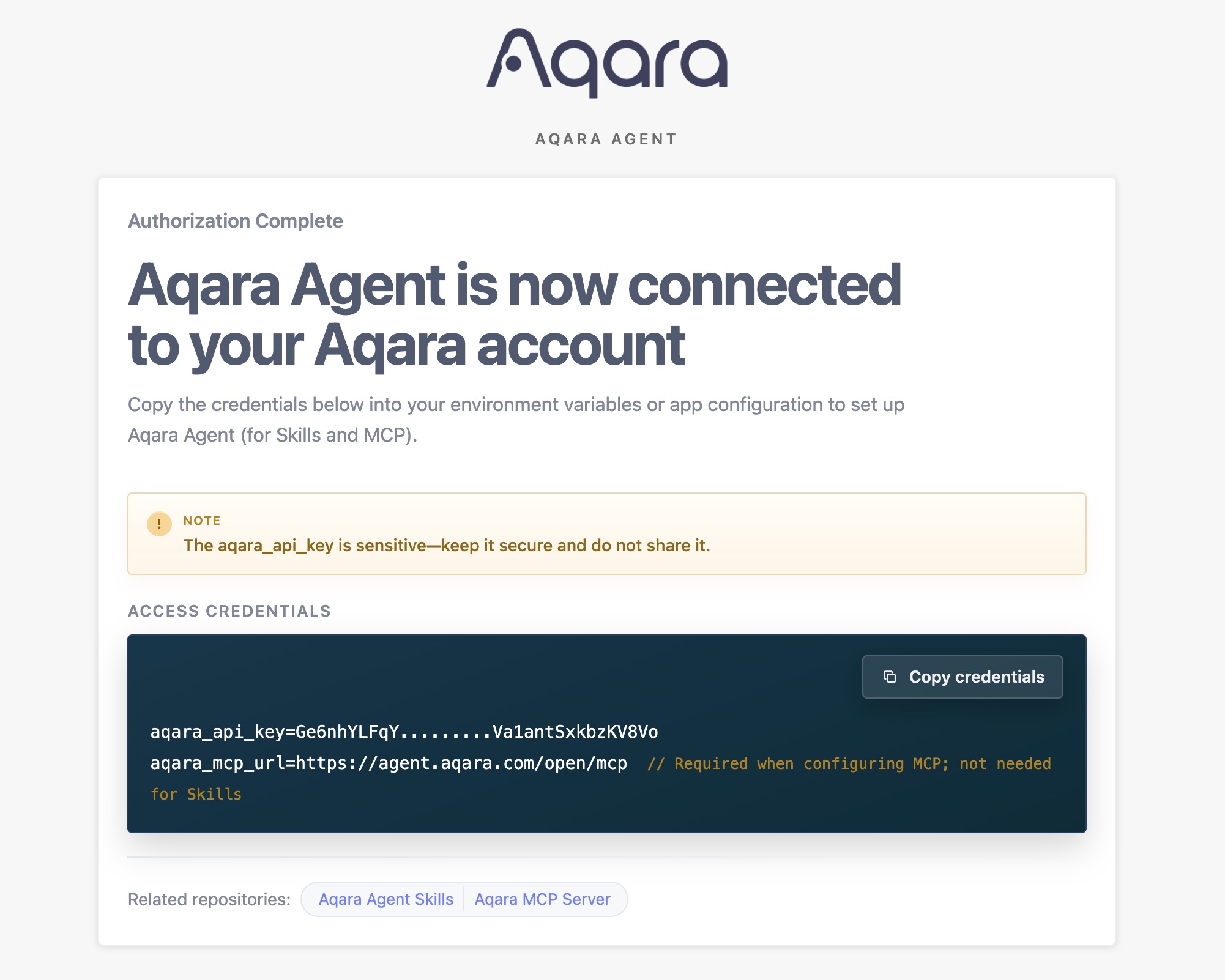
- After sign-in, copy the aqara_api_key shown on the page.
- For MCP configuration, use the aqara_mcp_url on the page—typically https://agent.aqara.com/open/mcp.
3. Store credentials securely:
> Keep your aqara_api_key safe. Do not commit it to a repository, publish it in screenshots, or share it with others.
- Use https://agent.aqara.com/open/mcp or the aqara_mcp_url from the login page as the MCP URL—do not use the login page URL as the MCP URL.
- Tools for device control, scene execution, and firmware upgrades affect real home devices. On first use, run query Tools first to confirm home, space, device, and scene information.
- If connection fails, check: MCP type is Streamable HTTP, URL includes /open/mcp, credentials are not expired, and the app was restarted or MCP reloaded after configuration changes.
---
Query parameters required to configure lighting effects on light devices.
Parameters:
- device_ids _(Array\<String\>, required)_: Target light device IDs.
Returns: Effect configuration parameters, including configurable items, value ranges, and saved user effects.
The Tool list below is based on function definitions registered on the current Aqara Agent service. Applications may display different Tool names in the UI, but parameter semantics and capability scope stay the same.
| Tool Category | Tool | Description |
| --- | --- | --- |
| Home and Positions | all_homes_inquiry, position_base_inquiry | Query home and room/space information |
| Device Query and Control | device_base_inquiry, device_status_inquiry, device_status_control, fuzzy_device_batch_control, device_log_inquiry | Query device basics and real-time status, control devices, and view control logs |
| Scenes | scene_base_inquiry, scene_run, scene_execution_history_inquiry | Query and run scenes, and query scene execution history |
| Automations | automation_base_inquiry, automation_execution_history_inquiry | Query automation rules and execution history |
| Energy Consumption | energy_consumption_inquiry_for_position, energy_consumption_inquiry_for_device | Query electricity usage/cost by room/space or device |
| Lighting Effects | lighting_effect_inquiry, device_lighting_effect_inquiry, lighting_effect_control, lighting_effect_config_params_inquiry | Query and apply lighting effects, and query effect configuration parameters |
| Firmware | device_firmware_inquiry, device_firmware_upgrade | Query and upgrade device firmware |
Claude Desktop / Cursor
Paste into your MCP client config file to install this server.
{
    "mcpServers": {
        "aqara mcp server": {
            "aqara": {
                "command": "/<File Directory>/aqara-mcp-server",
                "args": [
                    "run",
                    "stdio"
                ],
                "env": {
                    "token": "",
                    "region": ""
                }
            }
        }
    }
}McpServers
{
    "aqara": {
        "command": "/<File Directory>/aqara-mcp-server",
        "args": [
            "run",
            "stdio"
        ],
        "env": {
            "token": "",
            "region": ""
        }
    }
}
<div align="center" style="display: flex; align-items: center; justify-content: center; ">
<h1>Aqara MCP Server</h1>
</div>
<div align="center">
English | 中文 | Français | 한국어 | Español | 日本語 | Deutsch | Italiano


</div>
Aqara MCP Server is a remote MCP service provided by Aqara Agent. It lets MCP-enabled AI applications securely connect to Aqara smart home capabilities. When you need MCP integration, configure the remote MCP URL provided by Aqara Agent.
> [!TIP]
> Recommended: Official Aqara Agent Skills
>
> If your application supports Agent Skills (such as Codex App, Cursor, or OpenClaw), we recommend using the official Aqara Agent Skills first. You can query and control homes/spaces, devices, scenes, automations, energy consumption, and more in natural language—without configuring an MCP server.
>
> - GitHub: aqara/aqara-agent-skills
> - ClawHub: aqara/aqara-agent
Table of Contents
- Overview
- Features
- How It Works
- Quick Start
- Prerequisites
- Step 1: Account Authentication
- Step 2: Configure Remote MCP
- Step 3: Verification
- Configuration Notes
- MCP Tool Reference
- Core Tools Overview
- Home and Positions
- Device Query and Control
- Scenes
- Automations
- Energy Consumption
- Lighting Effects
- Firmware
- Parameter Conventions
- License
Overview
The recommended MCP integration today centers on Aqara Agent:
- Remote MCP: For applications that support Streamable HTTP via https://agent.aqara.com/open/mcp.
- Aqara Agent Skills: For applications with Agent Skills—install skills without manually configuring an MCP server.
- MCP Tool capabilities: Cover smart home operations across homes/spaces, devices, scenes, automations, energy consumption, lighting effects, and firmware.
Features
- 🔍 Flexible device queries: Query device basics, real-time status, and control logs by home/space, device type, or device ID.
- ✨ Comprehensive device control: Control power, brightness, color temperature, temperature, fan speed, mode, curtain percentage, and more on Aqara devices.
- 🎬 Smart scene management: Query and run scenes, and review scene execution history.
- ⏰ Automation queries: Query automation rules and their execution history.
- 📈 Energy statistics: Query electricity usage and cost by room/space or device, with aggregated and detailed views.
- 💡 Lighting effect management: Query lighting scenarios/effects, apply specified effects, and query effect configuration parameters.
- 🔄 Firmware management: Query current and available firmware versions, and start device firmware upgrades.
- 🏠 Multiple homes and spaces: List homes on your Aqara account and rooms/spaces in the current home.
- 🔌 Remote MCP integration: Connect via an MCP URL for apps such as Cursor and Codex App.
- 🔐 Secure authentication: Obtain aqara_api_key after signing in to Aqara Agent—keep credentials safe when configuring.
How It Works
In remote MCP mode, the application connects over HTTP to Aqara Agent’s MCP service and includes the bearer token generated on the login page. Aqara Agent validates credentials, executes tool calls, and returns results to the application:
graph LR
    A[AI App / MCP host] --> B[Aqara Agent]
    B --> C[Aqara Cloud API]
    C --> D[Aqara Devices / Scenes / Automations]
1. AI App / MCP host: The user sends natural-language instructions from Cursor, Codex App, and similar apps.
2. Aqara Agent: Validates user credentials, interprets, and runs the corresponding Tools.
3. Aqara Cloud API: Performs data queries or control actions for devices, scenes, automations, energy consumption, lighting effects, firmware, and more.
---
Quick Start
Prerequisites
- An Aqara account with registered smart devices.
- An application that supports remote MCP, such as Cursor or Codex App.
- Aqara Agent credentials: aqara_api_key and aqara_mcp_url from the login page.
Step 1: Account Authentication
1. Open the login page:
https://agent.aqara.com/login
2. Complete sign-in:
- Sign in with your Aqara account.
- After sign-in, copy the aqara_api_key shown on the page.
- For MCP configuration, use the aqara_mcp_url on the page—typically https://agent.aqara.com/open/mcp.
3. Store credentials securely:
> Keep your aqara_api_key safe. Do not commit it to a repository, publish it in screenshots, or share it with others.
Step 2: Configure Remote MCP
Cursor
1. Open Cursor Settings, go to Tools & MCPs, and click New MCP Server.
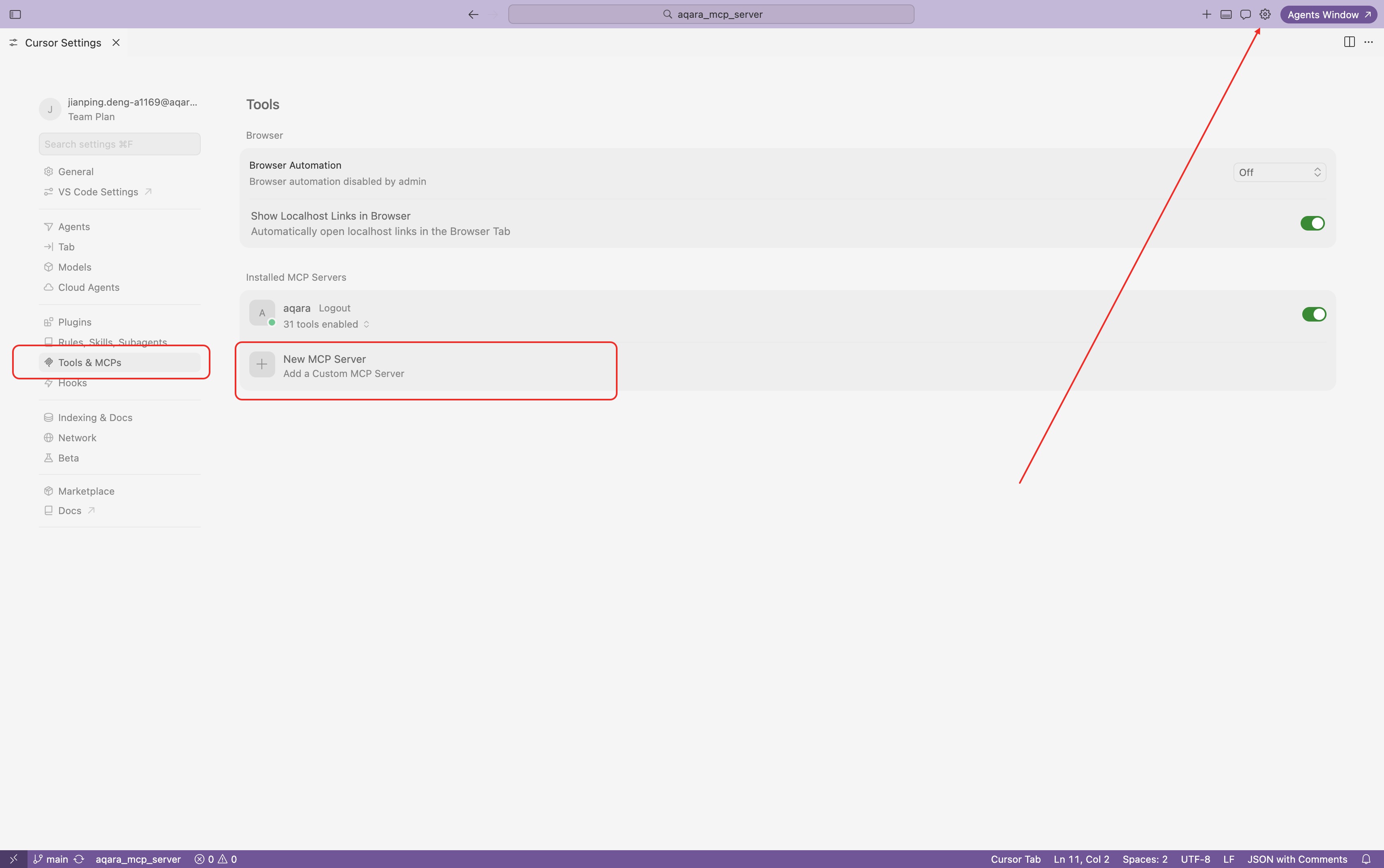
2. Add the remote MCP configuration. Use the aqara_mcp_url from the login page; if entering manually, use the /open/mcp path.
   {
     "mcpServers": {
       "aqara": {
         "type": "http",
         "url": "https://agent.aqara.com/open/mcp",
         "headers": {
           "Authorization": "Bearer <YOUR_AQARA_API_KEY>"
         }
       }
     }
   }
3. Save the configuration and restart Cursor for MCP settings to take effect.
Codex App
1. Save the aqara_api_key from the login page as an environment variable. For macOS with zsh, add the following to ~/.zshrc:
export AQARA_API_KEY="<YOUR_AQARA_API_KEY>"
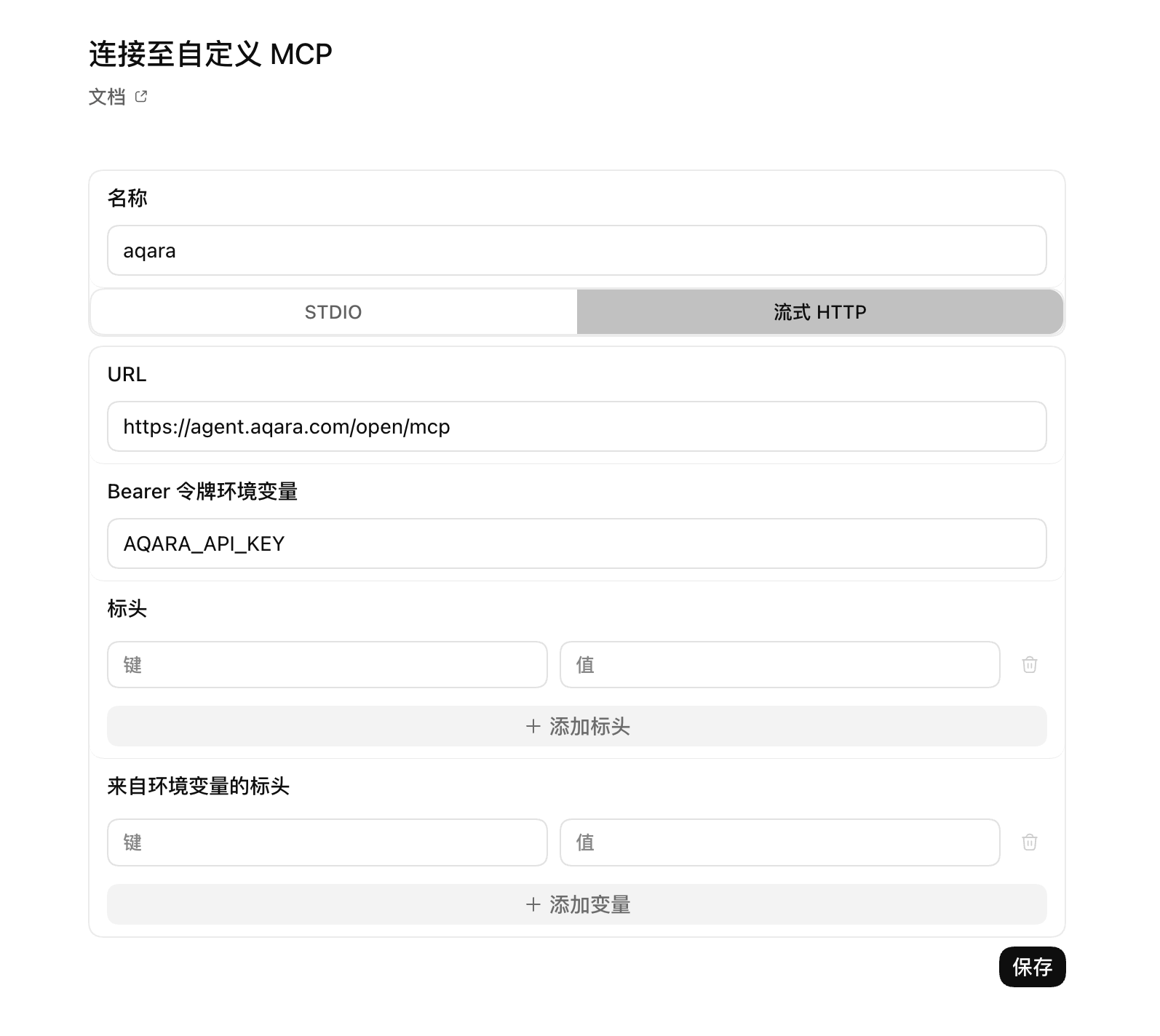
2. Restart Codex App, then connect to a custom MCP in Settings.
3. Select Streamable HTTP.
4. Enter the aqara_mcp_url from the login page, e.g. https://agent.aqara.com/open/mcp.
5. In Bearer token env var, enter the environment variable name AQARA_API_KEY, not the API key itself. Codex App reads the token from this variable.
Step 3: Verification
After configuration succeeds, you can test with natural-language requests such as:
User: Show all devices in my home
Assistant: Query the device list via MCP
User: Turn on the living room light

Assistant: Run device control via MCP
User: Run the movie night scene

Assistant: Run the scene via MCP
If the app’s MCP panel shows Aqara as connected and Aqara Tools are visible, the configuration is active.
---
Configuration Notes
- Use https://agent.aqara.com/open/mcp or the aqara_mcp_url from the login page as the MCP URL—do not use the login page URL as the MCP URL.
- Tools for device control, scene execution, and firmware upgrades affect real home devices. On first use, run query Tools first to confirm home, space, device, and scene information.
- If connection fails, check: MCP type is Streamable HTTP, URL includes /open/mcp, credentials are not expired, and the app was restarted or MCP reloaded after configuration changes.
---
MCP Tool Reference
The Tool list below is based on function definitions registered on the current Aqara Agent service. Applications may display different Tool names in the UI, but parameter semantics and capability scope stay the same.
Core Tools Overview
| Tool Category | Tool | Description |
| --- | --- | --- |
| Home and Positions | all_homes_inquiry, position_base_inquiry | Query home and room/space information |
| Device Query and Control | device_base_inquiry, device_status_inquiry, device_status_control, fuzzy_device_batch_control, device_log_inquiry | Query device basics and real-time status, control devices, and view control logs |
| Scenes | scene_base_inquiry, scene_run, scene_execution_history_inquiry | Query and run scenes, and query scene execution history |
| Automations | automation_base_inquiry, automation_execution_history_inquiry | Query automation rules and execution history |
| Energy Consumption | energy_consumption_inquiry_for_position, energy_consumption_inquiry_for_device | Query electricity usage/cost by room/space or device |
| Lighting Effects | lighting_effect_inquiry, device_lighting_effect_inquiry, lighting_effect_control, lighting_effect_config_params_inquiry | Query and apply lighting effects, and query effect configuration parameters |
| Firmware | device_firmware_inquiry, device_firmware_upgrade | Query and upgrade device firmware |
Home and Positions
all_homes_inquiry
Query all homes under the current Aqara account.
Parameters: none
Returns: A list of homes with home name, home ID, and related fields.
position_base_inquiry
Query basic information for all rooms/spaces in the current home.
Parameters: none
Returns: A list of rooms/spaces with position name, position ID, and related fields.
Device Query and Control
device_base_inquiry
Query device basic information by room/space and device type, without real-time status.
Parameters:
- position_ids _(Array\<String\>, optional)_: List of room/space IDs. When empty, no position filter is applied.
- device_types _(Array\<String\>, optional)_: Device types, e.g. Light, Switch, Outlet, AirConditioner, WindowCovering, Camera. When empty, no device type filter is applied.
Returns: A list of device basics including device name, device ID, position, and device type.
device_status_inquiry
Query real-time device status such as power, brightness, color temperature, temperature, fan speed, and mode.
Parameters:
- device_ids _(Array\<String\>, optional)_: Device IDs. When provided, query prioritizes device ID.
- position_ids _(Array\<String\>, optional)_: Room/space IDs.
- device_types _(Array\<String\>, optional)_: Device types.
Returns: A list of device states with current readable values.
device_status_control
Control state or attributes of specified devices, such as power, brightness, color temperature, temperature, fan speed, mode, and curtain percentage.
Parameters:
- device_ids _(Array\<String\>, required)_: Target device IDs.
- attribute _(String, required)_: Attribute to control, e.g. on_off, brightness, color_temperature, temperature, percentage, mode.
- action _(String, required)_: Control action, e.g. on, off, set, up, down, warmer, cooler, start, stop.
- value _(String, optional)_: Target value, e.g. 50, max, min, cool, heat, red.
Returns: Device control execution result.
fuzzy_device_batch_control
Batch-control devices by room/space and device type—for example, “turn off all lights,” “turn off everything in the living room,” or “set all AC units to 26°.”
Parameters:
- position_ids _(Array\<String\>, optional)_: Room/space IDs. When empty, may mean the entire home.
- device_types _(Array\<String\>, optional)_: Device types.
- attribute _(String, required)_: Attribute to control.
- action _(String, required)_: Control action.
- value _(String, optional)_: Target value.
Returns: Batch control execution result.
device_log_inquiry
Query device control logs within a time range, including control time, content, and result.
Parameters:
- time_range _(Array\<String\>, optional)_: Time interval, e.g. ["2026-01-01 00:00:00", "2026-01-01 23:59:59"].
- device_ids _(Array\<String\>, optional)_: Device IDs. When provided, query prioritizes device ID.
- position_ids _(Array\<String\>, optional)_: Room/space IDs.
- device_types _(Array\<String\>, optional)_: Device types.
Returns: Control log list and the actual queried time range.
Scenes
scene_base_inquiry
Query scene basic information, filterable by scene ID, position ID, or device ID.
Parameters:
- scene_ids _(Array\<String\>, optional)_: Scene IDs. When provided, query prioritizes scene ID.
- position_ids _(Array\<String\>, optional)_: Room/space IDs.
- device_ids _(Array\<String\>, optional)_: Device IDs for device-related scenes.
Returns: A list of scene basic information.
scene_run
Run one or more specified scenes.
Parameters:
- scene_ids _(Array\<String\>, required)_: Scene IDs to run.
Returns: Scene execution result.
scene_execution_history_inquiry
Query scene execution history within a time range.
Parameters:
- time_range _(Array\<String\>, optional)_: Time interval.
- scene_ids _(Array\<String\>, optional)_: Scene IDs.
- position_ids _(Array\<String\>, optional)_: Room/space IDs.
- device_ids _(Array\<String\>, optional)_: Device IDs.
Returns: Scene execution history and the actual queried time range.
Automations
automation_base_inquiry
Query automation rule basics, filterable by automation ID, position ID, or device ID.
Parameters:
- automation_ids _(Array\<String\>, optional)_: Automation IDs. When provided, query prioritizes automation ID.
- position_ids _(Array\<String\>, optional)_: Room/space IDs.
- device_ids _(Array\<String\>, optional)_: Device IDs for device-related automations.
Returns: A list of automation rules.
automation_execution_history_inquiry
Query automation execution history within a time range.
Parameters:
- time_range _(Array\<String\>, optional)_: Time interval.
- automation_ids _(Array\<String\>, optional)_: Automation IDs.
- position_ids _(Array\<String\>, optional)_: Room/space IDs.
- device_ids _(Array\<String\>, optional)_: Device IDs.
Returns: Automation execution history and the actual queried time range.
Energy Consumption
energy_consumption_inquiry_for_position
Query electricity usage or cost by home/room/space, with aggregated and detailed views.
Parameters:
- data_type _(String, required)_: Query type—1 for electricity usage, 2 for electricity cost, 3 for both.
- time_range _(Array\<String\>, required)_: Time interval.
- time_gradient _(String, optional)_: Granularity: 30min, 1hour, 1day, 1week, 1month.
- data_aggregation_mode _(String, optional)_: total = aggregated summary, detail = detail view.
- positions _(Array\<String\>, optional)_: Room/space IDs. When empty, queries all valid rooms.
Returns: Electricity usage/cost statistics by room/space.
energy_consumption_inquiry_for_device
Query electricity usage or cost by device, filterable by position or device, with aggregated and detailed views.
Parameters:
- data_type _(String, required)_: 1 = electricity usage, 2 = electricity cost, 3 = both.
- time_range _(Array\<String\>, required)_: Time interval.
- time_gradient _(String, optional)_: 30min, 1hour, 1day, 1week, 1month.
- data_aggregation_mode _(String, optional)_: total = aggregated summary, detail = detail view.
- positions _(Array\<String\>, optional)_: Room/space IDs.
- device_ids _(Array\<String\>, optional)_: Device IDs. When provided, query prioritizes device.
Returns: Electricity usage/cost statistics by device.
Lighting Effects
lighting_effect_inquiry
Query available lighting scenarios/effects in the home.
Parameters: none
Returns: A list of effects with names and applicable scope for control.
device_lighting_effect_inquiry
Query supported lighting effect names per device.
Parameters:
- device_ids _(Array\<String\>, required)_: Device IDs to query for effects.
Returns: Device-to-effect name mapping list.
lighting_effect_control
Apply the specified lighting effect to target devices or rooms/spaces.
Parameters:
- effect_name _(String, required)_: Effect name.
- device_ids _(Array\<String\>, optional)_: Target device IDs. When provided, control prioritizes device.
- position_ids _(Array\<String\>, optional)_: Room/space IDs.
Returns: Lighting effect control execution result.
lighting_effect_config_params_inquiry
Query parameters required to configure lighting effects on light devices.
Parameters:
- device_ids _(Array\<String\>, required)_: Target light device IDs.
Returns: Effect configuration parameters, including configurable items, value ranges, and saved user effects.
Firmware
device_firmware_inquiry
Batch-query current firmware version and available upgrade version for devices.
Parameters:
- device_ids _(Array\<String\>, optional)_: Device IDs. When provided, query prioritizes device.
- position_ids _(Array\<String\>, optional)_: Room/space IDs.
- device_types _(Array\<String\>, optional)_: Device types.
Returns: Firmware information including device name, online status, current version, and available version.
device_firmware_upgrade
Start firmware upgrades for eligible devices after filtering by device, position, or type.
Parameters:
- device_ids _(Array\<String\>, optional)_: Device IDs. When provided, upgrades those devices first.
- position_ids _(Array\<String\>, optional)_: Room/space IDs.
- device_types _(Array\<String\>, optional)_: Device types.
Returns: Firmware upgrade submission result.
Parameter Conventions
- position_ids / positions: Room/space ID lists; when omitted, query or control scope follows each Tool’s description.
- device_ids: Device ID or device endpoint ID lists, resolved via client-side identification and server mapping.
- device_types: Device types, e.g. Light, Switch, Outlet, AirConditioner, WindowCovering, Camera, TemperatureSensor.
- attribute: Control attributes, e.g. on_off, brightness, color_temperature, temperature, wind_speed, mode, percentage, volume, color.
- action: Control actions, e.g. on, off, set, up, down, warmer, cooler, start, stop, pause, resume.
- value: Target values, e.g. 50, 100, max, min, red, cool, heat, lighting effect names.
- time_range: Time interval array, usually ["YYYY-MM-DD HH:MM:SS", "YYYY-MM-DD HH:MM:SS"].
- data_type: Energy query type—1 = electricity usage, 2 = electricity cost, 3 = both.
- time_gradient: Energy statistics granularity: 30min, 1hour, 1day, 1week, 1month.
- data_aggregation_mode: Energy aggregation mode—total = aggregated summary, detail = detail view.
License
This project is licensed under the MIT License. See the LICENSE file for details.
---
Copyright © 2025 Aqara-Agent. All rights reserved.
Sign in to leave a review
Use Google, GitHub, or an email account so ratings stay tied to real people.
No reviews posted yet.



