
Artifacts — self-hosted artifact publishing (HTML/JSX/Markdown/zip → unguessable URL)
About
Self-hosted artifact publishing — POST HTML/JSX/Markdown/zip, get an unguessable public URL. MCP server built in.
Details
- Transport
- SSE
- License
- MIT
Explore
- Four content types: HTML, JSX/TSX (single React component, rendered client-side via esm.sh — arbitrary npm imports, no build), Markdown (rendered server-side), and zip sites (multi-file static projects with images/CSS/JS).
- MCP server at /mcp — publish, update, rename, disable/enable, set expiry, list, delete.
- Web UI at / — drag-and-drop or paste to publish, manage everything, locked behind your API key.
- Lifecycle controls: rename slugs, disable without deleting (404), auto-expire (expiresAt → 410), delete.
- Non-crawlable: X-Robots-Tag: noindex, nofollow on every response, deny-all robots.txt.
- Zip uploads are validated before anything is stored: index.html required, static-only extension whitelist, traversal/symlink rejection, size and file-count limits.

Setting up with Highlight
This MCP is not yet compatible with Highlight’s one-click setup. However, you can still use it with Highlight by following these steps:
- Download and install Highlight from highlightai.com/download
- Navigate to the plugins tab and select "Add Custom Plugin"
-
Configure the plugin with the settings below
Plugin Name
Artifacts — self-hosted artifact publishing (HTML/JSX/Markdown/zip → unguessable URL)Command (node, npx, python, etc.)Please refer to the README for specific instructions on how to obtain API keys or other required environment variables.
- Enable "Start Automatically" if you want the plugin to start when Highlight launches





From the repository
| Env var | Required | Default | Purpose |
|---|---|---|---|
| ARTIFACTS_API_KEY | yes | — | Bearer token for all writes and the MCP endpoint |
| BASE_URL | recommended | http://localhost:3000 | Public origin used in returned URLs |
| DATA_DIR | no | /data | Where artifacts are stored (plain files) |
| PORT | no | 3000 | Listen port |
[mcp_servers.artifacts]
url = "https://artifacts.example.com/mcp"
bearer_token_env_var = "ARTIFACTS_API_KEY"
Claude Desktop / Cursor
Paste into your MCP client config file to install this server.
{
    "mcpServers": {
        "artifacts \u2014 self-hosted artifact publishing (html/jsx/markdown/zip \u2192 unguessable url)": {
            "artifacts": {
                "command": "docker",
                "args": [
                    "run",
                    "-d",
                    "-p",
                    "3000:3000",
                    "-v",
                    "artifacts-data:/data",
                    "\\"
                ]
            }
        }
    }
}McpServers
{
    "artifacts": {
        "command": "docker",
        "args": [
            "run",
            "-d",
            "-p",
            "3000:3000",
            "-v",
            "artifacts-data:/data",
            "\\"
        ]
    }
}
artifacts-host
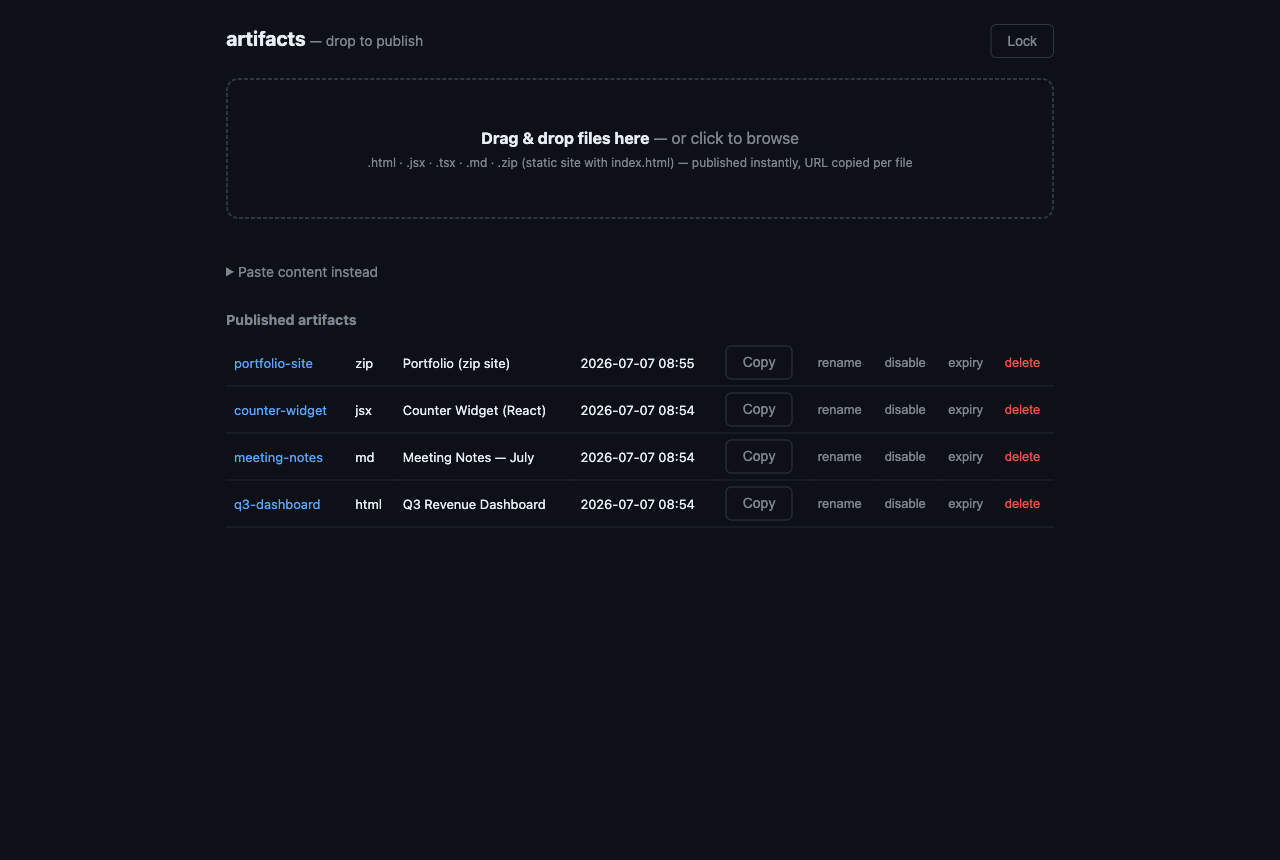
Self-hosted, Claude-style artifact publishing. POST an HTML page, a React component, a Markdown doc, or a whole zipped static site — get back a public, unguessable, non-crawlable URL on your own domain. Built for coding agents (MCP server included) and humans (drag-and-drop web UI included).


Why
AI assistants generate a lot of shareable output — dashboards, prototypes, reports, little apps. Claude's hosted artifacts are great, but the URLs live on someone else's infrastructure. This is the ~600-line self-hosted version:
- One tiny Node service. Express + a handful of deps. No database, no accounts, no build step — artifacts are plain files under /data.
- Agent-native. Built-in MCP server (streamable HTTP), so Claude Code, Codex, or any MCP client can publish with one tool call. Everything is also a single curl.
- Private by default. Random unguessable slugs, noindex everywhere, bearer-token writes, optional expiry.
Features
- Four content types: HTML, JSX/TSX (single React component, rendered client-side via esm.sh — arbitrary npm imports, no build), Markdown (rendered server-side), and zip sites (multi-file static projects with images/CSS/JS).
- MCP server at /mcp — publish, update, rename, disable/enable, set expiry, list, delete.
- Web UI at / — drag-and-drop or paste to publish, manage everything, locked behind your API key.
- Lifecycle controls: rename slugs, disable without deleting (404), auto-expire (expiresAt → 410), delete.
- Non-crawlable: X-Robots-Tag: noindex, nofollow on every response, deny-all robots.txt.
- Zip uploads are validated before anything is stored: index.html required, static-only extension whitelist, traversal/symlink rejection, size and file-count limits.
Quickstart
docker compose (recommended)
git clone https://github.com/kuyazee/artifacts && cd artifacts
ARTIFACTS_API_KEY=$(openssl rand -hex 32) BASE_URL=https://artifacts.example.com docker compose up -d
docker
docker run -d -p 3000:3000 -v artifacts-data:/data \
  -e ARTIFACTS_API_KEY=$(openssl rand -hex 32) \
  -e BASE_URL=https://artifacts.example.com \
  ghcr.io/kuyazee/artifacts:latest
bare node
npm ci
ARTIFACTS_API_KEY=$(openssl rand -hex 32) BASE_URL=https://artifacts.example.com node server.js
Then publish something:
```bash
curl -s -X POST https://artifacts.example.com/api/artifacts \
-H "Authorization: Bearer $ARTIFACTS_API_KEY" \
-H "Content-Type: application/json" \
-d '{"content": "<h1>hello</h1>", "type": "html", "slug": "hello"}'
Sign in to leave a review
Use Google, GitHub, or an email account so ratings stay tied to real people.
No reviews posted yet.



