Aseprite MCP Tools
About
A Python MCP server that gives AI assistants full control over Aseprite for creating pixel art and animated sprites, offering 104 tools across 17 categories.
Details
- License
- MIT
Explore
- 104 tools across 17 categories for full Aseprite control
- Drawing tools: pixels, lines, shapes, fills, gradients
- Animation tools: frames, cels, tweening, onion skin rendering
- Palette management: presets, color ramps, quantization
- Visual feedback: scaled previews, frame diffs, color stats
- Export: PNG, GIF, spritesheets, per-layer/per-tag export
- Raw Lua escape hatch for custom scripting

Setting up with Highlight
This MCP is not yet compatible with Highlight’s one-click setup. However, you can still use it with Highlight by following these steps:
- Download and install Highlight from highlightai.com/download
- Navigate to the plugins tab and select "Add Custom Plugin"
-
Configure the plugin with the settings below
Plugin Name
Aseprite MCP ToolsCommand (node, npx, python, etc.)Please refer to the README for specific instructions on how to obtain API keys or other required environment variables.
- Enable "Start Automatically" if you want the plugin to start when Highlight launches





From the repository
Build and run the Docker image:
docker build -t aseprite-mcp:latest .
docker run -it --rm aseprite-mcp:latest
Or use the provided build scripts:
- Linux/macOS: chmod +x build-docker.sh && ./build-docker.sh
- Windows: .\build-docker.ps1
To have the container install Aseprite via SteamCMD at startup, provide Steam credentials:
Category
Tools
A Python MCP server that gives AI assistants full control over Aseprite for creating pixel art and animated sprites.
104 tools across 17 categories — canvas, drawing, layers, animation, palettes, effects, slices, tilemaps, exports, visual-feedback/analysis tools, and a raw Lua escape hatch. The tool set is designed so an LLM has everything it needs to produce good pixel art, not just primitives: shading ramps with hue shifting, ordered dithering, outlines, retro palette presets with quantization, onion-skin renders, and frame diffing for animation work.
| Category | Tools | Description |
|----------|------:|-------------|
| Canvas | 6 | Create sprites, manage layers/frames, set the active state |
| Drawing | 14 | Pixels, lines, rectangles, circles, ellipses, polygons, paths, fills, gradients |
| Layers | 7 | Delete, rename, duplicate, reorder, blend modes, merge, flatten |
| Selection & Regions | 4 | Move, copy, and erase rectangular regions or colors |
| Effects | 5 | Outlines, color replacement, HSL adjustment, ordered dithering |
| Animation | 24 | Frames, cels, tags, tweening with easing, propagation |
| Palette | 8 | Get/set palettes, retro presets, color ramps, quantization, color modes |
| Transform | 4 | Flip, rotate, resize, crop |
| Slices | 5 | Named regions, 9-patch centers, pivot points |
| Tilemap | 5 | Tilemap layers, tileset editing, tile placement |
| Export & Import | 7 | PNG, GIF, sprite sheets, per-layer/per-tag export, image import |
| Inspection | 3 | Read pixels and sprite metadata |
| Analysis & Visual Feedback | 3 | Onion-skin renders, frame diffing, color statistics |
| Quality | 4 | Validate and sanitize animation consistency |
| Scene | 1 | Copy layers between sprite files |
| Preview & Guide | 3 | Local HTTP preview server, workflow guide |
| Scripting | 1 | Raw Lua escape hatch for anything not covered above |
Claude Desktop / Cursor
Paste into your MCP client config file to install this server.
{
    "mcpServers": {
        "aseprite mcp tools": {
            "aseprite-mcp": {
                "command": "docker",
                "args": [
                    "build",
                    "-t",
                    "aseprite-mcp:latest",
                    "."
                ]
            }
        }
    }
}McpServers
{
"aseprite-mcp": {
"command": "docker",
"args": [
"build",
"-t",
"aseprite-mcp:latest",
"."
]
}
}A Python MCP server that gives AI assistants full control over Aseprite for creating pixel art and animated sprites.
104 tools across 17 categories — canvas, drawing, layers, animation, palettes, effects, slices, tilemaps, exports, visual-feedback/analysis tools, and a raw Lua escape hatch. The tool set is designed so an LLM has everything it needs to produce good pixel art, not just primitives: shading ramps with hue shifting, ordered dithering, outlines, retro palette presets with quantization, onion-skin renders, and frame diffing for animation work.
Example: a swordsman, drawn and animated by Claude
<table>
<tr>
<td align="center">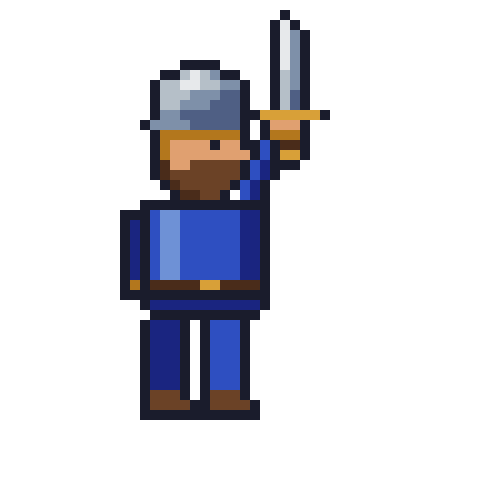 </td>
</td>
<td align="center">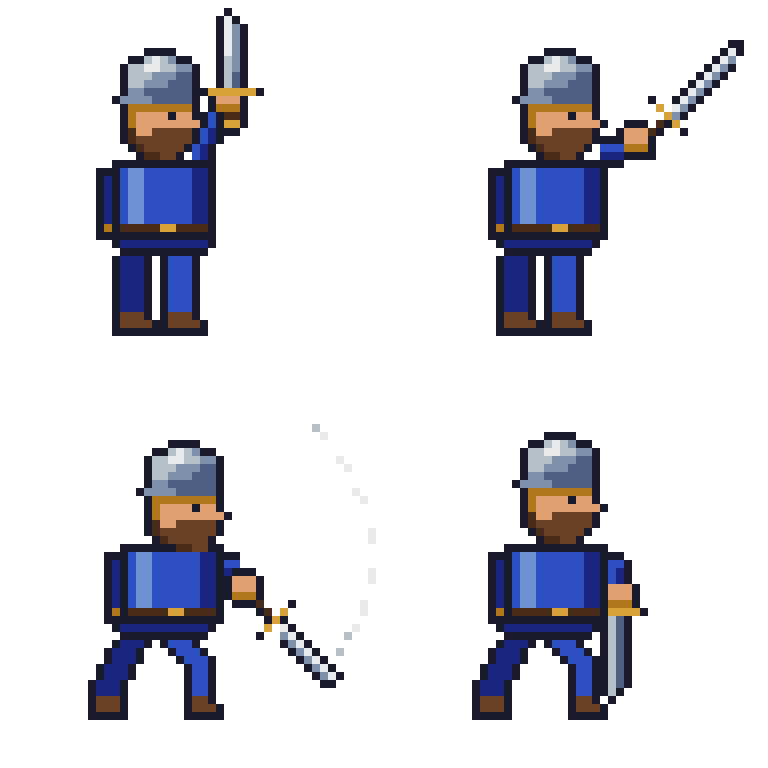 </td>
</td>
</tr>
<tr>
<td align="center"><sub><b>Task 1</b> — <em>"Draw me a pixel art of a swordsman."</em><br>32×32 still, exported at 10×.</sub></td>
<td align="center"><sub><b>Task 2</b> — <em>"…a sword slash attack sequence, from windup to follow-through."</em><br>4-frame animation, exported with <code>export_tag</code>.</sub></td>
</tr>
<tr>
<td align="center" colspan="2">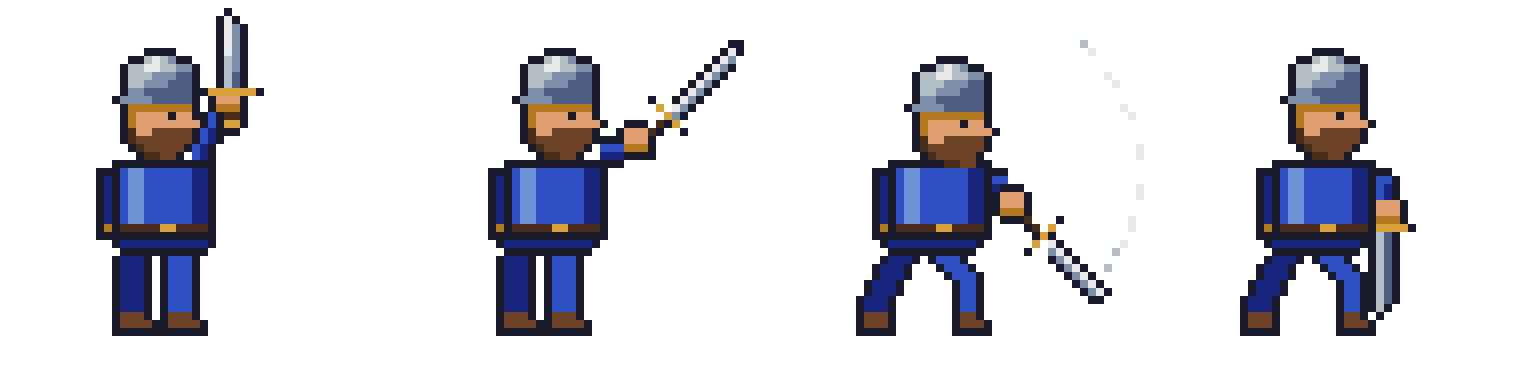 </td>
</td>
</tr>
<tr>
<td align="center" colspan="2"><sub>The same slash as a spritesheet (<code>export_spritesheet</code>): windup → extension → swing → follow-through.</sub></td>
</tr>
</table>
Both were created end-to-end by Claude Fable 5 through this server's MCP tools — drawing, checking its own work with scaled export_frame previews and render_onion_skin, then exporting. The tasks recreate the benchmark from Draw Me a Swordsman by Lj Miranda, whose findings inspired this server's expanded toolset.
Tool Categories
| Category | Tools | Description |
|----------|------:|-------------|
| Canvas | 6 | Create sprites, manage layers/frames, set the active state |
| Drawing | 14 | Pixels, lines, rectangles, circles, ellipses, polygons, paths, fills, gradients |
| Layers | 7 | Delete, rename, duplicate, reorder, blend modes, merge, flatten |
| Selection & Regions | 4 | Move, copy, and erase rectangular regions or colors |
| Effects | 5 | Outlines, color replacement, HSL adjustment, ordered dithering |
| Animation | 24 | Frames, cels, tags, tweening with easing, propagation |
| Palette | 8 | Get/set palettes, retro presets, color ramps, quantization, color modes |
| Transform | 4 | Flip, rotate, resize, crop |
| Slices | 5 | Named regions, 9-patch centers, pivot points |
| Tilemap | 5 | Tilemap layers, tileset editing, tile placement |
| Export & Import | 7 | PNG, GIF, sprite sheets, per-layer/per-tag export, image import |
| Inspection | 3 | Read pixels and sprite metadata |
| Analysis & Visual Feedback | 3 | Onion-skin renders, frame diffing, color statistics |
| Quality | 4 | Validate and sanitize animation consistency |
| Scene | 1 | Copy layers between sprite files |
| Preview & Guide | 3 | Local HTTP preview server, workflow guide |
| Scripting | 1 | Raw Lua escape hatch for anything not covered above |
Canvas
| Tool | Description |
|------|-------------|
| create_canvas | Create a new sprite with the given dimensions |
| add_layer | Add a new layer, optionally inside a named group |
| add_group | Add a new (optionally nested) group layer |
| add_frame | Append a new frame |
| set_frame | Set the active frame |
| set_frame_duration | Set one frame's duration in ms |
| set_layer | Set the active layer (optionally creating it) |
Drawing
All _at variants target a specific layer/frame and can create the cel on demand. Coordinates are sprite-global.
| Tool | Description |
|------|-------------|
| draw_pixels | Plot individual pixels with per-pixel colors |
| draw_pixels_at | Plot pixels on a specific layer/frame |
| draw_line / draw_line_at | Lines with thickness |
| draw_rectangle / draw_rectangle_at | Outlined or filled rectangles |
| draw_circle / draw_circle_at | Outlined or filled circles |
| draw_ellipse_at | Outlined or filled ellipses with separate x/y radii |
| draw_polygon | Outlined or filled polygons from a point list |
| draw_path | Polyline through a point list with thickness |
| fill_area / fill_area_at | Paint-bucket flood fill |
| apply_gradient_rect | Smooth linear gradient fill in a rectangle |
Layers
| Tool | Description |
|------|-------------|
| delete_layer | Delete a layer by name |
| rename_layer | Rename a layer |
| duplicate_layer | Duplicate a layer with all cels, opacity, and blend mode, optionally into a group |
| reorder_layer | Move a layer to a position in the stack |
| set_layer_blend_mode | Set blend mode (multiply, screen, overlay, ... 19 modes) |
| merge_layer_down | Merge a layer into the one below it |
| flatten_sprite | Flatten all layers into one |
Selection & Regions
| Tool | Description |
|------|-------------|
| move_region | Cut a rectangle of pixels and paste it elsewhere |
| copy_region | Copy a rectangle to another position, layer, or frame |
| erase_region | Make a rectangle transparent |
| erase_color | Magic-eraser: make all pixels of a color transparent (with tolerance) |
Effects
The pixel-art toolbox: clean outlines, palette-respecting blends, and shading variants.
| Tool | Description |
|------|-------------|
| outline_cel | Add a 1px outline around all opaque pixels |
| replace_color | Replace one color with another (with tolerance), preserving alpha |
| adjust_hsl | Shift hue/saturation/lightness of a cel — palette swaps, night scenes, shadows |
| apply_dither_gradient | Two-color gradient using Bayer 4×4 ordered dithering |
| apply_dither_pattern | Uniform dithered mix of two colors at a given density |
Animation
| Tool | Description |
|------|-------------|
| add_frames | Append N frames with optional duration |
| delete_frame | Delete a frame |
| set_frame_duration_all | Set every frame's duration |
| duplicate_frame_range | Duplicate a frame range N times |
| copy_frame / propagate_frame_to_range | Copy all cels of a frame to other frames |
| create_cel / clear_cel / copy_cel | Cel lifecycle on a layer/frame |
| propagate_cels | Copy selected layers' cels across a frame range |
| set_cel_position | Place a cel at x,y |
| set_cel_opacity | Set a single cel's opacity |
| offset_cel_positions | Shift cels by a delta across frames |
| tween_cel_positions | Linear position tween across frames |
| tween_cel_positions_eased | Position tween with easing (ease_in/out, smoothstep) |
| tween_cel_opacity_eased | Opacity tween with easing |
| tween_cel_scale_eased | Scale tween with easing and anchor |
| oscillate_cel_positions | Sine-wave motion (bobbing, breathing, hovering) |
| set_tag / delete_tag | Animation tags with direction (forward/reverse/pingpong) |
| set_layer_visibility / set_layer_opacity | Layer-level visibility and opacity |
| set_onion_skin | Configure onion-skin UI prefs (see render_onion_skin for batch use) |
| get_sprite_info | Sprite metadata: size, layers, frames, durations, tags |
Palette
| Tool | Description |
|------|-------------|
| get_palette | Read the palette as hex colors |
| set_palette | Set the palette from a list of hex colors |
| list_palette_presets | List built-in retro palettes |
| apply_palette_preset | Apply a preset: gameboy, pico8, c64, cga, dawnbringer16, dawnbringer32, grayscale_4, monochrome |
| generate_color_ramp | Build a dark→light shading ramp with hue shifting from a base color |
| quantize_to_palette | Snap every pixel to the nearest palette color |
| remap_colors_in_cel_range | Remap specific colors across a frame range |
| set_color_mode | Convert between RGB, grayscale, and indexed |
Transform
| Tool | Description |
|------|-------------|
| flip_layer | Flip a cel horizontally or vertically |
| rotate_layer | Rotate a cel 90/180/270° |
| resize_canvas | Scale the sprite to new dimensions |
| crop_canvas | Crop to a rectangle |
Slices
| Tool | Description |
|------|-------------|
| create_slice | Create a named rectangular region |
| set_slice_center | Set the 9-patch stretchable center |
| set_slice_pivot | Set the pivot point |
| list_slices | List all slices with bounds, centers, pivots as JSON |
| delete_slice | Delete a slice |
Tilemap
| Tool | Description |
|------|-------------|
| create_tilemap_layer | Add a tilemap layer with its own tileset and tile grid |
| draw_on_tile | Paint pixels into a tileset tile (auto-appends new tiles) |
| set_tiles | Place tiles on the map by grid position |
| get_tile_at | Read which tile occupies a grid cell |
| get_tilemap_info | Tile size, tile count, and map dimensions as JSON |
Export & Import
| Tool | Description |
|------|-------------|
| export_sprite | Export to PNG, GIF, JPG, ... |
| export_frame | Export one frame as PNG with integer upscaling — the core visual-feedback loop: draw, export at 8×, look, iterate |
| export_spritesheet | Sprite sheet (horizontal/vertical/rows/columns/packed) with optional JSON metadata and per-tag filtering |
| export_layers | One PNG per layer |
| export_tag | Export an animation tag as GIF or PNG sequence |
| import_image_as_layer | Import a PNG into a layer (references, premade parts) |
| copy_sprite | Duplicate the .aseprite file |
Inspection
| Tool | Description |
|------|-------------|
| get_pixel_color | Read one pixel's RGBA |
| get_pixels_rect | Read a rectangle of pixels as JSON |
| get_sprite_info | Sprite metadata (also listed under Animation) |
Analysis & Visual Feedback
Batch-mode equivalents of what a human artist gets from the Aseprite UI.
| Tool | Description |
|------|-------------|
| render_onion_skin | Render a frame over translucent ghosts of neighboring frames — check motion continuity without opening Aseprite |
| compare_frames | Diff two frames: changed pixel count, percentage, bounding box |
| get_color_stats | Color histogram of a frame — catches palette drift and near-duplicate colors |
Quality
| Tool | Description |
|------|-------------|
| ensure_layers_present | Create missing cels for layers across a frame range |
| validate_scene | Report missing layers/cels as JSON |
| audit_animation | Audit frames for overlaps and out-of-range layer activity |
| animation_sanitize | Normalize layer order, coverage, and overlaps |
Scene
| Tool | Description |
|------|-------------|
| copy_layers_between_sprites | Copy layers by name from one .aseprite file to another |
Preview & Guide
| Tool | Description |
|------|-------------|
| start_preview_server / stop_preview_server | Serve exported files over local HTTP |
| animation_workflow_guide | Returns a step-by-step workflow guide for the LLM |
Scripting
| Tool | Description |
|------|-------------|
| run_lua_script | Execute arbitrary Aseprite Lua (API docs) in batch mode. The escape hatch when no dedicated tool fits: one script can batch many operations into a single Aseprite launch. Remember to spr:saveAs(spr.filename) and print() your results. ⚠️ Runs unrestricted code on the host — only pass scripts you trust. |
Recommended Workflow for LLMs
1. Plan the palette first: generate_color_ramp for each material (skin, armor, blade), or apply_palette_preset for a retro look.
2. Build in layers: background / body / equipment / effects, so parts can be animated and edited independently.
3. Draw coarse to fine: silhouette with draw_rectangle_at / draw_ellipse_at / fill_area_at, then refine with draw_pixels_at.
4. Look at your work: export_frame at 8×, inspect, fix, repeat. Use get_color_stats to keep the palette tight.
5. Shade with intent: adjust_hsl for shadow layers, apply_dither_gradient for blends, outline_cel for readability.
6. Animate with the cel tools: propagate_cels, then tween_cel_positions_eased / oscillate_cel_positions; verify with render_onion_skin and compare_frames; export with export_tag.
Docker Usage
Quick Start
Build and run the Docker image:
docker build -t aseprite-mcp:latest .

docker run -it --rm aseprite-mcp:latest
Or use the provided build scripts:
- Linux/macOS: chmod +x build-docker.sh && ./build-docker.sh
- Windows: .\build-docker.ps1
Using Docker Compose
```bashSign in to leave a review
Use Google, GitHub, or an email account so ratings stay tied to real people.
No reviews posted yet.





