
Assisted Service MCP Server
About
MCP server for interracting with the OpenShift Assisted Installer API
Explore
- List, create, and manage assisted installer clusters
- Retrieve detailed cluster and infraenv information
- Monitor cluster and host events
- Set cluster VIPs and host roles
- List OpenShift versions and operator bundles
infraenv_info - Get detailed information about the assisted installer infra env with the given ID. Contains data like ISO download URL and infra env metadata.
infraenv_id: Infrastructure environment ID (string, required)
List all clusters: "Show me all my clusters"
Get cluster details: "Give me detailed information about cluster abc123"
Create a cluster: "Create a new cluster named 'my-cluster' with OpenShift 4.14 and base domain 'example.com'"
Check cluster events: "What events happened on cluster abc123?"
- Install a cluster: "Start the installation for cluster abc123"
The MCP server provides the following tools for interacting with the OpenShift Assisted Installer:
MCP server for interacting with the OpenShift assisted installer API.
Diagnose cluster failures and find out how to fix them.
Try it out:
1. Clone the repo:
git clone [email protected]:carbonin/assisted-service-mcp.git
2. Get your OpenShift API token from https://cloud.redhat.com/openshift/token
3. The server is started and configured differently depending on what transport you want to use
For STDIO:
In VSCode for example:
   "mcp": {

        "servers": {

            "AssistedService": {

                "command": "uv",

                "args": [

                    "--directory",

                    "/path/to/assisted-service-mcp",

                    "run",

                    "mcp",

                    "run",

                    "/path/to/assisted-service-mcp/server.py"

                ],

                "env": {

                    "OFFLINE_TOKEN": <your token>

                }

            }

        }

    }
For SSE (recommended):
Start the server in a terminal:
OFFLINE_TOKEN=<your token> uv run server.py
Configure the server in the client:
    "assisted-sse": {
      "transport": "sse",
      "url": "http://localhost:8000/sse"
    }
Providing the Offline Token via Request Header
If you do not set the OFFLINE_TOKEN environment variable, you can provide the token as a request header.
When configuring your MCP client, add the OCM-Offline-Token header:
    "assisted-sse": {
      "transport": "sse",
      "url": "http://localhost:8000/sse",
      "headers": {
        "OCM-Offline-Token": "<your token>"
      }
    }
4. Ask about your clusters:
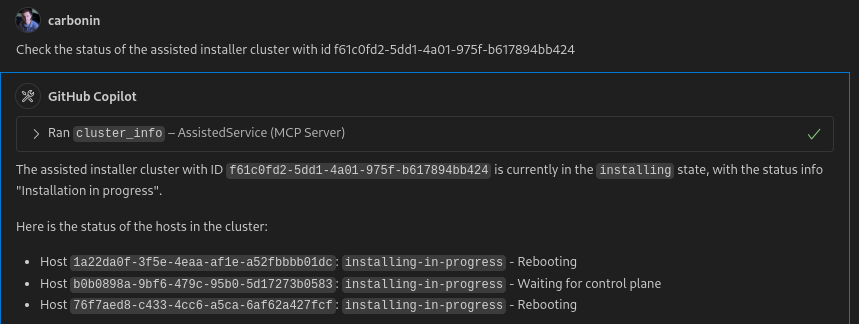
Available Tools
The MCP server provides the following tools for interacting with the OpenShift Assisted Installer:
Cluster Management
list_clusters - Lists all current user assisted installer clusters. Returns minimal cluster information.
cluster_info - Get detailed information about the assisted installer cluster with the given ID
cluster_id: Cluster ID (string, required)
create_cluster - Create a new assisted installer cluster and infraenv. Set single_node to true only for single node clusters or when high availability is not needed. Returns cluster ID and infraenv ID as JSON.
name: Cluster name (string, required)
version: OpenShift version (string, required)
base_domain: Base domain for the cluster (string, required)
single_node: Whether to create a single node cluster (boolean, required)
install_cluster - Trigger installation for the assisted installer cluster with the given ID
cluster_id: Cluster ID (string, required)
set_cluster_vips - Set the API and ingress virtual IP addresses (VIPs) for the cluster
cluster_id: Cluster ID (string, required)
api_vip: API virtual IP address (string, required)
ingress_vip: Ingress virtual IP address (string, required)
Events and Monitoring
cluster_events - Get the events related to a cluster with the given ID
cluster_id: Cluster ID (string, required)
host_events - Get the events related to a specific host within a cluster
cluster_id: Cluster ID (string, required)
host_id: Host ID (string, required)
Infrastructure Environment
infraenv_info - Get detailed information about the assisted installer infra env with the given ID. Contains data like ISO download URL and infra env metadata.
infraenv_id: Infrastructure environment ID (string, required)
Host Management
set_host_role - Update a host to a specific role. Role options are: 'auto-assign', 'master', 'arbiter', 'worker'
host_id: Host ID (string, required)
infraenv_id: Infrastructure environment ID (string, required)
role: Host role (string, required)
OpenShift Versions and Operators
list_versions - Lists the available OpenShift versions for installation with the assisted installer
list_operator_bundles - Lists the operator bundles that can be optionally added to a cluster during installation
add_operator_bundle_to_cluster - Request an operator bundle to be installed with the given cluster
cluster_id: Cluster ID (string, required)
bundle_name: Operator bundle name (string, required)
Usage Examples
List all clusters: "Show me all my clusters"
Get cluster details: "Give me detailed information about cluster abc123"
Create a cluster: "Create a new cluster named 'my-cluster' with OpenShift 4.14 and base domain 'example.com'"
Check cluster events: "What events happened on cluster abc123?"
- Install a cluster: "Start the installation for cluster abc123"
Sign in to leave a review
Use Google, GitHub, or an email account so ratings stay tied to real people.
No reviews posted yet.



