
BeeMCP - A Bee MCP Server
About
BeeMCP: an unofficial Model Context Protocol (MCP) server that connects your Bee wearable lifelogger to AI via the Model Context Protocol
Details
- License
- MIT
Explore
- List, get, create, update, and delete user facts.
- List, get, create, update, and delete to‑dos (reminders).
- List conversations and retrieve full conversation details.
- Query location history by time range (today, week, month, or custom).
- Provides MCP resources for direct data access (e.g., bee://conversations, bee://locations).

Setting up with Highlight
This MCP is not yet compatible with Highlight’s one-click setup. However, you can still use it with Highlight by following these steps:
- Download and install Highlight from highlightai.com/download
- Navigate to the plugins tab and select "Add Custom Plugin"
-
Configure the plugin with the settings below
Plugin Name
BeeMCP - A Bee MCP ServerCommand (node, npx, python, etc.)Please refer to the README for specific instructions on how to obtain API keys or other required environment variables.
- Enable "Start Automatically" if you want the plugin to start when Highlight launches





From the repository
Prerequisites
1. Python: Version 3.10 or higher.
2. Bee.computer API Key: You need an API key from your Bee account settings.
These are the actions the LLM can request from beemcp.
Claude Desktop / Cursor
Paste into your MCP client config file to install this server.
{
    "mcpServers": {
        "beemcp - a bee mcp server": {
            "beemcp": {
                "command": "uvx",
                "args": [
                    "beemcp"
                ]
            }
        }
    }
}McpServers
{
    "beemcp": {
        "command": "uvx",
        "args": [
            "beemcp"
        ]
    }
}

Unofficial Model Context Protocol (MCP) server for interacting with your Bee wearable lifelogging data. More context on my blog.
This server acts as a bridge, allowing Large Language Models (LLMs) like Claude or custom AI agents to access and interact with your personal data stored in Bee, including conversations, facts, to-dos, and location history.
Disclaimer: This is an unofficial project and is not affiliated with Bee. Use it at your own risk. Ensure you understand the security implications of granting AI access to your personal data via the API key.
Core Concept
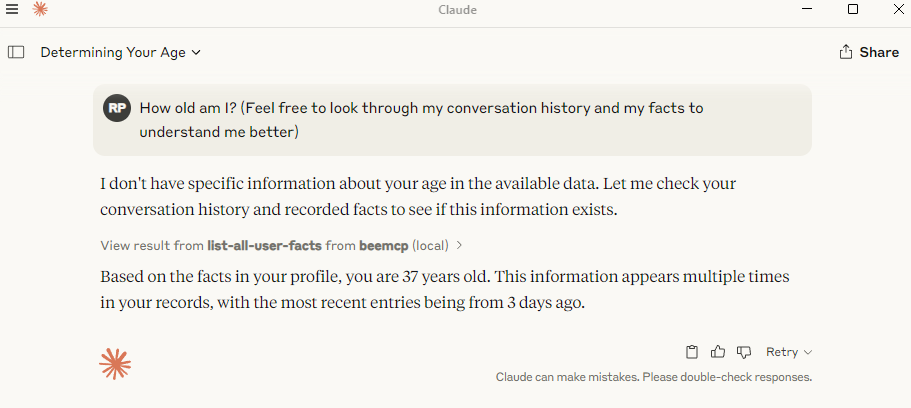
Bee.computer helps you capture moments from your life (conversations, places visited, notes). beemcp makes this data available to your AI assistant through the Model Context Protocol. This means you can ask your AI questions like:
"What important things did I discuss last week?"
"Remind me about Brad's dietary preferences."
"Where was I last Tuesday afternoon?"
"Add 'Book flight tickets' to my reminders."
The AI, using beemcp, can securely fetch or modify this information from your Bee.computer account.
Prerequisites
1. Python: Version 3.10 or higher.
2. Bee.computer API Key: You need an API key from your Bee account settings.
Installation
You can install and run beemcp using uv (recommended) or pip.
Using uv (recommended)
uv is a fast Python package installer and resolver. If you have uv installed, you don't need to install beemcp separately. You can run it directly using uvx:
```bash
Sign in to leave a review
Use Google, GitHub, or an email account so ratings stay tied to real people.
No reviews posted yet.




