
Bluetooth Low Energy (BLE) MCP server -- scan, connect and interact with BLE peripherals
About
Mac OS X command line BLE tool and MCP server
Details
- License
- BSD-2-Clause
Explore

Setting up with Highlight
This MCP is not yet compatible with Highlight’s one-click setup. However, you can still use it with Highlight by following these steps:
- Download and install Highlight from highlightai.com/download
- Navigate to the plugins tab and select "Add Custom Plugin"
-
Configure the plugin with the settings below
Plugin Name
Bluetooth Low Energy (BLE) MCP server -- scan, connect and interact with BLE peripheralsCommand (node, npx, python, etc.)Please refer to the README for specific instructions on how to obtain API keys or other required environment variables.
- Enable "Start Automatically" if you want the plugin to start when Highlight launches





From the repository
- macOS 14 (Sonoma) or later
- Xcode 16 or later (Swift 6.0+ toolchain)
The MCP server (the blew mcp subcommand) depends on the MCP swift-sdk, which requires the Swift 6.1 toolchain (Xcode 16.3+). To keep blew building on older toolchains, MCP support is compiled in conditionally: when built with Swift 6.1 or newer the mcp subcommand is available; when built with Swift 6.0.x (Xcode 16.0–16.2) the MCP server is omitted and every other command works unchanged. No flags are needed — the detection happens automatically in Package.swift.
% blew periph adv --config device.json
% blew periph adv -n "Override Name" --config device.json
Example config files are provided in the Examples/ directory:
| File | Description |
|------|-------------|
| health-thermometer.json | Health Thermometer (1809) — indicate temperature measurement (2A1C), read temperature type (2A1D), read/write/notify measurement interval (2A21) |
| environmental-sensing.json | Environmental Sensing (181A) — read/notify temperature (2A6E), humidity (2A6F), and pressure (2A6D) |
| blood-pressure.json | Blood Pressure (1810) — indicate measurement (2A35), read feature flags (2A49) |
| custom-sensor.json | Fully custom vendor service with 128-bit UUIDs — read/notify value, read/write config register, write-only command endpoint |
Output (text mode):
Advertising "My Sensor" [180F (Battery Service)]
Service 180F (Battery Service)
+-- 2A19 (Battery Level) [read, notify]
[12:34:56] central A1B2C3D4 connected
[12:34:56] read 2A19 (Battery Level) by A1B2C3D4
[12:34:57] subscribe 2A19 (Battery Level) by A1B2C3D4
[12:35:01] write 2A19 (Battery Level) by A1B2C3D4 <- 2a
^C
Stopped advertising.
Output (kv mode):
event=connected ts=12:34:56 central=A1B2C3D4-...
event=read ts=12:34:56 central=A1B2C3D4-... char=2A19
event=subscribe ts=12:34:57 central=A1B2C3D4-... char=2A19
event=write ts=12:35:01 central=A1B2C3D4-... char=2A19 value=2a
Cursor (.cursor/mcp.json):
{
"mcpServers": {
"blew": {
"command": "/path/to/blew",
"args": ["mcp"]
}
}
}
Claude Desktop (claude_desktop_config.json):
{
"mcpServers": {
"blew": {
"command": "/path/to/blew",
"args": ["mcp"]
}
}
}
```
ble_scan
Scan for nearby BLE devices
ble_connect
Connect to a device by ID, name, or filters
ble_disconnect
Disconnect from current device
ble_status
Show connection status
ble_gatt_services
List GATT services
ble_gatt_tree
Full GATT tree with optional values
ble_gatt_chars
List characteristics of a service
ble_gatt_descriptors
List descriptors of a characteristic
ble_gatt_info
Look up Bluetooth SIG characteristic spec (no device needed)
ble_read
Read a characteristic value
ble_write
Write to a characteristic
ble_subscribe
Collect notifications (returns batch)
ble_periph_advertise
Start advertising as a peripheral
ble_periph_clone
Clone a real device's GATT structure
ble_periph_stop
Stop advertising
ble_periph_set
Update a peripheral characteristic value
ble_periph_notify
Update value and notify subscribers
| Tool | Description |
|------|-------------|
| ble_scan | Scan for nearby BLE devices |
| ble_connect | Connect to a device by ID, name, or filters |
| ble_disconnect | Disconnect from current device |
| ble_status | Show connection status |
| ble_gatt_services | List GATT services |
| ble_gatt_tree | Full GATT tree with optional values |
| ble_gatt_chars | List characteristics of a service |
| ble_gatt_descriptors | List descriptors of a characteristic |
| ble_gatt_info | Look up Bluetooth SIG characteristic spec (no device needed) |
| ble_read | Read a characteristic value |
| ble_write | Write to a characteristic |
| ble_subscribe | Collect notifications (returns batch) |
| ble_periph_advertise | Start advertising as a peripheral |
| ble_periph_clone | Clone a real device's GATT structure |
| ble_periph_stop | Stop advertising |
| ble_periph_set | Update a peripheral characteristic value |
| ble_periph_notify | Update value and notify subscribers |
| `ble_periph
Claude Desktop / Cursor
Paste into your MCP client config file to install this server.
{
    "mcpServers": {
        "bluetooth low energy (ble) mcp server -- scan, connect and interact with ble peripherals": {
            "blew": {
                "command": "/path/to/blew",
                "args": [
                    "mcp"
                ]
            }
        }
    }
}McpServers
{
    "blew": {
        "command": "/path/to/blew",
        "args": [
            "mcp"
        ]
    }
}
blew -- BLE scanner and CLI tool for Mac OS X
Stop fumbling with GUI apps to debug Bluetooth Low Energy devices. blew gives you full BLE control from the macOS command line: scan the airwaves, drill into any device's GATT tree, read and write characteristics, stream live notifications, and even spin up a virtual peripheral that other devices can connect to.
Why blew
- One tool, zero ceremony. Scan, connect, inspect, read, write, subscribe -- each is a single command. Auto-connect means you never have to manually pair before doing real work.
- Interactive when you want it. Launch the REPL for an exploratory session with tab completion, persistent history, and background subscriptions that print while you keep typing.
- Scriptable when you need it. Chain commands with exec, pipe machine-readable kv output into awk or a log file, and use deterministic exit codes in CI or monitoring scripts.
- Full GATT visibility. Print the service/characteristic tree of any device in one shot. Read all values inline. Look up any Bluetooth SIG characteristic's field-level spec without even connecting.
- Peripheral mode. Turn your Mac into a virtual BLE device. Define a GATT server from a JSON config, or clone a real device's entire service tree and replay it.
- Human-readable by default. Standard Bluetooth SIG UUIDs are resolved to their names everywhere -- scan results, GATT trees, notifications -- sourced from the official Bluetooth SIG database.
Modes of operation
- Command mode -- run a single command, then exit: blew [global-options] <command> [command-options]
- Interactive REPL -- run blew with no command for a readline-style shell with history and tab completion
- Script mode -- run a semicolon-separated sequence sharing one connection: blew exec "connect -n Sensor; gatt tree; read -f uint8 2A19"
- MCP server mode -- expose all BLE operations as MCP tools for AI agents: blew mcp
> Requires macOS 13+ and Bluetooth permission.
Things you can do
Clone a real device and impersonate it. Walk up to a heart rate monitor, clone its full GATT tree, and your Mac starts advertising as that device. Other apps can connect to the clone as if it were the real thing:
% blew periph clone -n "Heart Rate Monitor" --save hr.json
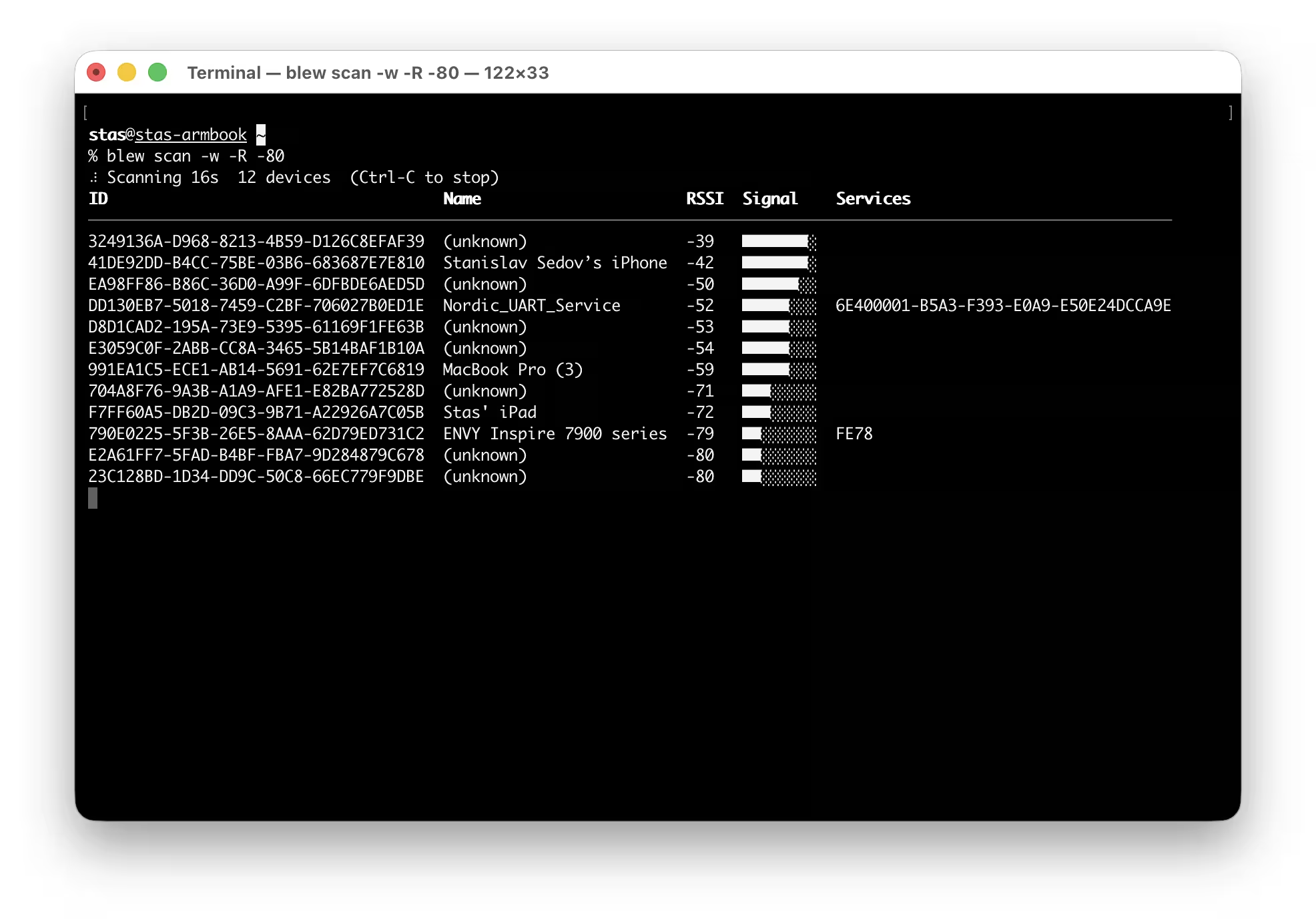
Watch the BLE airwaves live. See every device around you with signal-strength bars, updating in real time. Filter by name, service, or signal floor to zero in on what you need in a crowded venue:
% blew scan -w -R -70
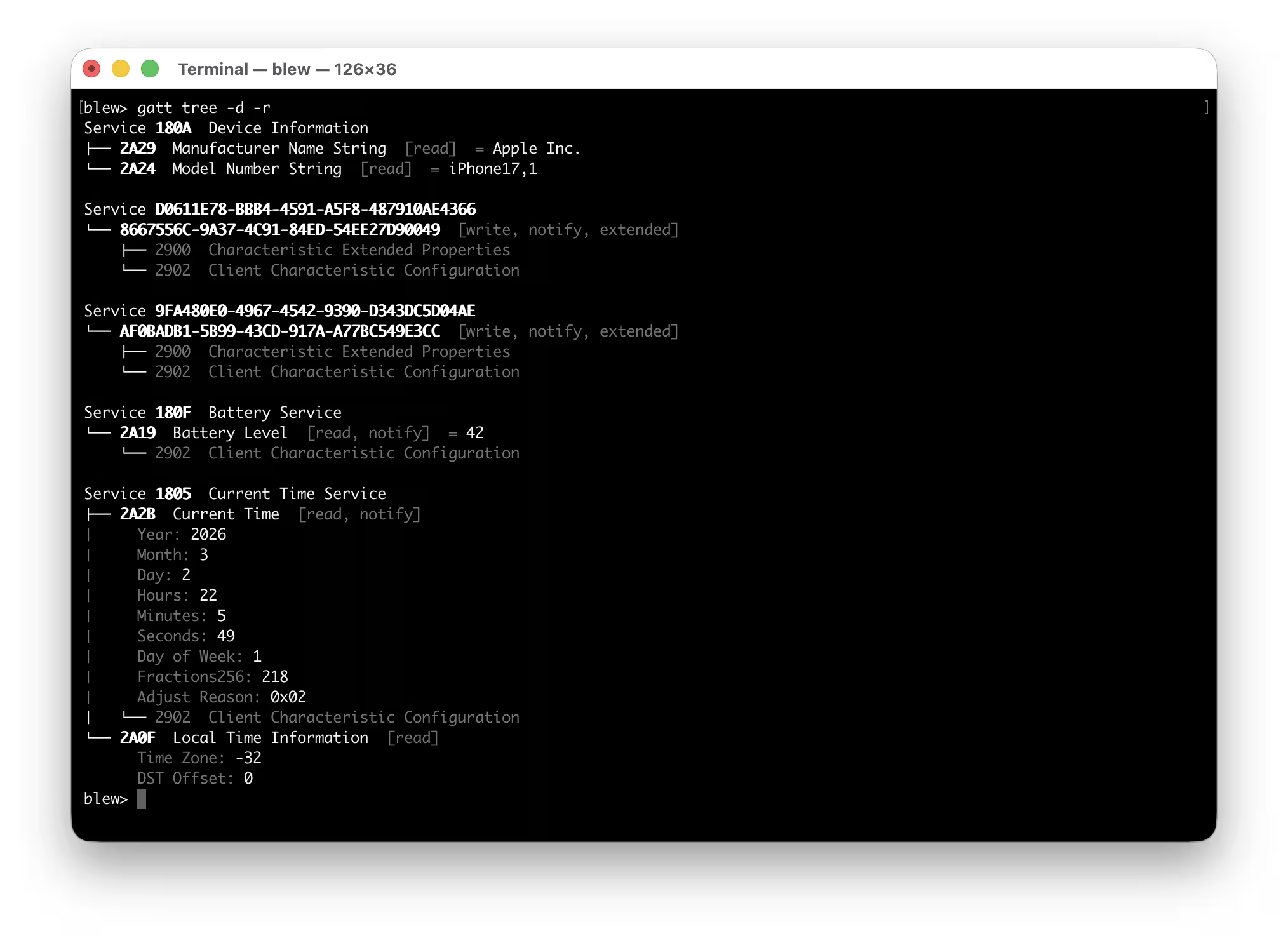
X-ray a device in one shot. Connect, discover all services, read every readable characteristic, and print the whole thing as a tree, including names, properties, descriptors and live values:
% blew -n "Thingy" gatt tree -dr
Look up any Bluetooth SIG characteristic without a device. Instantly see the field-level structure of any standard characteristic, like byte layout, types, conditional fields:
% blew gatt info 2A37 # Heart Rate Measurement spec
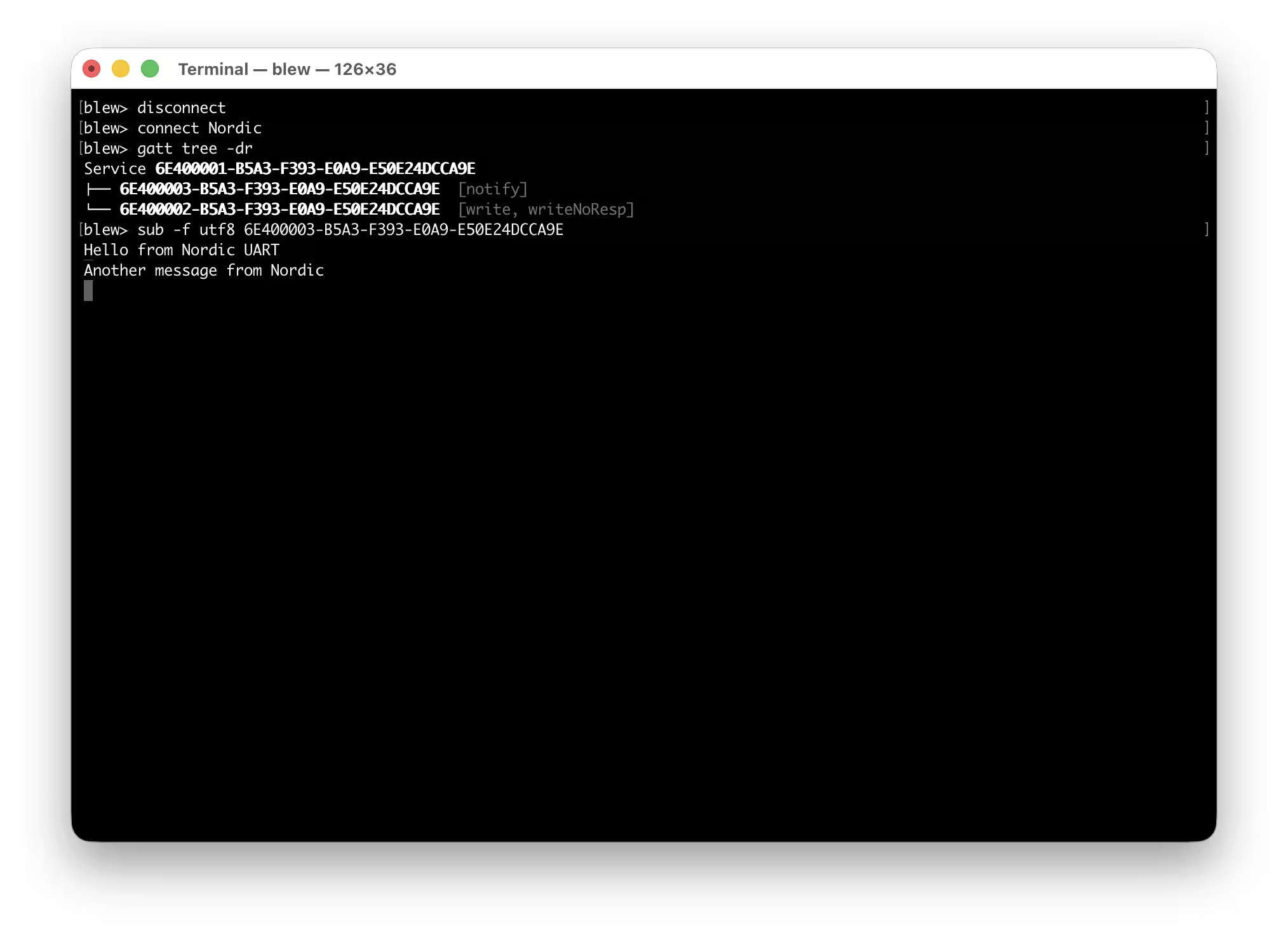
Stream sensor data straight to a log. Subscribe to a characteristic, format values as key-value pairs, and pipe to a file or another tool. Runs headless, exits cleanly on timeout:
% blew -o kv sub -n "Sensor" -f uint16le -d 3600 fff1 >> hourly.log
Spin up a virtual BLE device from a JSON file. Define services, characteristics, properties, and initial values in a config file and start advertising in one command:
% blew periph adv --config health-thermometer.json
Run a multi-step test sequence as a one-liner. Connect, inspect, read, write, wait, read again or subscribe to notifications as a single command:
% blew exec -k "connect -n Sensor; gatt tree; write -f uint8 fff2 01; sleep 2; read -f uint16le fff1"
---
Installation
Homebrew
brew install stass/tap/blew
Requirements
- macOS 14 (Sonoma) or later
- Xcode 16 or later (Swift 6.0+ toolchain)
The MCP server (the blew mcp subcommand) depends on the MCP swift-sdk, which requires the Swift 6.1 toolchain (Xcode 16.3+). To keep blew building on older toolchains, MCP support is compiled in conditionally: when built with Swift 6.1 or newer the mcp subcommand is available; when built with Swift 6.0.x (Xcode 16.0–16.2) the MCP server is omitted and every other command works unchanged. No flags are needed — the detection happens automatically in Package.swift.
Build from source
git clone --recurse-submodules https://github.com/stass/blew.git
swift build -c release
cp .build/release/blew /usr/local/bin/blew
--recurse-submodules is required — the Bluetooth SIG name and characteristic databases are included as git submodules under Vendor/. The Swift build generates all data files automatically from the submodule data.
On first run, macOS will prompt for Bluetooth permission. Grant it in System Settings → Privacy & Security → Bluetooth.
---
Quick start
```sh
Sign in to leave a review
Use Google, GitHub, or an email account so ratings stay tied to real people.
No reviews posted yet.



