
BundlerMCP
About
A Model Context Protocol (MCP) server enabling AI agents to query information about gems in a Ruby project's Gemfile, including source code and metadata.
Details
- License
- MIT
Explore
- Lists all bundled Ruby gems with versions, descriptions, and paths
- Retrieves detailed information about a specific gem
- Provides top-level documentation locations (e.g., README, CHANGELOG)
- Supports logging for troubleshooting via environment variable
- Built on the Model Context Protocol for AI agent integration

Setting up with Highlight
This MCP is not yet compatible with Highlight’s one-click setup. However, you can still use it with Highlight by following these steps:
- Download and install Highlight from highlightai.com/download
- Navigate to the plugins tab and select "Add Custom Plugin"
-
Configure the plugin with the settings below
Plugin Name
BundlerMCPCommand (node, npx, python, etc.)Please refer to the README for specific instructions on how to obtain API keys or other required environment variables.
- Enable "Start Automatically" if you want the plugin to start when Highlight launches





From the repository
Install the gem and add to the application's Gemfile by executing:
bundle add bundler_mcp --group=development
- BUNDLE_GEMFILE: Used by Bundler to locate your Gemfile. If you use the binstub method described in the Usage section, this is usually not needed.
- BUNDLER_MCP_LOG_FILE: Path to log file. Useful for troubleshooting (defaults to no logging)
npx @modelcontextprotocol/inspector ./bin/bundler_mcp
The server provides two tools for AI agents:
Claude Desktop / Cursor
Paste into your MCP client config file to install this server.
{
    "mcpServers": {
        "bundlermcp": {
            "bundler_mcp": {
                "command": "npx",
                "args": [
                    "@modelcontextprotocol/inspector",
                    "./bin/bundler_mcp"
                ]
            }
        }
    }
}McpServers
{
    "bundler_mcp": {
        "command": "npx",
        "args": [
            "@modelcontextprotocol/inspector",
            "./bin/bundler_mcp"
        ]
    }
}
A Model Context Protocol (MCP) server enabling AI agents to query information about dependencies in a Ruby project's Gemfile. Built with fast-mcp.


Installation
Install the gem and add to the application's Gemfile by executing:
bundle add bundler_mcp --group=development
Usage
1. Generate the binstub:
bundle binstubs bundler_mcp
2. Configure your client to execute the binstub. Here are examples that work for Claude and Cursor:
Basic Example (mcp.json)
{
  "mcpServers": {
    "bundler-mcp": {
      "command": "/Users/mike/my_project/bin/bundler_mcp"
    }
  }
}
Example with logging and explicit Gemfile
{
  "mcpServers": {
    "bundler-mcp": {
      "command": "/Users/mike/my_project/bin/bundler_mcp",
"env": {

        "BUNDLER_MCP_LOG_FILE": "/Users/mike/my_project/log/mcp.log",

        "BUNDLE_GEMFILE": "/Users/mike/my_project/subdir/Gemfile"

      }

    }

  }

}
Documentation
Available Tools
The server provides two tools for AI agents:
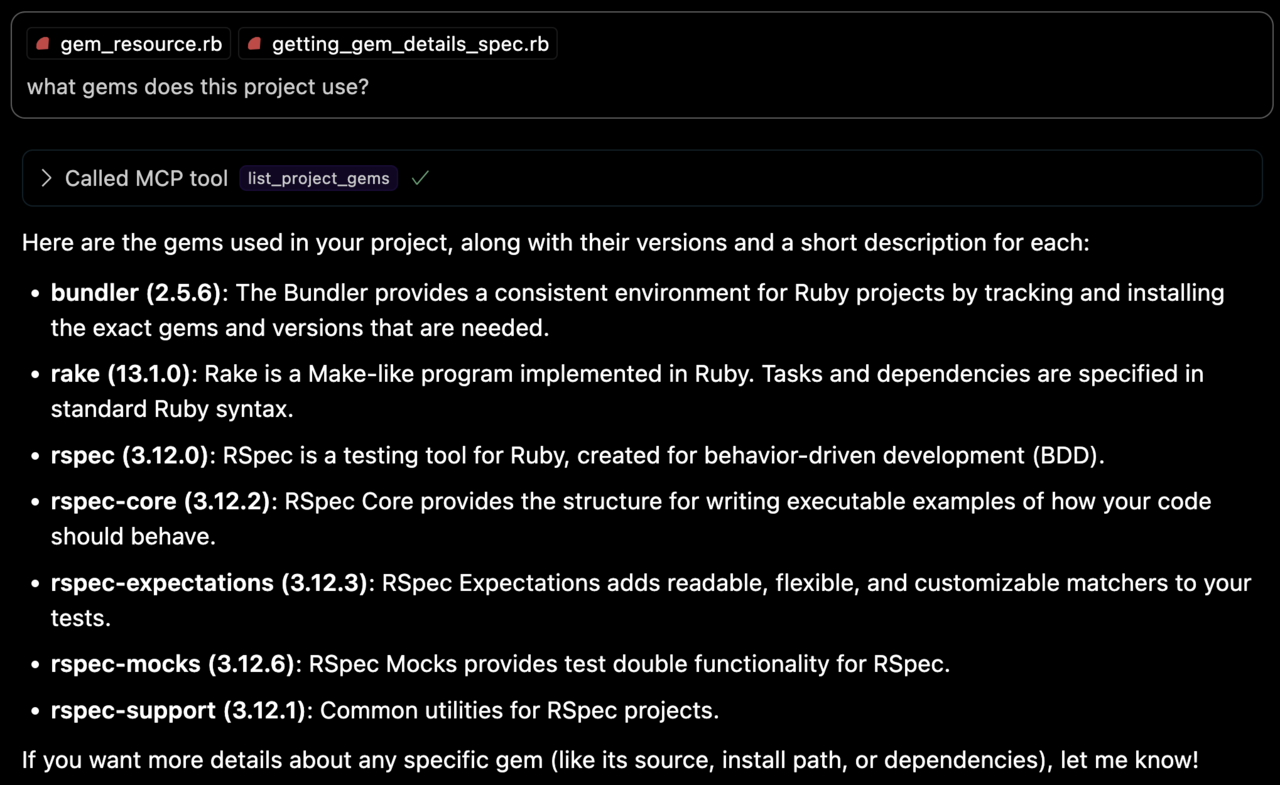
list_project_gems
Lists all bundled Ruby gems with their:
- Versions
- Descriptions
- Installation paths
- Top-level documentation locations (e.g. README and CHANGELOG)
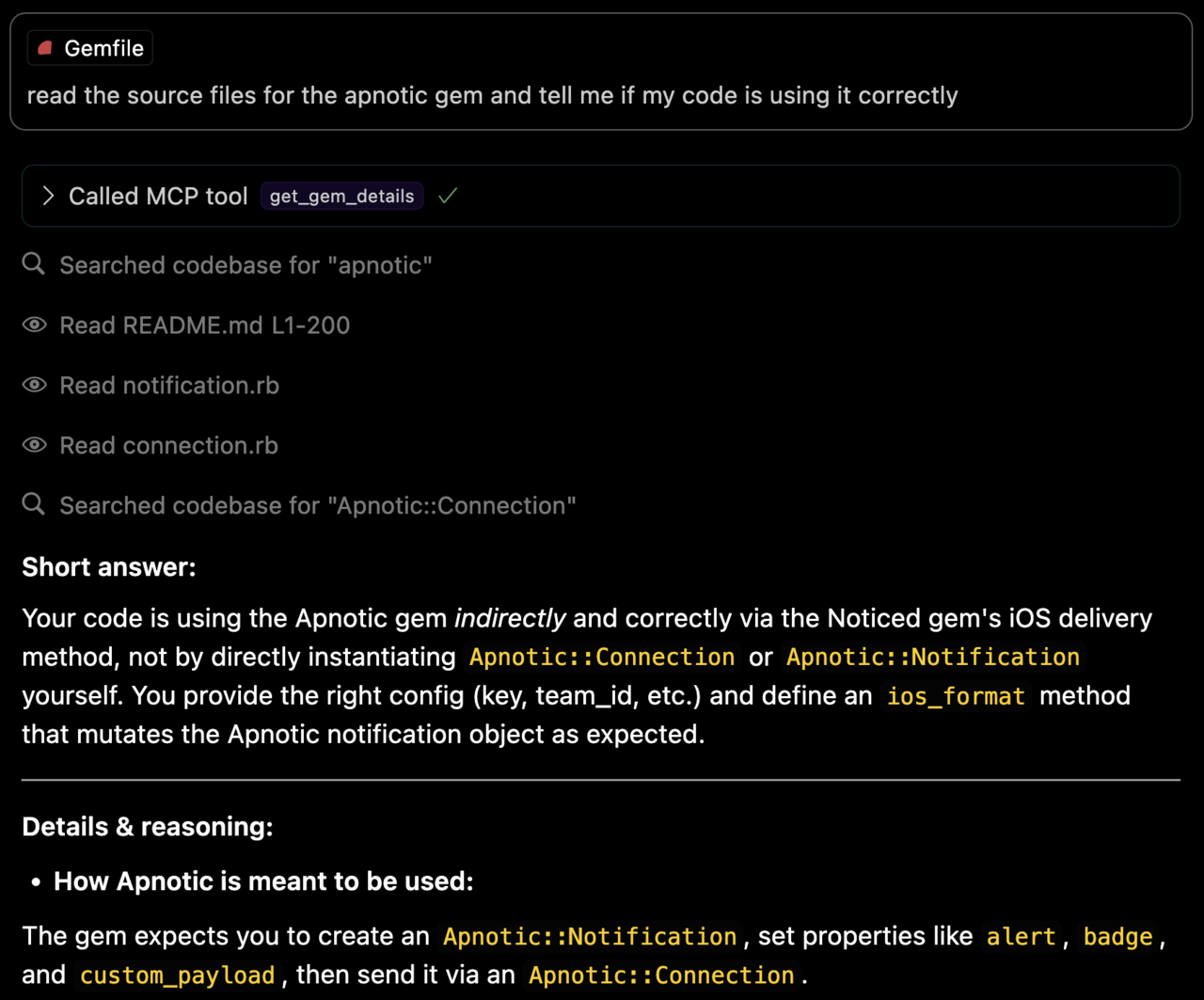
get_gem_details
Retrieves detailed information about a specific gem, including:
- Version
- Description
- Installation path
- Top-level documentation locations
- Source code file locations
Environment Variables
- BUNDLE_GEMFILE: Used by Bundler to locate your Gemfile. If you use the binstub method described in the Usage section, this is usually not needed.
- BUNDLER_MCP_LOG_FILE: Path to log file. Useful for troubleshooting (defaults to no logging)
Development
After checking out the repo, run bin/setup to install dependencies and bundle exec rspec to run the tests. You can also run bin/console for an interactive prompt that will allow you to experiment.
Testing with the MCP Inspector
You can test the server directly using the MCP inspector:
```bash
Sign in to leave a review
Use Google, GitHub, or an email account so ratings stay tied to real people.
No reviews posted yet.



