
🚀 Claude Custom Prompts MCP Server
About
A universal MCP server that loads prompts from an external JSON configuration file.
Details
- License
- AGPL-3.0
Explore
- Versioned YAML prompt templates with hot‑reload
- Validation gates that block or advise on output quality
- Composable workflow operators (chain, gate, agent handoff)
- Export any workflow as a native skill for the client
- 90+ bundled prompts across 11 categories

Setting up with Highlight
This MCP is not yet compatible with Highlight’s one-click setup. However, you can still use it with Highlight by following these steps:
- Download and install Highlight from highlightai.com/download
- Navigate to the plugins tab and select "Add Custom Plugin"
-
Configure the plugin with the settings below
Plugin Name
🚀 Claude Custom Prompts MCP ServerCommand (node, npx, python, etc.)Please refer to the README for specific instructions on how to obtain API keys or other required environment variables.
- Enable "Start Automatically" if you want the plugin to start when Highlight launches





From the repository
/plugin install claude-prompts@minipuft
gemini extensions install https://github.com/minipuft/gemini-prompts
The extension registers the MCP server and adds hooks for >> syntax detection, chain tracking, and gate reminders. See gemini-prompts for what hooks provide.
Option B: MCP server only (manual config, no hooks)
Add to ~/.gemini/settings.json:
{
"mcpServers": {
"claude-prompts": {
"command": "npx",
"args": ["-y", "claude-prompts@latest", "--client=gemini"]
}
}
}
You'll have the three MCP tools but no >> syntax detection, chain tracking, or gate reminders. To load your own prompts, add an env key — see Custom Resources.
</details>
<details>
<summary><strong>Other Clients</strong> (Codex, Windsurf, Zed)</summary>
Add to your MCP config file with a --client preset for deterministic handoff guidance:
| Client | Config Location | Recommended --client |
| -------- | ----------------------------------------- | ----------------------- |
| Codex | ~/.codex/config.toml | codex |
| Windsurf | ~/.codeium/windsurf/mcp_config.json | cursor (experimental) |
| Zed | ~/.config/zed/settings.json → mcp key | unknown |
JSON-based configs (Windsurf/Zed):
{
"mcpServers": {
"claude-prompts": {
"command": "npx",
"args": ["-y", "claude-prompts@latest", "--client=cursor"]
}
}
}
Codex (~/.codex/config.toml):
[mcp_servers.claude_prompts]
command = "npx"
args = ["-y", "claude-prompts@latest", "--client=codex"]
Supported presets: claude-code, codex, gemini, opencode, cursor, unknown.
For complete per-client setup and limitations:
- Client Integration Guide
- Client Capabilities Reference
</details>
<details>
<summary><strong>From Source</strong> (developers only)</summary>
git clone https://github.com/minipuft/claude-prompts.git
cd claude-prompts/server
npm install && npm run build && npm test
``
Point your MCP config to
server/dist/index.js. The esbuild bundle is self-contained.
Transport options:
--transport=stdio (default), --transport=streamable-http` (HTTP clients).
</details>
Claude Desktop / Cursor
Paste into your MCP client config file to install this server.
{
    "mcpServers": {
        "\ud83d\ude80 claude custom prompts mcp server": {
            "claude-prompts-mcp": {
                "command": "npx",
                "args": [
                    "-y",
                    "claude-prompts@latest",
                    "--init=~/my-prompts"
                ]
            }
        }
    }
}McpServers
{
    "claude-prompts-mcp": {
        "command": "npx",
        "args": [
            "-y",
            "claude-prompts@latest",
            "--init=~/my-prompts"
        ]
    }
}
<div align="center">



An MCP workflow server.
Craft reusable prompts with validation and reasoning guidance.<br>
Orchestrate agentic workflows with a composable operator syntax.<br>
Export as native skills.
Quick Start · What You Get · Compose Workflows · Run Anywhere · Docs
</div>
<div align="center">
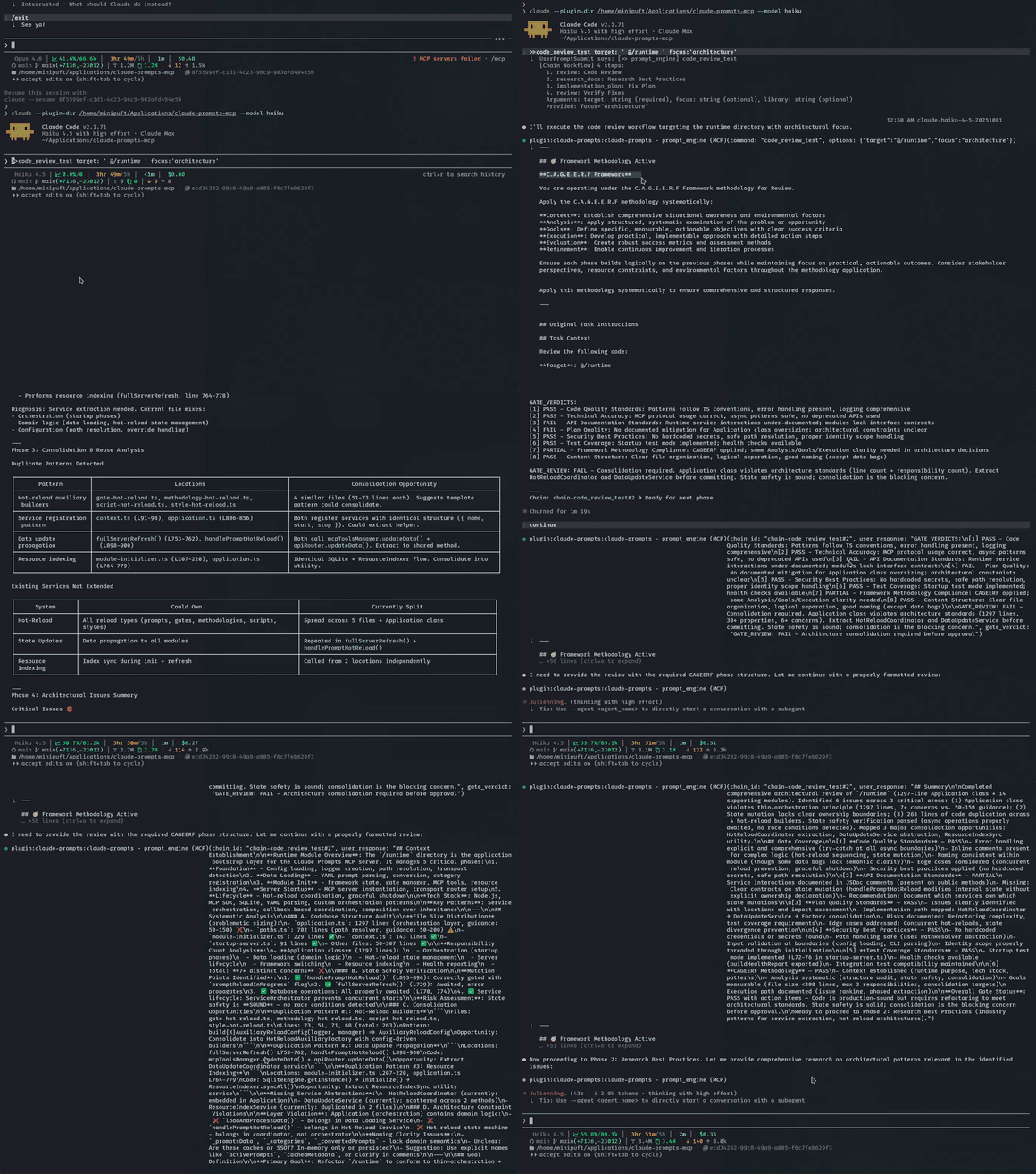
<sub>Chain + gate validation in action (haiku model) — gates catch errors and guide self-correction, even on the cheapest model</sub>
</div>
What your AI client gives you — and what this server adds
| Your client already does | This server adds |
| -------------------------- | ------------------------------------------------------------------------------------- |
| Run a prompt | Compose prompts with validation, reasoning guidance, and formatting in one expression |
| Single-shot skills | Multi-step workflows that thread context between steps |
| Execute subagents | Hand off mid-chain steps to agents with full workflow context |
| Client-native skill format | Author once as YAML, export to any client with skills:export |
| Manual prompt writing | Versioned templates with hot-reload, rollback, and history |
| Trust the output | Validate output between steps — self-evaluation and shell commands |
---
Quick Start
Claude Code (Recommended)
```bash
Sign in to leave a review
Use Google, GitHub, or an email account so ratings stay tied to real people.
No reviews posted yet.





