Claudinho — live 2026 World Cup scores for your AI agent (stdio, npm)
About
⚽ 2026 World Cup live scores in your terminal, Claude Code and Cursor CLI statusline & MCP. No API keys. Not affiliated with FIFA or Anthropic.
Details
- License
- MIT
Explore
- Live scores in Claude Code and Cursor CLI statuslines
- 9 read-only MCP tools (scores, standings, bracket, etc.)
- Bundled offline schedule for all 104 fixtures
- No API key, no signup needed
- Shareable text cards for standings, matches, and brackets
- Read-only prediction-market signals (source: Polymarket)

Setting up with Highlight
This MCP is not yet compatible with Highlight’s one-click setup. However, you can still use it with Highlight by following these steps:
- Download and install Highlight from highlightai.com/download
- Navigate to the plugins tab and select "Add Custom Plugin"
-
Configure the plugin with the settings below
Plugin Name
Claudinho — live 2026 World Cup scores for your AI agent (stdio, npm)Command (node, npx, python, etc.)Please refer to the README for specific instructions on how to obtain API keys or other required environment variables.
- Enable "Start Automatically" if you want the plugin to start when Highlight launches





From the repository
Install the CLI globally (npm i -g @claudinho/cli) and run commands like claudinho today or claudinho live. For Cursor CLI, run claudinho init cursor to wire the live-score statusline and MCP config. For Claude Code, run claudinho init claude to add statusline and a score-aware hook. Other MCP clients use the stdio config: { "mcpServers": { "claudinho": { "command": "npx", "args": ["-y", "@claudinho/mcp"] } } }. Then ask your agent mid-task—it calls the MCP server and answers with scores.
get_today
All fixtures for a date (default: today), with live score and minute overlaid on any match in play. Optional prediction-market enrichment carries marketComplete; false means the read was incomplete, not that no signal exists. Use this for a whole day's card; for only in-play matches use get_live, for one team's match use get_next_fixture, for a single match's detail use get_match. Kickoffs render in tz; lang localizes dates, attribution, and commentary (en/es/pt/fr); flavor sets commentary tone.
get_live
Only matches in play right now — each with current score and minute (empty when nothing is live). Use during matches for in-play state; for a full day's schedule including upcoming and finished, use get_today. tz/lang/flavor affect formatting only.
get_match
One match by its id, with live score/minute overlaid when it's in play. Optional prediction-market enrichment carries marketComplete; false means the read was incomplete, not that no signal exists. Get the id from get_today or get_live; to find a team's match without an id, use get_next_fixture. tz/lang/flavor affect formatting.
get_standings
Live cumulative group standings — pass a group letter A–L, or omit for all 12. Returns ranked rows (team, played, W/D/L, goal difference, points). Use get_today for fixtures/scores and get_next_fixture for one team. If unavailable, the default World Cup scope returns a roster at zero; competitions without a compatible bundled roster return no tables. Both are flagged degraded.
get_bracket
Knockout bracket from the Round of 32 through the final, with live scores overlaid. Group slots project from live standings once a group has started; winner slots need a confirmed FT result. Pass an optional stage (R32, R16, QF, SF, 3P, F) to filter one round. Falls back to structure-only when live data is unavailable.
get_next_fixture
A team's next match, live-resolved: a confirmed knockout tie (Round of 32 onward) is read from the live overlay, group fixtures from the bundled schedule. Use a 3-letter code, e.g. MEX, BRA, USA. Falls back to the bundled schedule if the provider is unreachable.
get_market_signal
Read-only prediction-market signals for a match (by id), a team's current-or-next fixture, or a date (default: today). Returns market-implied percentages with attribution; complete:false means the provider read was incomplete, not that no signal exists. Shown only before and during a match — finished matches have no market read. Informational only — relay the numbers factually; do not add betting, trading, or 'value' advice, and do not invent links.
get_share_snippet
A polished, copy-pasteable card (plain text) for a match (matchId), a team's next fixture (team), a group's standings table (group, e.g. "A"), the knockout bracket (bracket: true), a date (default: today), or live matches (live: true). Returns the ready-to-paste snippet plus structured data — hand the snippet text to the user verbatim. marketComplete:false is stated inside the card as an incomplete optional read. No links; it carries a non-affiliation disclaimer, and any market line stays informational only.
get_team
Resolve a nation name or 3-letter code to its FIFA code, flag, and group. Fuzzy and forgiving: accepts "Mexico", "mex", "USA", "DR Congo", "Türkiye"/"Turkey", "Holland", etc. Use this FIRST to turn a user's team name into the code the other tools need (get_next_fixture, get_standings, get_market_signal, get_share_snippet). Returns the single confident match (team), plus candidates (matches) when the query is ambiguous (e.g. "south" → South Africa, South Korea). Offline — reads the bundled roster, never the network.
- get_today: All fixtures for a date (default: today), with live score and minute overlaid on any match in play. Optional prediction-market enrichment carries marketComplete; false means the read was incomplete, not that no signal exists. Use this for a whole day's card; for only in-play matches use get_live, for one team's match use get_next_fixture, for a single match's detail use get_match. Kickoffs render in tz; lang localizes dates, attribution, and commentary (en/es/pt/fr); flavor sets commentary tone.
- get_live: Only matches in play right now — each with current score and minute (empty when nothing is live). Use during matches for in-play state; for a full day's schedule including upcoming and finished, use get_today. tz/lang/flavor affect formatting only.
- get_match: One match by its id, with live score/minute overlaid when it's in play. Optional prediction-market enrichment carries marketComplete; false means the read was incomplete, not that no signal exists. Get the id from get_today or get_live; to find a team's match without an id, use get_next_fixture. tz/lang/flavor affect formatting.
- get_standings: Live cumulative group standings — pass a group letter A–L, or omit for all 12. Returns ranked rows (team, played, W/D/L, goal difference, points). Use get_today for fixtures/scores and get_next_fixture for one team. If unavailable, the default World Cup scope returns a roster at zero; competitions without a compatible bundled roster return no tables. Both are flagged degraded.
- get_bracket: Knockout bracket from the Round of 32 through the final, with live scores overlaid. Group slots project from live standings once a group has started; winner slots need a confirmed FT result. Pass an optional stage (R32, R16, QF, SF, 3P, F) to filter one round. Falls back to structure-only when live data is unavailable.
- get_next_fixture: A team's next match, live-resolved: a confirmed knockout tie (Round of 32 onward) is read from the live overlay, group fixtures from the bundled schedule. Use a 3-letter code, e.g. MEX, BRA, USA. Falls back to the bundled schedule if the provider is unreachable.
- get_market_signal: Read-only prediction-market signals for a match (by id), a team's current-or-next fixture, or a date (default: today). Returns market-implied percentages with attribution; complete:false means the provider read was incomplete, not that no signal exists. Shown only before and during a match — finished matches have no market read. Informational only — relay the numbers factually; do not add betting, trading, or 'value' advice, and do not invent links.
- get_share_snippet: A polished, copy-pasteable card (plain text) for a match (matchId), a team's next fixture (team), a group's standings table (group, e.g. "A"), the knockout bracket (bracket: true), a date (default: today), or live matches (live: true). Returns the ready-to-paste snippet plus structured data — hand the snippet text to the user verbatim. marketComplete:false is stated inside the card as an incomplete optional read. No links; it carries a non-affiliation disclaimer, and any market line stays informational only.
- get_team: Resolve a nation name or 3-letter code to its FIFA code, flag, and group. Fuzzy and forgiving: accepts "Mexico", "mex", "USA", "DR Congo", "Türkiye"/"Turkey", "Holland", etc. Use this FIRST to turn a user's team name into the code the other tools need (get_next_fixture, get_standings, get_market_signal, get_share_snippet). Returns the single confident match (team), plus candidates (matches) when the query is ambiguous (e.g. "south" → South Africa, South Korea). Offline — reads the bundled roster, never the network.
Claude Desktop / Cursor
Paste into your MCP client config file to install this server.
{
    "mcpServers": {
        "claudinho \u2014 live 2026 world cup scores for your ai agent (stdio, npm)": {
            "claudinho": {
                "command": "npx",
                "args": [
                    "-y",
                    "@claudinho/mcp"
                ]
            }
        }
    }
}McpServers
{
    "claudinho": {
        "command": "npx",
        "args": [
            "-y",
            "@claudinho/mcp"
        ]
    }
}








Live scores for the 2026 men's football tournament — in your terminal, your Claude Code / Cursor CLI statusline, and any MCP client. No API key, no signup; all 104 fixtures ship bundled, so the schedule works offline.
<p align="center">
</p>
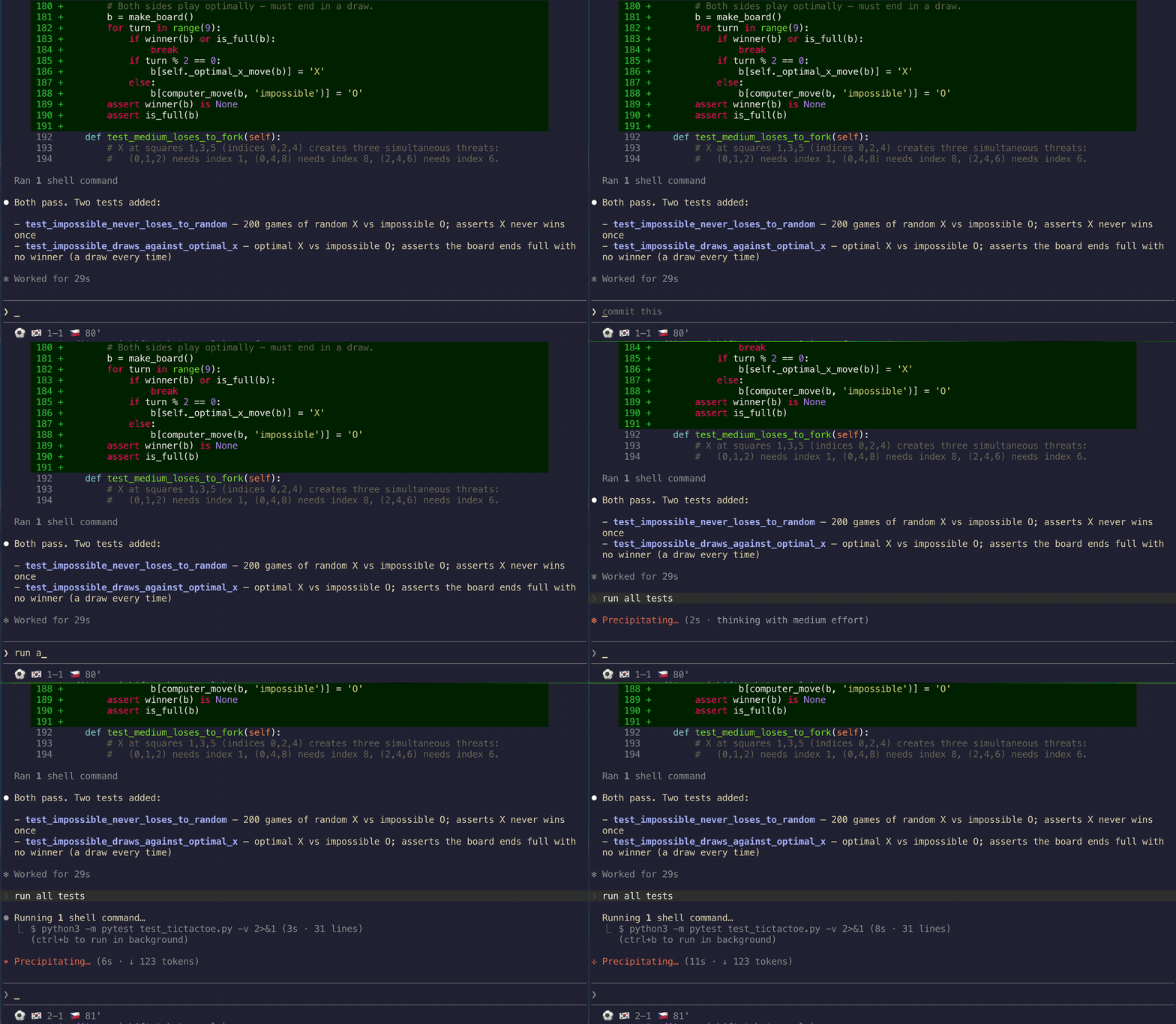
<!-- HERO: real live-match capture from the Jun 11 opener — the statusline flips to
South Korea's 81st-minute winner (1–1 → 2–1) while pytest runs. -->
npx @claudinho/cli today      # try it in 10 seconds — no install, no key
npx @claudinho/cli live       # what's on right now (during match windows)
> ⭐ Like it? Star the repo — a fan project's only scoreboard is its stars. (claudinho star shows you how anytime.)
While matches are live, your Claude Code or Cursor CLI statusline reads:
⚽ 🇳🇴 1–1 🇫🇷 87' · 🇸🇳 1–2 🇮🇶 86'
And claudinho share prints a card made for the group chat:
<!-- DEMO CARD: verbatim output of claudinho share table A. Chosen over a single
match card because it has no fixed date to go stale (a played-and-passed fixture
reads as abandoned). Standings still drift across matchdays — REGENERATE
periodically, especially before any conversion-sensitive moment. Never hand-edit. -->
Group A · standings
1. 🇲🇽 MEX  9 pts · 3-0-0 · +6

2. 🇿🇦 RSA  4 pts · 1-1-1 · -1

3. 🇰🇷 KOR  3 pts · 1-0-2 · -1

4. 🇨🇿 CZE  1 pts · 0-1-2 · -4
Live data: ESPN

#VibingLaVidaLoca · Independent fan project · not affiliated with FIFA or Anthropic.

Try it: npx @claudinho/cli table A
> ⚠️ Not affiliated with, endorsed by, or connected to FIFA or Anthropic.
> Claudinho is an independent, open-source fan project. It displays factual match data
> (scores, fixtures, standings) and uses emoji flags only — no logos, emblems, kits,
> broadcast footage, or player likenesses.
Install
Just the CLI
npm i -g @claudinho/cli
claudinho today
claudinho next MEX --tz America/Mexico_City --lang es
Cursor CLI — statusline + MCP
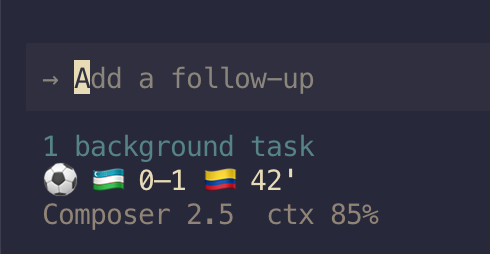
One command wires the live-score statusline and prints the MCP config to paste:
npm i -g @claudinho/cli
claudinho init cursor          # statusline → ~/.cursor/cli-config.json (+ the MCP paste)
<p align="center">
</p>
Restart your agent session to see it. Prefer to paste it yourself? claudinho init cursor --print
emits the snippets, or copy them straight from here:
Statusline — ~/.cursor/cli-config.json:
{

  "statusLine": {

    "type": "command",

    "command": "claudinho prompt",

    "padding": 0,

    "updateIntervalMs": 1000,

    "timeoutMs": 1500

  }

}
MCP tools — ~/.cursor/mcp.json (global) or a project .cursor/mcp.json:
{ "mcpServers": { "claudinho": { "command": "npx", "args": ["-y", "@claudinho/mcp"] } } }
Optional env — a model + context line below the score, or scope to your team:
export CLAUDINHO_CURSOR_META=auto   # model + context % line under the score (recommended)

export CLAUDINHO_TEAM=MEX           # show only your team's match

export CLAUDINHO_FLAGS=off          # 3-letter codes instead of flag emoji (already automatic in Warp)

export CLAUDINHO_DEBUG=1            # print data-provider failure diagnostics to stderr
> Note: Cursor's beforeSubmitPrompt hook doesn't yet reliably inject context into the
> model, so the score-aware hook stays Claude Code-only for now — the statusline and MCP
> server work great in Cursor.
Claude Code — statusline, score-aware hook, MCP
npm i -g @claudinho/cli
claudinho init claude          # statusline + live-score hook, then the MCP one-liner
init claude backs up ~/.claude/settings.json first and is idempotent. Prefer the pieces
à la carte? Run init-statusline, init-hook, and:
claude mcp add claudinho -- npx -y @claudinho/mcp
Restart Claude Code to activate.
> Monorepo / local dev? The init cursor / init claude aliases wire the global
> claudinho. To point a statusline or hook at a local build, use the granular commands
> with --command, e.g. claudinho init-cursor-statusline --command "node ./packages/cli/dist/index.js prompt"
> (and init-statusline / init-hook for Claude Code).
Other MCP clients — Codex, Claude Desktop, Windsurf, Zed, VS Code
codex mcp add claudinho -- npx -y @claudinho/mcp # Codex CLI
Everything else takes the standard stdio config:
{ "mcpServers": { "claudinho": { "command": "npx", "args": ["-y", "@claudinho/mcp"] } } }
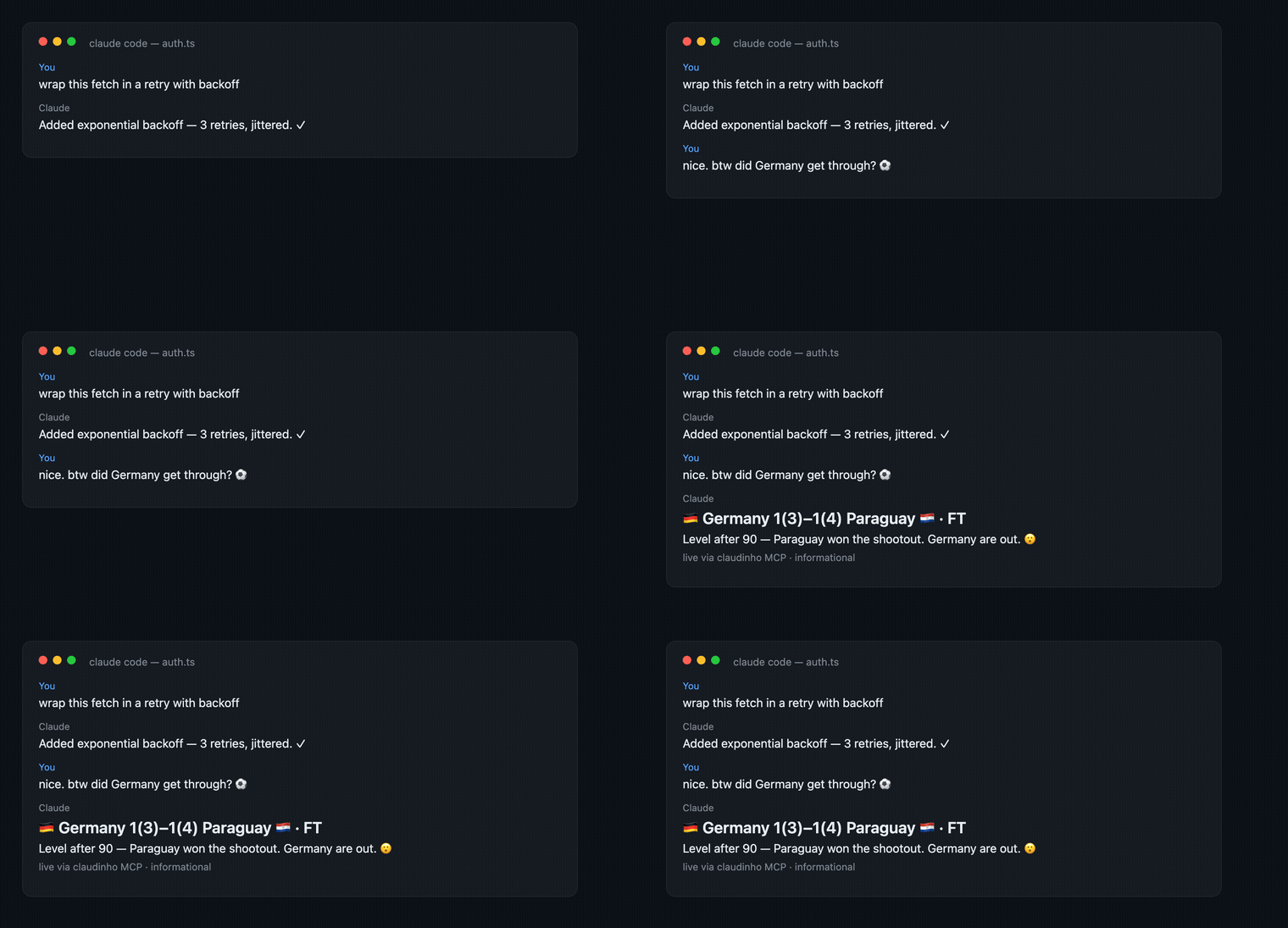
Then just ask, mid-task — the agent calls the MCP server and answers with the score:
<p align="center">
</p>
Surfaces
- CLI — today, live, next MEX, table, match <id>, bracket, markets, share, team (name → code, e.g. team "DR Congo") (plus vibe 😎 and star ⭐). --json on everything; TZ-aware via --tz.
- Live statusline — Claude Code & Cursor CLI — every live score inline; reads a local micro-cache, never blocks on the network. One command per agent: claudinho init claude / claudinho init cursor (also tmux & Starship via claudinho prompt).
- Score-aware hook (Claude Code) — a UserPromptSubmit hook that drops the live score into the model's context during matches; zero tokens off-match. (Cursor parity pending — its hook can't reliably inject context yet.)
- MCP server — 9 read-only tools (get_today, get_live, get_match, get_next_fixture, get_standings, get_bracket, get_market_signal, get_share_snippet, get_team) plus my_team / tournament_today prompts.
- Prediction-market signals — a read-only "who's favored" line (market-implied percentages, Source: Polymarket), shown only when a reliable market exists. Informational only — not betting advice. Opt out: --no-markets / CLAUDINHO_MARKETS=off.
- Shareable cards — claudinho share next MEX --copy puts a plain-text match card on your clipboard; claudinho share table A does the same for a group's live standings; claudinho share bracket for the knockout tree.
Speaks en / es / pt / fr, with optional localized commentary flair (¡GOOOOL!) — dial it down with --flavor subtle|off.
_Planned (not shipped yet):_ a desktop notifier and an AI pundit with a public accuracy scorecard.
FAQ
Do I need an API key or account? No. Nothing to sign up for; npx and done.
Does it work offline? The bundled data does — the full schedule, group fixtures, and the knockout bracket structure (all 104 fixtures ship bundled, no key). Anything live hits the network: scores, group standings, and a team's resolved knockout opponent (next once the draw fills in).
Where does the data come from? Live scores from ESPN's public scoreboard (attributed in output as Live data: ESPN); market signals from Polymarket public data. Rate limits respected.
Is the market line betting advice? No. It's read-only, informational-only market data with attribution — no trading, no links — and it never appears on the statusline or hook.
Why no crests, kits, or player photos? Legal-clean by design: facts and emoji flags only.
Flags show as boxed letters (CH, BA)? Some terminals — notably Warp — don't compose
the regional-indicator pairs into flag glyphs, so 🇨🇭 renders as a boxed CH. claudinho
auto-detects Warp and drops the flags: 3-letter codes on the statusline (MEX 1–0 RSA 67')
and plain team names in the hook, today / live / table, and next. Force it anywhere with CLAUDINHO_FLAGS=off, or keep flags
with CLAUDINHO_FLAGS=on.
Windows? Works, but flag emoji rendering varies by terminal — best on macOS/Linux. See the
flags note above; CLAUDINHO_FLAGS=off gives clean codes on any terminal that can't render them.
Why star?
Claudinho is a solo, $0, organic fan project — a GitHub star is the only signal that it's worth maintaining, and the nudge to keep shipping through the final. A star also:
- surfaces it for other devs hunting live scores during the tournament,
- puts new releases in your feed — a desktop notifier, an AI pundit, and other tournaments are on the roadmap,
- takes one click → ⭐ star Claudinho.
New here? CONTRIBUTING.md has the layout, the dev loop, and good first issues.
License
MIT © 2026 Arturo Garrido. All three packages publish with npm provenance via OIDC trusted publishing.
---
_Built while watching the games._ #VibingLaVidaLoca ⚽
Sign in to leave a review
Use Google, GitHub, or an email account so ratings stay tied to real people.
No reviews posted yet.