
cookbook-mcp-server
About
It is an MCP server that provides access to a collection of recipes from the HowToCook GitHub repository. It offers tools to list all dishes and retrieve individual cooking instructions, intended for use with MCP clients like AI coding assistants or IDEs.
Explore
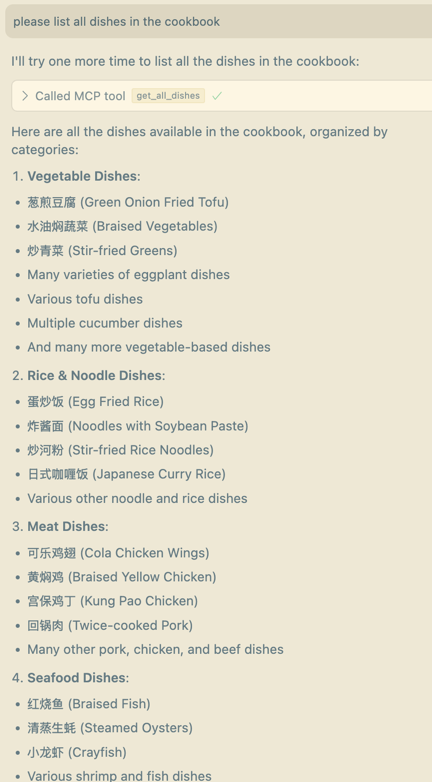
- get_all_dishes: retrieve all dish names from the cookbook
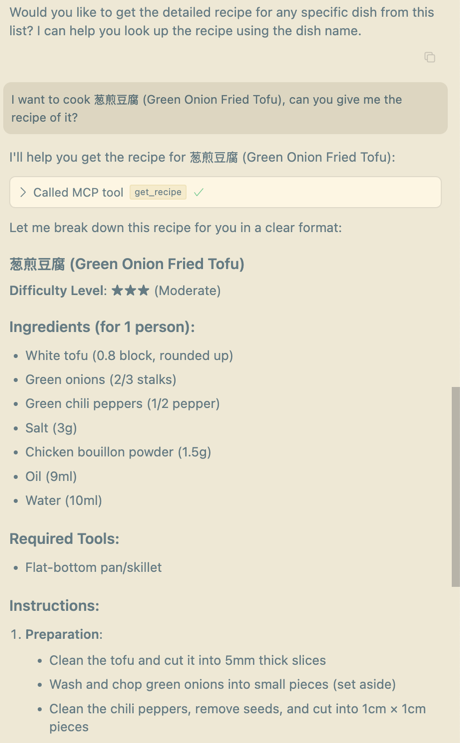
- get_recipe: retrieve a detailed recipe for a specific dish
- Supports both stdio and SSE transport modes
- Uses uv for dependency and environment management
- Easily integrates with MCP clients such as Cursor

Setting up with Highlight
This MCP is not yet compatible with Highlight’s one-click setup. However, you can still use it with Highlight by following these steps:
- Download and install Highlight from highlightai.com/download
- Navigate to the plugins tab and select "Add Custom Plugin"
-
Configure the plugin with the settings below
Plugin Name
cookbook-mcp-serverCommand (node, npx, python, etc.)Please refer to the README for specific instructions on how to obtain API keys or other required environment variables.
- Enable "Start Automatically" if you want the plugin to start when Highlight launches





From the repository
Clone the HowToCook repository and set the COOKBOOK_URL constant in cookbook.py to the local dishes folder path. Configure your MCP client with the correct uv command and script path, or switch to SSE transport by modifying the server entry point and client URL settings.
Claude Desktop / Cursor
Paste into your MCP client config file to install this server.
{
    "mcpServers": {
        "cookbook-mcp-server": {
            "cookbook-mcp-server": {
                "command": "uv",
                "args": [
                    "init",
                    "cookbook"
                ]
            }
        }
    }
}McpServers
{
    "cookbook-mcp-server": {
        "command": "uv",
        "args": [
            "init",
            "cookbook"
        ]
    }
}
一个菜谱mcp server
支持工具:
- get_all_dishes:获取cookbook中的所有菜谱
- get_recipe:获取任意菜品的菜谱
环境配置
# Create a new directory for our project
uv init cookbook
cd cookbook
Create virtual environment and activate it
uv venv
source .venv/bin/activate
Install dependencies
uv add "mcp[cli]"
使用方法
1. 获取菜谱: 菜谱:https://github.com/Anduin2017/HowToCook/tree/master git clone https://github.com/Anduin2017/HowToCook/tree/master
   # Constants
   COOKBOOK_URL = "/PATH/OF/YOUR/COOKBOOK"
    {
      "mcpServers": {
        "cookbook": {
          "command": "/PATH/OF/uv",
          "args": [
            "--directory",
            "/PATH/OF/ROOT/mcp-server-cookbook/cookbook",
            "run",
            "/PATH/OF/ROOT/mcp-server-cookbook/cookbook.py"
          ]
        }
      }
    }
     if __name__ == "__main__":
        # Initialize and run the server
        mcp.run(transport='sse')
     {
      "mcpServers": {
        "cookbook": {
          "url": "http://localhost:PORT/sse"
        }
      }
     }
cursor中效果截图
Sign in to leave a review
Use Google, GitHub, or an email account so ratings stay tied to real people.
No reviews posted yet.



