
Crypto Intel Mcp
About
# crypto-intel-mcp  **Crypto market intelligence for any LLM, over the [Model Context Protocol](https://modelcontextprotocol.io).** Gives any MCP client (Claude Desktop, Claude Code, agents) clean tools for crypto price, momentum, and what's trending — and blends…
Details
- Transport
- SSE
Explore
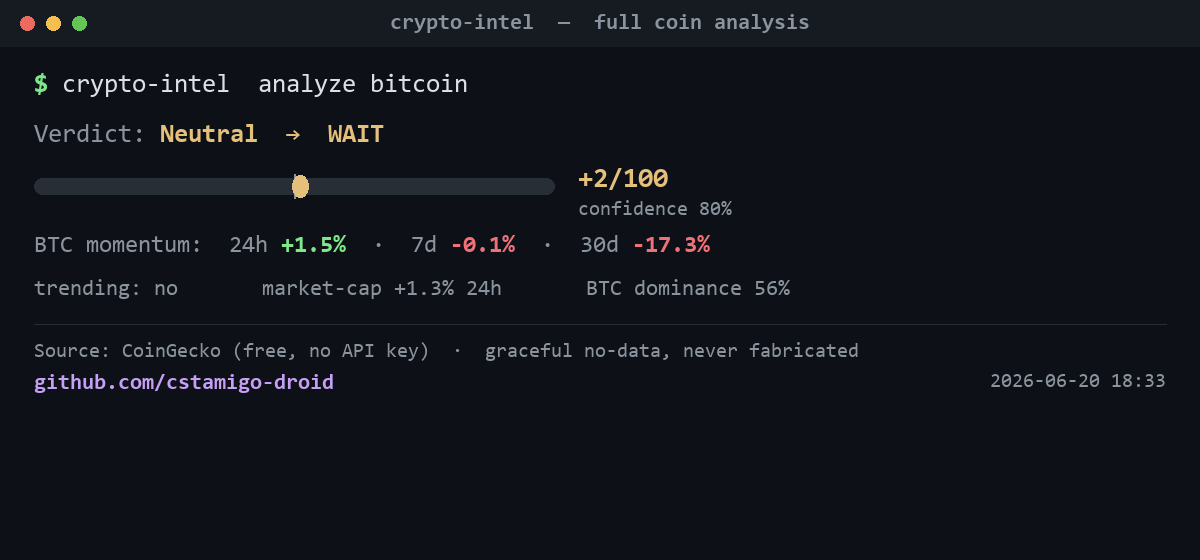
- Blends price, momentum, and trending into a single scored verdict (crypto_analyze)
- Live price, 24h change, rank, volume, ATH distance (crypto_get_quote)
- Multi‑timeframe momentum scored into a directional signal (crypto_momentum)
- Displays coins currently being searched most (crypto_trending)
- Returns Markdown by default, JSON on demand (response_format="json")
- Fails gracefully: missing sources return “no data”, never fabricated values
- Short per‑source TTL cache to avoid hammering rate‑limited endpoints

Setting up with Highlight
This MCP is not yet compatible with Highlight’s one-click setup. However, you can still use it with Highlight by following these steps:
- Download and install Highlight from highlightai.com/download
- Navigate to the plugins tab and select "Add Custom Plugin"
-
Configure the plugin with the settings below
Plugin Name
Crypto Intel McpCommand (node, npx, python, etc.)Please refer to the README for specific instructions on how to obtain API keys or other required environment variables.
- Enable "Start Automatically" if you want the plugin to start when Highlight launches





From the repository
git clone https://github.com/cstamigo-droid/crypto-intel-mcp crypto-intel-mcp
cd crypto-intel-mcp
python -m venv .venv && .venv\Scripts\activate # Windows
pip install -r requirements.txt
python -m crypto_intel_mcp # starts the MCP server over stdio (no .env needed)
Smoke test (hits the live CoinGecko API and prints each signal):
python tests/test_smoke.py bitcoin
---
crypto_analyze
**Hero tool.** Blends momentum + trending + market tide into one scored verdict (RISK-ON → AVOID).
crypto_get_quote
Live price, 24h change, market-cap rank, volume, distance from ATH.
crypto_momentum
Multi-timeframe momentum (24h/7d/30d) scored into one directional signal.
crypto_trending
The coins the market is searching for most right now.
| Tool | What it does | Source | Status |
|------|--------------|--------|:------:|
| crypto_analyze | Hero tool. Blends momentum + trending + market tide into one scored verdict (RISK-ON → AVOID). | composite | ✅ |
| crypto_get_quote | Live price, 24h change, market-cap rank, volume, distance from ATH. | CoinGecko | ✅ |
| crypto_momentum | Multi-timeframe momentum (24h/7d/30d) scored into one directional signal. | CoinGecko | ✅ |
| crypto_trending | The coins the market is searching for most right now. | CoinGecko | ✅ |
Every tool returns Markdown (human-readable, default) or JSON
(response_format="json") for programmatic use.
---
Claude Desktop / Cursor
Paste into your MCP client config file to install this server.
{
    "mcpServers": {
        "crypto intel mcp": {
            "crypto-intel-mcp": {
                "command": "python",
                "args": [
                    "-m",
                    "crypto_intel_mcp"
                ],
                "cwd": "C:/path/to/crypto-intel-mcp"
            }
        }
    }
}McpServers
{
    "crypto-intel-mcp": {
        "command": "python",
        "args": [
            "-m",
            "crypto_intel_mcp"
        ],
        "cwd": "C:/path/to/crypto-intel-mcp"
    }
}
Crypto market intelligence for any LLM, over the Model Context Protocol.
Gives any MCP client (Claude Desktop, Claude Code, agents) clean tools for crypto
price, momentum, and what's trending — and blends them into a single scored
verdict. Runs entirely on CoinGecko's free public API (no key), fails
gracefully (a missing source returns "no data", never a fabricated value), and
outputs Markdown by default or JSON on demand.
```
Sign in to leave a review
Use Google, GitHub, or an email account so ratings stay tied to real people.
No reviews posted yet.



