
Darwinbox HRMS MCP Server
About
A Model Context Protocol (MCP) server for interacting with the Darwinbox HRMS API. It provides standardized tools for managing employee data, attendance, and leave management, enabling AI assistants to perform HR operations.
Details
- License
- MIT license
Explore
- Employee management: get, update, add, and deactivate employees.
- Download personal documents and upload profile attachments.
- Get employee history, position master data, and forms data.
- Attendance management: get monthly/daily attendance and roster.
- Record and backdate attendance punches.
- Leave management: approve leaves, get balance, balance, import leaves.

Setting up with Highlight
This MCP is not yet compatible with Highlight’s one-click setup. However, you can still use it with Highlight by following these steps:
- Download and install Highlight from highlightai.com/download
- Navigate to the plugins tab and select "Add Custom Plugin"
-
Configure the plugin with the settings below
Plugin Name
Darwinbox HRMS MCP ServerCommand (node, npx, python, etc.)Please refer to the README for specific instructions on how to obtain API keys or other required environment variables.
- Enable "Start Automatically" if you want the plugin to start when Highlight launches





From the repository
1. Clone the repository:
git clone https://github.com/prithvidbox/darwinbox-mcp
cd darwinbox-server
2. Install dependencies:
npm install
3. Build the project:
npm run build
{
"servers": {
"darwinbox": {
"command": "node",
"args": ["path/to/darwinbox-server/build/index.js"],
"env": {
"DARWINBOX_DOMAIN": "https://your-domain.darwinbox.in",
"DARWINBOX_CLIENT_ID": "your-client-id",
"DARWINBOX_CLIENT_SECRET": "your-client-secret",
"DARWINBOX_GRANT_TYPE": "authorization_code",
"DARWINBOX_CODE": "your-auth-code",
"DARWINBOX_DATASET_KEY": "your-dataset-key"
}
}
}
}
{
"mcpServers": {
"darwinbox": {
"command": "node",
"args": ["path/to/darwinbox-server/build/index.js"],
"env": {
"DARWINBOX_DOMAIN": "https://your-domain.darwinbox.in",
"DARWINBOX_CLIENT_ID": "your-client-id",
"DARWINBOX_CLIENT_SECRET": "your-client-secret",
"DARWINBOX_GRANT_TYPE": "authorization_code",
"DARWINBOX_CODE": "your-auth-code",
"DARWINBOX_DATASET_KEY": "your-dataset-key"
}
}
}
}
The server uses OAuth 2.0 for authentication. It automatically handles:
1. Token acquisition using the provided credentials
2. Token management and renewal
3. Authenticated API requests with proper headers
- Employee Management
- Get employee details (single, multiple, or all employees)
- Update employee information
- Add new employees
- Deactivate employees
- Download personal documents
- Get employee history
- Get position master data
- Get forms data
- Get separation details
- Upload profile attachments
- Attendance Management
- Get monthly attendance
- Get daily attendance
- Get attendance roster
- Record attendance punches
- Record backdated attendance
- Leave Management
- Approve leaves
- Get leave action history
- Get holiday list
- Get leave balance
- Import leaves
Claude Desktop / Cursor
Paste into your MCP client config file to install this server.
{
    "mcpServers": {
        "darwinbox hrms mcp server": {
            "darwinbox": {
                "command": "node",
                "args": [
                    "path/to/darwinbox-server/build/index.js"
                ],
                "env": {
                    "DARWINBOX_DOMAIN": "",
                    "DARWINBOX_CLIENT_ID": "",
                    "DARWINBOX_CLIENT_SECRET": "",
                    "DARWINBOX_GRANT_TYPE": "",
                    "DARWINBOX_CODE": "",
                    "DARWINBOX_DATASET_KEY": ""
                }
            }
        }
    }
}McpServers
{
"darwinbox": {
"command": "node",
"args": [
"path/to/darwinbox-server/build/index.js"
],
"env": {
"DARWINBOX_DOMAIN": "",
"DARWINBOX_CLIENT_ID": "",
"DARWINBOX_CLIENT_SECRET": "",
"DARWINBOX_GRANT_TYPE": "",
"DARWINBOX_CODE": "",
"DARWINBOX_DATASET_KEY": ""
}
}
}A Model Context Protocol (MCP) server for interacting with the Darwinbox HRMS API. This server provides tools for managing employee data, attendance, and leave management through a standardized interface.
Demo
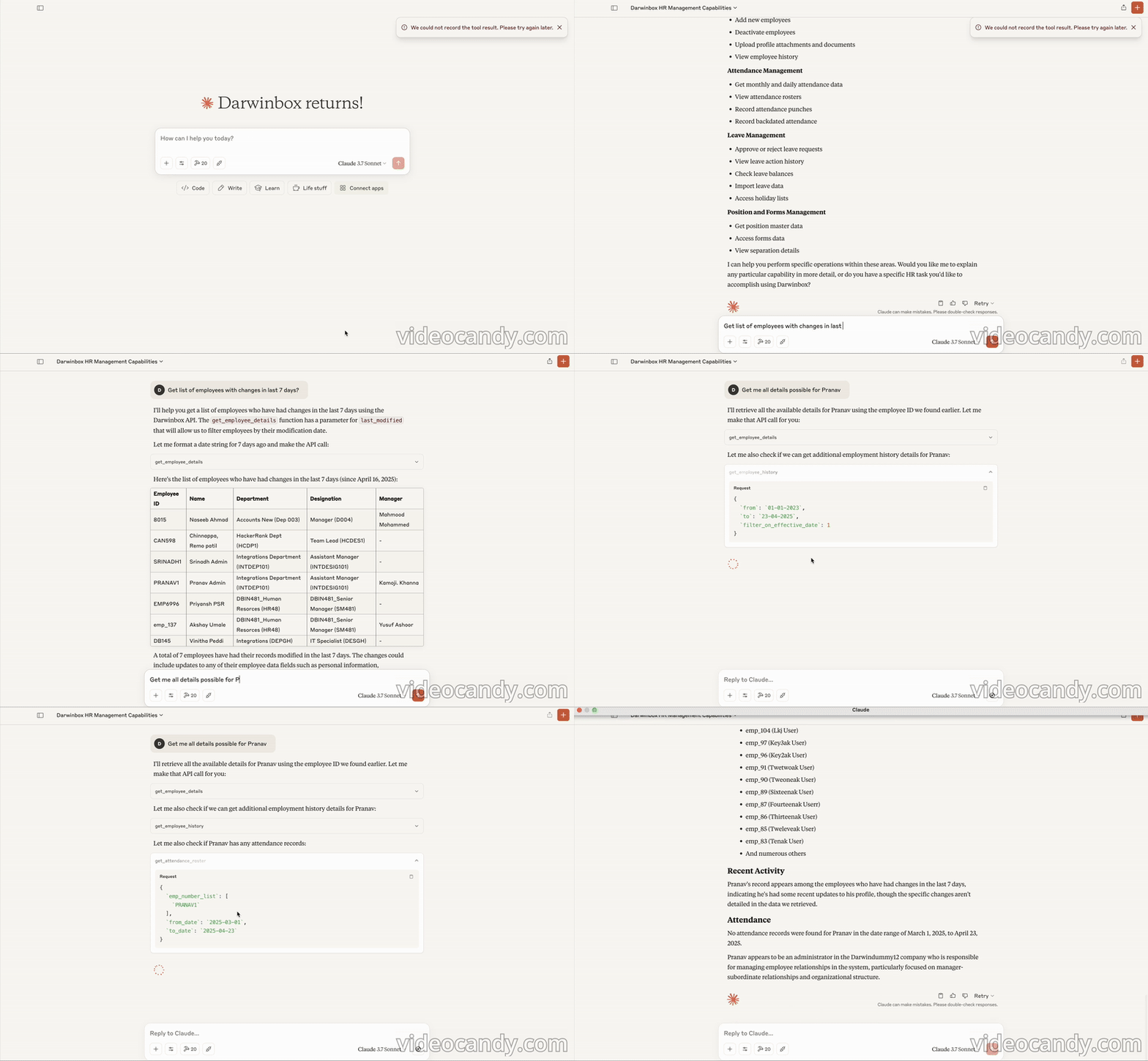
Features
Core Tools
- Employee Management - Get employee details (single, multiple, or all employees) - Update employee information - Add new employees - Deactivate employees - Download personal documents - Get employee history - Get position master data - Get forms data - Get separation details - Upload profile attachmentsTime Management Tools
- Attendance Management - Get monthly attendance - Get daily attendance - Get attendance roster - Record attendance punches - Record backdated attendance - Leave Management - Approve leaves - Get leave action history - Get holiday list - Get leave balance - Import leavesInstallation
1. Clone the repository:
git clone https://github.com/prithvidbox/darwinbox-mcp

cd darwinbox-server
2. Install dependencies:
npm install
3. Build the project:
npm run build
MCP Client Configuration
Claude Desktop Client
{
"mcpServers": {
"darwinbox": {
"command": "node",
"args": ["path/to/darwinbox-server/build/index.js"],
"env": {
"DARWINBOX_DOMAIN": "https://your-domain.darwinbox.in",
"DARWINBOX_CLIENT_ID": "your-client-id",
"DARWINBOX_CLIENT_SECRET": "your-client-secret",
"DARWINBOX_GRANT_TYPE": "authorization_code",
"DARWINBOX_CODE": "your-auth-code",
"DARWINBOX_DATASET_KEY": "your-dataset-key"
},
"disabled": false,
"autoApprove": []
}
}
}
Cline Configuration
{
  "servers": {
    "darwinbox": {
      "command": "node",
      "args": ["path/to/darwinbox-server/build/index.js"],
      "env": {
        "DARWINBOX_DOMAIN": "https://your-domain.darwinbox.in",
        "DARWINBOX_CLIENT_ID": "your-client-id",
        "DARWINBOX_CLIENT_SECRET": "your-client-secret",
        "DARWINBOX_GRANT_TYPE": "authorization_code",
        "DARWINBOX_CODE": "your-auth-code",
        "DARWINBOX_DATASET_KEY": "your-dataset-key"
      }
    }
  }
}
Cursor Configuration
{
  "mcpServers": {
    "darwinbox": {
      "command": "node",
      "args": ["path/to/darwinbox-server/build/index.js"],
      "env": {
        "DARWINBOX_DOMAIN": "https://your-domain.darwinbox.in",
        "DARWINBOX_CLIENT_ID": "your-client-id",
        "DARWINBOX_CLIENT_SECRET": "your-client-secret",
        "DARWINBOX_GRANT_TYPE": "authorization_code",
        "DARWINBOX_CODE": "your-auth-code",
        "DARWINBOX_DATASET_KEY": "your-dataset-key"
      }
    }
  }
}
Authentication
The server uses OAuth 2.0 for authentication. It automatically handles:
1. Token acquisition using the provided credentials
2. Token management and renewal
3. Authenticated API requests with proper headers
Error Handling
The server provides detailed error messages for:
- Missing or invalid configuration
- Authentication failures
- Invalid API requests
- API response errors
License
This project is licensed under the MIT License - see the LICENSE file for details.
Sign in to leave a review
Use Google, GitHub, or an email account so ratings stay tied to real people.
No reviews posted yet.



