
Dashy
About
<h1 align="center">Dashy</h1> <p align="center"> <i>Dashy helps you organize your self-hosted services by making them accessible from a single place</i> <br/> <img width="120" src="https://i.ibb.co/yhbt6CY/dashy.png" /> <br/> <b><a href="./docs/showcase.md">User Showcase</a></b> | <b><a…
Explore
- 📃 Support for multiple pages
- 🚦 Real-time status monitoring for each of your apps/links
- 📊 Use widgets to display info and dynamic content from self-hosted services
- 🔎 Instant search by name, domain, or tags + customizable hotkeys & keyboard shortcuts
- 🎨 Many built-in color themes, with UI color editor and support for custom CSS
- 🧸 Many icon options - Font-Awesome, homelab icons, auto-fetching Favicon, images, emojis, etc.
- 💂 Optional authentication with multi-user access, configurable privileges, and SSO support
- 🌎 Multi-language support, with 10+ human-translated languages, and more on the way
- ☁ Optional, encrypted, free off-site cloud backup and restore feature available
- 💼 A workspace view, for easily switching between multiple apps simultaneously
- 🛩️ A minimal view, for use as a fast-loading browser Startpage
- 🖱️ Choose app launch methods: new tab, same tab, clipboard, pop-up modal, or open in workspace view
- 📏 Customizable layout, sizes, text, component visibility, sort order, behavior, etc.
- 🖼️ Options for a full-screen background image, custom nav-bar links, HTML footer, title, etc.
- 🚀 Easy to setup with Docker, or on bare metal, or with 1-Click cloud deployment
- ⚙️ Easy single-file YAML-based configuration, and option to configure app through the UI
- ✨ Under active development with improvements and new features added regularly
- 🤏 Small bundle size, fully responsive UI, and PWA for basic offline access
- 🆓 100% free and open-source
- 🔐 Strong focus on privacy
- 🌈 And loads more...
> For full setup instructions, see: Deployment
You will need Docker installed on your system
docker run -p 8080:8080 lissy93/dashy
Or
docker run -d \
  -p 4000:8080 \
  -v /root/my-local-conf.yml:/app/user-data/conf.yml \
  --name my-dashboard \
  --restart=always \
  lissy93/dashy:latest

See also: examples with Docker Compose. Dashy is also available via GHCR, and tags for other architectures (arm32v7, arm64v8, etc.) and set versions are supported
> Once you've got Dashy running, see App Management Docs for info on using health checks, updating, backups, web-server configs, logs, performance, security, and more.
You will need git, the latest or LTS version of Node.js and _(optionally)_ Yarn installed on your system.
- Clone the Repo: git clone https://github.com/Lissy93/dashy.git and cd dashy
- Configuration: Fill in your settings in ./user-data/conf.yml
- Install dependencies: yarn
- Build: yarn build
- Run: yarn start
> See docs: Full list of Dashy's commands
Dashy supports 1-Click deployments on several popular cloud platforms. To spin up a new instance, just click a link below:
-  Deploy to Netlify
-  Deploy to Heroku
-  Deploy to Vercel
-  Deploy to Render
-  Deploy to Railway
-  Deploy to GCP
-  Deploy to PWD
-  Deploy to Easypanel
> For more 1-click cloud deployments, see Cloud Deployment
---
> For full configuration documentation, see: Configuring
Dashy is configured through a YAML file, located at ./user-data/conf.yml. In addition, you can find a complete list of available options in the Configuring Docs. The config can also be edited and saved directly through the UI.
---
> For full authentication documentation, see: Authentication
Dashy has full support for secure single-sign-on using Keycloak for secure, easy authentication, see setup docs for a full usage guide.
There is also a basic auth feature, which doesn't require additional setup. To enable this, add an auth attribute under appConfig, containing an array of users, each with a username, SHA-256 hashed password and optional user type. Basic auth also supports several access control features, including read-only guest access and granular controls.
appConfig:
  auth:
    users:
    - user: alicia
      hash: 4D1E58C90B3B94BCAD9848ECCACD6D2A8C9FBC5CA913304BBA5CDEAB36FEEFA3
      type: admin
Other access control systems are also supported, see the Alternative Auth Methods docs.
---
> For full config documentation, see: Configuring
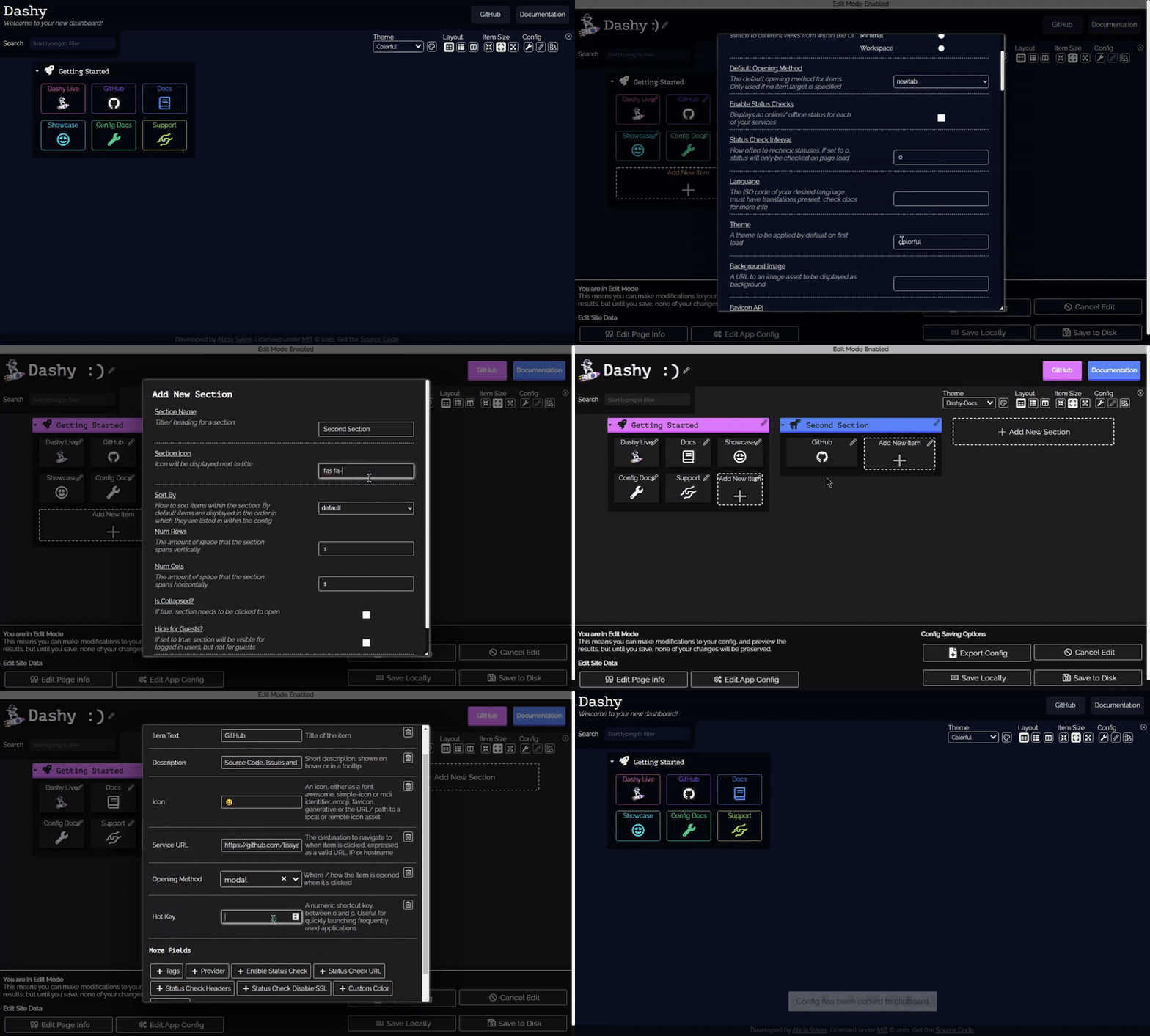
As well as passing in a YAML config file, you can also configure the app directly through the UI and preview changes live.
To edit any section or item, right-click on it, and select "Edit", or enter the Edit Mode (using the Pen icon in the top-right), then click any part of the page to edit. Changes will be visible immediately but will not be saved until clicking "Save to Disk" or "Save Locally".
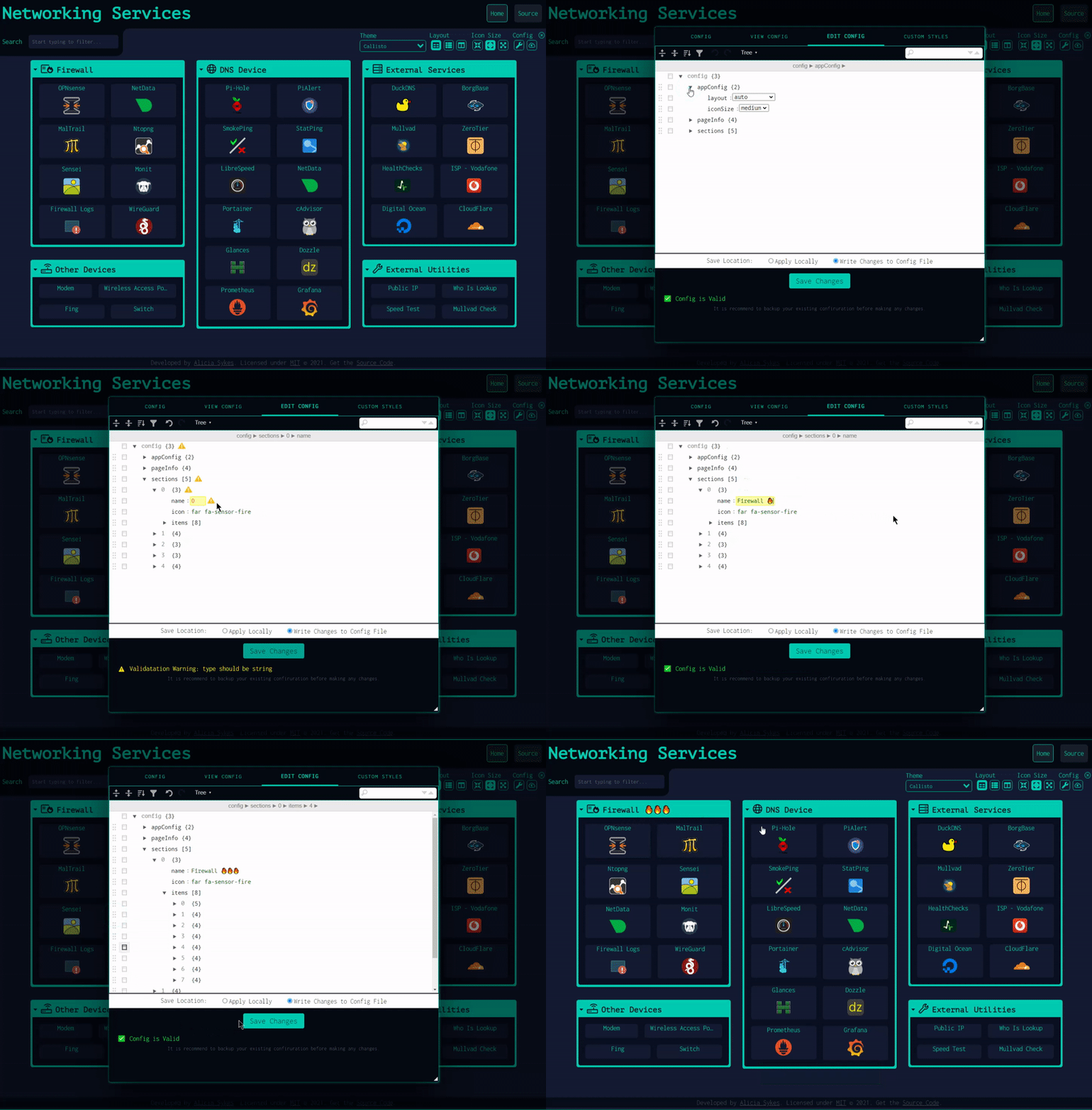
Under the config menu, you can export, view, backup, or reset app config and edit the raw config file in a text editor with built-in schema validation. It's recommended to keep a backup of your config.
<p align="center">
</p>
<p align="center">
</p>
---
- 💨 Quick Start - TDLR guide on getting Dashy up and running in under 5 minutes
- 🚀 Deployment - Full guide on setting up Dashy on various different environments
- 🔧 Configuring - Complete list of all available options in the config file
- 💻 Management - Managing your app, updating, security, web server configuration, etc
- 🚒 Troubleshooting - Common errors and problems, and how to fix them
Supporting Dashy 💖
> For full details and other ways you can help out, see: Contributing
If you're using Dashy and would like to help support its development, then that would be awesome! Contributions of any type, any size, are always very much appreciated, and we will appropriately credit you for your effort.
Several areas that we need a bit of help with at the moment are:
- Translating - Help make Dashy available to non-native English speakers by adding your language
- Donate a small amount by Sponsoring @Lissy93 on GitHub and receive some extra perks!
- Complete a short survey to have your say about future features
- Share your dashboard in the Showcase, to inspire others
- Spread the word by sharing Dashy or a screenshot of your dashboard to help new users discover it
- Submit a PR to add a new feature, fix a bug, update the docs, add a theme, widget or something else
- Star Dashy on GitHub/ DockerHub or leave an upvote / review on these platforms

Sign in to leave a review
Use Google, GitHub, or an email account so ratings stay tied to real people.
No reviews posted yet.



