
🪐 ✨ Jupyter MCP Server
About
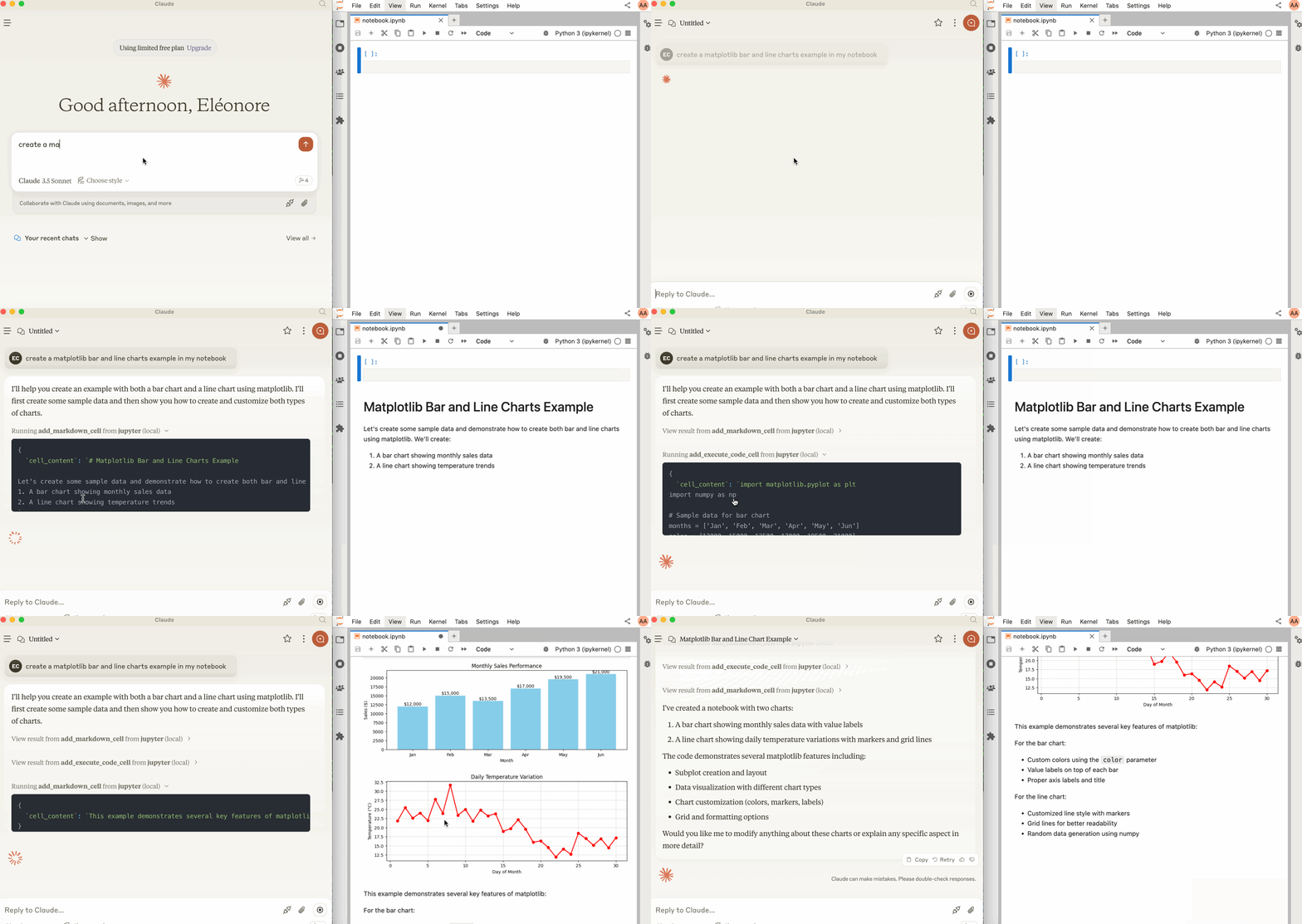
Jupyter MCP Server is a Model Context Protocol (MCP) server that enables interaction with Jupyter notebooks running in a local JupyterLab instance. Designed for AI agents and developers, it uses Jupyter Real Time Collaboration (RTC) to reflect notebook modifications live.
Explore
- Connect AI agents to live Jupyter notebooks
- Add and execute code cells remotely
- Insert Markdown cells into notebooks
- Uses Docker for easy deployment
- Works with JupyterLab’s Real Time Collaboration

Setting up with Highlight
This MCP is not yet compatible with Highlight’s one-click setup. However, you can still use it with Highlight by following these steps:
- Download and install Highlight from highlightai.com/download
- Navigate to the plugins tab and select "Add Custom Plugin"
-
Configure the plugin with the settings below
Plugin Name
🪐 ✨ Jupyter MCP ServerCommand (node, npx, python, etc.)Please refer to the README for specific instructions on how to obtain API keys or other required environment variables.
- Enable "Start Automatically" if you want the plugin to start when Highlight launches





From the repository
To use this with Claude Desktop, add the following to your claude_desktop_config.json:
> [!IMPORTANT]
> Ensure the port of the SERVER_URLand TOKEN match those used in the jupyter lab command.
> The NOTEBOOK_PATH should be relative to the directory where JupyterLab was started.
To install Jupyter MCP Server for Claude Desktop automatically via Smithery:
npx -y @smithery/cli install @datalayer/jupyter-mcp-server --client claude
cell_content
(string): Code to be executed
The server currently offers 2 tools:
1. add_execute_code_cell
- Add and execute a code cell in a Jupyter notebook.
- Input:
- cell_content(string): Code to be executed
- Returns: Success message
2. add_markdown_cell
- Add a markdown cell in a Jupyter notebook.
- Input:
- cell_content(string): Markdown content
- Returns: Success message
Claude Desktop / Cursor
Paste into your MCP client config file to install this server.
{
    "mcpServers": {
        "\ud83e\ude90 \u2728 jupyter mcp server": {
            "datalayer_jupyter-mcp-server": {
                "command": "docker",
                "args": [
                    "build",
                    "-t",
                    "datalayer/jupyter-mcp-server",
                    "."
                ]
            }
        }
    }
}McpServers
{
    "datalayer_jupyter-mcp-server": {
        "command": "docker",
        "args": [
            "build",
            "-t",
            "datalayer/jupyter-mcp-server",
            "."
        ]
    }
}

Jupyter MCP Server is a Model Context Protocol (MCP) server implementation that provides interaction with Jupyter notebooks 📓 running in a local JupyterLab 💻.
Start JupyterLab
Make sure you have the following installed. The modifications made on the notebook can be seen thanks to Jupyter Real Time Collaboration (RTC).
pip install jupyterlab jupyter-collaboration ipykernel
Then, start JupyterLab with the following command:
jupyter lab --port 8888 --IdentityProvider.token MY_TOKEN --ip 0.0.0.0
> [!NOTE]

> The
--ip is set to 0.0.0.0 to allow the MCP server running in a Docker container to access your local JupyterLab.
Usage with Claude Desktop
To use this with Claude Desktop, add the following to your claude_desktop_config.json:
> [!IMPORTANT]
> Ensure the port of the
SERVER_URLand TOKEN match those used in the jupyter lab command.
> The NOTEBOOK_PATH should be relative to the directory where JupyterLab was started.
MacOS and Windows
{
"mcpServers": {
"jupyter": {
"command": "docker",
"args": [
"run",
"-i",
"--rm",
"-e",
"SERVER_URL",
"-e",
"TOKEN",
"-e",
"NOTEBOOK_PATH",
"datalayer/jupyter-mcp-server:latest"
],
"env": {
"SERVER_URL": "http://host.docker.internal:8888",
"TOKEN": "MY_TOKEN",
"NOTEBOOK_PATH": "notebook.ipynb"
}
}
}
}
Linux
{
"mcpServers": {
"jupyter": {
"command": "docker",
"args": [
"run",
"-i",
"--rm",
"-e",
"SERVER_URL",
"-e",
"TOKEN",
"-e",
"NOTEBOOK_PATH",
"--network=host",
"datalayer/jupyter-mcp-server:latest"
],
"env": {
"SERVER_URL": "http://localhost:8888",
"TOKEN": "MY_TOKEN",
"NOTEBOOK_PATH": "notebook.ipynb"
}
}
}
}
Components
Tools
The server currently offers 2 tools:
1.
add_execute_code_cell
  - Add and execute a code cell in a Jupyter notebook.

  - Input:

- (string): Code to be executed
- Returns: Success message
2. add_markdown_cell
  - Add a markdown cell in a Jupyter notebook.

  - Input:

- - Returns: Success message
Building
docker build -t datalayer/jupyter-mcp-server .
Installing via Smithery
To install Jupyter MCP Server for Claude Desktop automatically via Smithery:
npx -y @smithery/cli install @datalayer/jupyter-mcp-server --client claude
Sign in to leave a review
Use Google, GitHub, or an email account so ratings stay tied to real people.
No reviews posted yet.



