
Image
About
# 🦌 DeerFlow [](https://www.python.org/downloads/) [](https://opensource.org/licenses/MIT) [English](./README.md) | [简体中文](./README_zh.md) | [日本語](./README_ja.md) > Originated from…
Explore
- 🤖 LLM Integration
- It supports the integration of most models through litellm.
- Support for open source models like Qwen
- OpenAI-compatible API interface
- Multi-tier LLM system for different task complexities

Setting up with Highlight
This MCP is not yet compatible with Highlight’s one-click setup. However, you can still use it with Highlight by following these steps:
- Download and install Highlight from highlightai.com/download
- Navigate to the plugins tab and select "Add Custom Plugin"
-
Configure the plugin with the settings below
Plugin Name
ImageCommand (node, npx, python, etc.)Please refer to the README for specific instructions on how to obtain API keys or other required environment variables.
- Enable "Start Automatically" if you want the plugin to start when Highlight launches





From the repository
DeerFlow is developed in Python, and comes with a web UI written in Node.js. To ensure a smooth setup process, we recommend using the following tools:
Make sure your system meets the following minimum requirements:
- Python: Version 3.12+
- Node.js: Version 22+
uv sync
cp conf.yaml.example conf.yaml
Please refer to the Configuration Guide for more details.
> [!NOTE]
> Before you start the project, read the guide carefully, and update the configurations to match your specific settings and requirements.
DeerFlow includes a langgraph.json configuration file that defines the graph structure and dependencies for the LangGraph Studio. This file points to the workflow graphs defined in the project and automatically loads environment variables from the .env file.
curl -LsSf https://astral.sh/uv/install.sh | sh
uvx --refresh --from "langgraph-cli[inmem]" --with-editable . --python 3.12 langgraph dev --allow-blocking
```
pip install -e .
pip install -U "langgraph-cli[inmem]"
create_or_update_file
Create or update a single file in a GitHub repository
search_repositories
Search for GitHub repositories
create_repository
Create a new GitHub repository in your account
get_file_contents
Get the contents of a file or directory from a GitHub repository
push_files
Push multiple files to a GitHub repository in a single commit
create_issue
Create a new issue in a GitHub repository
create_pull_request
Create a new pull request in a GitHub repository
fork_repository
Fork a GitHub repository to your account or specified organization
create_branch
Create a new branch in a GitHub repository
list_commits
Get list of commits of a branch in a GitHub repository
list_issues
List issues in a GitHub repository with filtering options
update_issue
Update an existing issue in a GitHub repository
add_issue_comment
Add a comment to an existing issue
search_code
Search for code across GitHub repositories
search_issues
Search for issues and pull requests across GitHub repositories
search_users
Search for users on GitHub
get_issue
Get details of a specific issue in a GitHub repository.
get_pull_request
Get details of a specific pull request
list_pull_requests
List and filter repository pull requests
create_pull_request_review
Create a review on a pull request
merge_pull_request
Merge a pull request
get_pull_request_files
Get the list of files changed in a pull request
get_pull_request_status
Get the combined status of all status checks for a pull request
update_pull_request_branch
Update a pull request branch with the latest changes from the base branch
get_pull_request_comments
Get the review comments on a pull request
get_pull_request_reviews
Get the reviews on a pull request
- uv:
Simplify Python environment and dependency management. uv automatically creates a virtual environment in the root directory and installs all required packages for you—no need to manually install Python environments.
- nvm:
Manage multiple versions of the Node.js runtime effortlessly.
- pnpm:
Install and manage dependencies of Node.js project.
- 🔍 Search and Retrieval
- Web search via Tavily, Brave Search and more
- Crawling with Jina
- Advanced content extraction
- 🔗 MCP Seamless Integration
- Expand capabilities for private domain access, knowledge graph, web browsing and more
- Facilitates integration of diverse research tools and methodologies
Claude Desktop / Cursor
Paste into your MCP client config file to install this server.
{
    "mcpServers": {
        "image": {
            "github": {
                "command": "npx",
                "args": [
                    "-y",
                    "@modelcontextprotocol/server-github"
                ],
                "env": {
                    "GITHUB_PERSONAL_ACCESS_TOKEN": "<YOUR_TOKEN>"
                }
            }
        }
    }
}McpServers
{
    "github": {
        "command": "npx",
        "args": [
            "-y",
            "@modelcontextprotocol/server-github"
        ],
        "env": {
            "GITHUB_PERSONAL_ACCESS_TOKEN": "<YOUR_TOKEN>"
        }
    }
}
🦌 DeerFlow


> Originated from Open Source, give back to Open Source.
DeerFlow (Deep Exploration and Efficient Research Flow) is a community-driven Deep Research framework that builds upon the incredible work of the open source community. Our goal is to combine language models with specialized tools for tasks like web search, crawling, and Python code execution, while giving back to the community that made this possible.
Please visit our official website for more details.
Demo
Video
https://github.com/user-attachments/assets/f3786598-1f2a-4d07-919e-8b99dfa1de3e
In this demo, we showcase how to use DeerFlow to:
- Seamlessly integrate with MCP services
- Conduct the Deep Research process and produce a comprehensive report with images
- Create podcast audio based on the generated report
Replays
- How tall is Eiffel Tower compared to tallest building?
- What are the top trending repositories on GitHub?
- Write an article about Nanjing's traditional dishes
- How to decorate a rental apartment?
- Visit our official website to explore more replays.
---
📑 Table of Contents
- 🚀 Quick Start
- 🌟 Features
- 🏗️ Architecture
- 🛠️ Development
- 🗣️ Text-to-Speech Integration
- 📚 Examples
- ❓ FAQ
- 📜 License
- 💖 Acknowledgments
- ⭐ Star History
Quick Start
DeerFlow is developed in Python, and comes with a web UI written in Node.js. To ensure a smooth setup process, we recommend using the following tools:
Recommended Tools
-uv:
Simplify Python environment and dependency management. uv automatically creates a virtual environment in the root directory and installs all required packages for you—no need to manually install Python environments.
- nvm:
Manage multiple versions of the Node.js runtime effortlessly.
- pnpm:
Install and manage dependencies of Node.js project.
Environment Requirements
Make sure your system meets the following minimum requirements: - Python: Version3.12+
- Node.js: Version 22+
Installation
# Clone the repository
git clone https://github.com/bytedance/deer-flow.git
cd deer-flow
Install dependencies, uv will take care of the python interpreter and venv creation, and install the required packages
uv sync
Configure .env with your API keys
Tavily: https://app.tavily.com/home
Brave_SEARCH: https://brave.com/search/api/
volcengine TTS: Add your TTS credentials if you have them
cp .env.example .env
See the 'Supported Search Engines' and 'Text-to-Speech Integration' sections below for all available options
Configure conf.yaml for your LLM model and API keys
Please refer to 'docs/configuration_guide.md' for more details
cp conf.yaml.example conf.yaml
Install marp for ppt generation
https://github.com/marp-team/marp-cli?tab=readme-ov-file#use-package-manager
brew install marp-cli
Optionally, install web UI dependencies via pnpm:
cd deer-flow/web
pnpm install
Configurations
Please refer to the Configuration Guide for more details.
> [!NOTE]
> Before you start the project, read the guide carefully, and update the configurations to match your specific settings and requirements.
Console UI
The quickest way to run the project is to use the console UI.
# Run the project in a bash-like shell
uv run main.py
Web UI
This project also includes a Web UI, offering a more dynamic and engaging interactive experience.
> [!NOTE]
> You need to install the dependencies of web UI first.
# Run both the backend and frontend servers in development mode
On macOS/Linux
./bootstrap.sh -d
On Windows
bootstrap.bat -d
Open your browser and visit http://localhost:3000 to explore the web UI.
Explore more details in the web directory.
Supported Search Engines
DeerFlow supports multiple search engines that can be configured in your .env file using the SEARCH_API variable:
- Tavily (default): A specialized search API for AI applications
- Requires TAVILY_API_KEY in your .env file
- Sign up at: https://app.tavily.com/home
- DuckDuckGo: Privacy-focused search engine
- No API key required
- Brave Search: Privacy-focused search engine with advanced features
- Requires BRAVE_SEARCH_API_KEY in your .env file
- Sign up at: https://brave.com/search/api/
- Arxiv: Scientific paper search for academic research
- No API key required
- Specialized for scientific and academic papers
To configure your preferred search engine, set the SEARCH_API variable in your .env file:
# Choose one: tavily, duckduckgo, brave_search, arxiv
SEARCH_API=tavily
Features
Core Capabilities
- 🤖 LLM Integration
- It supports the integration of most models through litellm.
- Support for open source models like Qwen
- OpenAI-compatible API interface
- Multi-tier LLM system for different task complexities
Tools and MCP Integrations
- 🔍 Search and Retrieval
- Web search via Tavily, Brave Search and more
- Crawling with Jina
- Advanced content extraction
- 🔗 MCP Seamless Integration
- Expand capabilities for private domain access, knowledge graph, web browsing and more
- Facilitates integration of diverse research tools and methodologies
Human Collaboration
- 🧠 Human-in-the-loop
- Supports interactive modification of research plans using natural language
- Supports auto-acceptance of research plans
- 📝 Report Post-Editing
- Supports Notion-like block editing
- Allows AI refinements, including AI-assisted polishing, sentence shortening, and expansion
- Powered by tiptap
Content Creation
- 🎙️ Podcast and Presentation Generation
- AI-powered podcast script generation and audio synthesis
- Automated creation of simple PowerPoint presentations
- Customizable templates for tailored content
Architecture
DeerFlow implements a modular multi-agent system architecture designed for automated research and code analysis. The system is built on LangGraph, enabling a flexible state-based workflow where components communicate through a well-defined message passing system.
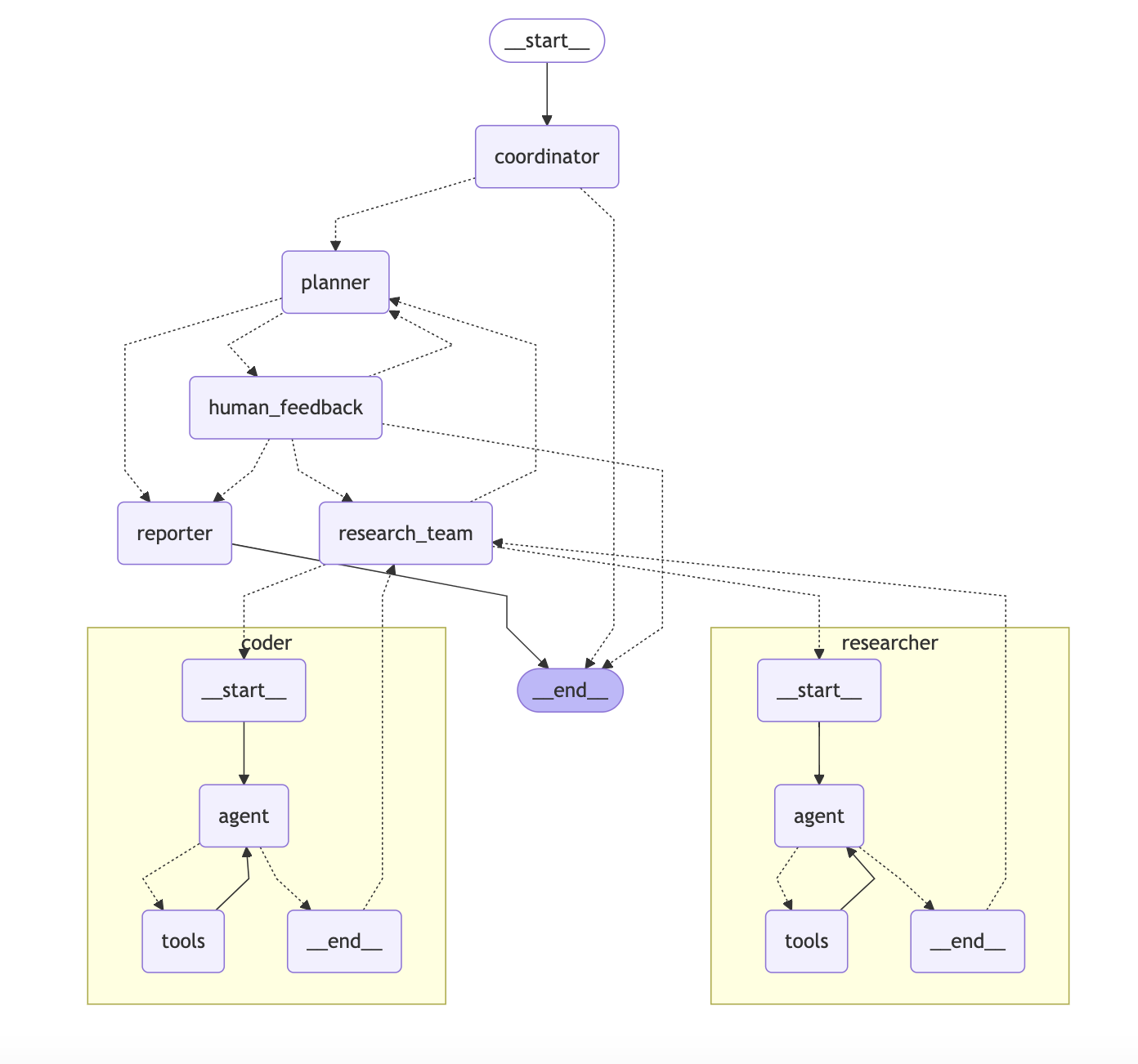
> See it live at deerflow.tech
The system employs a streamlined workflow with the following components:
1. Coordinator: The entry point that manages the workflow lifecycle
- Initiates the research process based on user input
- Delegates tasks to the planner when appropriate
- Acts as the primary interface between the user and the system
…
Sign in to leave a review
Use Google, GitHub, or an email account so ratings stay tied to real people.
No reviews posted yet.



