
Dev Proxy MCP Server
About
The Dev Proxy MCP Server is a Model Context Protocol (MCP) server for Dev Proxy that enables AI assistants to interact with Dev Proxy capabilities using the MCP standard. It allows users to create Dev Proxy configurations using natural language, get contextual help, and discover…
Details
- License
- MIT
Explore
- Create Dev Proxy configurations using natural language
- Get contextual help for working with Dev Proxy
- Discover Dev Proxy features and capabilities
- Find Dev Proxy documentation with natural language queries
- Retrieve the installed Dev Proxy version

Setting up with Highlight
This MCP is not yet compatible with Highlight’s one-click setup. However, you can still use it with Highlight by following these steps:
- Download and install Highlight from highlightai.com/download
- Navigate to the plugins tab and select "Add Custom Plugin"
-
Configure the plugin with the settings below
Plugin Name
Dev Proxy MCP ServerCommand (node, npx, python, etc.)Please refer to the README for specific instructions on how to obtain API keys or other required environment variables.
- Enable "Start Automatically" if you want the plugin to start when Highlight launches





From the repository
GetBestPractices
Gets a list of best practices for configuring and using Dev Proxy. Call it for any code generation or operation involving Dev Proxy. These best practices do not change so once it has been called during the current session, you do not need to invoke it again. Returns a markdown string.
FindDocs
Finds the relevant Dev Proxy documentation for the given query
GetVersion
Gets the currently installed Dev Proxy version
CreateJwt
Creates a JSON Web Token (JWT) using the Dev Proxy jwt create command. Returns the generated token.
Claude Desktop / Cursor
Paste into your MCP client config file to install this server.
{
    "mcpServers": {
        "dev proxy mcp server": {
            "devproxy": {
                "command": "npx",
                "args": [
                    "-y",
                    "@devproxy/mcp"
                ]
            }
        }
    }
}McpServers
{
    "devproxy": {
        "command": "npx",
        "args": [
            "-y",
            "@devproxy/mcp"
        ]
    }
}

A Model Context Protocol (MCP) server for Dev Proxy that enables AI assistants to interact with Dev Proxy capabilities using the MCP standard. Use this server to:
1. Create Dev Proxy configurations using natural language
1. Get contextual help for working with Dev Proxy
1. Discover Dev Proxy features and capabilities
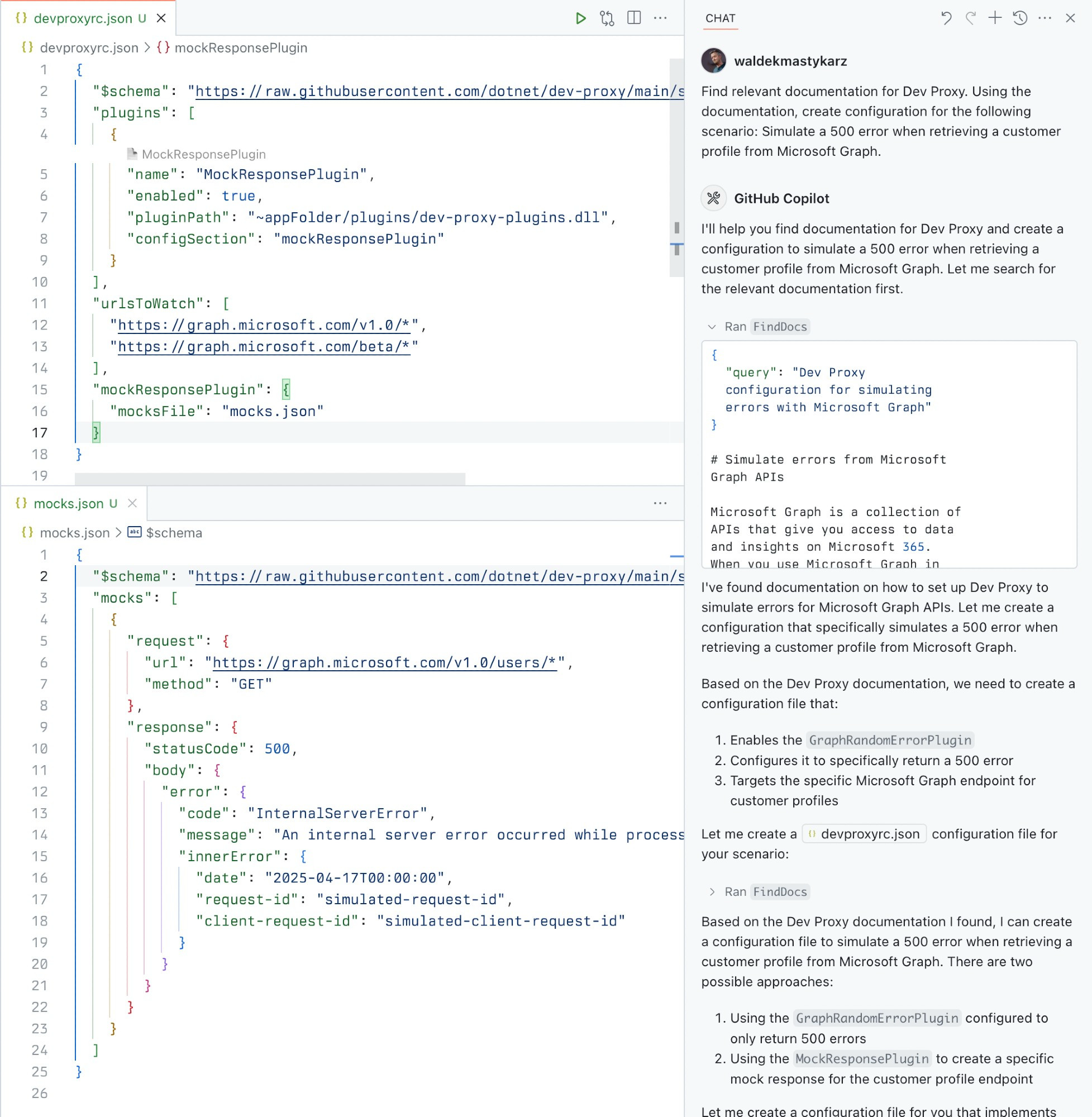
What is Dev Proxy?
Dev Proxy is an API simulator that helps you effortlessly test your app beyond the happy path. It allows you to:
- Test API error handling: See how your app responds to API errors without changing your code
- Verify rate limit handling: Simulate API rate limits to improve user experience
- Test slow API responses: See how your app handles slow APIs to implement necessary affordances
- Create mock APIs: Quickly stand up mock APIs without writing code you won't ship
Dev Proxy works with any type of app and tech stack as it intercepts network requests at the proxy level.
What This Package Does
This package provides a Model Context Protocol (MCP) server interface to Dev Proxy. It allows AI assistants and other MCP-compatible clients to:
1. Find Dev Proxy documentation using natural language queries
2. Get the installed Dev Proxy version
Prerequisites
- Node.js LTS
- Dev Proxy installed globally
Usage
To set up and use the MCP server, refer to the instructions for your MCP host, such as Visual Studio Code. The Dev Proxy MCP server is published on npm under @devproxy/mcp.
Use the following values:
- Type: stdio
- Command: npx
- Arguments:
- -y
- @devproxy/mcp
- Environment: _none_
> [!TIP]
> If you want to test the preview version of the server using @devproxy/mcp@next.
Connect with an MCP Client
This MCP server exposes the following tools:
GetBestPractices
Gets a list of best practices for configuring and using Dev Proxy. Call it for any code generation or operation involving Dev Proxy. These best practices do not change so once it has been called during the current session, you do not need to invoke it again.
_Best practices in markdown_
FindDocs
Finds relevant Dev Proxy documentation related to a specific query.
{
  "query": "How to simulate API errors"
}
GetVersion
Gets the currently installed Dev Proxy version. This is useful to ensure that the generated configuration is compatible with the installed version of Dev Proxy.
{}
Development
```bash
Sign in to leave a review
Use Google, GitHub, or an email account so ratings stay tied to real people.
No reviews posted yet.



