
dify-mcp-client
About
MCP Client as an Agent Strategy Plugin. Support GUI operation via UI-TARS-SDK.
Details
- License
- Apache-2.0
Explore
- On-demand GUI automation: UI-TARS is called only when needed, reducing token consumption
- Life-time control: Set maximum loop count per task to prevent runaway automation

Setting up with Highlight
This MCP is not yet compatible with Highlight’s one-click setup. However, you can still use it with Highlight by following these steps:
- Download and install Highlight from highlightai.com/download
- Navigate to the plugins tab and select "Add Custom Plugin"
-
Configure the plugin with the settings below
Plugin Name
dify-mcp-clientCommand (node, npx, python, etc.)Please refer to the README for specific instructions on how to obtain API keys or other required environment variables.
- Enable "Start Automatically" if you want the plugin to start when Highlight launches





From the repository
MCP Agent Plugin node require config_json like this to command or URL to connect MCP servers
{
"mcpServers":{
"name_of_server1":{
"url": "http://host.docker.internal:8080/sse"
},
"name_of_server2":{
"url": "http://host.docker.internal:8008/mcp"
}
}
}
> [!WARNING]
> - Each server's port number should be different, like 8080, 8008, ...
> - If you want to use stdio mcp server, there are 3 ways.
> 1. Convert it to Streamable HTTP mcp server using mcp-proxy https://github.com/sparfenyuk/mcp-proxy?tab=readme-ov-file#1-stdio-to-ssestreamablehttp
> 2. Deploy with source code (NOT by .difypkg or GitHub reposity name install) https://github.com/3dify-project/dify-mcp-client/edit/main/README.md#-how-to-develop-and-deploy-plugin
> 3. Pre-install Node.js inside dify-plugin docker (Only TypeScript stdio server)
Without Node.js in container, you lose TypeScript stdio MCP support.
</details>
For detailed UI-TARS setup, refer to the UI-TARS Desktop deployment guide.
The plugin automatically configures UI-TARS as a tool within the ReAct loop. You need to provide:
- Hugging Face Inference Endpoint URL
- API Key like (hf_xxxxx)
- (Optional) Adjust ui_tars_max_life_time_count in agent parameters
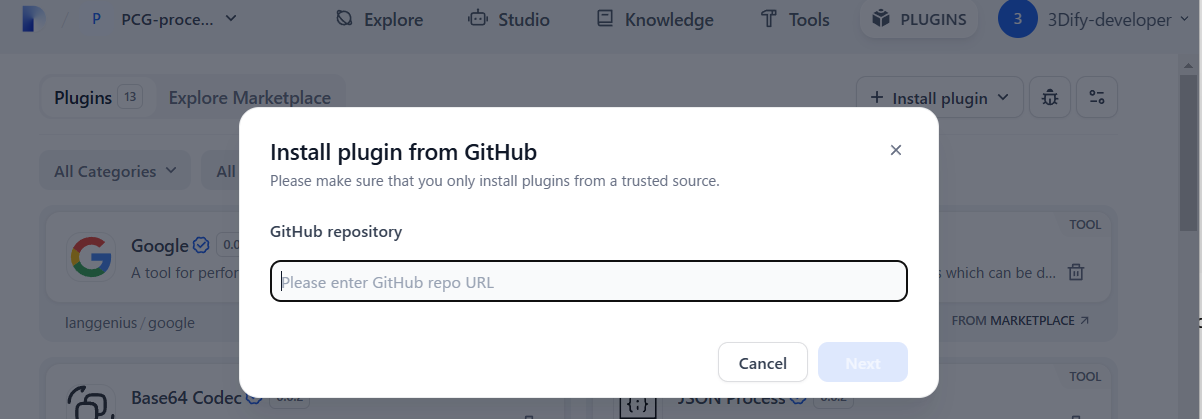
- Enter the following GitHub repository name
https://github.com/3dify-project/dify-mcp-client/
- Dify > PLUGINS > + Install plugin > INSTALL FROM > GitHub
- Go to Releases https://github.com/3dify-project/dify-mcp-client/releases
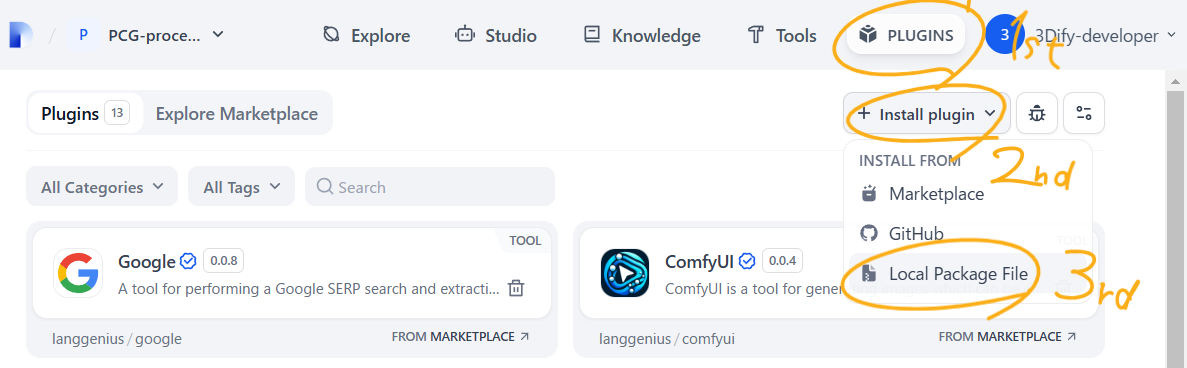
- Select suitable version of .difypkg
- Dify > PLUGINS > + Install plugin > INSTALL FROM > Local Package File
Issue: If you encounter the error message: plugin verification has been enabled, and the plugin you want to install has a bad signature, how to handle the issue? <br>
Solution: Open /docker/.env and change from true to false:
FORCE_VERIFYING_SIGNATURE=false
Run the following commands to restart the Dify service:
cd docker
docker compose down
docker compose up -d
Once this field is added, the Dify platform will allow the installation of all plugins that are not listed (and thus not verified) in the Dify Marketplace.
(Mac/Linux)
which npx
(Windows)
where npx
result
C:\Program Files\nodejs\npx
C:\Program Files\nodejs\npx.cmd
C:\Users\USER_NAME\AppData\Roaming\npm\npx
C:\Users\USER_NAME\AppData\Roaming\npm\npx.cmd
If claude_desktop_config.json is following schema,
{
"mcpServers": {
"SERVER_NAME": {
"command": CMD_NAME_OR_PATH
"args": {VALUE1, VALUE2}
}
}
}
Python3.12+ is compatible. The venv and uv are not necessary, but recommended.
uv venv -p 3.12
.venv\Scripts\activate
Install python modules for plugin development
uv pip install -r requirements.txt
For only UI-TARS-SDK user (after installing Node.js v22 LTS)
npm install
```
Claude Desktop / Cursor
Paste into your MCP client config file to install this server.
{
    "mcpServers": {
        "dify-mcp-client": {
            "dify-mcp-client": {
                "command": "docker",
                "args": [
                    "build",
                    "-t",
                    "dify-mcp-client:latest",
                    "."
                ]
            }
        }
    }
}McpServers
{
    "dify-mcp-client": {
        "command": "docker",
        "args": [
            "build",
            "-t",
            "dify-mcp-client:latest",
            "."
        ]
    }
}
MCP Client as Agent Strategy Plugin with Computer Using Agent (UI-TARS-SDK) support.
> [!IMPORTANT]
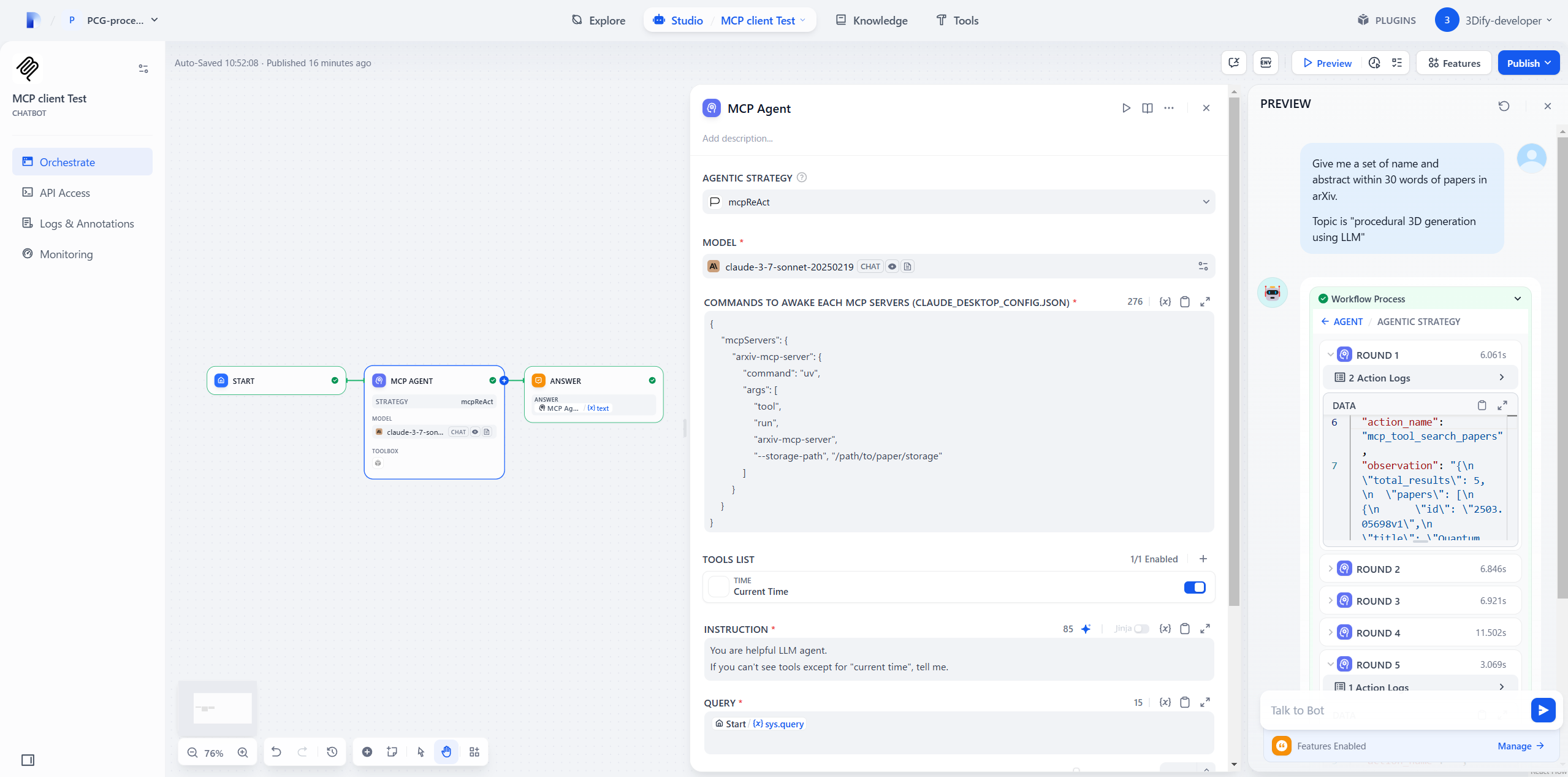
> Dify is not MCP Server but MCP Host.
How it works
EachMCP client (ReAct Agent) node can connect MCP servers.
1. Tool, Resource, Prompt lists are converted into Dify Tools.
2. Your selected LLM can see their name, description, argument type
3. The LLM calls Tools based on the ReAct loop (Reason → Act → Observe).
> [!NOTE]
> Most of the code in this repository contains the following files.
> #### Dify Official Plugins / Agent Strategies
> https://github.com/langgenius/dify-official-plugins/tree/main/agent-strategies/cot_agent
✅ What I did
- CopiedReAct.py and renamed file as mcpReAct.py
- Added config_json GUI input field by editing mcpReAct.yaml and class mcpReActParams()
in mcpReAct.py, I added
- New 12 functions for MCP -__init__() for initializing AsyncExitStack and event loop
- Some codes in _handle_invoke_action() for MCP
- MCP setup and cleanup in _invoke()
> [!IMPORTANT]
> ReAct while loop is as they are
🔄 Update history
- Add SSE MCP client (v0.0.2) - Support multi SSE servers (v0.0.3) - Update python module and simplify its dependency (v0.0.4) - mcp(v1.1.2→v1.6.0+) - dify_plugin(0.0.1b72→v0.1.0) - Add UI-TARS SDK integration for GUI automation capabilities (v0.0.5) - Support Streamable HTTP MCP client - Feat SSE param:/sse?key=value (v0.0.6)
🤖 UI-TARS Integration
This plugin includes UI-TARS SDK integration for GUI automation capabilities.
> [!WARNING]
> UI-TARS-SDK integration is supported only Dify Plugin's local debug deployment.
> https://github.com/3dify-project/dify-mcp-client#-how-to-develop-and-deploy-plugin
>
> Normal difypkg install doesn't work. Because UI-TARS require OS native API, yet Dify plugin env is Linux docker container.
>
> I'm thinking alternative solusion via Streamable HTTP MCP.
Key Features
- On-demand GUI automation: UI-TARS is called only when needed, reducing token consumption
- Life-time control: Set maximum loop count per task to prevent runaway automation
Known Limitations
- Single Monitor Support: UI-TARS currently recognizes the primary monitor only. Multi-monitor setups are not supported. - Mac Retina Display Issue: On macOS with Retina displays, UI-TARS requires the display resolution to be set to "Default" instead of the highest quality setting. Otherwise wrong (w,h) point is clicked. https://github.com/bytedance/UI-TARS-desktop/issues/591Life-time Parameter
Thelife_time parameter controls the maximum number of GUI actions UI-TARS can perform:
- Default: 10 iterations
- User-configurable maximum via ui_tars_max_life_time_count
- Your selected LLM can dynamically adjust within the user-defined limit based on task complexity
> [!NOTE]
> Currently hardcoded to use UI-TARS-1.5-7B model for optimal cost-performance balance.
🐳 Docker Deployment with Pre-built Node.js
Building the Docker Image
<details> <summary> This pulldown guide is for TypeScript stdio MCP server user</summary>docker build -t dify-mcp-client:latest .
Or use our pre-built image:
```yaml
Sign in to leave a review
Use Google, GitHub, or an email account so ratings stay tied to real people.
No reviews posted yet.




