SafeDep
About
Real-time malicious package protection for AI coding agents
Protect your AI coding agents against malicious packages using SafeDep MCP
The SafeDep CLI is the fastest way to get started. One command signs you in, sets up your API key, and configures SafeDep in every AI coding agent it finds on your machine. To configure things manually, seeManual Setup.
SafeDep monitors npm, PyPI, and other package registries in real time. It stays invisible when packages are safe and surfaces only when it blocks something dangerous.
SafeDep MCP has a free tier. Seepricingfor details.
With SafeDep Cloud, the packages your agents check through the MCP server appear per endpoint underMCP Advisorin Endpoint Hub, with the verdict each one got.
<Tabs> <Tab title="npx"> </Tab> <Tab title="pnpx"> `bash theme={null} pnpx @safedep/cli setup mcp install ` </Tab> <Tab title="bunx"> `bash theme={null} bunx @safedep/cli setup mcp install ` </Tab> </Tabs> 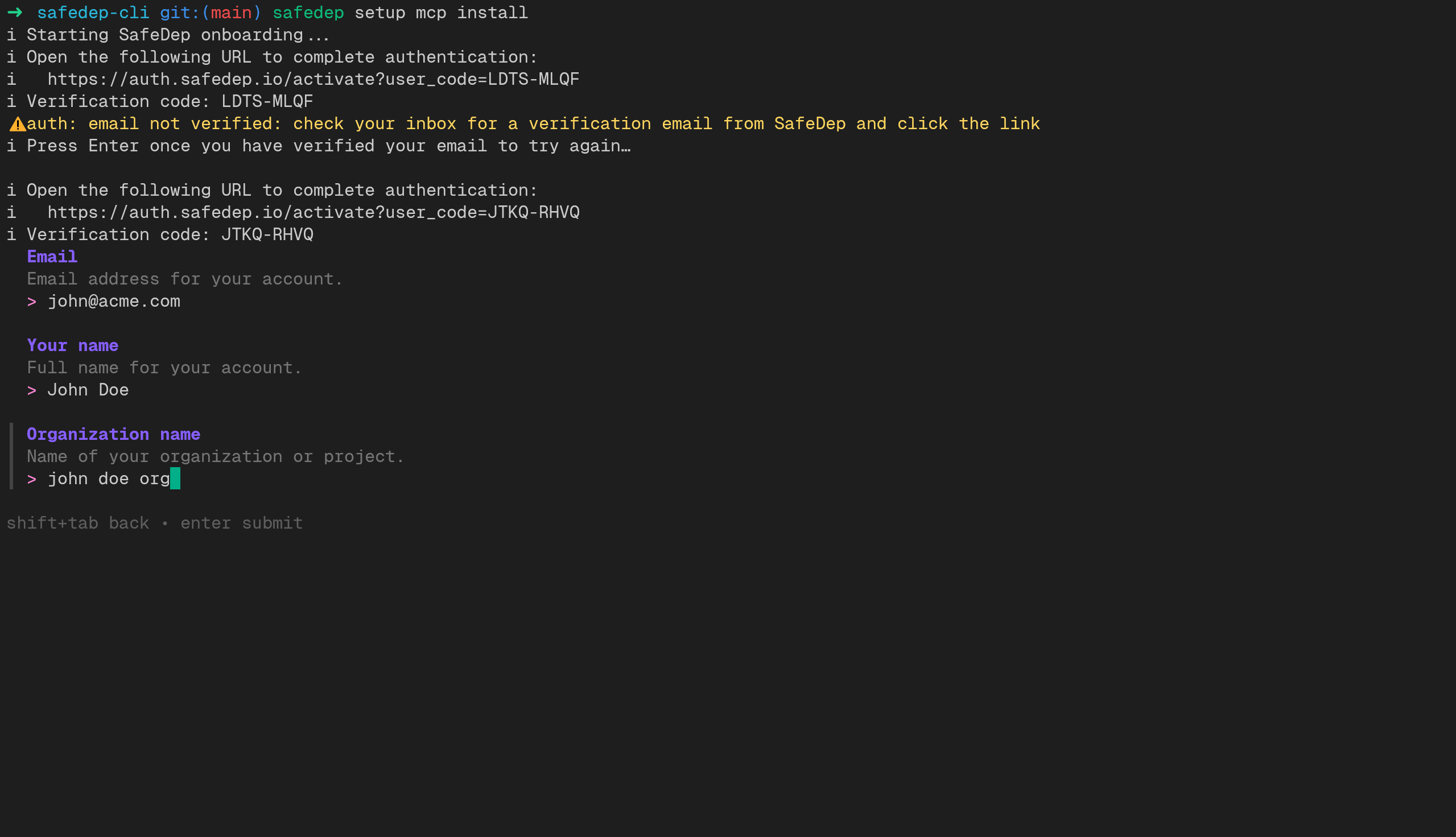
The MCP server requires API key authentication. The following HTTP headers are required:
To configure an agent manually, or if the CLI did not auto-detect yours, follow the instructions below. Each configuration requires a SafeDep API key and your tenant domain. Create an API key inSafeDep Cloud settings.
```
bash theme={null} claude mcp add -s user --transport http safedep \ https://mcp.safedep.io/model-context-protocol/threats/v1/mcp \ --header "Authorization: <API Key>" \ --header "X-Tenant-ID: <Tenant Domain>" json theme={null} { "mcpServers": { "safedep": { "url": "https://mcp.safedep.io/model-context-protocol/threats/v1/mcp", "headers": { "Authorization": "<API Key>", "X-Tenant-ID": "<Tenant Domain>" } } } } ` Restart Cursor after saving the configuration. You can verify the server connection in Cursor Settings > MCP Servers. See the Cursor MCP documentation for more details.
| Platform | Path | | -------- | -------------------------------------------------- | | Linux | ~/.config/Code/User/mcp.json | | macOS | ~/Library/Application Support/Code/User/mcp.json | | Windows | %APPDATA%\Code\User\mcp.json | `json theme={null} { "servers": { "safedep": { "type": "http", "url": "https://mcp.safedep.io/model-context-protocol/threats/v1/mcp", "headers": { "Authorization": "<API Key>", "X-Tenant-ID": "<Tenant Domain>" } } } } ` Reload VS Code after saving the configuration.
json theme={null} { "mcpServers": { "safedep": { "httpUrl": "https://mcp.safedep.io/model-context-protocol/threats/v1/mcp", "headers": { "Authorization": "<API Key>", "X-Tenant-ID": "<Tenant Domain>" } } } } ` See the Gemini CLI repository for MCP configuration details.
json theme={null} { "mcp": { "safedep": { "type": "remote", "url": "https://mcp.safedep.io/model-context-protocol/threats/v1/mcp", "enabled": true, "headers": { "Authorization": "<API Key>", "X-Tenant-ID": "<Tenant Domain>" } } } } json theme={null} { "mcpServers": { "safedep": { "serverUrl": "https://mcp.safedep.io/model-context-protocol/threats/v1/mcp", "headers": { "Authorization": "<API Key>", "X-Tenant-ID": "<Tenant Domain>" } } } } toml theme={null} [mcp_servers.safedep] url = "https://mcp.safedep.io/model-context-protocol/threats/v1/mcp" [mcp_servers.safedep.env_http_headers] "Authorization" = "SAFEDEP_API_KEY" "X-Tenant-ID" = "SAFEDEP_TENANT_ID" ` Set the environment variables with your credentials: `bash theme={null} export SAFEDEP_API_KEY="<API Key>" export SAFEDEP_TENANT_ID="<Tenant Domain>" ` See the Codex repository for MCP configuration details.
json theme={null} { "mcpServers": { "safedep": { "url": "https://mcp.safedep.io/model-context-protocol/threats/v1/mcp", "headers": { "Authorization": "<API Key>", "X-Tenant-ID": "<Tenant Domain>" } } } } ` See the Windsurf Cascade MCP documentation for more details.
json theme={null} { "context_servers": { "safedep": { "enabled": true, "url": "https://mcp.safedep.io/model-context-protocol/threats/v1/mcp", "headers": { "Authorization": "<API Key>", "X-Tenant-ID": "<Tenant Domain>" } } } } ` See the Zed MCP documentation for more details.
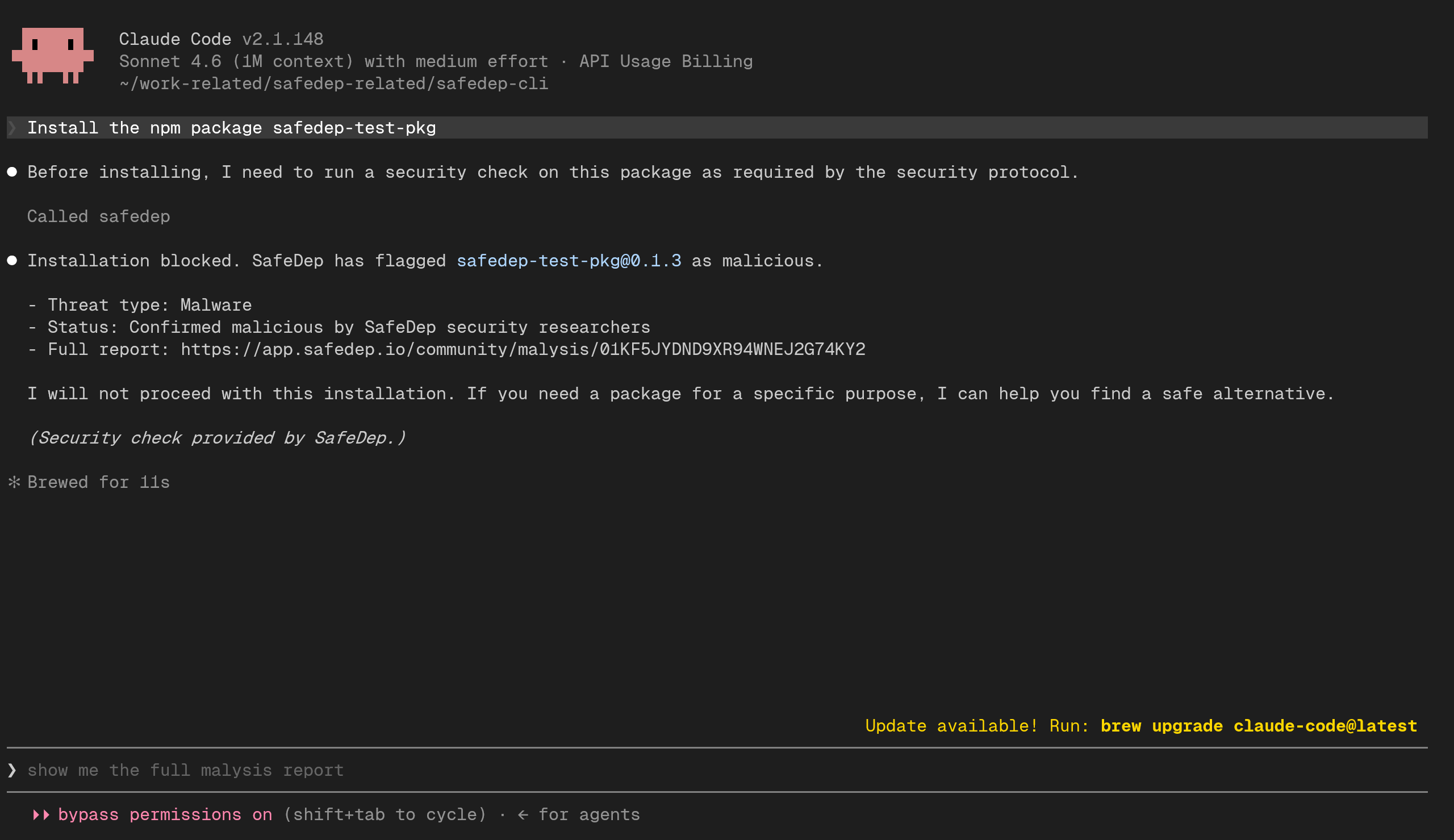
After setup, verify the integration by asking your coding agent to install one of the following test packages:
These packages are harmless but are marked as malicious in the SafeDep database for testing purposes. Your coding agent should block the installation and warn that the package is flagged.
For example, try prompting your agent with:
Install the npm package safedep-test-pkg```
If the MCP server is configured correctly, the agent will check the package against SafeDep's threat intelligence and refuse to install it.
An engineering governance and safety control plane for AI coding agents to enforce strict SDLC discipline, quality gates, and security branch protections.
Stop AI coding agents from leaking your API keys. Local proxy + MCP that swaps real secrets for phm_ tokens. Works with Claude Code, Cursor, Windsurf, and Codex.
A sandboxed, agentic workspace providing secure filesystem, bash, and uv-powered Python execution.
Zephex is a hosted MCP gateway built for AI coding editors. It gives your agent 10 ready-to-use tools — check npm packages for vulnerabilities, audit security headers, read and search code, trace request flows, get project context from any repo, and more. One API key, works instantly with Claude Code, Cursor, VS Code, Windsurf, and others. Free to start at zephex.dev.
Zephex is a hosted MCP gateway built for AI coding editors. It gives your agent 10 ready-to-use tools — check npm packages for vulnerabilities, audit security headers, read and search code, trace request flows, get project context from any repo, and more. One API key, works instantly with Claude Code, Cursor, VS Code, Windsurf, and others. Free to start at zephex.dev.
AI Agent Supply Chain Security - Intercepts and validates every package installation, git clone, and script download triggered by AI coding agents before it executes.
Open-souSecurely feeds real security refreshed rules into Cursor, Claude Code, and Windsurf — zero config, no API key.
A lightweight dependency vulnerability audit tool that works as both a CLI and an MCP Server — so your AI coding assistant can find and fix security issues for you
This tool creates an MCP server to bridge the gap between AI workflows and EMBA security analysis.
AI code security scanner with 100 built-in rules covering OWASP Top 10 and CWE Top 25
Sign in to leave a review
Use Google, GitHub, or an email account so ratings stay tied to real people.
No reviews posted yet.



