
EduBase
About
Interact with [EduBase](https://www.edubase.net), a comprehensive e-learning platform with advanced quizzing, exam management, and content organization capabilities
Details
- Transport
- SSE
- License
- MIT
Explore
- Exposes each documented API endpoint as a separate edubase_<method>_<endpoint> tool.
- Supports stdio, SSE, and streamable HTTP transports.
- Offers remote server usage with optional OAuth 2.1 authentication.
- Runs locally via npx, Node.js, or Docker.
- Hosted instance available for www.edubase.net users.
- Integrates with EduBase’s advanced quiz system, unified learning environment, and AI tools.

Setting up with Highlight
This MCP is not yet compatible with Highlight’s one-click setup. However, you can still use it with Highlight by following these steps:
- Download and install Highlight from highlightai.com/download
- Navigate to the plugins tab and select "Add Custom Plugin"
-
Configure the plugin with the settings below
Plugin Name
EduBaseCommand (node, npx, python, etc.)Please refer to the README for specific instructions on how to obtain API keys or other required environment variables.
- Enable "Start Automatically" if you want the plugin to start when Highlight launches





From the repository
The MCP server can be configured using environment variables. The following variables are available:
| Variable | Description | Required | Default value |
|---|---|---|---|
| EDUBASE_API_URL | The base URL of the EduBase API, most probably https://subdomain.edubase.net/api. | Yes | https://www.edubase.net/api |
| EDUBASE_API_APP | The App ID of your integration app on EduBase, the app on the EduBase API. Find this in the integration details window on EduBase. | Not if HTTP transport is used with authentication, otherwise Yes | - |
| EDUBASE_API_KEY | The Secret key of your integration app on EduBase, the secret on the EduBase API. Find this along the App ID in the integration details window on EduBase. | Not if HTTP transport is used with authentication, otherwise Yes | - |
| EDUBASE_SSE_MODE | Start MCP server in HTTP mode with SSE transport. Value must be true. | No | false |
| EDUBASE_STREAMABLE_HTTP_MODE | Start MCP server in HTTP mode with streamable HTTP transport. Value must be true. | No | false |
| EDUBASE_HTTP_PORT | HTTP server will listen on this port if SSE or streamable HTTP transport mode is used. | No | 3000 |
| EDUBASE_OAUTH | Enables OAuth 2.1 protected-resource behaviour: unauthenticated requests are rejected with 401 + WWW-Authenticate pointing at /.well-known/oauth-protected-resource, and bearer tokens are forwarded to the EduBase API. | No | false |
| EDUBASE_OAUTH_AUTHORIZATION_SERVER | Public base URL of the EduBase deployment acting as the OAuth IdP. Used to advertise the authorization server in the protected-resource metadata document. | No | derived from EDUBASE_API_URL |
| EDUBASE_OAUTH_RESOURCE_URL | Public base URL of this MCP server (the OAuth resource indicator). Used in the WWW-Authenticate header and resource metadata. | No | derived from EDUBASE_API_URL |
You can use server in two modes:
Without client authentication: In this mode, the server will not require any authentication from the client. This is useful for testing or development purposes, or in a closed network but it is not recommended for production use. For this, you have to configure the server with the EDUBASE_API_APP and EDUBASE_API_KEY as well!
With Bearer token authentication: In this mode, the server will require a Bearer token to be sent with each request. This is the recommended way to use the server in production. You can obtain the Bearer token from your EduBase account by creating an integration app and providing the App ID and Secret key in the {app}:{secret} format, base64 encoded as a token. The server will then use this token to authenticate the client and authorize access to the API endpoints.
- With OAuth 2.1 (EduBase as IdP): When
EDUBASE_OAUTH=true, compatible clients (Claude Desktop, Claude.ai connectors, Cursor, ChatGPT connectors, etc.) discover the EduBase authorization server through/.well-known/oauth-protected-resource, register themselves dynamically (RFC 7591), walk the user through an EduBase consent screen, and exchange an authorization code (with PKCE S256) for an opaque access token. The MCP server forwards that token verbatim to the EduBase API, which resolves it to the auto-provisioned MCP integration, created on first consent. No App ID/Secret to copy — users just click "Connect EduBase" in their client.
For a step-by-step walkthrough, see our blog post on how to connect EduBase with Claude: The Complete MCP Integration Guide.
Add the following to your claude_desktop_config.json:
You can use the provided EduBase MCP server (if available) as a remote server. We recommend Base64 encoding your EDUBASE_API_APP and EDUBASE_API_KEY and using it in as a Bearer token in the Authorization header (Authorization: Bearer ${BASE64_ENCODED_TOKEN}).
{
"mcpServers": {
"edubase": {
"command": "npx",
"args": [
"mcp-remote",
"https://domain.edubase.net/mcp",
"--header",
"Authorization: Bearer ${EDUBASE_API_APP}:${EDUBASE_API_KEY}"
]
}
}
}
To install EduBase MCP server for Claude Desktop automatically via Smithery:
npx -y @smithery/cli install @EduBase/MCP --client claude
edubase_mcp_server_version
Get the MCP server version (only use for debugging).
edubase_filebin
Upload a local file or a file from a URL to the EduBase temporary file storage with a link requested from the API in advance.
edubase_post_filebin_upload
Generate an upload link for the temporary file storage (filebin). Returns the filebin identifier, the upload link, its expiration and the maximum file size. Upload the file with edubase_filebin, then reference the filebin identifier in the fields accepting files (e.g. question images and attachments). A previous valid link is returned unless force is set.
edubase_delete_filebin_upload
Delete an uploaded temporary file and/or its upload link, identified by the filebin identifier returned by edubase_post_filebin_upload.
edubase_get_questions
List owned and managed Quiz questions. Returns the question identification strings and external identifiers. Use edubase_post_question_export to read the content of a question.
edubase_get_question
Check existing question. Questions are the lowest level in the EduBase hierarchy, serving as the building blocks for Quiz sets. To get question details, use the question export function!
edubase_post_question
Publish or update a question. Questions are the atomic building blocks of the EduBase Quiz system and represent the lowest level in the hierarchy (Questions -> Quiz sets -> Exams). Always check what the fields named like the type of the question do and consider using them, for example if creating a HOTSPOT question, both hotspot_zones and hotspot_image will be required!
edubase_delete_question
Permanently delete a Quiz question, identified by its external unique question identifier. This cannot be undone, confirm with the user first.
edubase_post_question_export
Generate download link for exporting the question (in JSON format). If a previous valid link exists, it will be returned instead.
edubase_get_question_id
Get external unique question identifier by question identification string.
edubase_post_question_id
Set external unique question identifier for question identified by a question identification string.
edubase_get_quizes
List owned and managed Quiz sets. Quiz sets are named collections of questions that sit at the middle level of the EduBase Quiz hierarchy.
edubase_get_quiz
Get/check Quiz set. Containing questions and powering Exams.
edubase_post_quiz
Create a new Quiz set. Quiz sets are collections of questions that can be used for practice or to power multiple Exams.
edubase_patch_quiz
Update the details of an existing Quiz set: title, external identifier, language, description and organization. Use edubase_post_quiz_settings to change its settings and edubase_post_quiz_questions to add questions.
edubase_get_quiz_settings
Get the settings of a Quiz set: question shuffling, time limits and grading. Change them with edubase_post_quiz_settings.
edubase_post_quiz_settings
Change individual settings of a Quiz set: question shuffling, time limits, grading and grading threshold. Only the given settings are changed, and the updated settings are returned. List the available grading presets with edubase_get_quiz_grading_presets.
edubase_put_quiz_settings
Replace the complete configuration of a Quiz set with the configuration of another Quiz set. Only the configuration is copied, questions and question groups are not. The question selection, filtering and export settings of the target Quiz set are kept as well.
edubase_patch_quiz_settings
Copy only those settings from another Quiz set that are not configured yet in the target Quiz set.
edubase_delete_quiz
Delete a Quiz set, or archive it when the user is not allowed to delete it. Confirm with the user first.
edubase_get_quiz_grading_presets
List the grading presets available for the user. The global presets, the owned custom presets and the presets of the organizations of the user are returned. A Quiz set or an exam can be specified to list only the presets that can be used on it, together with the one it is currently using.
edubase_get_quiz_grading_preset
Get a grading preset with its thresholds and grades, including whether its threshold is configurable and whether certificates can be issued with it. List the presets with edubase_get_quiz_grading_presets.
edubase_post_quiz_grading_preset
Create a new custom grading preset. Needs the custom grading feature to be enabled.
edubase_patch_quiz_grading_preset
Update an existing custom grading preset. The global presets and the presets of the organizations cannot be modified.
edubase_delete_quiz_grading_preset
Remove a custom grading preset. The global presets, the presets of the organizations, and the presets that are still used by a Quiz set or an exam cannot be removed.
edubase_get_quiz_skills
Get the skills defined in a Quiz set, with the identifier, title and description of each skill.
edubase_get_quiz_questions
List all questions and question groups in a Quiz set. Quiz sets contain questions (lowest level) and can be used by exams (highest level).
edubase_post_quiz_questions
Assign question(s) to a Quiz set, or one of its question group. Questions can exist independently from Quiz sets.
edubase_delete_quiz_questions
Remove question(s) from a Quiz set, or one of its question group.
edubase_get_exams
List owned and managed exams. Exams are the highest level in the EduBase Quiz hierarchy, built from Quiz sets.
edubase_get_exam
Get the details of an exam: title, language, the Quiz set it uses, active state, status (INACTIVE, ACTIVE, PAUSED, REVIEW, EXPIRED), start and end times, deadline and Safe Exam Browser links. Use edubase_get_exam_settings for its settings.
edubase_post_exam
Create a new exam from an existing Quiz set. Exams are at the top level of the EduBase Quiz hierarchy and MUST be created from existing Quiz sets. They are time-constrained, secured assessment instances of Quiz sets.
edubase_patch_exam
Update the details of an existing exam: title, external identifier, language, description, organization, start and end times, and deadline. The start time can only be changed until the first result arrives. Use edubase_post_exam_settings to change its settings.
edubase_delete_exam
Delete an exam, or archive it when the user is not allowed to delete it. Confirm with the user first.
edubase_get_exam_settings
Get the settings of an exam. Surveys are never graded and their results cannot be viewed later, so the grading and the results viewing settings are not returned for them. The columns of the results export cannot be configured for surveys either, only the format and the ordering of the exported file.
edubase_post_exam_settings
Change individual settings of an exam. The columns of the export (every setting from export_stats on) cannot be configured for surveys, only the export_format and the export_sort settings are available for them. The export_attendance setting is read only, the attendance is configured together with its source on the interface.
edubase_put_exam_settings
Replace the complete configuration of an exam with the configuration of another exam. Exam specific data and state (automatic account generation, rounds, notifications, login settings and previously used patterns) is never copied. Branding, and the attached learning materials (course, SCORM package and video) of the target exam are kept as well.
edubase_patch_exam_settings
Copy only those settings from another exam that are not configured yet in the target exam.
edubase_get_exam_autologin
Get the automatic login configuration of an exam: whether it is enabled, the PIN code, the login and results links, and whether exam accounts are generated or registered users can join automatically.
edubase_post_exam_autologin
Enable or reconfigure automatic login for an exam, optionally with a shortlink for the login link. Returns the configuration with the PIN code and login link, the same way as edubase_get_exam_autologin. Disable it with edubase_delete_exam_autologin.
Each documented API endpoint is available as a separate tool, named edubase_<method>_<endpoint>. For example, the tool for the GET /user:me endpoint is named edubase_get_user_me. See our developer documentation for more information.
Claude Desktop / Cursor
Paste into your MCP client config file to install this server.
{
    "mcpServers": {
        "edubase": {
            "MCP": {
                "command": "npx",
                "args": [
                    "-y",
                    "@smithery/cli",
                    "install",
                    "@EduBase/MCP",
                    "--client",
                    "claude"
                ]
            }
        }
    }
}McpServers
{
"MCP": {
"command": "npx",
"args": [
"-y",
"@smithery/cli",
"install",
"@EduBase/MCP",
"--client",
"claude"
]
}
}
This repository contains the implementation of the Model Context Protocol (MCP) server for the EduBase platform. It allows MCP clients (for example Claude Desktop) and LLMs to interact with your EduBase account and perform tasks on your behalf. It supports stdio, SSE and streamable HTTP transport protocols.
<a href="https://glama.ai/mcp/servers/@EduBase/MCP">
</a>
What is EduBase?
EduBase is an innovative, modular, online educational platform that makes learning more enjoyable, simpler and interactive, suitable for educational institutions or enterprises.
Why choose EduBase?
EduBase revolutionizes digital learning with its unique combination of features:
Advanced Quiz System with parametrization allowing infinite variations of the same question, real-time cheating detection, beautiful LaTeX typesetting, advanced STEM-support and automatic grading
Unified Learning Environment that centralizes all your educational content — videos, exams, documents, and SCORM modules — in one intuitive system
Enterprise-Grade Security with features like SSO integration, fine-grained access controls, comprehensive auditing, and GDPR compliance
Integration with your existing systems through LTI, comprehensive API, and custom integration options
AI-Assisted Tools, such as EduBase Assistant, that can instantly transform your existing content into interactive quizzes and assessments, or translate your materials from one language to another
From higher education institutions to corporate training departments, EduBase scales to meet your specific needs while maintaining an intuitive user experience across all devices.
Demo video
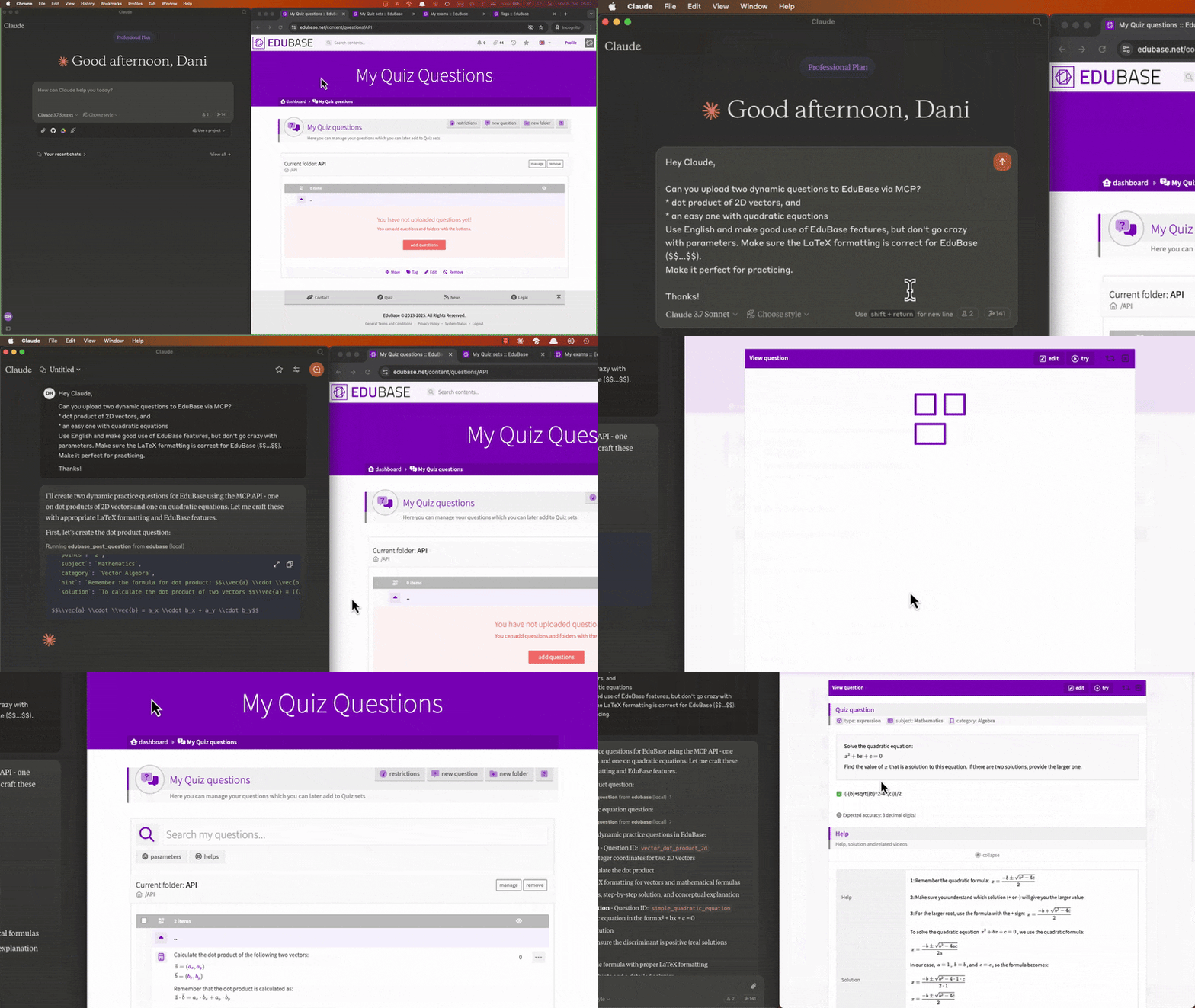
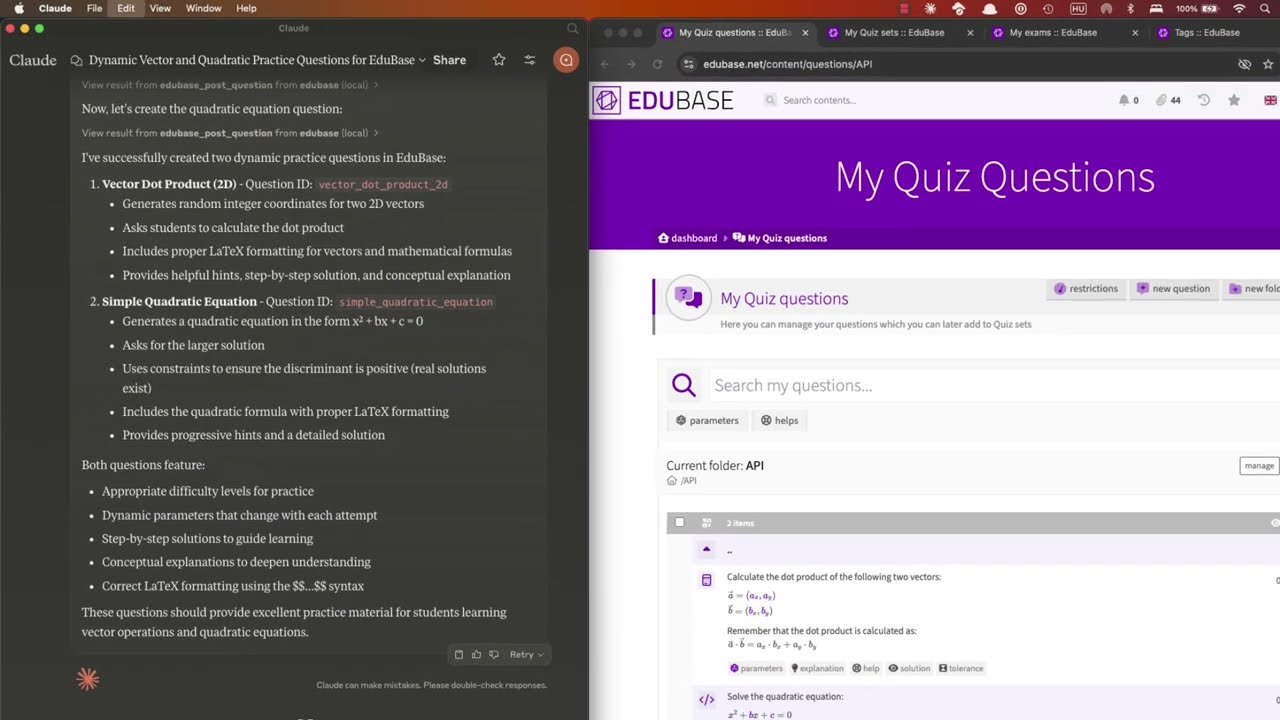
Collaboratively creating and uploading questions, scheduling exams and analyzing user results with Claude:
<a href="https://www.youtube.com/watch?v=jvGP-5NzRPs">
</a>
Obtaining your API credentials
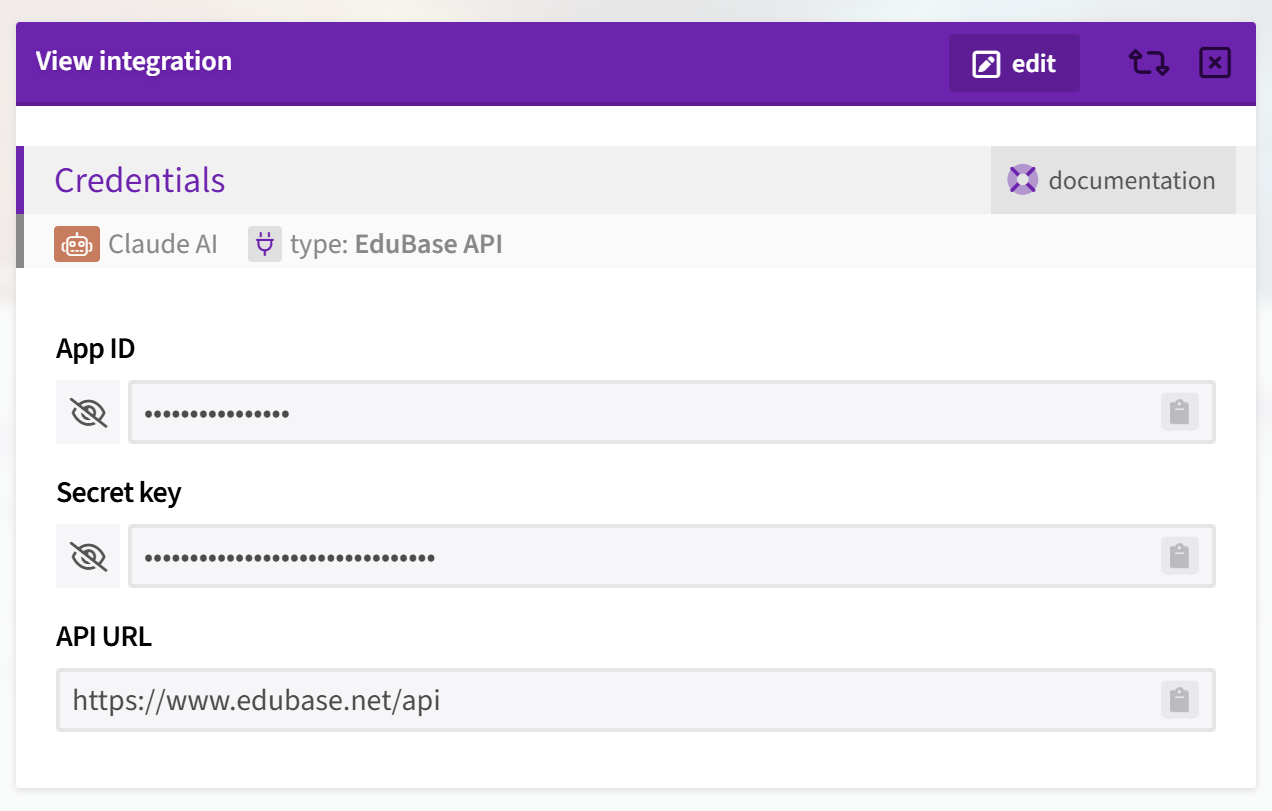
Once logged in, on your Dashboard, search for the Integrations menu, click "add integration" and choose the type "EduBase API".
If you don't see this option, enter the MCPGITHUB activation code or feel free to contact us to request access at [email protected].
Tools
Each documented API endpoint is available as a separate tool, named edubase_<method>_<endpoint>. For example, the tool for the GET /user:me endpoint is named edubase_get_user_me. See our developer documentation for more information.
Configuration
The MCP server can be configured using environment variables. The following variables are available:
| Variable | Description | Required | Default value |
|---|---|---|---|
| EDUBASE_API_URL | The base URL of the EduBase API, most probably https://subdomain.edubase.net/api. | Yes | https://www.edubase.net/api |
| EDUBASE_API_APP | The App ID of your integration app on EduBase, the app on the EduBase API. Find this in the integration details window on EduBase. | Not if HTTP transport is used with authentication, otherwise Yes | - |
| EDUBASE_API_KEY | The Secret key of your integration app on EduBase, the secret on the EduBase API. Find this along the App ID in the integration details window on EduBase. | Not if HTTP transport is used with authentication, otherwise Yes | - |
| EDUBASE_SSE_MODE | Start MCP server in HTTP mode with SSE transport. Value must be true. | No | false |
| EDUBASE_STREAMABLE_HTTP_MODE | Start MCP server in HTTP mode with streamable HTTP transport. Value must be true. | No | false |
| EDUBASE_HTTP_PORT | HTTP server will listen on this port if SSE or streamable HTTP transport mode is used. | No | 3000 |
| EDUBASE_OAUTH | Enables OAuth 2.1 protected-resource behaviour: unauthenticated requests are rejected with 401 + WWW-Authenticate pointing at /.well-known/oauth-protected-resource, and bearer tokens are forwarded to the EduBase API. | No | false |
| EDUBASE_OAUTH_AUTHORIZATION_SERVER | Public base URL of the EduBase deployment acting as the OAuth IdP. Used to advertise the authorization server in the protected-resource metadata document. | No | derived from EDUBASE_API_URL |
| EDUBASE_OAUTH_RESOURCE_URL | Public base URL of this MCP server (the OAuth resource indicator). Used in the WWW-Authenticate header and resource metadata. | No | derived from EDUBASE_API_URL |
Use as a remote MCP server
You can use the EduBase MCP server as a remote MCP server for your MCP client. To do this, you need to host the MCP server where clients can access it, and then configure the client to connect to the server. Either start it with SSE or streamable HTTP transport mode and always use HTTPS when accessing the server remotely over the internet!
Authentication with remote servers
You can use server in two modes:
Without client authentication: In this mode, the server will not require any authentication from the client. This is useful for testing or development purposes, or in a closed network but it is not recommended for production use. For this, you have to configure the server with the EDUBASE_API_APP and EDUBASE_API_KEY as well!
With Bearer token authentication: In this mode, the server will require a Bearer token to be sent with each request. This is the recommended way to use the server in production. You can obtain the Bearer token from your EduBase account by creating an integration app and providing the App ID and Secret key in the {app}:{secret} format, base64 encoded as a token. The server will then use this token to authenticate the client and authorize access to the API endpoints.
With OAuth 2.1 (EduBase as IdP): When EDUBASE_OAUTH=true, compatible clients (Claude Desktop, Claude.ai connectors, Cursor, ChatGPT connectors, etc.) discover the EduBase authorization server through /.well-known/oauth-protected-resource, register themselves dynamically (RFC 7591), walk the user through an EduBase consent screen, and exchange an authorization code (with PKCE S256) for an opaque access token. The MCP server forwards that token verbatim to the EduBase API, which resolves it to the auto-provisioned MCP integration, created on first consent. No App ID/Secret to copy — users just click "Connect EduBase" in their client.
Usage with Claude Desktop
For a step-by-step walkthrough, see our blog post on how to connect EduBase with Claude: The Complete MCP Integration Guide.
Using the provided EduBase MCP server
You can use the provided EduBase MCP server (if available) without any configuration, just by adding it as a remote server in your client with the URL https://domain.edubase.net/mcp (replace with the actual domain), if it supports OAuth authentication, or with the appropriate Bearer token in the Authorization header (Authorization: Bearer ${BASE64_ENCODED_TOKEN}).
Recommended for www.edubase.net users, as the server is maintained and updated by us, and you don't have to worry about hosting or configuring it. Just make sure to use the correct URL and authentication method when connecting your client.
Installing manually
Add the following to your claude_desktop_config.json:
Using Node.js
Before running the MCP server, make sure you have Node.js installed. You can download it from nodejs.org or use a package manager like brew.
{
"mcpServers": {
"edubase": {
"command": "npx",
"args": [
"-y",
"@edubase/mcp"
],
"env": {
"EDUBASE_API_URL": "https://domain.edubase.net/api",
"EDUBASE_API_APP": "your_integration_app_id",
"EDUBASE_API_KEY": "your_integration_secret_key"
}
}
}
}
Or download EduBase MCP server release or clone the repository and run npm run build to build the server. Do not forget to adjust /path/to/dist to the actual directory and configure the environmental variables!
{
"mcpServers": {
"edubase": {
"command": "node",
"args": [
"/path/to/dist/index.js"
],
"env": {
"EDUBASE_API_URL": "https://domain.edubase.net/api",
"EDUBASE_API_APP": "your_integration_app_id",
"EDUBASE_API_KEY": "your_integration_secret_key"
}
}
}
}
Using Docker
Before running the MCP server, make sure you have Docker installed and is running. You can download it from docker.com or use a package manager. Do not forget to configure the environmental variables!
{
"mcpServers": {
"edubase": {
"command": "docker",
"args": [
"run",
"-i",
"--rm",
"-e",
"EDUBASE_API_URL",
"-e",
"EDUBASE_API_APP",
"-e",
"EDUBASE_API_KEY",
"edubase/mcp"
],
"env": {
"EDUBASE_API_URL": "https://domain.edubase.net/api",
"EDUBASE_API_APP": "your_integration_app_id",
"EDUBASE_API_KEY": "your_integration_secret_key"
}
}
}
}
Installing via remote MCP server
You can use the provided EduBase MCP server (if available) as a remote server. We recommend Base64 encoding your EDUBASE_API_APP and EDUBASE_API_KEY and using it in as a Bearer token in the Authorization header (Authorization: Bearer ${BASE64_ENCODED_TOKEN}).
{
  "mcpServers": {
    "edubase": {
      "command": "npx",
      "args": [
        "mcp-remote",
        "https://domain.edubase.net/mcp",
        "--header",
        "Authorization: Bearer ${EDUBASE_API_APP}:${EDUBASE_API_KEY}"
      ]
    }
  }
}
Installing via Smithery
To install EduBase MCP server for Claude Desktop automatically via Smithery:
npx -y @smithery/cli install @EduBase/MCP --client claude
Contact
Website: www.edubase.net
Developer Documentation: developer.edubase.net
Email: [email protected]
Sign in to leave a review
Use Google, GitHub, or an email account so ratings stay tied to real people.
No reviews posted yet.



