
Erick Wendel Contributions
About
Provides access to Erick Wendel's technical content contributions across platforms through specialized tools for filtering and querying talks, posts, and videos by language, title, and country.
Details
- Repository
- ErickWendel/erickwendel-contributions-mcp
- License
- MIT
Explore
- Built with Model Context Protocol (MCP)
- Full MCP Capabilities: Tools, Prompts, and Resources
- Type-safe with TypeScript and Zod schema validation
- Native TypeScript support in Node.js without transpilation
- Generated SDK using GenQL
- Modular architecture with separation of concerns
- Standard I/O transport for easy integration
- Structured error handling
- Compatible with Claude Desktop, Cursor, and MCPHost (free alternative)
> Note: This project requires Node.js v23+ as it uses the native TypeScript support added in the last year.

Setting up with Highlight
This MCP is not yet compatible with Highlight’s one-click setup. However, you can still use it with Highlight by following these steps:
- Download and install Highlight from highlightai.com/download
- Navigate to the plugins tab and select "Add Custom Plugin"
-
Configure the plugin with the settings below
Plugin Name
Erick Wendel ContributionsCommand (node, npx, python, etc.)npxArguments-
Argument 1
-y -
Argument 2
@erickwendel/contributions-mcp
Please refer to the README for specific instructions on how to obtain API keys or other required environment variables.
-
Argument 1
- Enable "Start Automatically" if you want the plugin to start when Highlight launches





From the repository
Use this MCP server directly with Claude Desktop or Cursor without installation:
{
"mcpServers": {
"erickwendel-contributions": {
"command": "npx",
"args": ["-y", "@erickwendel/contributions-mcp"]
}
}
}
Add this configuration to:
- Claude Desktop: ~/Library/Application Support/Claude/claude_desktop_config.json (macOS)
- Cursor: ~/.cursor/mcp.json
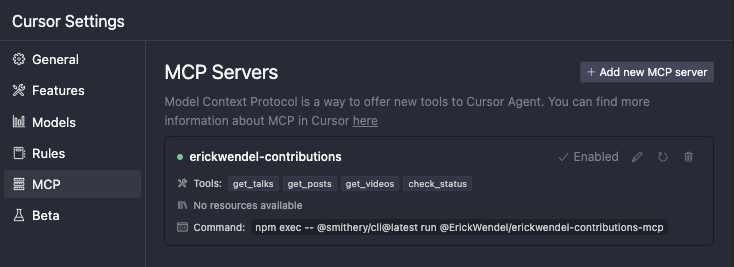
Add the following configuration to ~/.cursor/mcp.json:
{
"mcpServers": {
"erickwendel-contributions": {
"command": "npx",
"args": ["-y", "@erickwendel/contributions-mcp"]
}
}
}
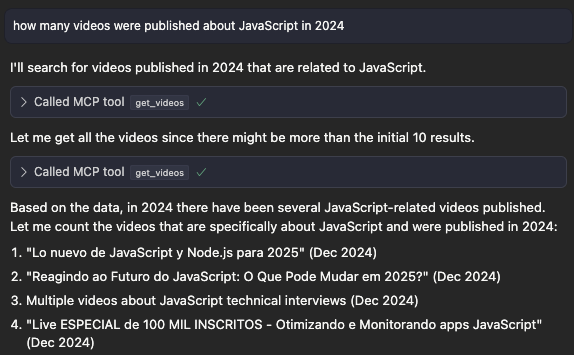
Make sure Cursor chat is in Agent mode by selecting "Agent" in the lower left side dropdown, then ask "how many videos were published about JavaScript in 2024":
1. Go to Claude settings
2. Click in the Developer tab
3. Click in edit config
4. Open the config in a code editor
5. Add the following configuration to ~/Library/Application Support/Claude/claude_desktop_config.json (macOS):
{
"mcpServers": {
"erickwendel-contributions": {
"command": "npx",
"args": ["-y", "@erickwendel/contributions-mcp"]
}
}
}
get-talks
Retrieves a paginated list of talks with optional filtering. Supports filtering by ID, title, language, city, country, and year. Can return counts grouped by language, country, or city.
get-posts
Fetches posts with optional filtering and pagination. Supports filtering by ID, title, language, and portal.
get-videos
Retrieves videos with optional filtering and pagination. Supports filtering by ID, title, and language.
check-status
Verifies if the API is alive and responding.
- get-talks: Retrieves a paginated list of talks with optional filtering
- Supports filtering by ID, title, language, city, country, and year
- Can return counts grouped by language, country, or city
- get-posts: Fetches posts with optional filtering and pagination
- Supports filtering by ID, title, language, and portal
- get-videos: Retrieves videos with optional filtering and pagination
- Supports filtering by ID, title, and language
- check-status: Verifies if the API is alive and responding
Claude Desktop / Cursor
Paste into your MCP client config file to install this server.
{
    "mcpServers": {
        "erick wendel contributions": {
            "env": {},
            "args": [
                "-y",
                "@erickwendel/contributions-mcp"
            ],
            "command": "npx"
        }
    }
}Linux
{
"env": [],
"args": [
"-y",
"@erickwendel/contributions-mcp"
],
"command": "npx"
}Macos
{
"env": [],
"args": [
"-y",
"@erickwendel/contributions-mcp"
],
"command": "npx"
}Windows
{
"env": [],
"args": [
"/c",
"npx",
"-y",
"@erickwendel/contributions-mcp"
],
"command": "cmd"
}


A Model Context Protocol (MCP) server that provides tools to query Erick Wendel's contributions across different platforms. Query talks, blog posts, and videos using natural language through Claude, Cursor or similars. This project was built using Cursor IDE with the default agent (trial version).
Quick Start
Use this MCP server directly with Claude Desktop or Cursor without installation:
{
  "mcpServers": {
    "erickwendel-contributions": {
      "command": "npx",
      "args": ["-y", "@erickwendel/contributions-mcp"]
    }
  }
}
Add this configuration to:
- Claude Desktop: ~/Library/Application Support/Claude/claude_desktop_config.json (macOS)
- Cursor: ~/.cursor/mcp.json
Available Tools
This MCP server provides the following capabilities:
Tools
-get-talks: Retrieves a paginated list of talks with optional filtering
- Supports filtering by ID, title, language, city, country, and year
- Can return counts grouped by language, country, or city
- get-posts: Fetches posts with optional filtering and pagination
- Supports filtering by ID, title, language, and portal
- get-videos: Retrieves videos with optional filtering and pagination
- Supports filtering by ID, title, and language
- check-status: Verifies if the API is alive and responding
Prompts
-find-content: Generate queries to find specific content by type, topic, and language
- summarize-activity: Create summaries of content activity by year
Resources
-erickwendel://about: Server information and capabilities metadata
- erickwendel://statistics: Content statistics and available queriesSign in to leave a review
Use Google, GitHub, or an email account so ratings stay tied to real people.
No reviews posted yet.



