
GPTers Search MCP Server
About
GPTers Search MCP Server is an MCP server that enables searching the knowledge base of the GPTers AI study community and provides results to MCP clients such as Claude Desktop or Cursor. It is designed for developers and community members who need to query community posts and…
Explore
- Integration with GPTers AI study community search API
- Provides search results in MCP format
- Supports filtering by posting date, author, and board name
- Works with MCP clients like Claude Desktop and Cursor

Setting up with Highlight
This MCP is not yet compatible with Highlight’s one-click setup. However, you can still use it with Highlight by following these steps:
- Download and install Highlight from highlightai.com/download
- Navigate to the plugins tab and select "Add Custom Plugin"
-
Configure the plugin with the settings below
Plugin Name
GPTers Search MCP ServerCommand (node, npx, python, etc.)Please refer to the README for specific instructions on how to obtain API keys or other required environment variables.
- Enable "Start Automatically" if you want the plugin to start when Highlight launches





From the repository
Install via Smithery using commands for Claude Desktop or Cursor, providing your API key obtained from GPTers community administrators. Once configured, the server responds to search prompts with filtered results.
Claude Desktop / Cursor
Paste into your MCP client config file to install this server.
{
    "mcpServers": {
        "gpters search mcp server": {
            "gpters-search-mcp-server": {
                "command": "npx",
                "args": [
                    "-y",
                    "@smithery/cli@latest",
                    "install",
                    "@chat-prompt/gpters-search-mcp-server",
                    "--client",
                    "claude",
                    "--config",
                    "\"{\"apiSecretKey\":\"your_api_key\"}\""
                ]
            }
        }
    }
}McpServers
{
    "gpters-search-mcp-server": {
        "command": "npx",
        "args": [
            "-y",
            "@smithery/cli@latest",
            "install",
            "@chat-prompt/gpters-search-mcp-server",
            "--client",
            "claude",
            "--config",
            "\"{\"apiSecretKey\":\"your_api_key\"}\""
        ]
    }
}
본 MCP 서버는 GPTers AI 스터디 커뮤니티의 지식을 검색할 수 있는 MCP 서버입니다.
소개
GPTers Search MCP Server는 GPTers AI 스터디 커뮤니티의 지식을 검색하고, 이를 MCP를 통해 Claude Desktop이나 Cursor와 같은 MCP Client(Host)에게 제공합니다.
해당 서버는 GPTers 커뮤니티의 지식을 기반으로 한 다양한 응용 서비스에 활용될 수 있습니다.
주요 기능
- GPTers AI 스터디 커뮤니티 검색 API 연동
- MCP 형식의 검색 결과 제공
- 작성일시, 작성자, 게시판 기준 필터링 지원
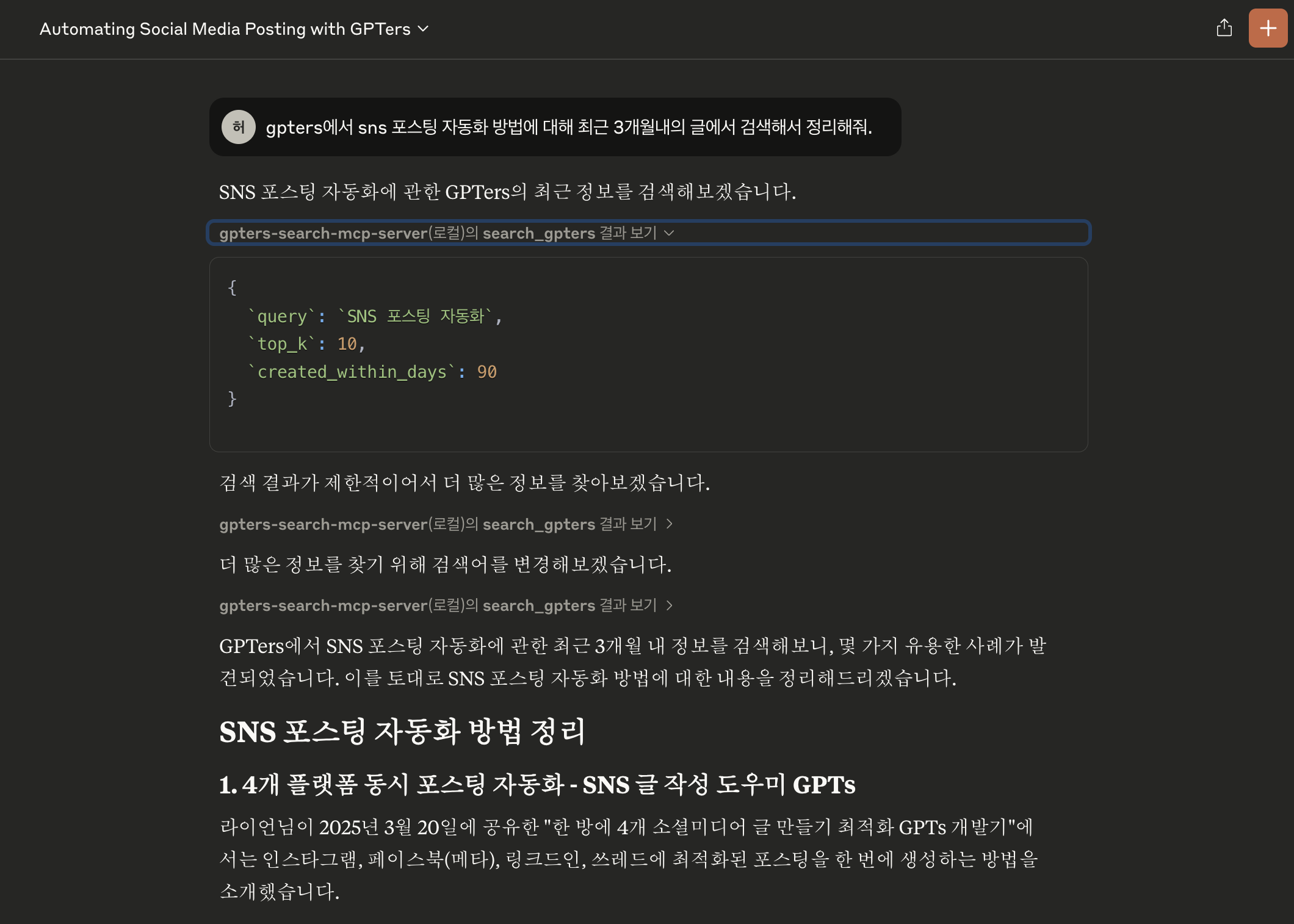
- 작성일시 기준으로 검색 가능
- 프롬프트 예 : gpters에서 ~~를 찾아주고, 최근 1년 내의 사례 글에서 정리해줘.
- 작성자 기준으로 검색 가능
- 프롬프트 예 : gpters에서 작성자가 김태현이고 ~~ 관련한 게시물을 찾아서 정리해줘.
- 게시판 이름으로 검색 가능
- 프롬프트 예 : gpters에서 "이미지 / 음악 / 영상" 게시판에서 검색해서 ~~ 관련한 게시물을 찾아서 정리해줘.
설치 방법
Smithery를 통한 설치
Smithery를 통해 GPTers Search MCP 서버를 자동으로 설치하려면 AI 클라이언트에 따라 다음 명령 중 하나를 사용하세요:
> Note: API 키는 GPTers 커뮤니티 관리자에게 요청하여 발급받을 수 있습니다.
Claude Desktop:
npx -y @smithery/cli@latest install @chat-prompt/gpters-search-mcp-server --client claude --config '"{\"apiSecretKey\":\"your_api_key\"}"'
Cursor:
npx -y @smithery/cli@latest install @chat-prompt/gpters-search-mcp-server --client cursor --config '"{\"apiSecretKey\":\"your_api_key\"}"'
사용 예제
기본 검색
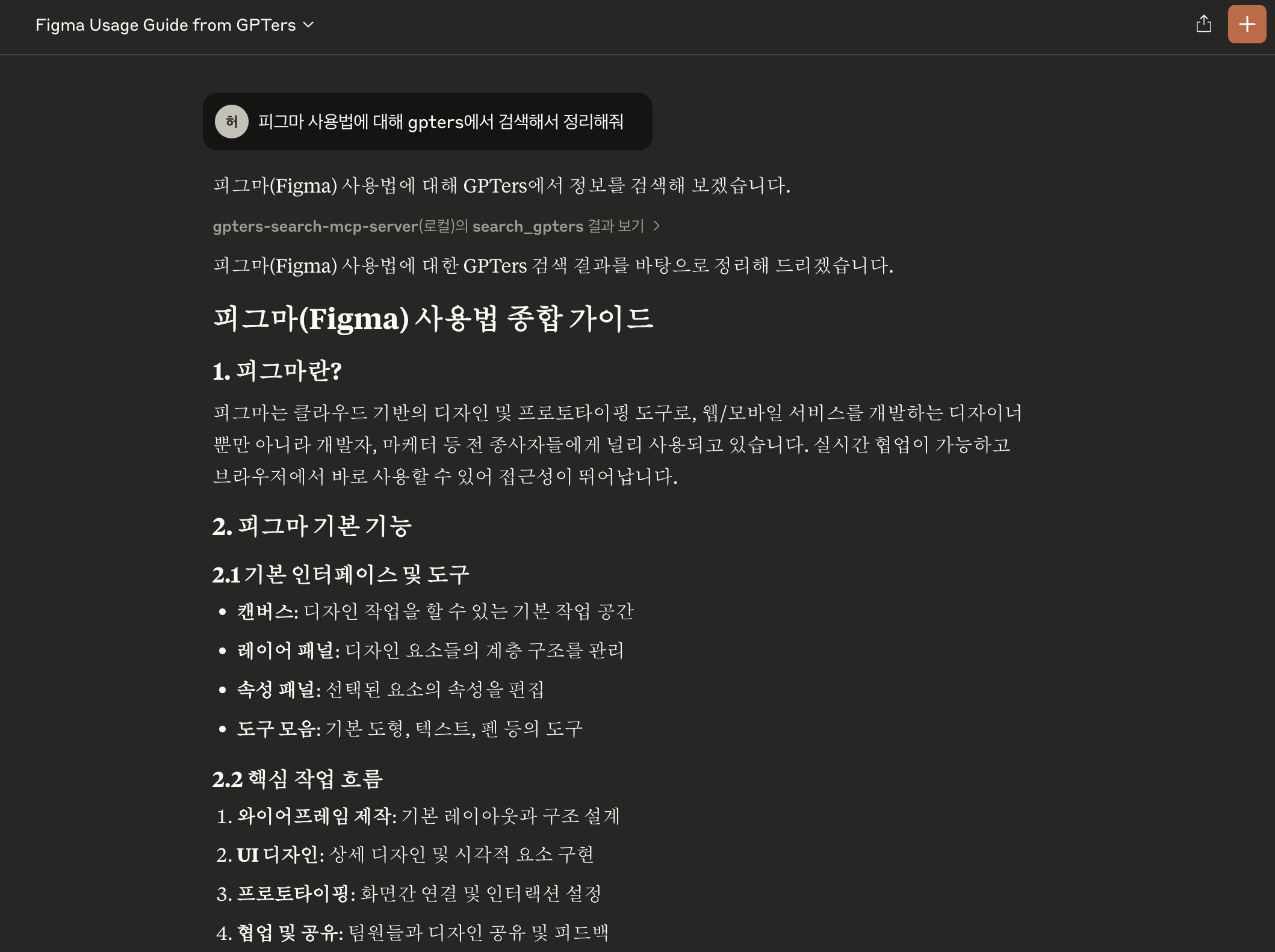
작성일시 기준 검색
Sign in to leave a review
Use Google, GitHub, or an email account so ratings stay tied to real people.
No reviews posted yet.



