
About
Integrates with Reddit's API to fetch and retrieve diverse content including posts, comments, and subreddit information for data analysis and content curation.
Details
- Repository
- Hawstein/mcp-server-reddit
- License
- MIT
Explore
- Retrieve hot posts from Reddit’s frontpage
- Get detailed subreddit information by name
- Fetch hot, new, top, and rising posts per subreddit
- Obtain full post content with comments
- Control output with optional limit and depth arguments
- No authentication required for public Reddit data

Setting up with Highlight
This MCP is not yet compatible with Highlight’s one-click setup. However, you can still use it with Highlight by following these steps:
- Download and install Highlight from highlightai.com/download
- Navigate to the plugins tab and select "Add Custom Plugin"
-
Configure the plugin with the settings below
Plugin Name
RedditCommand (node, npx, python, etc.)uvxArguments-
Argument 1
mcp-server-reddit
Please refer to the README for specific instructions on how to obtain API keys or other required environment variables.
-
Argument 1
- Enable "Start Automatically" if you want the plugin to start when Highlight launches





From the repository
To install MCP Server Reddit for Claude Desktop automatically via Smithery:
npx -y @smithery/cli install @Hawstein/mcp-server-reddit --client claude
Add to your Claude settings:
<details>
<summary>Using uvx</summary>
"mcpServers": {
"reddit": {
"command": "uvx",
"args": ["mcp-server-reddit"]
}
}
<details>
<summary>Using pip installation</summary>
"mcpServers": {
"reddit": {
"command": "python",
"args": ["-m", "mcp_server_reddit"]
}
}
Add to your Zed settings.json:
<details>
<summary>Using uvx</summary>
"context_servers": [
"mcp-server-reddit": {
"command": "uvx",
"args": ["mcp-server-reddit"]
}
],
<details>
<summary>Using pip installation</summary>
"context_servers": {
"mcp-server-reddit": {
"command": "python",
"args": ["-m", "mcp_server_reddit"]
}
},
get_frontpage_posts
Get hot posts from Reddit frontpage. Optional arguments: limit (integer): Number of posts to return (default: 10, range: 1-100)
get_subreddit_info
Get information about a subreddit. Required arguments: subreddit_name (string): Name of the subreddit (e.g. 'Python', 'news')
get_subreddit_hot_posts
Get hot posts from a specific subreddit. Required arguments: subreddit_name (string): Name of the subreddit (e.g. 'Python', 'news'). Optional arguments: limit (integer): Number of posts to return (default: 10, range: 1-100)
get_subreddit_new_posts
Get new posts from a specific subreddit. Required arguments: subreddit_name (string): Name of the subreddit (e.g. 'Python', 'news'). Optional arguments: limit (integer): Number of posts to return (default: 10, range: 1-100)
get_subreddit_top_posts
Get top posts from a specific subreddit. Required arguments: subreddit_name (string): Name of the subreddit (e.g. 'Python', 'news'). Optional arguments: limit (integer): Number of posts to return (default: 10, range: 1-100), time (string): Time filter for top posts (default: '', options: 'hour', 'day', 'week', 'month', 'year', 'all')
get_subreddit_rising_posts
Get rising posts from a specific subreddit. Required arguments: subreddit_name (string): Name of the subreddit (e.g. 'Python', 'news'). Optional arguments: limit (integer): Number of posts to return (default: 10, range: 1-100)
get_post_content
Get detailed content of a specific post. Required arguments: post_id (string): ID of the post. Optional arguments: comment_limit (integer): Number of top-level comments to return (default: 10, range: 1-100), comment_depth (integer): Maximum depth of comment tree (default: 3, range: 1-10)
get_post_comments
Get comments from a post. Required arguments: post_id (string): ID of the post. Optional arguments: limit (integer): Number of comments to return (default: 10, range: 1-100)
- get_frontpage_posts - Get hot posts from Reddit frontpage
- Optional arguments:
- limit (integer): Number of posts to return (default: 10, range: 1-100)
- get_subreddit_info - Get information about a subreddit
- Required arguments:
- subreddit_name (string): Name of the subreddit (e.g. 'Python', 'news')
- get_subreddit_hot_posts - Get hot posts from a specific subreddit
- Required arguments:
- subreddit_name (string): Name of the subreddit (e.g. 'Python', 'news')
- Optional arguments:
- limit (integer): Number of posts to return (default: 10, range: 1-100)
- get_subreddit_new_posts - Get new posts from a specific subreddit
- Required arguments:
- subreddit_name (string): Name of the subreddit (e.g. 'Python', 'news')
- Optional arguments:
- limit (integer): Number of posts to return (default: 10, range: 1-100)
- get_subreddit_top_posts - Get top posts from a specific subreddit
- Required arguments:
- subreddit_name (string): Name of the subreddit (e.g. 'Python', 'news')
- Optional arguments:
- limit (integer): Number of posts to return (default: 10, range: 1-100)
- time (string): Time filter for top posts (default: '', options: 'hour', 'day', 'week', 'month', 'year', 'all')
- get_subreddit_rising_posts - Get rising posts from a specific subreddit
- Required arguments:
- subreddit_name (string): Name of the subreddit (e.g. 'Python', 'news')
- Optional arguments:
- limit (integer): Number of posts to return (default: 10, range: 1-100)
- get_post_content - Get detailed content of a specific post
- Required arguments:
- post_id (string): ID of the post
- Optional arguments:
- comment_limit (integer): Number of top-level comments to return (default: 10, range: 1-100)
- comment_depth (integer): Maximum depth of comment tree (default: 3, range: 1-10)
- get_post_comments - Get comments from a post
- Required arguments:
- post_id (string): ID of the post
- Optional arguments:
- limit (integer): Number of comments to return (default: 10, range: 1-100)
Claude Desktop / Cursor
Paste into your MCP client config file to install this server.
{
    "mcpServers": {
        "reddit": {
            "cwd": "string",
            "env": {},
            "args": [
                "mcp-server-reddit"
            ],
            "shell": false,
            "command": "uvx"
        }
    }
}Linux
{
"cwd": "string",
"env": [],
"args": [
"mcp-server-reddit"
],
"shell": false,
"command": "uvx"
}Macos
{
"cwd": "string",
"env": [],
"args": [
"mcp-server-reddit"
],
"shell": false,
"command": "uvx"
}Windows
{
"cwd": "string",
"env": [],
"args": [
"mcp-server-reddit"
],
"shell": false,
"command": "uvx"
}MCP Server Reddit
A Model Context Protocol server providing access to Reddit public API for LLMs. This server enables LLMs to interact with Reddit's content, including browsing frontpage posts, accessing subreddit information, and reading post comments.
This server uses redditwarp to interact with Reddit's public API and exposes the functionality through MCP protocol.
<a href="https://glama.ai/mcp/servers/4032xr14pu"></a>
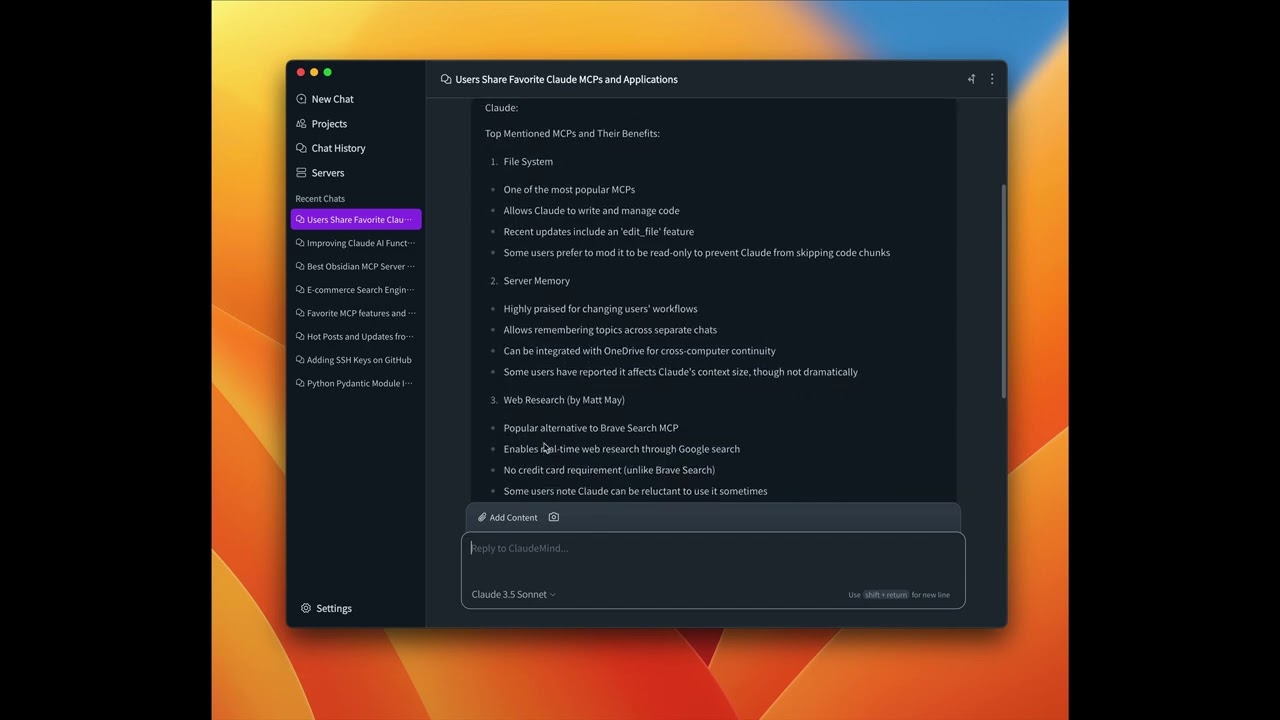
Video Demo (Click to Watch)
A demo in Clinde 👇
Available Tools
- get_frontpage_posts - Get hot posts from Reddit frontpage
- Optional arguments:
- limit (integer): Number of posts to return (default: 10, range: 1-100)
- get_subreddit_info - Get information about a subreddit
- Required arguments:
- subreddit_name (string): Name of the subreddit (e.g. 'Python', 'news')
- get_subreddit_hot_posts - Get hot posts from a specific subreddit
- Required arguments:
- subreddit_name (string): Name of the subreddit (e.g. 'Python', 'news')
- Optional arguments:
- limit (integer): Number of posts to return (default: 10, range: 1-100)
- get_subreddit_new_posts - Get new posts from a specific subreddit
- Required arguments:
- subreddit_name (string): Name of the subreddit (e.g. 'Python', 'news')
- Optional arguments:
- limit (integer): Number of posts to return (default: 10, range: 1-100)
- get_subreddit_top_posts - Get top posts from a specific subreddit
- Required arguments:
- subreddit_name (string): Name of the subreddit (e.g. 'Python', 'news')
- Optional arguments:
- limit (integer): Number of posts to return (default: 10, range: 1-100)
- time (string): Time filter for top posts (default: '', options: 'hour', 'day', 'week', 'month', 'year', 'all')
- get_subreddit_rising_posts - Get rising posts from a specific subreddit
- Required arguments:
- subreddit_name (string): Name of the subreddit (e.g. 'Python', 'news')
- Optional arguments:
- limit (integer): Number of posts to return (default: 10, range: 1-100)
- get_post_content - Get detailed content of a specific post
- Required arguments:
- post_id (string): ID of the post
- Optional arguments:
- comment_limit (integer): Number of top-level comments to return (default: 10, range: 1-100)
- comment_depth (integer): Maximum depth of comment tree (default: 3, range: 1-10)
- get_post_comments - Get comments from a post
- Required arguments:
- post_id (string): ID of the post
- Optional arguments:
- limit (integer): Number of comments to return (default: 10, range: 1-100)
Installation
Using Clinde (recommended)
The easiest way to use MCP Server Reddit is through the Clinde desktop app. Simply download and install Clinde, then:
1. Open the Clinde app
2. Navigate to the Servers page
3. Find mcp-server-reddit and click Install
That's it! No technical knowledge required - Clinde handles all the installation and configuration for you seamlessly.
Using uv (recommended)
When using uv no specific installation is needed. We will
use uvx to directly run mcp-server-reddit.
Using PIP
Alternatively you can install mcp-server-reddit via pip:
pip install mcp-server-reddit
After installation, you can run it as a script using:
python -m mcp_server_reddit
Installing via Smithery
To install MCP Server Reddit for Claude Desktop automatically via Smithery:
npx -y @smithery/cli install @Hawstein/mcp-server-reddit --client claude
Configuration
Configure for Claude.app
Add to your Claude settings:
<details>
<summary>Using uvx</summary>
"mcpServers": {
  "reddit": {
    "command": "uvx",
    "args": ["mcp-server-reddit"]
  }
}
<details>
<summary>Using pip installation</summary>
"mcpServers": {
  "reddit": {
    "command": "python",
    "args": ["-m", "mcp_server_reddit"]
  }
}
Configure for Zed
Add to your Zed settings.json:
<details>
<summary>Using uvx</summary>
"context_servers": [
  "mcp-server-reddit": {
    "command": "uvx",
    "args": ["mcp-server-reddit"]
  }
],
<details>
<summary>Using pip installation</summary>
"context_servers": {
  "mcp-server-reddit": {
    "command": "python",
    "args": ["-m", "mcp_server_reddit"]
  }
},
Examples of Questions
- "What are the current hot posts on Reddit's frontpage?" (get_frontpage_posts)
- "Tell me about the r/ClaudeAI subreddit" (get_subreddit_info)
- "What are the hot posts in the r/ClaudeAI subreddit?" (get_subreddit_hot_posts)
- "Show me the newest posts from r/ClaudeAI" (get_subreddit_new_posts)
- "What are the top posts of all time in r/ClaudeAI?" (get_subreddit_top_posts)
- "What posts are trending in r/ClaudeAI right now?" (get_subreddit_rising_posts)
- "Get the full content and comments of this Reddit post: [post_url]" (get_post_content)
- "Summarize the comments on this Reddit post: [post_url]" (get_post_comments)
Debugging
You can use the MCP inspector to debug the server. For uvx installations:
npx @modelcontextprotocol/inspector uvx mcp-server-reddit
Or if you've installed the package in a specific directory or are developing on it:
cd path/to/mcp_server_reddit
npx @modelcontextprotocol/inspector uv run mcp-server-reddit
License
mcp-server-reddit is licensed under the MIT License. This means you are free to use, modify, and distribute the software, subject to the terms and conditions of the MIT License. For more details, please see the LICENSE file in the project repository.
Sign in to leave a review
Use Google, GitHub, or an email account so ratings stay tied to real people.
No reviews posted yet.