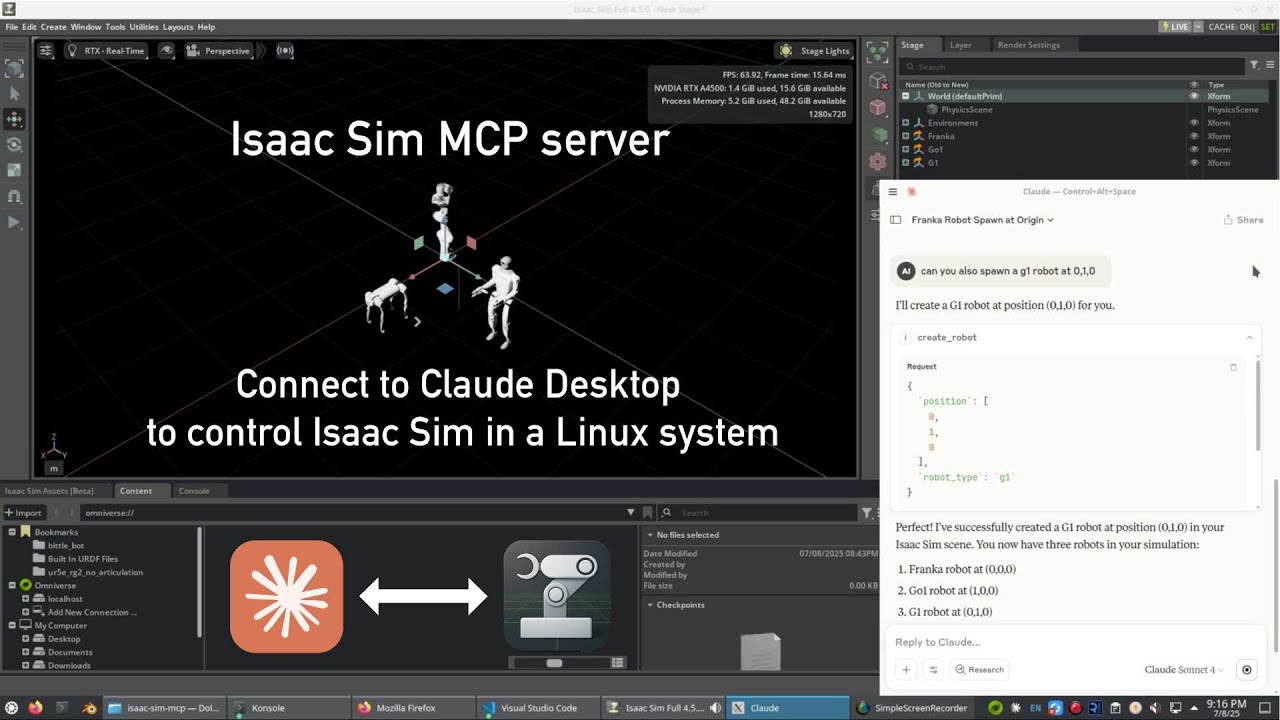
Isaac Sim MCP Extension and MCP Server
About
The MCP Server and its extension leverage the Model Context Protocol (MCP) to enable natural language control of NVIDIA Isaac Sim, turning conversational AI inputs into precise simulation manipulation. It bridges the MCP ecosystem with embodied intelligence applications.
Details
- License
- MIT
Explore
- Natural language control of Isaac Sim
- Dynamic robot positioning and movement
- Custom lighting and scene creation
- Advanced robot simulations with obstacle navigation
- Interactive code preview before execution

Setting up with Highlight
This MCP is not yet compatible with Highlight’s one-click setup. However, you can still use it with Highlight by following these steps:
- Download and install Highlight from highlightai.com/download
- Navigate to the plugins tab and select "Add Custom Plugin"
-
Configure the plugin with the settings below
Plugin Name
Isaac Sim MCP Extension and MCP ServerCommand (node, npx, python, etc.)Please refer to the README for specific instructions on how to obtain API keys or other required environment variables.
- Enable "Start Automatically" if you want the plugin to start when Highlight launches





From the repository
- NVIDIA Isaac Sim 4.2.0 or higher
- Python 3.9+
- Cursor AI editor for MCP integration
Isaac Sim extension folder should point to your project folder:
- Extension location: ~/Documents/isaac-sim-mcp
- Extension ID: isaac.sim.mcp_extension
export BEAVER3D_MODEL=<your beaver3d model name>
export export ARK_API_KEY=<Your Bearver3D API Key>
export NVIDIA_API_KEY="<your nvidia api key and apply it from https://ngc.nvidia.com/signout>"
cd ~/.local/share/ov/pkg/isaac-sim-4.2.0
./isaac-sim.sh --ext-folder /home/ubuntu/Documents/isaac-sim-mcp/ --enable isaac.sim.mcp_extension
Verify the extension starts successfully. The output should look like:
[7.160s] [ext: isaac.sim.mcp_extension-0.1.0] startup
trigger on_startup for: isaac.sim.mcp_extension-0.1.0
settings: {'envPath': '/home/ubuntu/.local/share/ov/data/Kit/Isaac-Sim/4.2/pip3-envs/default', 'archiveDirs': {}, 'installCheckIgnoreVersion': False, 'allowOnlineIndex': True, 'tryUpgradePipOnFirstUse': False}
Server thread startedIsaac Sim MCP server started on localhost:8766
The extension should be listening at localhost:8766 by default.
1. Go to terminal and run, make sure mcp server could start sucessfully at terminal with base venv.
uv pip install "mcp[cli]"
uv run /home/ubuntu/Documents/isaac-sim-mcp/isaac_mcp/server.py
2. Start Cursor and open the folder
~/Documents/isaac-sim-mcp3. Go to Cursor preferences, choose MCP and add a global MCP server:
{
"mcpServers": {
"isaac-sim": {
"command": "uv run /home/ubuntu/Documents/isaac-sim-mcp/isaac_mcp/server.py"
}
}
}
``
- create_physics_scene - Creates a physics scene with configurable parameters:
- objects: List of objects to create (each with type and position)floor
- : Whether to create a ground plane (default: true)gravity
- : Vector defining gravity direction and magnitude (default: [0, -0.981, 0])scene_name
- : Name for the scene (default: "physics_scene")
1. Always check connection with get_scene_info before executing any commandscreate_physics_scene
2. Initialize a physics scene with before adding robotscreate_robot
3. Use for standard robot placement before trying custom scriptsexecute_script` with proper async patterns
4. For complex simulations, use
5. Preview code in chat before execution for verification
The Isaac Sim MCP Extension provides several specialized tools that can be accessed through natural language in Cursor AI. These tools enable you to control and manipulate NVIDIA Isaac Sim with simple commands:
Claude Desktop / Cursor
Paste into your MCP client config file to install this server.
{
    "mcpServers": {
        "isaac sim mcp extension and mcp server": {
            "isaac-sim-mcp": {
                "command": "uv",
                "args": [
                    "run",
                    "mcp",
                    "dev",
                    "~/Documents/isaac-sim-mcp/isaac_mcp/server.py"
                ]
            }
        }
    }
}McpServers
{
    "isaac-sim-mcp": {
        "command": "uv",
        "args": [
            "run",
            "mcp",
            "dev",
            "~/Documents/isaac-sim-mcp/isaac_mcp/server.py"
        ]
    }
}
The MCP Server and its extension leverage the Model Context Protocol (MCP) framework to enable natural language control of NVIDIA Isaac Sim, transforming conversational AI inputs into precise simulation manipulation. This expansion bridges the MCP ecosystem with embodied intelligence applications.
Features
- Natural language control of Isaac Sim
- Dynamic robot positioning and movement
- Custom lighting and scene creation
- Advanced robot simulations with obstacle navigation
- Interactive code preview before execution
Requirements
- NVIDIA Isaac Sim 4.2.0 or higher
- Python 3.9+
- Cursor AI editor for MCP integration
Mandatory Pre-requisite
- Install uv/uvx: https://github.com/astral-sh/uv
- Install mcp[cli] to base env: [uv pip install "mcp[cli]"](https://pypi.org/project/mcp/)
Installation
cd ~/Documents
git clone https://github.com/omni-mcp/isaac-sim-mcp
Install and Enable Extension
Isaac Sim extension folder should point to your project folder:
- Extension location: ~/Documents/isaac-sim-mcp
- Extension ID: isaac.sim.mcp_extension
```bash
Sign in to leave a review
Use Google, GitHub, or an email account so ratings stay tied to real people.
No reviews posted yet.