
jellyfish-mcp: A Jellyfish MCP Server
About
A Model Context Protocol server for retrieving and analyzing data from Jellyfish’s API. It enables natural language queries about engineering metrics, team data, and other Jellyfish information via hosts like Claude Desktop or Cursor.
Details
- License
- MIT
Explore
- Retrieves Jellyfish API schema and current date
- Queries company, person, and team metrics
- Lists and searches teams, people, and deliverables
- Analyzes AI adoption and impact analytics
- Searches help center articles
See INSTALL.md for the full setup guide. Quick links:
- Claude Desktop — download the .mcpb extension, then double-click to install
- Claude Code, Cursor, VSCode — npx jellyfish-mcp-server@latest (recommended) or Docker
The server provides several tools for interacting with the Jellyfish API. Each tool corresponds to a specific Jellyfish API endpoint and allows you to retrieve or search for data as described in the API.
Jellyfish MCP Server




> Security Notice: There are known risks and inherent limitations in this implementation. Refer to SECURITY.md before using.
> [!IMPORTANT]
> PromptGuard is not bundled with this server. We recommend configuring it before using jellyfish-mcp daily — see PROMPTGUARD.md for setup and SECURITY.md before using.
Overview
A Model Context Protocol server for retrieving and analyzing data from Jellyfish's API. This server allows a host (e.g. Claude Desktop or Cursor) to interact with your Jellyfish instance, enabling natural language queries about your engineering metrics, team data, and other information available through the Jellyfish API.
Once you have the Jellyfish MCP connected, you can ask questions about your Jellyfish data, such as:
- "What were our company metrics in May 2026?"
- "Can you get a list of my organization's teams?"
- "What are the unlinked pull requests for the last month?"
Install
See INSTALL.md for the full setup guide. Quick links:
- Claude Desktop — download the .mcpb extension, then double-click to install
- Claude Code, Cursor, VSCode — npx jellyfish-mcp-server@latest (recommended) or Docker
Develop
Want to modify the source or run from a local clone? See DEVELOPMENT.md.
Tools and Resources
The server provides several tools for interacting with the Jellyfish API. Each tool corresponds to a specific Jellyfish API endpoint and allows you to retrieve or search for data as described in the API.
General
- api_schema - Retrieves the complete API schema with all available API endpoints
- get_current_date - Returns today's date in the specified timezone
AI Impact
- ai_company_adoption_analytics
- ai_company_impact_analytics
- ai_person_adoption
- ai_person_adoption_analytics
- ai_team_adoption_analytics
- ai_team_impact_analytics
Allocations
- allocations_by_person
- allocations_by_team
- allocations_by_investment_category
- allocations_by_investment_category_person
- allocations_by_investment_category_team
- allocations_by_work_category
- allocations_by_work_category_person
- allocations_by_work_category_team
- allocations_filter_fields
- allocations_summary_by_investment_category
- allocations_summary_by_work_category
Delivery
- deliverable_scope_and_effort_history
- work_categories
- get_deliverable
- search_deliverables
DevEx
- devex_insights_by_team
Metrics
- company_metrics
- person_metrics
- team_metrics
- team_sprint_summary
- unlinked_pull_requests
People
- list_engineers
- search_people
Teams
- list_teams
- search_teams
Help Center
- search_articles
- get_article
Skills
In addition to the MCP tools above, the Jellyfish MCP pairs with optional Agent Skills. Skills can similarly be invoked throughout the chat conversation, but are not bundled with the MCP and need to be independently installed. To install a skill in Claude Desktop, download its .skill file from the latest release and double-click to install. For other host applications, install the skill directly from the skills/ directory.
> Security note: Skills may ask the LLM to author HTML directly, building it from data returned by the Jellyfish API. Because the HTML is generated rather than fixed, using a skill means trusting that the data Jellyfish returns and the HTML the model builds from it are both safe to render. If that trust is misplaced, a skill could produce dangerous output, including HTML or JavaScript that the user did not intend. Skills are entirely optional and are installed separately, so anyone who would rather not take on this assumption can simply leave them uninstalled. See SECURITY.md for the full discussion.
Dashboards
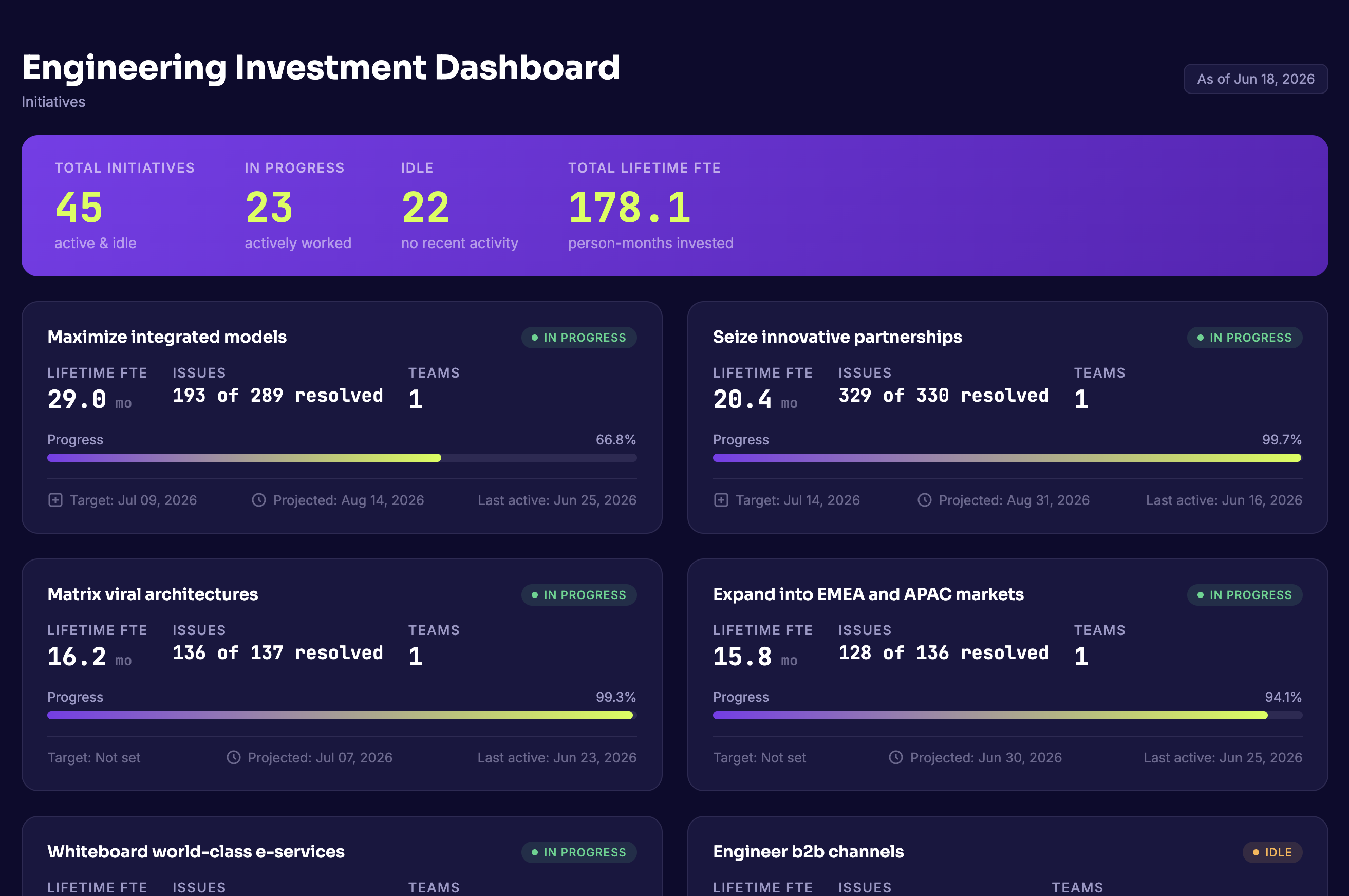
- jellyfish-custom-dashboards — Generate branded HTML dashboards from Jellyfish engineering analytics. Currently supports engineering investment reports.
License
This code is distributed under the MIT license. See LICENSE.
Sign in to leave a review
Use Google, GitHub, or an email account so ratings stay tied to real people.
No reviews posted yet.



