JLCPCB Parts MCP Server
About
It is an MCP server that helps search and select electronic components for JLCPCB’s PCBA (Printed Circuit Board Assembly) service. It uses an offline SQLite database from the JLC PCB SMD Assembly Component Catalogue (jlcparts) project.
Details
- License
- GPL-3.0 license
Explore
- Searches for PCBA parts in JLCPCB’s component catalogue.
- Uses an offline SQLite database for fast querying.
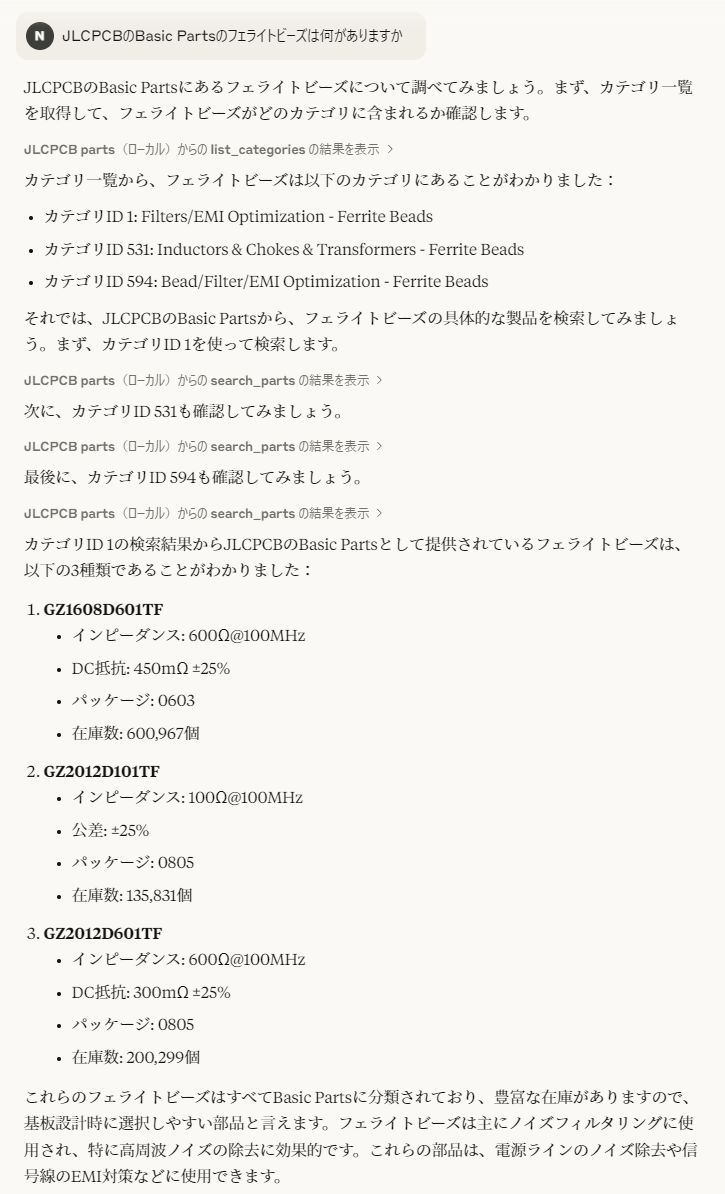
- Supports finding components in the Basic Parts category (e.g., ferrite beads).
- Provides example conversations for component selection (e.g., resistor values for a buck DC-DC converter).

Setting up with Highlight
This MCP is not yet compatible with Highlight’s one-click setup. However, you can still use it with Highlight by following these steps:
- Download and install Highlight from highlightai.com/download
- Navigate to the plugins tab and select "Add Custom Plugin"
-
Configure the plugin with the settings below
Plugin Name
JLCPCB Parts MCP ServerCommand (node, npx, python, etc.)Please refer to the README for specific instructions on how to obtain API keys or other required environment variables.
- Enable "Start Automatically" if you want the plugin to start when Highlight launches





From the repository
Set up a Python environment with MCP support. Place the server.py file and set the JLCPCB_DB_PATH environment variable to the cache.sqlite3 database file (available from the jlcparts repository as split ZIP archives, currently up to cache.z19). Then include the server in your MCP client configuration, for example in Claude Desktop as shown in the README.
Claude Desktop / Cursor
Paste into your MCP client config file to install this server.
{
    "mcpServers": {
        "jlcpcb parts mcp server": {
            "JLCPCB parts": {
                "command": "python",
                "args": [
                    "path/to/server.py"
                ],
                "env": {
                    "JLCPCB_DB_PATH": "path/to/database.sqlite3"
                }
            }
        }
    }
}McpServers
{
    "JLCPCB parts": {
        "command": "python",
        "args": [
            "path/to/server.py"
        ],
        "env": {
            "JLCPCB_DB_PATH": "path/to/database.sqlite3"
        }
    }
}
これは何
JLCPCBのPCBA向けの、部品探しを補助するMCPサーバーです。
会話例
Basic Partsに分類されている、フェライトビーズを検索した例です。
また、以下のページでは降圧型DC-DCコンバータの抵抗値の選定を行っています。
https://claude.ai/share/9f02f1a4-7b38-48fb-b29a-f10cf1e608ba
設定
データベースとして、JLC PCB SMD Assembly Component Catalogueを使用しています。
ここで分割ZIPにして提供されている cache.sqlite3 が必要です。2025年4月現在、番号は cache.z19 まで存在します。
PythonでMCPが利用可能な環境を作り、サーバーとして server.py を指定してください。
また、データベースへのパスを JLCPCB_DB_PATH 環境変数へ設定する必要があります。
Claude Desktopでの設定例を以下に示します。
{
  "mcpServers": {
    "JLCPCB parts": {
      "command": "python",
      "args": [
        "path/to/server.py"
      ],
      "env": {
        "JLCPCB_DB_PATH": "path/to/database.sqlite3"
      }
    }
  }
}
Sign in to leave a review
Use Google, GitHub, or an email account so ratings stay tied to real people.
No reviews posted yet.