
kickstart-mcp
About
🚀 Kickstart-mcp is tutorial for using mcp, making your own mcp server/client. We'll guide you through every step of your MCP journey
Details
- License
- MIT
Explore
- Interactive tutorials for MCP setup and development
- Step-by-step guides for different MCP hosts (Claude, Cursor, Custom)
- Comprehensive coverage of MCP concepts:
- Host configuration
- Server development
- Client implementation
- Built-in verification for each tutorial step
- Cross-platform support (macOS, Windows)

Setting up with Highlight
This MCP is not yet compatible with Highlight’s one-click setup. However, you can still use it with Highlight by following these steps:
- Download and install Highlight from highlightai.com/download
- Navigate to the plugins tab and select "Add Custom Plugin"
-
Configure the plugin with the settings below
Plugin Name
kickstart-mcpCommand (node, npx, python, etc.)Please refer to the README for specific instructions on how to obtain API keys or other required environment variables.
- Enable "Start Automatically" if you want the plugin to start when Highlight launches





From the repository
1. Start the tutorial:
uvx kickstart-mcp
2. Follow the interactive prompts to:
- Choose your preferred MCP host
- Complete each tutorial step
- Verify your progress
- Learn MCP concepts hands-on
> While it's recommended to follow the tutorials in order, if you want to quickly learn server development,
> you can start with FastMcp in the McpServer tutorial.
uvx kickstart-mcp -l ko
Since v0.1.0, you can use the -l option to specify your preferred language.
Currently supported languages:
| Code | Language |
| ---- | -------- |
| en | English |
| ko | Korean |
| zh | Chinese |
| ja | Japanese |
uv run kickstart-mcp
Claude Desktop / Cursor
Paste into your MCP client config file to install this server.
{
    "mcpServers": {
        "kickstart-mcp": {
            "kickstart-mcp": {
                "command": "uvx",
                "args": [
                    "kickstart-mcp",
                    "-l",
                    "ko"
                ]
            }
        }
    }
}McpServers
{
    "kickstart-mcp": {
        "command": "uvx",
        "args": [
            "kickstart-mcp",
            "-l",
            "ko"
        ]
    }
}
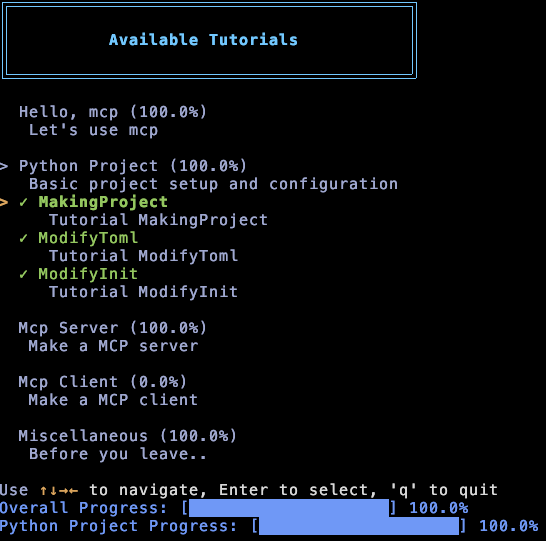
An interactive tutorial for learning Model Context Protocol (MCP). From setting up MCP hosts to building your own servers and clients, we'll guide you through every step of your MCP journey.
Features
- Interactive tutorials for MCP setup and development
- Step-by-step guides for different MCP hosts (Claude, Cursor, Custom)
- Comprehensive coverage of MCP concepts:
- Host configuration
- Server development
- Client implementation
- Built-in verification for each tutorial step
- Cross-platform support (macOS, Windows)
Dependencies
For package management, we recommend using UV:
brew install uv
The build tool used in the instructions is Hatch, so you'll need to install it as well:
brew install hatch
Installation
Quick Start (Recommended)
uvx kickstart-mcp -l ko
Since v0.1.0, you can use the -l option to specify your preferred language.
Currently supported languages:
| Code | Language |
| ---- | -------- |
| en | English |
| ko | Korean |
| zh | Chinese |
| ja | Japanese |
Development Installation
```bash
Sign in to leave a review
Use Google, GitHub, or an email account so ratings stay tied to real people.
No reviews posted yet.



