
Storyblok
About
Storyblok MCP server enables your AI assistants to directly access and manage your Storyblok spaces, stories, components, assets, workflows, and more.
Explore
- Manage stories with full CRUD and bulk operations
- Create, update, and delete components and component versions
- Upload, update, and delete assets and asset folders
- Handle releases, workflows, approvals, and scheduling
- Manage datasources, tags, webhooks, and space settings

Setting up with Highlight
This MCP is not yet compatible with Highlight’s one-click setup. However, you can still use it with Highlight by following these steps:
- Download and install Highlight from highlightai.com/download
- Navigate to the plugins tab and select "Add Custom Plugin"
-
Configure the plugin with the settings below
Plugin Name
StoryblokCommand (node, npx, python, etc.)Please refer to the README for specific instructions on how to obtain API keys or other required environment variables.
- Enable "Start Automatically" if you want the plugin to start when Highlight launches





From the repository
<details>
<summary>Manage branch deployments</summary>
- retrieve_multiple_branch_deployments: List branch deployments
- create_branch_deployment: Create a new branch deployment
- update_branch_deployment: Update a branch deployment
- delete_branch_deployment: Delete a branch deployment
</details>
1. Clone the repo
git clone <your-repo-url>
cd storyblok-mcp-server
2. Install dependencies
pip install -r requirements.txt
3. Configure your environment
- Copy
.env.example to .env and fill in your Storyblok credentials: STORYBLOK_SPACE_ID=your_space_id
STORYBLOK_MANAGEMENT_TOKEN=your_management_token
STORYBLOK_DEFAULT_PUBLIC_TOKEN=your_public_token
4. MCP Client Configuration
- To use this server with Claude or any MCP client, copy the following into your claude_desktop_config.json:
{
"mcpServers": {
"storyblok": {
"command": "uv",
"args": [
"run",
"--with",
"mcp",
"mcp",
"run",
"C:\\path\\to\\storyblok-mcp-server\\server.py"
],
"env": {
"STORYBLOK_SPACE_ID": "your_space_id",
"STORYBLOK_MANAGEMENT_TOKEN": "your_management_token",
"STORYBLOK_DEFAULT_PUBLIC_TOKEN": "your_public_token"
}
}
}
}
- Paste this config into your Claude or MCP client to connect instantly.
> [!NOTE]
> Make sure you have installed uv on your system
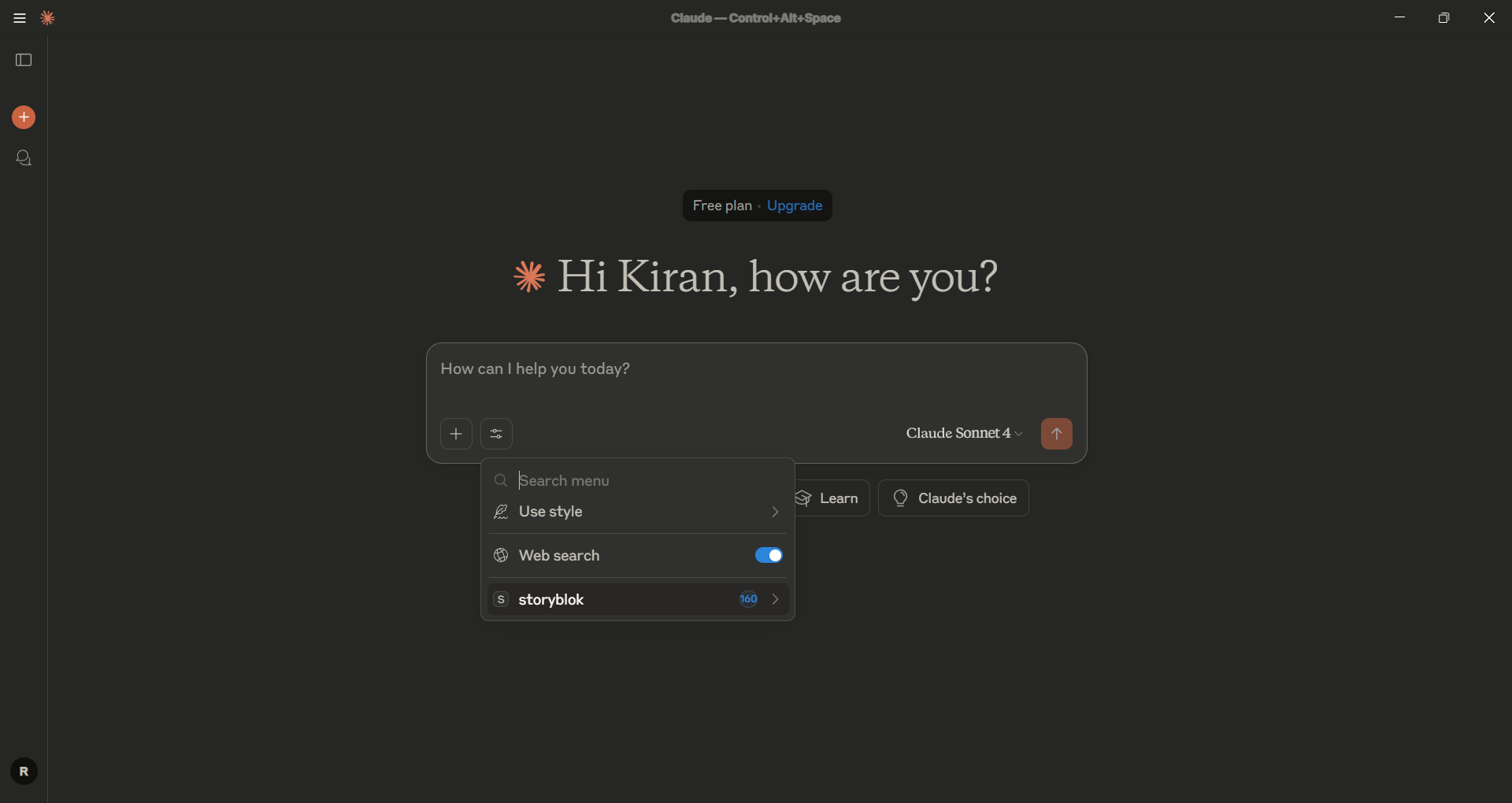
Restart your Claude Desktop and chek the tools. It will show total number tools available if you connected successfully.
5. Run and Test Locally
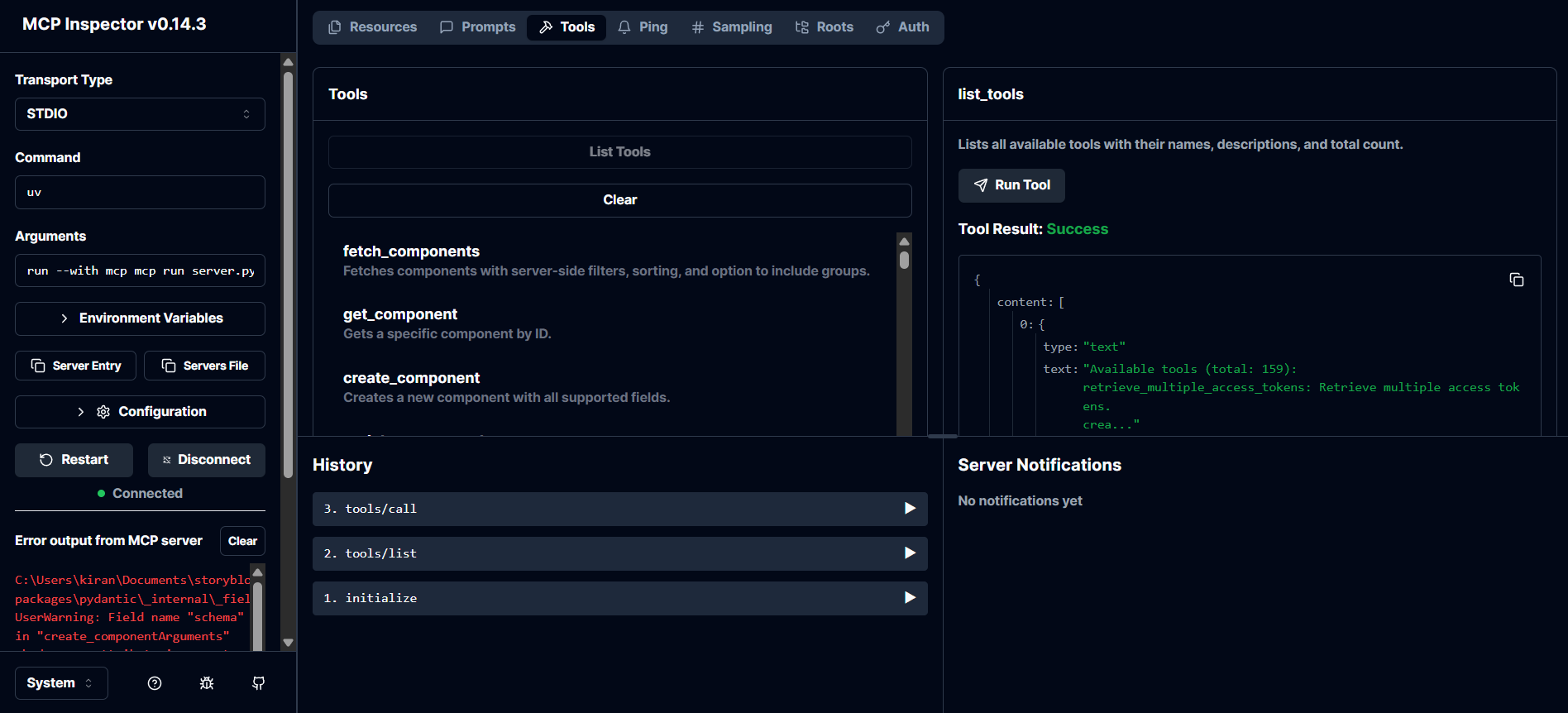
- You can also run and test the server locally using MCP Inspector:
mcp run server.py
Claude Desktop / Cursor
Paste into your MCP client config file to install this server.
{
    "mcpServers": {
        "storyblok": {
            "storyblok": {
                "command": "uv",
                "args": [
                    "run",
                    "--with",
                    "mcp",
                    "mcp",
                    "run",
                    "C:\\path\\to\\storyblok-mcp-server\\server.py"
                ],
                "env": {
                    "STORYBLOK_SPACE_ID": "your_space_id",
                    "STORYBLOK_MANAGEMENT_TOKEN": "your_management_token",
                    "STORYBLOK_DEFAULT_PUBLIC_TOKEN": "your_public_token"
                }
            }
        }
    }
}McpServers
{
    "storyblok": {
        "command": "uv",
        "args": [
            "run",
            "--with",
            "mcp",
            "mcp",
            "run",
            "C:\\path\\to\\storyblok-mcp-server\\server.py"
        ],
        "env": {
            "STORYBLOK_SPACE_ID": "your_space_id",
            "STORYBLOK_MANAGEMENT_TOKEN": "your_management_token",
            "STORYBLOK_DEFAULT_PUBLIC_TOKEN": "your_public_token"
        }
    }
}
What Does It Do?
With the Storyblok MCP Server, your AI assistant can:
- Create - Create new stories, components, assets, datasources, tags, releases, workflows, and more.
- Read - Read all your stories, components, assets, datasources, tags, releases, workflows, and more.
- Update - Update existing/new stories, components, assets, datasources, tags, releases, workflows, and more.
- Delete - Delete specific/all your stories, components, assets, datasources, tags, releases, workflows, and more.
---
🚀 API Coverage
| Resource | Description |
|----------------------------|--------------------------------------------------|
| Access Tokens | Manage access tokens for Storyblok API |
| Activities | Manage or retrieve activity logs |
| Approvals | Manage approval workflows |
| Assets | Manage assets (upload, update, delete, list) |
| Assets Folder | Manage asset folders |
| Branch Deployments | Manage branch deployments |
| Collaborators | Manage collaborators in a space |
| Components | Manage Storyblok components (CRUD, schema, etc.) |
| Components Folder | Manage folders for components |
| Datasource Entries | Manage entries in data sources |
| Data Sources | Manage data sources (CRUD, entries) |
| Discussions | Manage discussions and comments |
| Extensions | Manage Storyblok extensions |
| Field Plugins | Manage custom field plugins |
| Internal Tags | Manage internal tags for assets/stories |
| Meta | Meta tool: discover all available tools |
| Ping | Health check and server status |
| Pipelines | Manage pipelines for content delivery |
| Presets | Manage field presets for components |
| Releases | Manage releases (create, update, publish) |
| Scheduling Stories | Schedule stories for publishing |
| Space | Manage Storyblok space settings and info |
| Space Roles | Manage roles and permissions in a space |
| Stories | Manage stories (CRUD, bulk ops, validation) |
| Tags | Manage tags (CRUD, bulk association) |
| Tasks | Manage tasks (CRUD, webhooks, automation) |
| Webhooks | Manage webhooks (CRUD, trigger) |
| Workflows | Manage workflows and workflow stages |
| Workflow Stage | Manage individual workflow stages |
| Workflow Stage Changes | Track and manage workflow stage changes |
---
🪄 Available Tools
Access Tokens
<details> <summary>Manage access tokens for Storyblok API</summary> -retrieve_multiple_access_tokens: List all access tokens
- create_access_token: Create a new access token
- update_access_token: Update an existing access token
- delete_access_token: Delete an access token
</details>
Activities
<details> <summary>Manage or retrieve activity logs</summary> -retrieve_multiple_activities: List activity logs
</details>
Approvals
<details> <summary>Manage approval workflows</summary> -retrieve_multiple_approvals: List approvals
- create_approval: Create a new approval
- update_approval: Update an approval
- delete_approval: Delete an approval
</details>
Assets
<details> <summary>Manage assets (upload, update, delete, list)</summary> -fetch_assets: List assets with filtering
- get_asset: Get a specific asset by ID
- delete_asset: Delete an asset
- update_asset: Update an asset
- delete_multiple_assets: Delete multiple assets
- bulk_move_assets: Move multiple assets
- bulk_restore_assets: Restore multiple assets
- init_asset_upload: Initialize asset upload
- complete_asset_upload: Complete asset upload
</details>
Assets Folder
<details> <summary>Manage asset folders</summary> -retrieve_multiple_asset_folders: List asset folders
- create_asset_folder: Create a new asset folder
- update_asset_folder: Update an asset folder
- delete_asset_folder: Delete an asset folder
</details>
Branch Deployments
<details> <summary>Manage branch deployments</summary> -retrieve_multiple_branch_deployments: List branch deployments
- create_branch_deployment: Create a new branch deployment
- update_branch_deployment: Update a branch deployment
- delete_branch_deployment: Delete a branch deployment
</details>
Collaborators
<details> <summary>Manage collaborators in a space</summary> -retrieve_multiple_collaborators: List collaborators
- add_collaborator: Add a collaborator
- update_collaborator: Update a collaborator
- remove_collaborator: Remove a collaborator
</details>
Components
<details> <summary>Manage Storyblok components (CRUD, schema, etc.)</summary> -fetch_components: List components with filtering
- get_component: Get a specific component by ID
- create_component: Create a new component
- update_component: Update an existing component
- delete_component: Delete a component
- get_component_usage: Find stories using a component
- retrieve_component_versions: List versions of a component
- retrieve_single_component_version: Get a specific component version
- restore_component_version: Restore a component to a previous version
</details>
Components Folder
<details> <summary>Manage folders for components</summary> -retrieve_multiple_component_folders: List component folders
- create_component_folder: Create a new component folder
- update_component_folder: Update a component folder
- delete_component_folder: Delete a component folder
</details>
Datasource Entries
<details> <summary>Manage entries in data sources</summary> -retrieve_multiple_datasource_entries: List datasource entries
- create_datasource_entry: Create a new datasource entry
- update_datasource_entry: Update a datasource entry
- delete_datasource_entry: Delete a datasource entry
</details>
Data Sources
<details> <summary>Manage data sources (CRUD, entries)</summary> -retrieve_multiple_data_sources: List data sources
- create_data_source: Create a new data source
- update_data_source: Update a data source
- delete_data_source: Delete a data source
</details>
Discussions
<details> <summary>Manage discussions and comments</summary> -retrieve_multiple_discussions: List discussions
- retrieve_specific_discussion: Get a specific discussion
- retrieve_idea_discussions_comments: List idea discussion comments
- create_discussion: Create a new discussion
- retrieve_my_discussions: List my discussions
</details>
Extensions
<details> <summary>Manage Storyblok extensions</summary> -retrieve_all_extensions: List all extensions
- retrieve_extension: Get a specific extension
- create_extension: Create a new extension
- update_extension: Update an extension
- delete_extension: Delete an extension
- retrieve_extension_settings: Get extension settings
- retrieve_all_extension_settings: List all extension settings
</details>
…
Sign in to leave a review
Use Google, GitHub, or an email account so ratings stay tied to real people.
No reviews posted yet.



