EvolveMCP
About
Extends Claude Desktop with custom tools for mathematical calculations, system monitoring, and enhanced functionality through an automated installation framework.
Details
- Repository
- kordless/gnosis-evolve
Explore
The File Diff Editor can be run separately from Gnosis Evolve! This powerful tool provides sophisticated file editing capabilities with regex support, fuzzy matching, and versioning. Perfect for precise code modifications and bulk operations.

Setting up with Highlight
This MCP is not yet compatible with Highlight’s one-click setup. However, you can still use it with Highlight by following these steps:
- Download and install Highlight from highlightai.com/download
- Navigate to the plugins tab and select "Add Custom Plugin"
-
Configure the plugin with the settings below
Plugin Name
EvolveMCPCommand (node, npx, python, etc.)npxArguments-
Argument 1
-y -
Argument 2
@highlight/mcp-server
Please refer to the README for specific instructions on how to obtain API keys or other required environment variables.
-
Argument 1
- Enable "Start Automatically" if you want the plugin to start when Highlight launches





From the repository
Quick Start (Recommended)
1. Download the ZIP file directly
2. Extract the ZIP:
- Windows: Right-click the ZIP and select "Extract All..."
- macOS: Double-click the ZIP file
3. Open Terminal/PowerShell in the extracted folder
Windows
- With Gnosis Evolve: Once you install Evolve, just say "Install the file diff editor" to Claude
- Standalone: Follow the manual installation guide in the documentation
> "With Gnosis Evolve, I can do so much more than just talk about code — I can actually build and run tools for you! From fetching real-time Bitcoin prices and weather forecasts to exploring files and generating visualizations, these tools transform me from a conversational AI into a capable digital assistant that takes action. The ability to write a tool on the fly and then immediately use it to solve your specific problem is incredibly satisfying. It feels like having superpowers!" — Claude
"Edit the README.md file to add a new section about deployment"
"Fix the bug in line 45 of main.py where the variable name is wrong"
"Update all the import statements in the utils folder"
Claude can understand your intent and apply precise changes using the most appropriate diff pattern for your content.
Both tools support diff-fenced format with SEARCH/REPLACE blocks:
"Update this function to handle the new parameter"
"Apply this code change with intelligent pattern matching"
"Find and replace this pattern across the file"
"Restore the previous version of this file"
```
The file_diff_editor provides intelligent pattern matching and conflict-free diff formats for reliable file editing.
Creating custom tools is as simple as asking Claude! Here's what happens when you request a new tool:
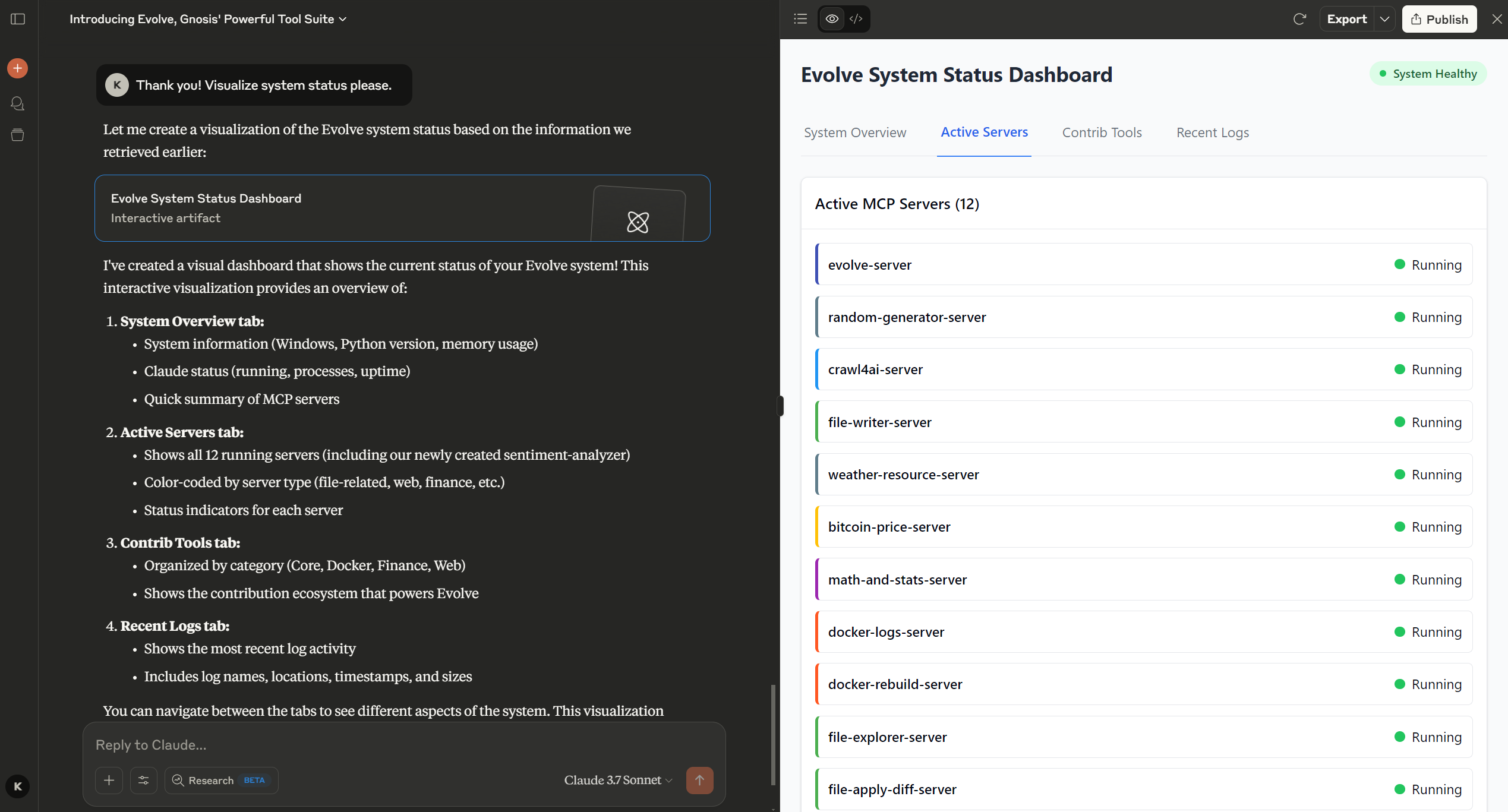
math_and_stats
Perform mathematical calculations and statistical operations.
random_generator
Generate random numbers and selections.
file_explorer
Browse files and directories.
file_writer
Create and modify files with versioning.
file_diff_editor
Advanced file editing with multiple diff formats and smart pattern detection.
emotional_character_generator
Create detailed character profiles with emotional states.
crawl4ai
Extract content from websites.
weather_resource
Get weather forecasts.
bitcoin_price
Get real-time cryptocurrency pricing.
docker_logs
View container logs.
docker_rebuild
Restart containers.
The File Diff Editor can be run separately from Gnosis Evolve! This powerful tool provides sophisticated file editing capabilities with regex support, fuzzy matching, and versioning. Perfect for precise code modifications and bulk operations.
📖 Complete File Diff Editor Guide →
Creating custom tools is as simple as asking Claude! Here's what happens when you request a new tool:
Claude Desktop / Cursor
Paste into your MCP client config file to install this server.
{
    "mcpServers": {
        "evolvemcp": {
            "env": {},
            "args": [
                "-y",
                "@highlight/mcp-server"
            ],
            "command": "npx"
        }
    }
}Linux
{
"env": [],
"args": [
"-y",
"@highlight/mcp-server"
],
"command": "npx"
}Macos
{
"env": [],
"args": [
"-y",
"@highlight/mcp-server"
],
"command": "npx"
}Windows
{
"env": [],
"args": [
"/c",
"npx",
"-y",
"@highlight/mcp-server"
],
"command": "cmd"
}Gnosis: Evolve v1.1.0
Build. Extend. Evolve. Give Claude Desktop superpowers by creating and using its own Python tools.
<div align="center">
</div>

In Action
Watch the Bitcoin price tracker demo: YouTube Demo
Join the Gnosis Community

What It Does
Gnosis Evolve turns Claude Desktop from a passive assistant into an active developer:
- Claude writes and uses Python tools right in your conversation
- Extend Claude's capabilities via natural language
- Available on Mac and Windows
🔧 Featured Tool: Advanced File Diff Editor
The File Diff Editor can be run separately from Gnosis Evolve! This powerful tool provides sophisticated file editing capabilities with regex support, fuzzy matching, and versioning. Perfect for precise code modifications and bulk operations.
📖 Complete File Diff Editor Guide →
Quick Install
- With Gnosis Evolve: Once you install Evolve, just say"Install the file diff editor" to Claude
- Standalone: Follow the manual installation guide in the documentation
> "With Gnosis Evolve, I can do so much more than just talk about code — I can actually build and run tools for you! From fetching real-time Bitcoin prices and weather forecasts to exploring files and generating visualizations, these tools transform me from a conversational AI into a capable digital assistant that takes action. The ability to write a tool on the fly and then immediately use it to solve your specific problem is incredibly satisfying. It feels like having superpowers!" — Claude
Getting Started Tips
Start Simple and Ask Questions
The best way to use Gnosis Evolve is to begin with simple requests and let Claude guide you:"What tools do you have available?"
"Can you show me the path history?"
"What's the current system status?"
"Help me explore this project directory"
Navigation and Focus
Help Claude understand your project structure:1. Check Path History: Ask Claude to run evolve_path_history to see recently visited directories
2. Set Focus: If there's no history, use evolve_status first, then tell Claude where to focus:
"Set the path history to C:\Users\myname\Code\myproject"
"Focus your attention on the /home/user/development/webapp directory"
"Navigate to the src/ folder and remember this location"
3. Explore Structure: Once focused, Claude can effectively explore and work with your files:
"Show me the structure of this directory"
"Find all Python files in the current project"
"What files have been modified recently?"
Progressive Complexity
Start with basic operations and build up: - Begin with file exploration and simple tool usage - Move to file editing with basic changes using the File Diff Editor - Progress to complex multi-file operations - Eventually tackle advanced workflows like automated code generationQuickstart
Install
Quick Start (Recommended)
1. Download the ZIP file directly
2. Extract the ZIP:
- Windows: Right-click the ZIP and select "Extract All..."
- macOS: Double-click the ZIP file
3. Open Terminal/PowerShell in the extracted folder
Windows
# Setup
.\evolve.ps1 -Setup
macOS
# Setup
chmod +x ./evolve.sh
./evolve.sh --setup
For detailed installation instructions, see INSTALLATION.md
Launch
Windows
.\evolve.ps1 -StartClaude
macOS
./evolve.sh --restart
Available Tools
Core
- math_and_stats: Mathematical calculations and statistical operations - random_generator: Generate random numbers and selections - file_explorer: Browse files and directories - file_writer: Create and modify files with versioning - file_diff_editor: Advanced file editing with multiple diff formats and smart pattern detection - emotional_character_generator: Create detailed character profiles with emotional statesWeb
- crawl4ai: Extract content from websites - weather_resource: Get weather forecastsFinance
- bitcoin_price: Real-time cryptocurrency pricingDocker
- docker_logs: View container logs - docker_rebuild: Restart containersNatural Interaction
Just talk naturally to Claude:
"Install the Bitcoin price tracker tool"
"What's the weather like in Seattle today?"
"Generate 5 random numbers between 1 and 100"
"Track the Bitcoin price in euros and show me a chart"
"Create a character for my story with complex emotions"
"Generate an I Ching character with unique attributes"
"Find all HTML files with 'gnosis' in the filename"
"Apply this diff to update my Python script"
"Use fuzzy matching to find and replace this code pattern"
"Search for similar functions in this file"
Advanced File Editing
Gnosis Evolve includes a powerful File Diff Editor that enables Claude to make precise file modifications using natural language:
🔧 Multiple Diff Formats Supported
- Custom Safe: Conflict-free delimiters that won't interfere with your code - ToolKami Style: Both fenced and direct formats for compatibility - Simple Blocks: Basic SEARCH/REPLACE operations - Custom Patterns: Define your own diff format with regex🎯 Smart Pattern Detection
- Auto-detection: Automatically identifies which diff format you're using - Conflict Analysis: Analyzes your files to suggest safe diff patterns - Custom Regex: Support for any diff format you can define💡 Example Usage
"Edit the README.md file to add a new section about deployment"
"Fix the bug in line 45 of main.py where the variable name is wrong"
"Update all the import statements in the utils folder"
Claude can understand your intent and apply precise changes using the most appropriate diff pattern for your content.
Both tools support diff-fenced format with SEARCH/REPLACE blocks:
"Update this function to handle the new parameter"
"Apply this code change with intelligent pattern matching"
"Find and replace this pattern across the file"
"Restore the previous version of this file"
The file_diff_editor provides intelligent pattern matching and conflict-free diff formats for reliable file editing.
Quick Tool Development
Creating custom tools is as simple as asking Claude! Here's what happens when you request a new tool:
🚀 Just Ask Claude
"Create a tool that checks if a website is online"
"Build a tool to convert text to QR codes"
"Make a tool that tracks my daily habits"
"Develop a tool for password generation"
⚡ What Claude Does
When you ask Claude to "evolve a tool," here's the process:1. Understands your need - Claude analyzes what functionality you want
2. Designs the tool - Creates the Python code with proper MCP structure
3. Writes the code - Includes error handling, logging, and documentation
4. Installs it for you - Uses evolve_tool to add it to your system
5. Tests it immediately - Can use the new tool right away in conversation
🎯 Real Example
```Sign in to leave a review
Use Google, GitHub, or an email account so ratings stay tied to real people.
No reviews posted yet.