
Slack
About
The most powerful MCP server for Slack Workspaces. This integration supports both Stdio and SSE transports, proxy settings and does not require any permissions or bots being created or approved by Workspace admins 😏.
Details
- Repository
- korotovsky/slack-mcp-server
- License
- MIT
Explore
- Stealth and OAuth authentication modes.
- Enterprise Slack workspace support.
- Channel and thread history with #Name and @Lookup.
- Smart history fetch by date range or message count.
- Unread messages across channels with priority sorting.
- Search messages with multiple filters (date, user, content).
- Safe, configurable message posting and reactions.

Setting up with Highlight
This MCP is not yet compatible with Highlight’s one-click setup. However, you can still use it with Highlight by following these steps:
- Download and install Highlight from highlightai.com/download
- Navigate to the plugins tab and select "Add Custom Plugin"
-
Configure the plugin with the settings below
Plugin Name
SlackCommand (node, npx, python, etc.)npxArguments-
Argument 1
@modelcontextprotocol/inspector -
Argument 2
go -
Argument 3
run -
Argument 4
mcp/mcp-server.go -
Argument 5
--transport -
Argument 6
stdio
Please refer to the README for specific instructions on how to obtain API keys or other required environment variables.
-
Argument 1
- Enable "Start Automatically" if you want the plugin to start when Highlight launches





From the repository
- Authentication Setup
- Installation
- Configuration and Usage
| Variable | Required? | Default | Description |
|-----------------------------------|-----------|---------------------------|-------------------------------------------------------------------------------------------------------------------------------------------------------------------------------------------------------------------------------------------------------------------------------------------|
| SLACK_MCP_XOXC_TOKEN | Yes | nil | Slack browser token (xoxc-...) |
| SLACK_MCP_XOXD_TOKEN | Yes | nil | Slack browser cookie d (xoxd-...) |
| SLACK_MCP_XOXP_TOKEN | Yes | nil | User OAuth token (xoxp-...) — alternative to xoxc/xoxd |
| SLACK_MCP_XOXB_TOKEN | Yes | nil | Bot token (xoxb-...) — alternative to xoxp/xoxc/xoxd. Bot has limited access (invited channels only, no search) |
| SLACK_MCP_PORT | No | 13080 | Port for the MCP server to listen on |
| SLACK_MCP_HOST | No | 127.0.0.1 | Host for the MCP server to listen on |
| SLACK_MCP_API_KEY | No | nil | Bearer token for SSE and HTTP transports |
| SLACK_MCP_PROXY | No | nil | Proxy URL for outgoing requests |
| SLACK_MCP_USER_AGENT | No | nil | Custom User-Agent (for Enterprise Slack environments) |
| SLACK_MCP_CUSTOM_TLS | No | nil | Send custom TLS-handshake to Slack servers based on SLACK_MCP_USER_AGENT or default User-Agent. (for Enterprise Slack environments) |
| SLACK_MCP_SERVER_CA | No | nil | Path to CA certificate |
| SLACK_MCP_SERVER_CA_TOOLKIT | No | nil | Inject HTTPToolkit CA certificate to root trust-store for MitM debugging |
| SLACK_MCP_SERVER_CA_INSECURE | No | false | Trust all insecure requests (NOT RECOMMENDED) |
| SLACK_MCP_ADD_MESSAGE_TOOL | No | nil | Enable message posting via conversations_add_message by setting it to true for all channels, a comma-separated list of channel IDs to whitelist specific channels, or use ! before a channel ID to allow all except specified ones. If empty, the tool is only registered when explicitly listed in SLACK_MCP_ENABLED_TOOLS. |
| SLACK_MCP_ADD_MESSAGE_MARK | No | nil | When conversations_add_message is enabled (via SLACK_MCP_ADD_MESSAGE_TOOL or SLACK_MCP_ENABLED_TOOLS), setting this to true will automatically mark sent messages as read. |
| SLACK_MCP_ADD_MESSAGE_UNFURLING | No | nil | Enable to let Slack unfurl posted links or set comma-separated list of domains e.g. github.com,slack.com to whitelist unfurling only for them. If text contains whitelisted and unknown domain unfurling will be disabled for security reasons. |
| SLACK_MCP_REACTION_TOOL | No | nil | Enable reactions_add and reactions_remove tools by setting to true for all channels, a comma-separated list of channel IDs to whitelist specific channels, or use ! before a channel ID to allow all except specified ones. If empty, the tools are only registered when explicitly listed in SLACK_MCP_ENABLED_TOOLS. |
| SLACK_MCP_ATTACHMENT_TOOL | No | nil | Enable the attachment_get_data tool by setting to true, 1, or yes. Does not support channel-level restrictions. If empty, the tool is only registered when explicitly listed in SLACK_MCP_ENABLED_TOOLS. |
| SLACK_MCP_MARK_TOOL | No | nil | Enable the conversations_mark tool by setting to true or 1. Disabled by default to prevent accidental marking of messages as read. |
| SLACK_MCP_USERS_CACHE | No | ~/Library/Caches/slack-mcp-server/users_cache.json (macOS)<br>~/.cache/slack-mcp-server/users_cache.json (Linux)<br>%LocalAppData%/slack-mcp-server/users_cache.json (Windows) | Path to the users cache file. Used to cache Slack user information to avoid repeated API calls on startup. |
| SLACK_MCP_CHANNELS_CACHE | No | ~/Library/Caches/slack-mcp-server/channels_cache_v2.json (macOS)<br>~/.cache/slack-mcp-server/channels_cache_v2.json (Linux)<br>%LocalAppData%/slack-mcp-server/channels_cache_v2.json (Windows) | Path to the channels cache file. Used to cache Slack channel information to avoid repeated API calls on startup. |
| SLACK_MCP_LOG_LEVEL | No | info | Log-level for stdout or stderr. Valid values are: debug, info, warn, error, panic and fatal |
| SLACK_MCP_GOVSLACK | No | nil | Set to true to enable GovSlack mode. Routes API calls to slack-gov.com endpoints instead of slack.com for FedRAMP-compliant government workspaces. |
| SLACK_MCP_ENABLED_TOOLS | No | nil | Comma-separated list of tools to register. If empty, all read-only tools and usergroups tools are registered; write tools (conversations_add_message, reactions_add, reactions_remove, attachment_get_data) require their specific env var OR must be explicitly listed here. When a write tool is listed here, it's enabled without channel restrictions. Available tools: conversations_history, conversations_replies, conversations_add_message, reactions_add, reactions_remove, attachment_get_data, conversations_search_messages, channels_list, usergroups_list, usergroups_me, usergroups_create, usergroups_update, usergroups_users_update. |
*You need one of: xoxp (user), xoxb (bot), or both xoxc/xoxd tokens for authentication.
conversations_history
Get messages from the channel (or DM) by channel_id. Parameters: channel_id (string, required), include_activity_messages (boolean, default: false), cursor (string, optional), limit (string, default: '1d').
conversations_replies
Get a thread of messages posted to a conversation by channelID and thread_ts. Parameters: channel_id (string, required), thread_ts (string, required), include_activity_messages (boolean, default: false), cursor (string, optional), limit (string, default: '1d').
conversations_add_message
Add a message to a public channel, private channel, or direct message (DM) conversation by channel_id and thread_ts. Parameters: channel_id (string, required), thread_ts (string, optional), payload (string, required), content_type (string, default: 'text/markdown').
conversations_search_messages
Search messages in a public channel, private channel, or DM using filters. Parameters: search_query (string, optional), filter_in_channel (string, optional), filter_in_im_or_mpim (string, optional), filter_users_with (string, optional), filter_users_from (string, optional), filter_date_before (string, optional), filter_date_after (string, optional), filter_date_on (string, optional), filter_date_during (string, optional), filter_threads_only (boolean, default: false), cursor (string, default: ''), limit (number, default: 20).
channels_list
Get list of channels. Parameters: channel_types (string, required), sort (string, optional), limit (number, default: 100), cursor (string, optional).
reactions_add
Add an emoji reaction to a message in a public channel, private channel, or DM. Parameters: channel_id (string, required), timestamp (string, required), emoji (string, required).
reactions_remove
Remove an emoji reaction from a message in a public channel, private channel, or DM. Parameters: channel_id (string, required), timestamp (string, required), emoji (string, required).
users_search
Search for users by name, email, or display name. Parameters: query (string, required), limit (number, default: 10).
usergroups_list
List all user groups in the workspace. Parameters: include_users (boolean, default: false), include_count (boolean, default: true), include_disabled (boolean, default: false).
usergroups_create
Create a new user group in the workspace. Parameters: name (string, required), handle (string, optional), description (string, optional), channels (string, optional).
usergroups_update
Update an existing user group's metadata. Parameters: usergroup_id (string, required), name (string, optional), handle (string, optional), description (string, optional), channels (string, optional).
usergroups_users_update
Update the members of a user group. This replaces all existing members. Parameters: usergroup_id (string, required), users (string, required).
usergroups_me
Manage your user group membership: list groups you're in, join a group, or leave a group. Parameters: action (string, required), usergroup_id (string, optional).
conversations_unreads
Get unread messages across all channels efficiently. Parameters: include_messages (boolean, default: true), channel_types (string, default: 'all'), max_channels (number, default: 50), max_messages_per_channel (number, default: 10), mentions_only (boolean, default: false).
conversations_mark
Mark a channel or DM as read. Parameters: channel_id (string, required), ts (string, optional).
saved_list
List saved items from Slack's 'Save for Later' panel. Parameters: filter (string, default 'saved'), limit (number, default 50), include_messages (boolean, default true), max_messages_per_item (number, default 5).
saved_update
Update a saved item: mark as completed, set a due date/reminder, or both. Parameters: item_id (string, required), ts (string, required), mark (string, optional), date_due (number, optional).
saved_clear_completed
Clear all completed saved items from the 'Save for Later' panel. Parameters: None.
Claude Desktop / Cursor
Paste into your MCP client config file to install this server.
{
    "mcpServers": {
        "slack": {
            "env": {},
            "args": [
                "@modelcontextprotocol/inspector",
                "go",
                "run",
                "mcp/mcp-server.go",
                "--transport",
                "stdio"
            ],
            "command": "npx"
        }
    }
}Linux
{
    "env": [],
    "args": [
        "@modelcontextprotocol/inspector",
        "go",
        "run",
        "mcp/mcp-server.go",
        "--transport",
        "stdio"
    ],
    "command": "npx"
}
Macos
{
    "env": [],
    "args": [
        "@modelcontextprotocol/inspector",
        "go",
        "run",
        "mcp/mcp-server.go",
        "--transport",
        "stdio"
    ],
    "command": "npx"
}
Windows
{
    "env": [],
    "args": [
        "/c",
        "npx",
        "@modelcontextprotocol/inspector",
        "go",
        "run",
        "mcp/mcp-server.go",
        "--transport",
        "stdio"
    ],
    "command": "cmd"
}
Model Context Protocol (MCP) server for Slack Workspaces. The most powerful MCP Slack server — supports Stdio, SSE and HTTP transports, proxy settings, DMs, Group DMs, Smart History fetch (by date or count), may work via OAuth or in complete stealth mode with no permissions and scopes in Workspace 😏.
> [!IMPORTANT]
> We need your support! Each month, over 30,000 engineers visit this repository, and more than 9,000 are already using it.
>
> If you appreciate the work our contributors have put into this project, please consider giving the repository a star.
This feature-rich Slack MCP Server has:
- Stealth and OAuth Modes: Run the server without requiring additional permissions or bot installations (stealth mode), or use secure OAuth tokens for access without needing to refresh or extract tokens from the browser (OAuth mode).
- Enterprise Workspaces Support: Possibility to integrate with Enterprise Slack setups.
- Channel and Thread Support with #Name @Lookup: Fetch messages from channels and threads, including activity messages, and retrieve channels using their names (e.g., #general) as well as their IDs.
- Smart History: Fetch messages with pagination by date (d1, 7d, 1m) or message count.
- Unread Messages: Get all unread messages across channels efficiently with priority sorting (DMs > partner channels > internal), @mention filtering, and mark-as-read support.
- Search Messages: Search messages in channels, threads, and DMs using various filters like date, user, and content.
- Safe Message Posting: The conversations_add_message tool is disabled by default for safety. Enable it via an environment variable, with optional channel restrictions.
- DM and Group DM support: Retrieve direct messages and group direct messages.
- Embedded user information: Embed user information in messages, for better context.
- Cache support: Cache users and channels for faster access.
- Stdio/SSE/HTTP Transports & Proxy Support: Use the server with any MCP client that supports Stdio, SSE or HTTP transports, and configure it to route outgoing requests through a proxy if needed.
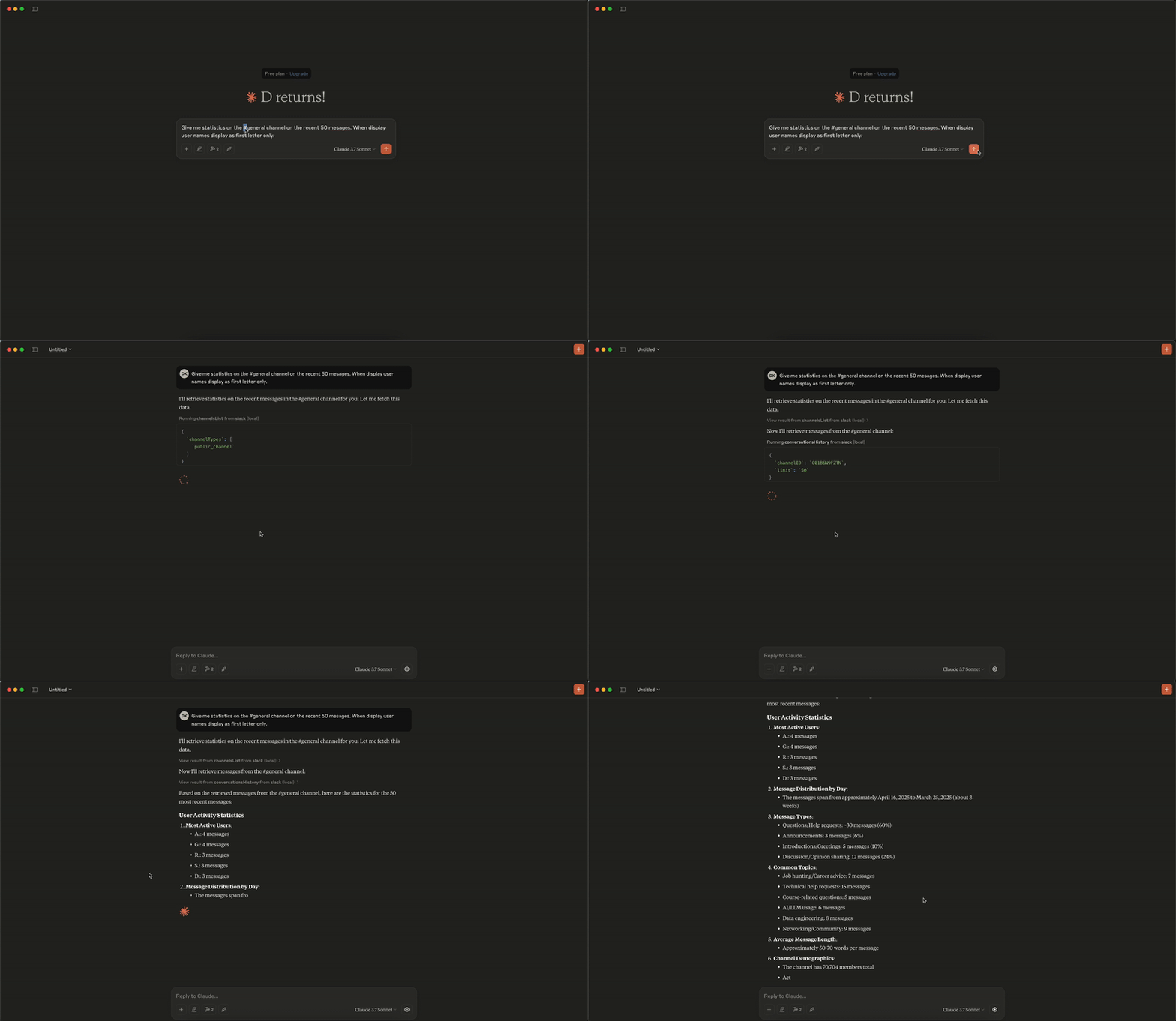
Analytics Demo
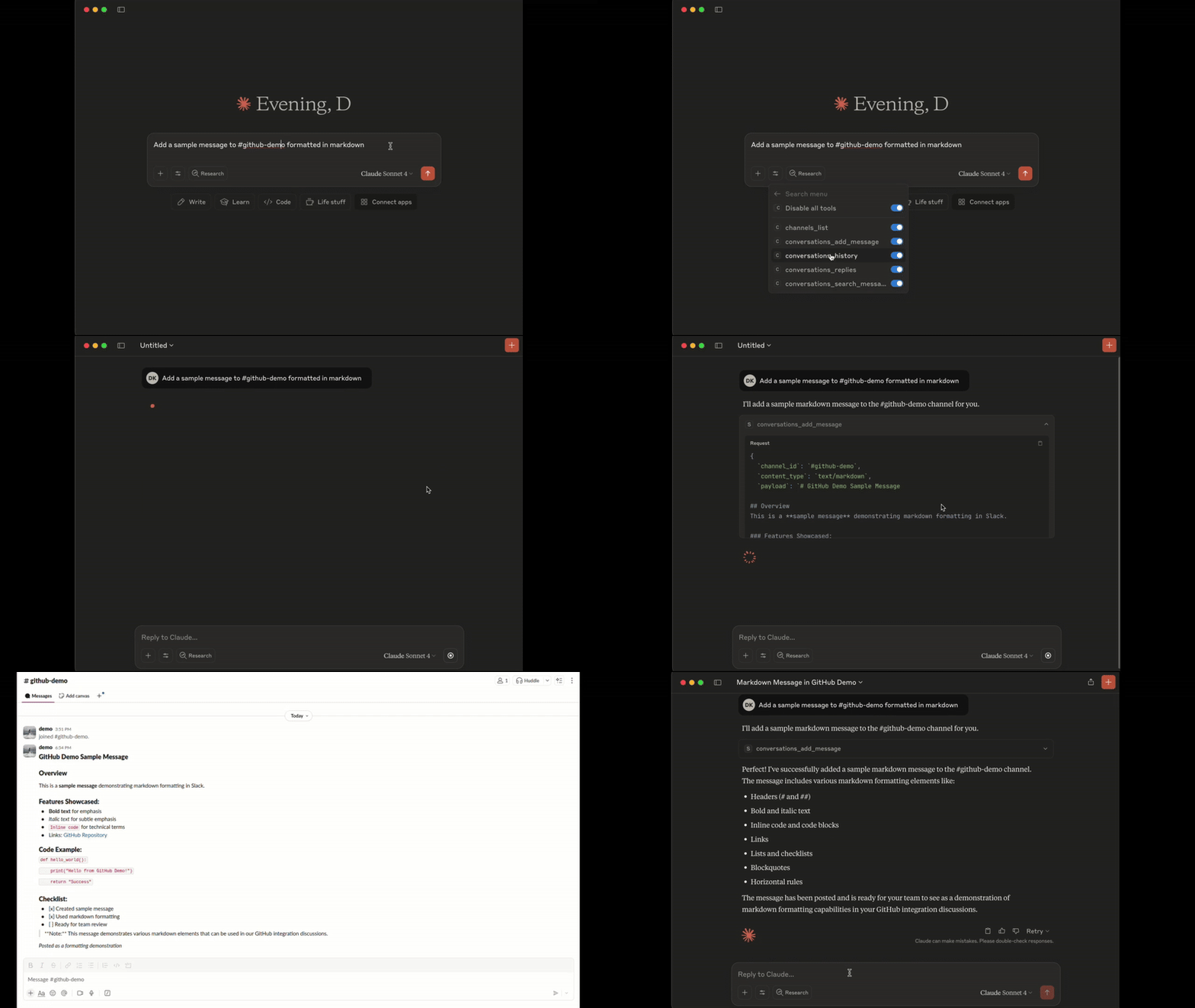
Add Message Demo
Tools
1. conversations_history:
Get messages from the channel (or DM) by channel_id, the last row/column in the response is used as 'cursor' parameter for pagination if not empty - Parameters: -channel_id (string, required): - channel_id (string): ID of the channel in format Cxxxxxxxxxx or its name starting with #... or @... aka #general or @username_dm.
- include_activity_messages (boolean, default: false): If true, the response will include activity messages such as channel_join or channel_leave. Default is boolean false.
- cursor (string, optional): Cursor for pagination. Use the value of the last row and column in the response as next_cursor field returned from the previous request.
- limit (string, default: "1d"): Limit of messages to fetch in format of maximum ranges of time (e.g. 1d - 1 day, 1w - 1 week, 30d - 30 days, 90d - 90 days which is a default limit for free tier history) or number of messages (e.g. 50). Must be empty when 'cursor' is provided.
2. conversations_replies:
Get a thread of messages posted to a conversation by channelID andthread_ts, the last row/column in the response is used as cursor parameter for pagination if not empty.
- Parameters:
- channel_id (string, required): ID of the channel in format Cxxxxxxxxxx or its name starting with #... or @... aka #general or @username_dm.
- thread_ts (string, required): Unique identifier of either a thread’s parent message or a message in the thread. ts must be the timestamp in format 1234567890.123456 of an existing message with 0 or more replies.
- include_activity_messages (boolean, default: false): If true, the response will include activity messages such as 'channel_join' or 'channel_leave'. Default is boolean false.
- cursor (string, optional): Cursor for pagination. Use the value of the last row and column in the response as next_cursor field returned from the previous request.
- limit (string, default: "1d"): Limit of messages to fetch in format of maximum ranges of time (e.g. 1d - 1 day, 1w - 1 week, 30d - 30 days, 90d - 90 days which is a default limit for free tier history) or number of messages (e.g. 50). Must be empty when 'cursor' is provided.
3. conversations_add_message
Add a message to a public channel, private channel, or direct message (DM, or IM) conversation by channel_id and thread_ts.> Note: Posting messages is disabled by default for safety. To enable, set the SLACK_MCP_ADD_MESSAGE_TOOL environment variable. If set to a comma-separated list of channel IDs, posting is enabled only for those specific channels. See the Environment Variables section below for details.
- Parameters:
- channel_id (string, required): ID of the channel in format Cxxxxxxxxxx or its name starting with #... or @... aka #general or @username_dm.
- thread_ts (string, optional): Unique identifier of either a thread’s parent message or a message in the thread_ts must be the timestamp in format 1234567890.123456 of an existing message with 0 or more replies. Optional, if not provided the message will be added to the channel itself, otherwise it will be added to the thread.
- payload (string, required): Message payload in specified content_type format. Example: 'Hello, world!' for text/plain or '# Hello, world!' for text/markdown.
- content_type (string, default: "text/markdown"): Content type of the message. Default is 'text/markdown'. Allowed values: 'text/markdown', 'text/plain'.
4. conversations_search_messages
Search messages in a public channel, private channel, or direct message (DM, or IM) conversation using filters. All filters are optional, if not provided then search_query is required.…
Sign in to leave a review
Use Google, GitHub, or an email account so ratings stay tied to real people.
No reviews posted yet.



