
AdsPower LocalAPI MCP Server Python
About
It is a Model Context Protocol server that interfaces with the AdsPower browser LocalAPI. It enables LLMs to start browsers, create browsers, and update browser fingerprint configurations. It is for developers using LLM tools like Claude Desktop or Cursor.
Details
- License
- MIT license
Explore
- Interfaces with AdsPower browser LocalAPI via MCP.
- Enables LLMs to start and create browser instances.
- Supports updating browser fingerprint configurations.
- Works with Claude Desktop and Cursor.
- Simple prompt‑based interaction for browser automation.

Setting up with Highlight
This MCP is not yet compatible with Highlight’s one-click setup. However, you can still use it with Highlight by following these steps:
- Download and install Highlight from highlightai.com/download
- Navigate to the plugins tab and select "Add Custom Plugin"
-
Configure the plugin with the settings below
Plugin Name
AdsPower LocalAPI MCP Server PythonCommand (node, npx, python, etc.)Please refer to the README for specific instructions on how to obtain API keys or other required environment variables.
- Enable "Start Automatically" if you want the plugin to start when Highlight launches





From the repository
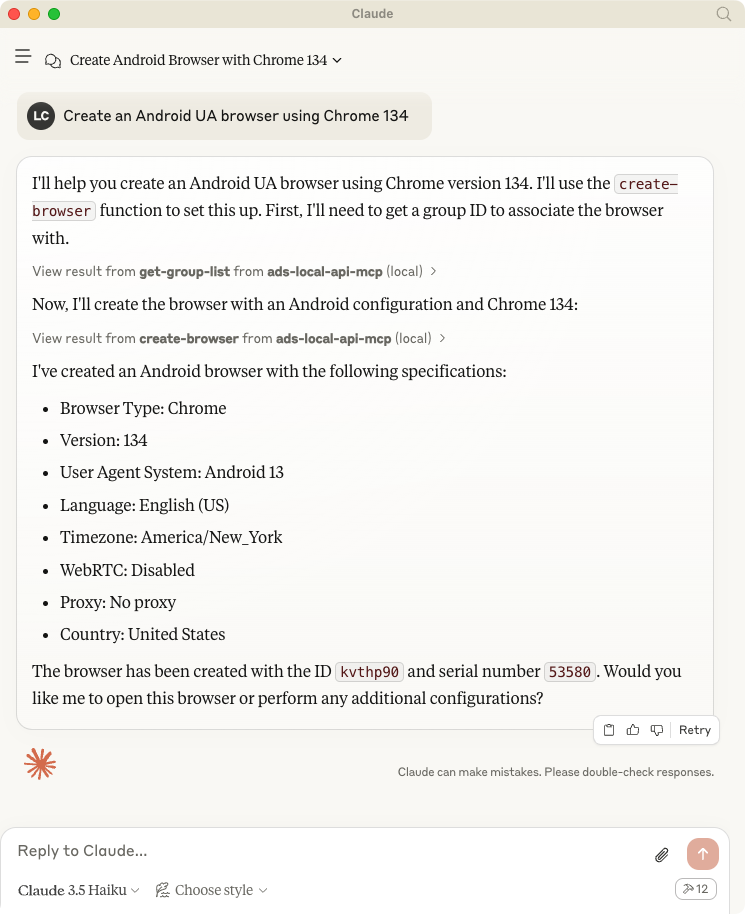
Talk to LLMs to create browser: Create an Android UA browser using Chrome 134
First, let’s install uv and set up our Python project and environment:
uv pip install .
To use with Claude Desktop, add the server config:
On macOS: ~/Library/Application Support/Claude/claude_desktop_config.json On Windows: %APPDATA%/Claude/claude_desktop_config.json
{
"mcpServers": {
"adspower-local-api": {
"command": "uv",
"args": [
"--directory",
"<Replace Your Project Path>/local-api-mcp-python",
"run",
"main.py"
]
}
}
}
```
Claude Desktop / Cursor
Paste into your MCP client config file to install this server.
{
    "mcpServers": {
        "adspower localapi mcp server python": {
            "local-api-mcp-python": {
                "command": "uv",
                "args": [
                    "venv"
                ]
            }
        }
    }
}McpServers
{
    "local-api-mcp-python": {
        "command": "uv",
        "args": [
            "venv"
        ]
    }
}Usage with Claude Desktop
Talk to LLMs to create browser: Create an Android UA browser using Chrome 134
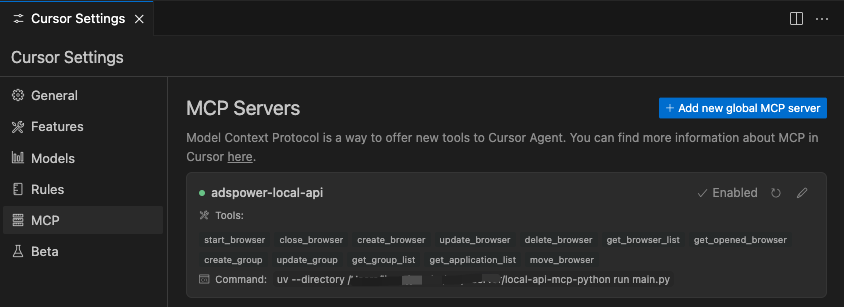
Usage width Cursor
System requirements
- AdsPower
- Python 3.10 or higher installed.
Set up your environment, install uv
First, let’s install uv and set up our Python project and environment:
MacOS / Linux
curl -LsSf https://astral.sh/uv/install.sh | sh
Windows
powershell -ExecutionPolicy ByPass -c "irm https://astral.sh/uv/install.ps1 | iex"
Development
```bash
Sign in to leave a review
Use Google, GitHub, or an email account so ratings stay tied to real people.
No reviews posted yet.



