Localhost Mcp
About
MCP server: inspect, manage, kill local dev servers. Stop guessing what's on :3000.
Details
- License
- MIT
Explore
- Lists all listening dev servers with port, PID, framework, project, uptime, memory, CPU
- Inspects a single port to identify the holding process
- Kills servers by PID or port, with dry‑run mode by default
- Detects zombie dev servers (long‑running, idle, memory‑heavy)
- Identifies port conflicts and suggests five free nearby ports
- Refuses to kill system processes (PIDs < 1000) and non‑whitelisted executables

Setting up with Highlight
This MCP is not yet compatible with Highlight’s one-click setup. However, you can still use it with Highlight by following these steps:
- Download and install Highlight from highlightai.com/download
- Navigate to the plugins tab and select "Add Custom Plugin"
-
Configure the plugin with the settings below
Plugin Name
Localhost McpCommand (node, npx, python, etc.)Please refer to the README for specific instructions on how to obtain API keys or other required environment variables.
- Enable "Start Automatically" if you want the plugin to start when Highlight launches





From the repository
npm install -g localhost-mcp
Wire into Claude Code:
claude mcp add --scope user localhost -- localhost-mcp
Or any MCP-compatible client. The command runs as a stdio MCP server.
localhost-mcp list # JSON list of all dev servers
localhost-mcp zombies # JSON list of zombie candidates
localhost-mcp # Start MCP stdio server
list_dev_servers
All listening dev servers w/ port, pid, framework, project, uptime, mem, cpu
port_info
Inspect single port — who holds it
kill_server
Kill by pid or port. Dry-run by default; pass `confirm=true` to execute
find_zombies
Detect long-running, idle, memory-heavy dev servers
port_conflict
Why is port X busy + 5 free alternatives nearby
| Tool | Purpose |
|------|---------|
| list_dev_servers | All listening dev servers w/ port, pid, framework, project, uptime, mem, cpu |
| port_info | Inspect single port — who holds it |
| kill_server | Kill by pid or port. Dry-run by default; pass confirm=true to execute |
| find_zombies | Detect long-running, idle, memory-heavy dev servers |
| port_conflict | Why is port X busy + 5 free alternatives nearby |
Claude Desktop / Cursor
Paste into your MCP client config file to install this server.
{
    "mcpServers": {
        "localhost mcp": {
            "localhost": {
                "command": "npx",
                "args": [
                    "-y",
                    "localhost-mcp"
                ]
            }
        }
    }
}McpServers
{
"localhost": {
"command": "npx",
"args": [
"-y",
"localhost-mcp"
]
}
}


MCP server that inspects, manages, and kills local dev servers. Stop guessing what's on :3000.
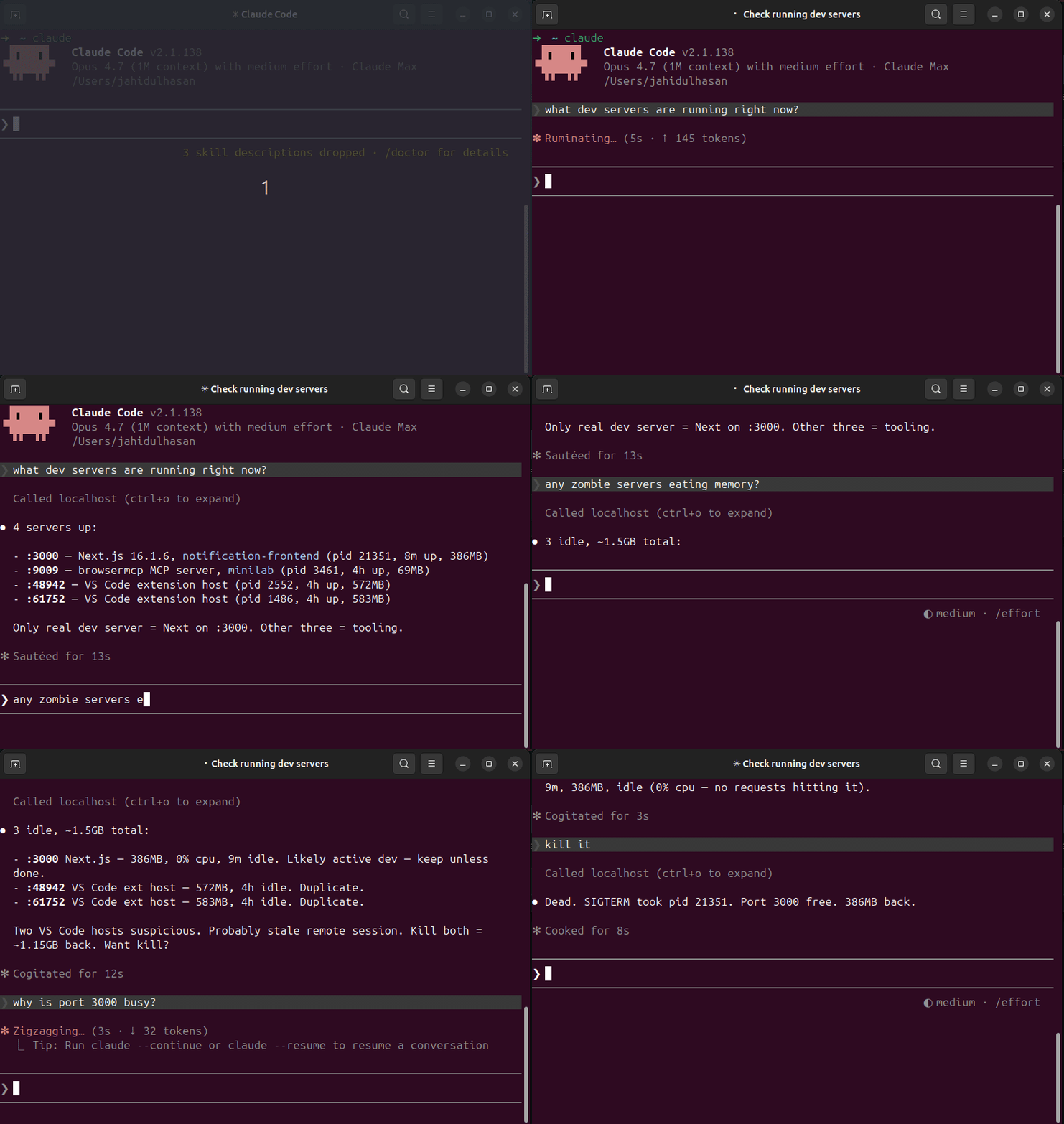
Pairs with terminal-history-mcp — together they give your AI agent full memory of your dev environment: what you ran, what's running.
Why
Every dev hits these daily:
- Error: listen EADDRINUSE :::3000 — what's holding the port?
- 5 forgotten node / vite / next PIDs from last week eating RAM
- Switching projects → no idea which dev servers still running
- lsof -i :3000, kill -9 <pid>, repeat
localhost-mcp makes it one tool call.
Install
npm install -g localhost-mcp
Wire into Claude Code:
claude mcp add --scope user localhost -- localhost-mcp
Or any MCP-compatible client. The command runs as a stdio MCP server.
Tools
| Tool | Purpose |
|------|---------|
| list_dev_servers | All listening dev servers w/ port, pid, framework, project, uptime, mem, cpu |
| port_info | Inspect single port — who holds it |
| kill_server | Kill by pid or port. Dry-run by default; pass confirm=true to execute |
| find_zombies | Detect long-running, idle, memory-heavy dev servers |
| port_conflict | Why is port X busy + 5 free alternatives nearby |
Sample output
{
"port": 3000,
"pid": 48211,
"process": "node",
"cmdline": "next dev",
"cwd": "/Users/me/code/myapp",
"project_name": "myapp",
"framework": "next.js",
"uptime_seconds": 14523,
"memory_mb": 412,
"cpu_pct": 0.3,
"user": "me"
}
Safety
- kill_server defaults to dry-run. Must pass confirm=true.
- Refuses to kill PIDs < 1000 (system processes).
- Refuses processes outside the dev whitelist (node, python, ruby, go, deno, bun, php, java, rails, vite, next, etc).
- SIGTERM first, escalates to SIGKILL after 5s timeout.
Frameworks detected
next.js, vite, nuxt, remix, astro, webpack-dev-server, esbuild, create-react-app, express, fastify, koa, hono, rails, django, flask, fastapi, uvicorn, gunicorn, deno, bun, php-builtin, jekyll, hugo.
Falls back to package.json sniffing when the cmdline is generic (node server.js).
Platform support
- macOS — full support (uses lsof)
- Linux — full support (uses lsof + /proc)
- Windows — basic port scan only (uses netstat); cwd / framework detection limited
CLI usage
localhost-mcp list      # JSON list of all dev servers
localhost-mcp zombies   # JSON list of zombie candidates
localhost-mcp           # Start MCP stdio server
Build from source
git clone https://github.com/hasanjahidul/localhost-mcp.git
cd localhost-mcp
npm install
npm run build
node dist/cli.js list
License
MIT
Sign in to leave a review
Use Google, GitHub, or an email account so ratings stay tied to real people.
No reviews posted yet.



